
AI is now a practical helper in the user experience design process. These tools assist designers across research, ideation, wireframing, and prototyping stages. However, they do not replace the need for genuine user research or human judgment. The goal is to accelerate routine tasks so designers can focus on solving complex problems. This guide reviews specific tools that help with different phases of UX work. It covers options for generating interface ideas, building prototypes, synthesizing workshop data, and analyzing user research. Each tool serves a distinct purpose in the workflow. Choosing the right combination depends on your team’s existing processes and the stage of the product lifecycle you are addressing. Every feature below is the vendor's own description, and the list is current as of November 2026.
AI for wireframes and UI ideas
These tools help convert abstract concepts into visual structures. They are useful for early-stage exploration when speed matters more than pixel-perfect precision.
UX Pilot
UX Pilot generates editable product designs using AI. It allows users to start from a sketch, a written thought, or an imported Product Requirements Document (PRD). The tool auto-generates structured low to high fidelity wireframes. It can also transform these wireframes into polished, on-brand high-fidelity screens. Users can export the results to Figma for collaboration or hand off ready-to-build code. It supports uploading sketches, PDFs, or screenshots as references to guide the generation process.
- Good for: Converting rough inputs like PRDs or sketches into structured wireframes quickly.
- Watch out: AI output needs a designer's review to ensure alignment with brand guidelines and usability standards.
Uizard
Uizard offers UI design capabilities for apps, websites, and desktop software. Its interface is designed to be accessible, noting that if you can use Google Slides or PowerPoint, you can use Uizard. The Autodesigner tool generates multi-screen, editable prototypes from simple text prompts. A Screenshot Scanner turns existing screenshots into editable mockups. Additionally, a Wireframe Scanner converts hand-drawn wireframe sketches into digital designs. Users can generate themes to change a project's style and collaborate in real time.
- Good for: Rapidly converting text descriptions or hand-drawn sketches into editable digital mockups.
- Watch out: Generated screens are a starting point; check plan limits on the vendor page before a team rollout.
Google Stitch
Google Stitch is a Google Labs experiment introduced in May 2025 via the Google Developers Blog. It turns prompt and image inputs into UI designs and frontend code. Built on Gemini models, it generates UI from natural language, including specifications for color palettes and desired user experience. It can also generate UI from images or wireframes, such as whiteboard sketches, screenshots, or rough drafts. The tool produces multiple variants and allows users to paste the output directly into Figma.
- Good for: Generating initial UI concepts and code snippets from natural language or rough sketches.
- Watch out: As an experimental tool, features and stability may change without notice.
AI for prototypes
Moving from static screens to interactive experiences requires tools that understand context and structure. These solutions bridge the gap between design files and functional code.
Figma Make
Figma Make is described as a "prompt to code" product with the tagline "Prototype. Polish. Ship." Everything built within the tool is code-backed and visually editable, so users can jump between code and canvas. It utilizes your existing design context, ranging from design systems to images. Make kits sync npm packages, library styles, and guidelines to generate high-fidelity prototypes. Users can point and edit by clicking elements in the preview to style them, swap components, or prompt changes. It includes comments and version history. Building on a local codebase is currently listed as beta or coming soon.
- Good for: Creating interactive, code-backed prototypes that respect existing design systems.
- Watch out: Verify compatibility with your current development stack before committing to this workflow.
AI for workshops and synthesis
Collaborative platforms integrate AI to help teams organize thoughts and extract insights during group sessions. These tools support the messy middle of the design process.
Miro AI
Miro AI functions as a collaborative canvas where teams, agents, and context come together. It is marketed as "The AI platform for teamwork." Specific AI Playbooks include Rapid Prototyping, which transforms sketches and concepts into clickable prototypes. Another playbook, Research Synthesis, aims to replace hours of manual analysis with clear insights generated in minutes. Miro's use-case menu also lists customer journey mapping and design workshops.
- Good for: Structuring workshop outputs and accelerating the synthesis of large amounts of qualitative data.
- Watch out: Ensure all participants have access to the necessary AI features to avoid workflow bottlenecks.
AI for user research and testing
Validating design decisions requires robust research tools. These platforms handle the logistics of recruiting, testing, and analyzing user feedback at scale.
Maze
Maze is a market and user research platform that integrates recruiting, testing, and analysis. It supports running both qualitative and quantitative research to test ideas, prototypes, and messaging. Methods range from usability testing and interviews to concept testing and broader market research. Maze describes its AI as research-grade and lists an AI moderator and an AI study builder. A customer quote on the page praises its AI summarization and analysis for interviews. Maze MCP brings research capabilities into other tools. On its site, Maze states it maintains GDPR standards and notes that "we also don't use your research data to train our AI."
- Good for: Running end-to-end user tests and analyzing mixed-method research data efficiently.
- Watch out: Review data retention policies carefully to ensure compliance with your organization's security requirements.
Dovetail
Dovetail is an "AI-native Customer Intelligence Platform" that ingests and analyzes unstructured customer feedback. Sources include calls, tickets, surveys, and interviews. It provides automatic transcription with each line linked to the moment it was said. The system classifies content into themes, topics, and sentiment, and synthesizes data into summaries. Features include semantic search, translation of transcripts, and OCR for screenshots. Dovetail connects via MCP to tools like Claude, Cursor, ChatGPT, Copilot, Slack, and Teams.
- Good for: Centralizing and searching through vast amounts of unstructured customer feedback.
- Watch out: Accurate tagging relies on clean input data; poorly recorded audio or vague survey answers may yield less useful classifications.
How to pick
Selecting the right tool depends on where you are in the design process. Consider these factors:
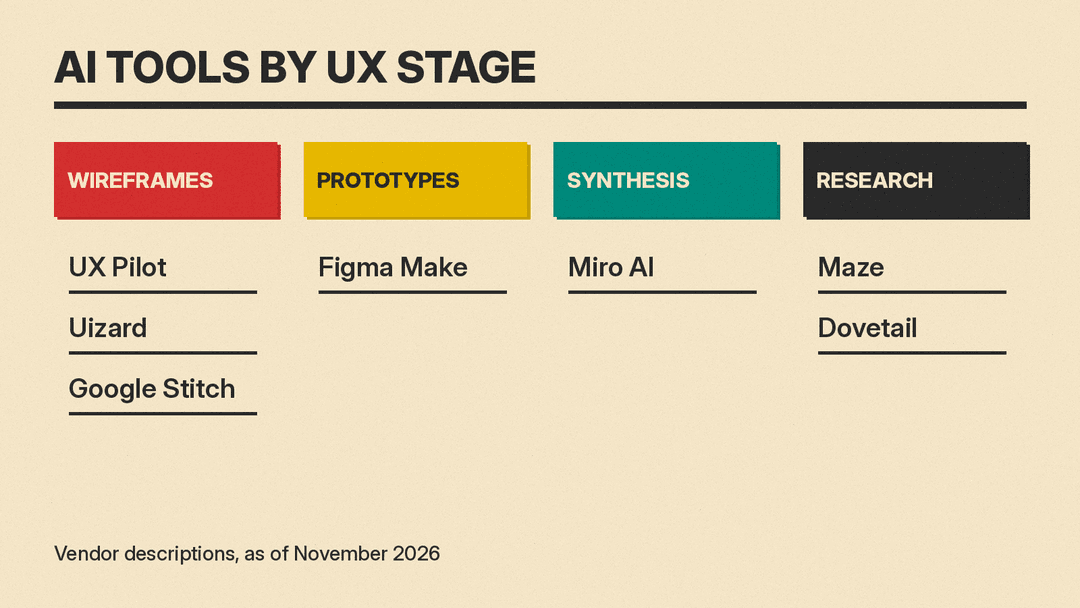
- Ideation Stage: If you need quick visuals from text or sketches, look at UX Pilot, Uizard, or Google Stitch.
- Prototyping Stage: If you need interactive, code-backed prototypes that use your design system, Figma Make is the primary option here.
- Workshop Stage: If your team needs to synthesize brainstorming sessions or journey maps collaboratively, Miro AI fits best.
- Research Stage: If you need to run tests and analyze interviews, Maze handles the execution. If you need to store and search historical feedback, Dovetail is stronger.
- Integration Needs: Check if the tool connects to your existing stack, such as Figma for design or Slack for communication.
For those interested in visual branding, consider reviewing best AI tools for graphic designers. Product managers often coordinate these workflows, so seeing best AI tools for product managers can provide context on stakeholder expectations. Finally, if the prototype moves to production, look at best AI website builders for shipping marketing sites.
A simple AI-assisted UX workflow
This sequence demonstrates how these tools might interact in a single project cycle.
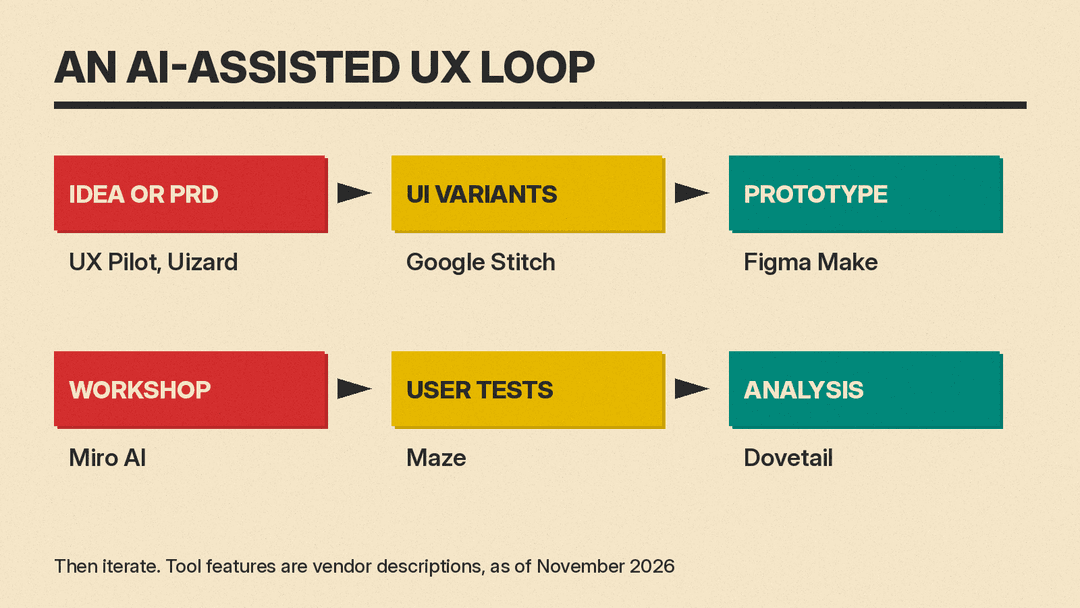
- Start with raw ideas or a PRD. Use UX Pilot or Uizard to generate initial wireframes from text or sketches.
- Refine the most promising concepts. Use Google Stitch to explore variations or import sketches for faster iteration.
- Build an interactive prototype. Move the selected screens into Figma Make to create code-backed, clickable flows.
- Gather team input. Host a workshop in Miro AI to map user journeys and synthesize feedback on the prototype direction.
- Test with users. Deploy the prototype in Maze to run usability tests and collect quantitative metrics.
- Analyze results. Feed interview recordings and open-ended survey responses into Dovetail to identify recurring themes and pain points.
- Iterate. Use insights from Dovetail and Maze to refine the next version in UX Pilot or Figma Make.
Privacy and research data
Handling user data requires caution. Tools like Maze explicitly state they do not use research data to train their AI and maintain GDPR standards. However, designers must always verify the privacy policy of any new tool. Do not upload personally identifiable information (PII) unless the tool guarantees secure handling. For experiments and free tools, read the terms to see how your inputs are used. For sensitive projects, prefer enterprise-grade solutions with clear data residency controls. Always anonymize participant data before sharing it with external AI services.
FAQ
Can AI tools replace user researchers? No. AI helps summarize and find patterns in data, and some tools, such as Maze, now list an AI moderator for interviews. Deciding what to study and what the findings mean still needs a researcher's judgment.
Do I need to know coding to use these tools? Not for most. Tools like Uizard and Miro AI are designed for visual interfaces. Figma Make and Google Stitch produce code, but the interaction is primarily visual and prompt-based.
Are these tools free to use? Availability varies. Several vendors show free starting points on their sites, such as Maze's "Start for free" and Dovetail's "Start free trial" buttons. Plans and limits change, so check each vendor's pricing page before you commit.
