
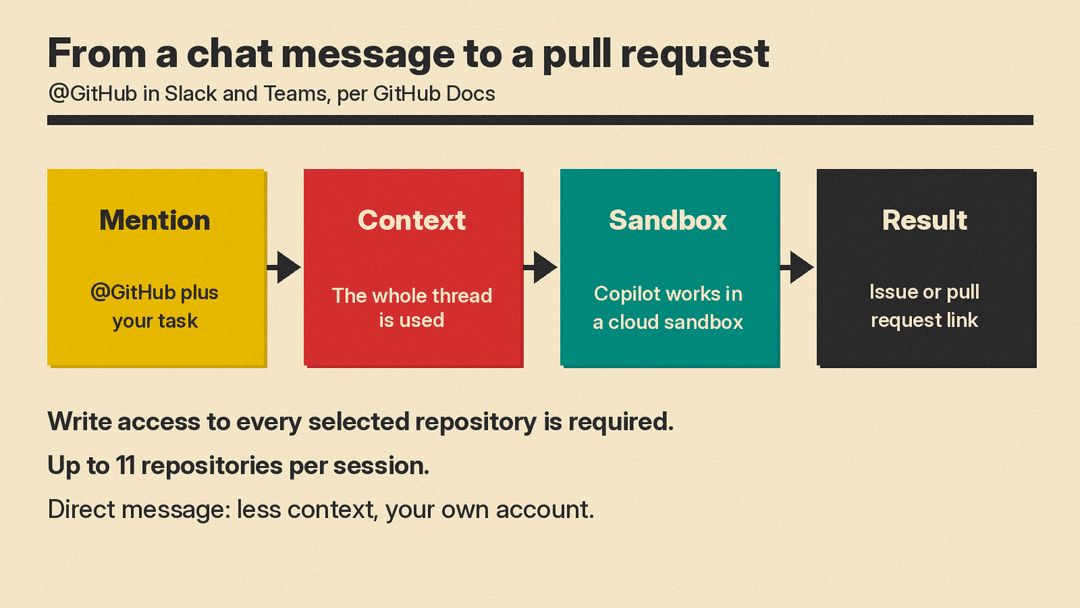
GitHub says @GitHub in Slack and Microsoft Teams is now generally available. You mention @GitHub in a chat, and Copilot cloud agent, GitHub's coding agent that works in a cloud sandbox, picks up the task from the conversation. It can investigate a problem, create issues, write code and open pull requests while the team keeps talking.
What GitHub announced
On November 6, 2026, GitHub posted a changelog entry titled "@GitHub in Slack and Teams is generally available." The entry says you can "Investigate bugs, create issues, implement changes, and open pull requests" without leaving your conversation.
The entry also adds Canvas in Teams, which GitHub says lets you review implementation plans, code changes and previews next to the conversation.
What @GitHub can do in a chat
GitHub's Slack setup guide says the Copilot cloud agent integration is included in the GitHub app for Slack. From a message, a thread or a direct message, you can start cloud agent sessions to investigate, plan, write code, and create issues and pull requests, using the context of the conversation. The guide says you can also choose the model, connect Model Context Protocol (MCP) servers, work across multiple repositories and use Copilot Memory.
Details from the docs:
- Cloud sandbox. Copilot keeps working asynchronously in a secure cloud sandbox and posts the result when it is ready.
- Slack Code channels. In Slack, Copilot cloud agent creates a dedicated code channel, called Slack Code, for each task: one channel per task. When the session is finished, you are asked whether you want to archive the channel. We covered how Slack's Code API lets agents open code channels in October.
- Issues from chat. Copilot can create one issue, several issues at once, or issues with parent and child relationships.
- Many repositories. A session can work with up to 11 repositories owned by the same organization or personal account.
- Teams canvas. The Teams guide says an Open canvas button shows the plan, the file changes and an overview of the pull requests Copilot creates. The canvas is read-only and shows only content you can already view on GitHub.
What is new at general availability
GitHub's changelog lists these changes alongside the GA label:
- Faster onboarding. "@GitHub now identifies the repository from your message and launches your session without requiring you to select it again." GitHub says getting started is also easier when you are not signed in, have no default repository, want to switch repositories or need app access.
- Follow-ups. GitHub fixed an issue that could prevent responses to follow-up messages.
- Attribution. Issues and pull requests created by
@GitHubnow include "Created from a Slack/Teams conversation with @username" in their description.
Who can use it
Both guides list the same core requirement: a GitHub account with access to Copilot through a paid Copilot plan, plus a Slack or Teams account. Slack also needs the GitHub integration for Slack installed.
In Teams, the combined GitHub app includes repository notifications and Copilot. The Teams guide says teams that already use the GitHub Notifications app should update to the combined app, and that existing subscriptions and scheduled reminders are preserved. The app is installed once per team.
If you get Copilot through an organization or enterprise, the docs say the relevant Copilot policy is enabled by default, but an owner can turn it off. For enterprise-owned repositories, the Slack guide says administrators must install and configure the Slack GitHub app and choose which repositories it can access.
Only users with write access to every repository selected for a session can trigger Copilot to make changes or steer the session. Anyone in the conversation can provide input. Guest members of a workspace and outside collaborators to repositories cannot start or steer a session.
Copilot also recently joined JetBrains Air and Xcode's coding assistant.
Whose name is on the pull request?
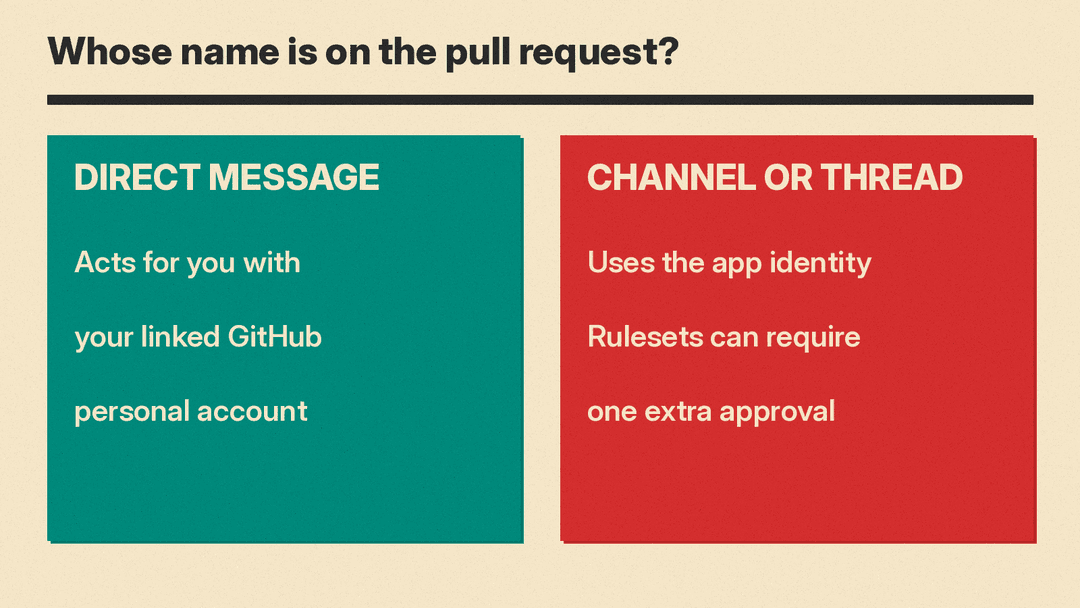
The identity depends on where you ask, per both guides:
- Direct message. Copilot can take actions for you, such as creating pull requests or issues. It uses the permissions of your linked GitHub personal account.
- Group thread or channel. Copilot creates artifacts such as pull requests under its app identity, not your personal account.
The docs add a merge rule for the second case. Because pull requests from a shared context are not attributed to a person, one more approval is required before merging if you use repository rulesets, as long as the repository already requires at least one approval. GitHub says this is enabled by default.
What to know before you mention @GitHub
The Slack guide says Copilot cloud agent will capture the entire thread as context for your request, and that this context is stored in the artifacts the agent generates. The Teams guide says the same. Both suggest a direct message to the GitHub app to limit the context.
Default repositories are shared settings. In Slack you set them per channel with @GitHub settings, and any change applies to everyone using Copilot in that channel. You cannot set default repositories for direct messages, so name the repositories in your prompt there.
GitHub also notes on both pages: "GitHub Copilot uses AI. Check for mistakes."
