
Most AI tools now live in a tab you have to switch to. A browser extension puts the AI on the page you are already reading: it can summarize an article, rewrite an email in Gmail, translate a paragraph, or, in the newest agent-style tools, click and type on a website for you. This guide covers the AI Chrome extensions worth installing as of October 2026, grouped by what they do, with each vendor's own description of the product and the limits it states.
One rule before you install anything: an AI extension usually asks to read and change data on the sites you visit. That is how it works, but it means you should install only from the official Chrome Web Store or the vendor's site, and think about which sites you let it touch.
Browser agents: AI that clicks and types for you
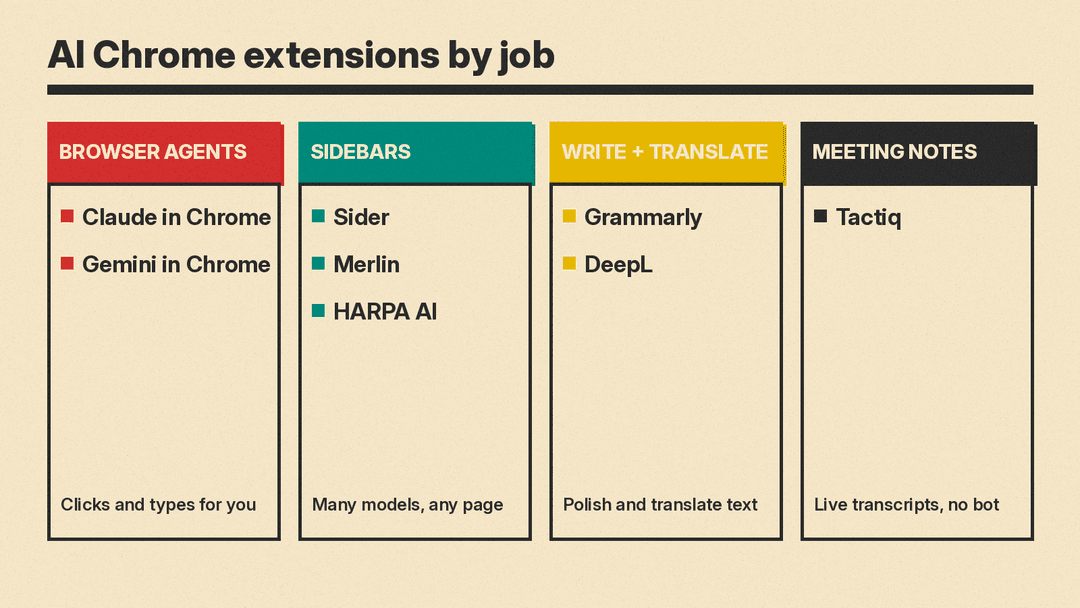
Claude in Chrome
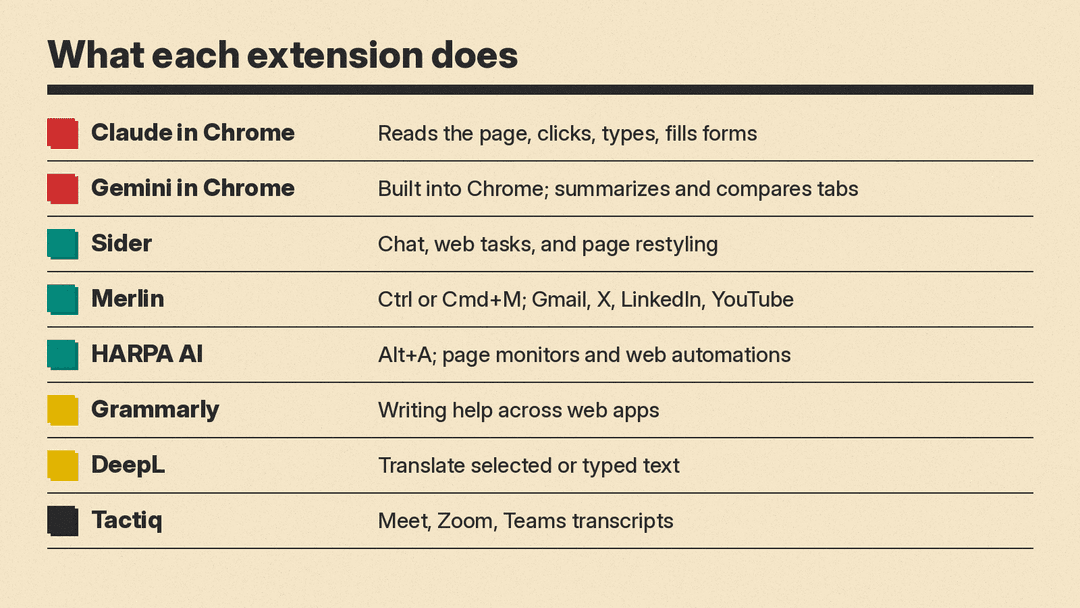
Claude in Chrome is Anthropic's extension. Anthropic says it "reads the page you're signed in to, then clicks, types, and fills forms while you decide what happens next." It opens in the Chrome side panel, can work across several tabs that you drag into its tab group, and can keep working in the background while you do something else.
According to the Claude help center, it is available on paid Claude plans (Pro, Max, Team and Enterprise), it runs only in Google Chrome (not other Chromium browsers or mobile), and you can save prompts as shortcuts and schedule them to run daily, weekly, monthly or annually. On Max and Team plans, the side panel runs as a Claude Cowork session, so your skills, plugins and connectors work there too.
Anthropic is direct about the risk. It says prompt injection (hidden instructions on a web page) can try to redirect Claude, that its protections "aren't foolproof," and it recommends skipping banking, health records and anything with credentials you would not share. You can grant access one site at a time in Permissions Mode, and Anthropic says Claude stops before purchases and other actions that cannot be undone.
Best for: people on a paid Claude plan who want help with repetitive web chores such as pulling numbers from a dashboard or tidying an inbox.
Gemini in Chrome
Gemini in Chrome is not an extension you install. Google says it is "part of the Chrome browser on desktop," opened from the Gemini icon in the toolbar or a keyboard shortcut you set up on Windows, macOS and Chromebook Plus. It uses the context of your open tabs to summarize pages and compare options, and it can work with Google apps such as Gmail and Google Flights.
Google's page lists an "auto browse" feature that handles tasks such as appointment booking on your behalf. Google says it is "rolling out first in preview to Google AI Pro and Ultra subscribers in the U.S." Google also says Gemini in Chrome activates only when you click the icon or use your shortcut, and that you can manage or delete your activity in Gemini Apps Activity. The page notes it is for users 18 and older and that availability varies.
Best for: Chrome users already in Google's apps who want a summary or comparison without installing anything.
Sidebar assistants: many models on any page
These extensions add a chat sidebar that can see the current page and let you pick from several AI models in one place.
Sider
Sider calls itself an "AI sidebar and agent for the browser." Its site describes three parts: Sider Chat, which summarizes, explains and translates web pages, PDFs and YouTube videos "using GPT, Claude, or Gemini"; Sider Hand, which works "across real websites" using your logged-in sessions; and Sider Code, which changes how a website looks based on a plain-language request and remembers the change for later visits.
Best for: people who want one sidebar for reading help and light web tasks across several models.
Merlin
Merlin is a Chrome extension and web app. Its FAQ says you open it on any site with Ctrl or Cmd+M, and that it adds Merlin buttons on X, LinkedIn, YouTube and Gmail. It summarizes YouTube videos, blogs and documents, drafts email replies in the context of the previous message, and drafts social posts and replies. Merlin says you do not need separate ChatGPT, Claude or Gemini accounts to use those models through it, and that free users get a daily allowance of queries.
Best for: students and creators who summarize a lot of video and want writing help inside Gmail and social sites.
HARPA AI
HARPA AI leans toward automation. Its site says you press Alt+A to open it on any page, and it lists a YouTube summarizer, a Gmail assistant, page-change monitoring, price-drop alerts and web automations that "navigate websites, extract data, click buttons and fill forms." It can connect to ChatGPT, Claude, Gemini, DeepSeek and Perplexity, and the site says it supports local models such as Meta Llama.
On cost, HARPA's FAQ says it "has a basic free tier" and that the "Basic S plan starts with $12 per month paid annually." On privacy, HARPA says it does not store website data on its servers, and that prompts you enter are sent to OpenAI, Google or Anthropic for processing. Read its privacy policy before connecting it to work accounts.
Best for: marketers and researchers who want to monitor pages and automate copy-and-paste work.
Writing and translation
Grammarly
Grammarly's browser extension checks and rewrites what you type on the web. Grammarly says it works "in 1 million+ apps and programs," naming Gmail, Google Docs, YouTube, Instagram, Salesforce and Jira, and that it can generate drafts, replies and rewrites, check tone, and suggest clearer wording. If you are choosing between writing tools, our Grammarly vs QuillBot comparison covers the differences.
Best for: anyone who writes email, posts or documents in the browser all day.
DeepL for Chrome
DeepL for Chrome translates text you select on a web page or text you are writing, and offers rewrite suggestions with style and tone options powered by DeepL Write. DeepL says a DeepL Pro subscription "unlocks full-page translation, unlimited characters, and more."
Best for: reading foreign-language sites and writing to people in other languages.
Meeting notes
Tactiq
Tactiq is a Chrome extension that transcribes Google Meet, Zoom and Microsoft Teams calls live and writes AI summaries and action items. Its main selling point is that no bot joins your call. Tactiq's FAQ says it does not record the audio and saves the transcript as text, and its Privacy Center says "You control where your transcription is stored." It says it supports more than 60 languages and uses OpenAI's enterprise API rather than ChatGPT. Check your company's rules on transcribing calls before you turn it on.
Best for: people who live in Google Meet and want notes without a visible note-taker bot.
How to choose
- If you want AI to do multi-step web tasks for you, start with Claude in Chrome (paid Claude plan) or Gemini in Chrome's auto browse (in U.S. preview for Google AI Pro and Ultra).
- If you mainly want summaries and quick answers about the page, Gemini in Chrome needs no install; Sider, Merlin and HARPA add a choice of models.
- If your problem is writing, Grammarly covers English polish and DeepL covers translation.
- If your problem is meetings, Tactiq transcribes without adding a bot to the call.
- Keep the number of AI extensions low. Each one with access to "all sites" can read the pages you open, so remove the ones you stop using.
For more picks that cost nothing to start, see our list of the best free AI tools, and for tools beyond the browser, our guide to the best AI tools for productivity.
