
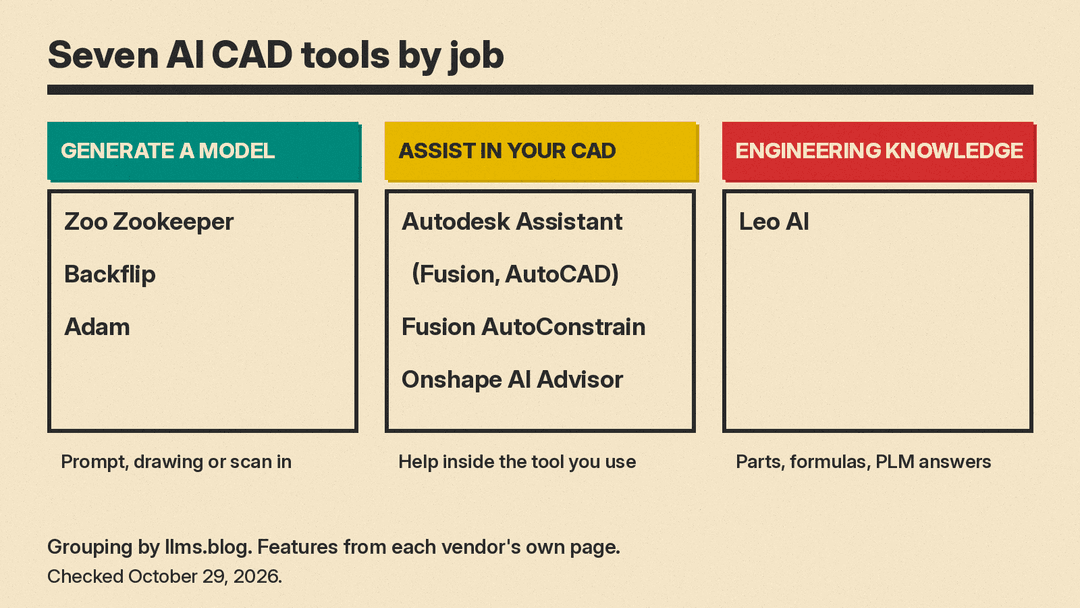
AI in CAD now comes in three shapes: tools that turn a text prompt or an old drawing into an editable 3D model, assistants built into the CAD program you already use, and engineering copilots that read your parts library and PLM data. This guide covers seven real options, as of October 2026, with what each vendor says it does, where it stops, and what it costs when the price is public.
Everything below comes from each vendor's own product, help, pricing or security page, checked on October 29, 2026. We did not run benchmark tests on these tools, so treat this as a map of the field, not a ranking.
Quick picks
- Try text-to-CAD for free: Zoo Design Studio with Zookeeper
- Turn drawings or 3D scans into editable models: Backflip
- An AI agent that works across many CAD and PLM tools: Adam
- Engineering answers, calculations and parts search: Leo AI
- AI inside Autodesk Fusion: Autodesk Assistant, AutoConstrain and automated drawings
- AI inside AutoCAD, Revit and Inventor: Autodesk Assistant
- Help learning Onshape: Onshape AI Advisor
How we picked
We looked for tools that work on real CAD geometry, meaning parametric or editable models and engineering drawings, not tools that only make a mesh for games or a picture of a product. For open-source models that generate meshes, see our comparison of TRELLIS, Hunyuan3D 2.0, TripoSR and InstantMesh. Each tool had to have a public product page that describes what it does. Prices appear only where the vendor shows them publicly, and they are copied as shown. If you want 3D assets for games and animation instead, see our AI tools for game developers guide.
1. Zoo Design Studio with Zookeeper: text-to-CAD you can try in a browser
Zoo calls Zookeeper "our conversational CAD agent." It is built into Zoo Design Studio, which Zoo describes as "an AI-native CAD platform built on our high-performance geometry engine." Zoo says Zookeeper builds on its earlier Text-to-CAD work and adds research and reasoning, plus engine-level tools that let the agent inspect, snapshot and debug geometry while it generates a model.
What it does, per Zoo:
- Creates "fully editable 3D models in one prompt."
- Works whether you start from scratch or iterate on an existing design.
- Lets engineers delegate tasks like research and manufacturability.
- Runs in a browser, and the desktop app is available on Mac, Windows and Linux.
Zoo's page also shows how much prompt detail matters. One of its before-and-after examples turns "a manhole cover" into "a manhole cover with cuts for lifting, 600mm diameter, 50mm thick, with a 200mm hole in the middle". The lesson carries to every tool in this list: give dimensions, units, counts of holes or features, and the standard the part must fit.
Pricing: Zoo's page says you can "Try out Zookeeper for free." Its pricing page says CAD modeling in Zoo Design Studio "remains unlimited," while Zookeeper reasoning time and billable API usage are metered and draw from the same monthly usage credit. On monthly billing, in our check on October 29, 2026, Zoo lists Free at $0 with 20 minutes of usage per month, Plus at $20 per month with about 400 minutes, Pro at $99 per month with 2,500 minutes, and Team at $399 per user per month with 10,000 minutes; Enterprise is priced by sales. The minutes are shared across Zookeeper, API and MCP use, and extra usage is optional pay-as-you-go at $0.0083 per second. The same page says that on the Free plan "Zoo can train on your data (no opt out)." Plus users can opt out by hand, and Team data is excluded from training by default.
Best for: makers, students and engineers who want to see what text-to-CAD can do today without installing anything.
2. Backflip: drawings and 3D scans to parametric CAD
Backflip describes itself as "The AI copilot that CADs like a human." Its pitch is that its foundation model "creates parametric 3D models with full feature trees, editable in your favorite CAD package." That matters because a model with a feature tree can be changed later, while a raw mesh usually has to be rebuilt by hand.
Backflip lists two main jobs:
- Drawing to CAD: it "inspects the geometry and dimensions in an engineering drawing and reconstructs it as a parametric 3D model."
- Scan to CAD: it translates 3D scans and other mesh files into CAD geometry with "a familiar feature tree, sketch constraints, and external references."
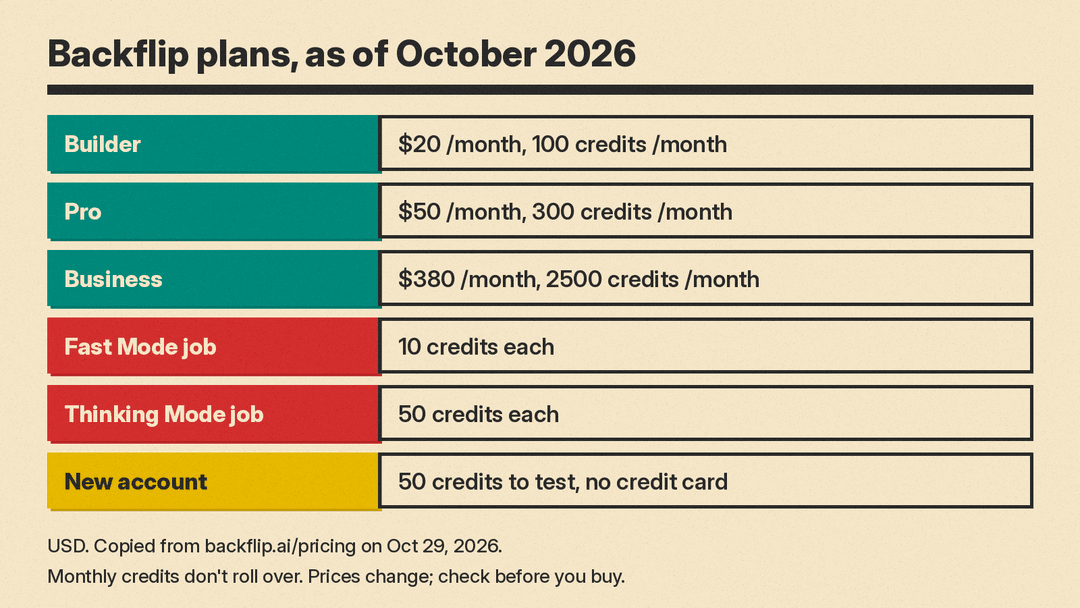
Pricing, as shown on Backflip's pricing page in our check on October 29, 2026:
- New accounts get 50 credits to test the tools, no credit card required.
- Builder: $20 /month, 100 credits /month.
- Pro: $50 /month, 300 credits /month.
- Business: $380 /month, 2500 credits /month.
- Enterprise: custom.
- Fast Mode jobs cost 10 credits each and Thinking Mode jobs cost 50 credits each. Monthly credits don't roll over.
Best for: shops and engineering teams with archives of paper or PDF drawings, or with scanned parts that need to become editable models.
3. Adam: an AI mechanical engineer that plugs into your stack
Adam, backed by Y Combinator, calls itself "the AI mechanical engineer that works in your CAD, PLM and simulation tools, and hands back finished work." Instead of replacing your CAD program, it connects to it.
The workflows on Adam's site:
- Prompt to CAD: generate designs from scratch.
- 3D CAD to 2D engineering drawings.
- A CAD to FEA loop that connects simulation software and carries results back into the design.
- Part editing after an engineering change order, using failure data from PLM and simulation.
- Design for manufacturing checks that use your company documents.
Adam lists support for Fusion, Inventor, Onshape, Creo, Solid Edge, SOLIDWORKS, Siemens NX and CATIA on the CAD side; Arena, Windchill, SOLIDWORKS PDM and Teamcenter for PLM; and Ansys, Abaqus, COMSOL and Simcenter for simulation. You can message it from Slack, Teams or email.
On data handling, Adam's security page says it is "SOC 2 Type I approved," encrypts data in transit and at rest, runs agent work in per-user sandboxes, and that "Model inputs are not used for training under our providers' commercial terms." It also says user content is deleted within 30 days of account closure.
Pricing: in our check on October 29, 2026, Adam's pricing page lists Free at $0 per month with a light daily quota and the Lite model only, Pro at $40 per month with a 7-day free trial, and Max at $200 per month with 5x the usage of Pro. Pro and Max also list a "Use your Codex plan" option. Teams and Enterprise plans have their own tab.
Best for: engineering teams that already run a mix of CAD, PLM and simulation tools and want one assistant across them.
4. Leo AI: answers, calculations and parts search for mechanical engineers
Leo AI says it is "the first AI built by and for mechanical engineers." Its FAQ says it can also generate parts and assemblies from text, images and drawings as editable, parametric models, but most of its pitch is the engineering work around the geometry.
Per Leo's site, it:
- Builds complete assemblies, finding formulas, running calculations and reusing existing parts.
- Answers questions "grounded in your PLM data and 1M+ engineering sources."
- Finds parts from your PLM and "120M+ vendor parts."
- Handles calculations "from stress analysis to material selection," citing sources.
Leo runs on what it calls a patented Large Mechanical Model. Its security page says it is SOC 2 Type II certified and that for Business and Enterprise customers, "Leo AI does not use your CAD files or documents to train its AI model."
Pricing: Leo does not list a price. Its FAQ says Leo for teams is "an annual enterprise subscription priced per user," quoted after a short scoping call, and that there is "no generic free trial." You evaluate it through a demo on one of your own parts.
Best for: mechanical engineering teams with large PLM libraries who lose time hunting for parts, formulas and past decisions.
5. Autodesk Fusion: Autodesk Assistant, AutoConstrain and automated drawings
If you already use Autodesk Fusion, its AI features are the lowest-friction place to start. Autodesk lists Autodesk Assistant, automated drawings, AI AutoConstrain, generative design and CAM automation.
Autodesk Assistant. Autodesk's Fusion FAQ says the Assistant is a panel inside Fusion that helps you create and modify designs using natural language, learn Fusion tools and workflows, manage projects and collaboration, get manufacturing guidance, and generate AI-rendered images of your designs. It works in three modes: "Show me" inspects a design without changing it, "With me" walks through a task step by step, and "For me" prepares an action, shows the plan and runs it once you approve. The FAQ says it "confirms changes before applying them" and does not automate entire end-to-end design processes without user involvement.
The same FAQ lists limits. The Assistant can create sketches but not sketch dimensions or constraints, its modeling tools work in centimeters, so inch coordinates can land in the wrong place, and it has limited capabilities in Assembly mode.
AutoConstrain. Autodesk's help page says AutoConstrain "generates a list of options to automatically apply dimensions and sketch constraints to your sketch," including splines. You add a few key dimensions, run it, review the options and accept one. Autodesk notes the tool "uses AI technology and should be used at your own discretion," and that "Finish with AutoConstrain is not available for Fusion for personal use."
Drawings and CAM. Autodesk says Fusion can automatically generate 2D drawings, and that the CloudNC CAM Assist add-in converts 3D models of 3-axis components into machining strategies.
Pricing. In our check on October 29, 2026, Autodesk lists Fusion at $85 per month on monthly billing or $680 per year ($57 per month billed annually), with a 30-day free trial. The Assistant FAQ says that starting October 13, 2026, every Fusion subscription includes a monthly quota of Flex Tokens (Beta) for agentic Assistant tasks. Asking for information or general guidance does not use the quota. After it runs out, you buy more Flex tokens.
Best for: Fusion users who want help with sketches, drawings and repetitive commands without changing tools.
6. Autodesk Assistant in AutoCAD, Revit and Inventor
Autodesk Assistant is not limited to Fusion. Autodesk says it is available across products "including Fusion, AutoCAD, Inventor, Civil 3D, Revit, Vault, Moldflow, 3ds Max, Maya, InfoWater Pro, Autodesk Forma, and more," and that "Availability and capabilities vary by product and will expand over time."
In AutoCAD, Autodesk says the Assistant supports drawing context, CAD standards checking and in-product guidance. Across products it describes natural-language answers with source links, model-aware actions, and checks of models and drawings against industry and company standards.
Best for: architects, drafters and civil engineers who live in AutoCAD, Revit or Civil 3D and want answers and standards checks without leaving the drawing.
7. Onshape AI Advisor: an expert guide for Onshape users
Onshape AI Advisor is a help assistant, not a model generator. Onshape says it answers questions about its cloud-native CAD and PDM platform using its documentation and tutorial videos, links to the sources it used, and is built into the design workspace.
Onshape is clear about the limits. Its FAQ says AI Advisor "does not generate designs, predict errors in real time, or make complex engineering decisions," and that it "does not currently support generative design." It is not available inside the Onshape Government product. Onshape's pricing page lists AI Advisor on every plan, including the Free plan for non-commercial use. Standard is $1,500 and Professional is $2,500 per user per year, as of our check on October 29, 2026.
Best for: new Onshape users, students and teams moving to Onshape from file-based CAD.
How to choose
- You want a model from a description. Start with Zookeeper, then compare Adam if you need the result inside SOLIDWORKS, Creo or another desktop CAD tool.
- You have drawings or scans, not models. Backflip is built for that job.
- You already pay for Fusion or AutoCAD. Try Autodesk Assistant and AutoConstrain first, since they need no new account.
- Your bottleneck is knowledge, not geometry. Leo AI focuses on parts reuse, calculations and answers from your own PLM data.
- You are learning a CAD tool. Onshape AI Advisor, or the learning features in Autodesk Assistant, help you find the right command faster.
What to check before you trust an AI-made part
Every vendor here frames its tool as an assistant to an engineer. Autodesk asks you to review AutoConstrain results, and Onshape tells users to cross-check critical design decisions. A few habits help with any of these tools:
- Check the feature tree. An editable model is only useful if the sketches are constrained and the features are in a sensible order.
- Measure what matters. Confirm critical dimensions, hole sizes, wall thicknesses and tolerances yourself.
- Run your normal checks. Simulation, design for manufacturing review and drawing checks still apply to AI-made parts.
- Read the data terms. If you upload customer or defense-related designs, read the vendor's security and privacy pages first. Leo limits its no-training promise to Business and Enterprise customers, and Adam ties its training statement to its model providers' commercial terms.
Bottom line
AI CAD tools are useful today for three narrow jobs: drafting a first model from a precise prompt, rebuilding models from drawings and scans, and cutting the busywork inside the CAD program you already use. None of the vendors claims to replace an engineer's review. Start with the tool that matches the input you have, keep prompts specific with dimensions and units, and check prices on the vendor's page, since they change.
Sources
- Zoo: Zookeeper conversational CAD agent
- Zoo: Pricing
- Backflip AI
- Backflip AI: Pricing
- Adam: The AI Mechanical Engineer
- Adam: Trust and Security
- Adam: Pricing
- Leo AI
- Leo AI: Security
- Autodesk: Fusion AI and automation
- Autodesk: Autodesk Assistant in Fusion FAQ
- Autodesk: AutoConstrain help
- Autodesk: Fusion plans and pricing
- Autodesk Assistant
- Onshape AI Advisor
- Onshape: Pricing
