
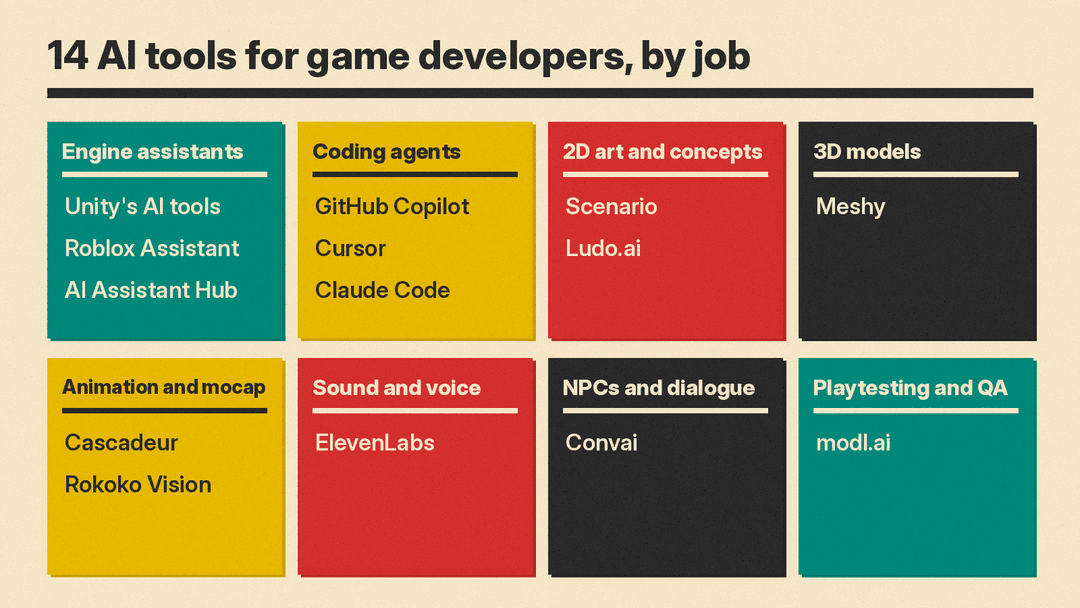
Game developers can now get AI help inside the engine, in the code editor, in the art pipeline, and in QA. Most of it is sold as separate products with separate credits. This guide lists 14 real tools, grouped by job, with what each does, who it suits, its main limit, and a price only where we read it on the vendor's own page.
All features, plans and prices below are as of October 2026. Check the linked page before you pay or ship.
How we picked
- Real, available products only. We loaded each tool's own site or docs in October 2026 and confirmed it is live and describes the feature we state.
- Useful for a game job. Each tool helps with one of these: working inside an engine, writing code, 2D art and concepts, 3D models, animation, audio, NPC dialogue, or QA.
- Verified details only. Prices come from vendor pricing pages. Where we could not read a price, we left it out.
- A clear limit for each. Every entry names a caveat, often a license or usage limit.
Engine assistants: Unity, Roblox and Godot
Unity's AI tools
Unity's AI tools are a set of products, not one assistant. Unity says it is retiring the "Unity AI" brand name and now names each tool by what it does: an in-editor AI assistant, an AI gateway, an MCP server, an official plugin, and a command-line interface. Unity says the in-editor assistant "understands your scene, drives Editor actions, and verifies changes behave as intended." The official plugin adds Unity-authored engineering skills to Claude Code, Codex and Grok.
- Who it suits: Unity 6 teams that want an assistant in the Editor, or a coding agent that drives the Editor.
- Limit: the tools need Unity 6.0 or later and are in beta. Unity says assets from its assistant carry metadata that flags them as AI-generated, and that developers are "fully responsible for managing app store declarations and verifying usage rights."
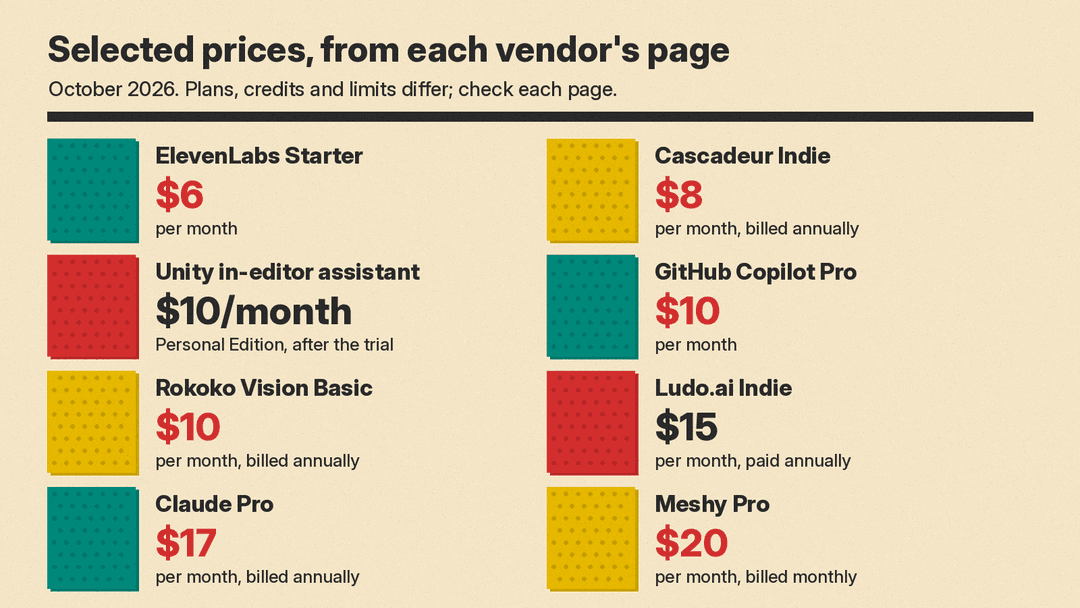
- Pricing note: the CLI, MCP server and official plugin are free. Pro, Enterprise and Industry subscribers get the in-editor assistant as part of their plan. Personal Edition users get a free trial that converts to a $10/month subscription, per Unity's AI tools page as of October 2026.
Roblox Assistant
Assistant is the AI helper built into Roblox Studio. Roblox says it "combines a large language model (LLM) with a run-command system that can act directly on your data model." It can write and edit scripts, insert free and paid Creator Store assets, generate materials, and generate textured 3D meshes or procedural models from a text prompt or an image. Planning Mode shows a plan before any work runs, and Roblox says plans "never auto-execute or time out into acceptance."
- Who it suits: Roblox creators who want to build and script inside Studio without switching tools.
- Limit: Roblox warns that "the generated script might not function flawlessly." Procedural models are capped at 50 in a rolling 24-hour window, and mesh segmentation is in early preview.
- Pricing note: we did not find a price on the docs we read, so we have left it out.
AI Assistant Hub (Godot plugin)
For Godot, we found community plugins rather than a built-in assistant. AI Assistant Hub is one listed in the official Godot Asset Library, MIT licensed and marked for Godot 4.3. Its listing says it can "Embed AI assistants in Godot to help you code, edit scenes, and more." It is "Designed for local LLMs first", and it supports Ollama, llama.cpp, Google Gemini, Jan, OpenRouter and xAI, among others. The source is on GitHub.
- Who it suits: Godot developers who want to run a local model and avoid a subscription.
- Limit: it is a community plugin submitted by a user, not part of Godot itself. The listing says it "does not run LLM models directly", so results depend on the model you connect.
Coding agents
General coding agents can handle much of a game's scripting work. For a deeper price comparison, see our Cursor vs Claude Code vs Codex guide.
GitHub Copilot
GitHub Copilot works in the editor, on the command line and across GitHub. GitHub says it can explain concepts, complete code, propose edits and validate files with agent mode, and that you can assign tasks to "agents like Copilot, Claude by Anthropic, and OpenAI Codex."
- Who it suits: programmers who already work in VS Code or keep their projects on GitHub.
- Limit: chat, agent mode, code review and the cloud agent draw on GitHub AI Credits, and the Free plan has "Limited chat and agent usage."
- Pricing note: Free is $0 with 2,000 completions per month. Pro is $10 per month, Pro+ is $39, and Max is $100, per GitHub's Copilot plans page as of October 2026.
Cursor
Cursor calls itself "your coding agent for building ambitious software." It runs as a desktop editor and a CLI, and Cursor says its cloud agents "use their own computers to build, test, and demo features end to end for you to review."
- Who it suits: developers who want an AI-first editor and agents that run in parallel.
- Limit: Cursor says "Third Party model usage in Cursor is not included in the monthly prices shown and must be purchased separately."
- Pricing note: Free is $0 with limited AI usage. Premium, which Cursor recommends for new AI users, is $30 per month, per Cursor's pricing page as of October 2026.
Claude Code
Claude Code is Anthropic's coding agent. Anthropic says it "builds the plan, asks clarifying questions, and handles work that runs for hours or days." It runs in the terminal, a desktop app, VS Code, JetBrains, the web and Slack. Unity's official plugin supports it. On Unreal Engine 5.8, Epic's Claude Code plugin drives the editor through the engine's built-in MCP server.
- Who it suits: developers who are comfortable in a terminal and want an agent for longer, multi-file tasks.
- Limit: it is not on Claude's Free plan, and usage limits apply. Anthropic describes Pro as "Perfect for short coding sprints in small codebases."
- Pricing note: Pro is $17 per month with annual billing ($200 billed up front) or $20 billed monthly. Max starts at $100 per month, per Claude's pricing page as of October 2026.
2D art, sprites and concepts
Scenario
Scenario describes itself as "AI for creative production and game assets." It puts image, video, 3D and audio generation in one workspace, with 650+ models from 40+ providers. Its main draw is custom models: Scenario says you can upload 10 to 30 images to train a style, or 5 to 15 for a character or object. It also connects to Claude Code, Codex and Cursor through Scenario MCP.
- Who it suits: art teams that need a large set of assets to hold one visual style.
- Limit: Scenario says "Free plan outputs are for personal and evaluation use only." Credits do not roll over, and training custom models starts on Pro.
- Pricing note: a free tier gives 50 credits. Starter is listed at $15/mo and Pro at $45/mo, and Scenario says annual plans are 33% cheaper, per Scenario's pricing page as of October 2026.
Ludo.ai
Ludo.ai generates "Sprites, icons, UI, textures, music, 3D, and video" for games, with a spritesheet generator for idle, walk, run, attack, hit and death animations. Its plans also cover early design work: game idea generation, game concept generation and game design documents. It has a Unity plugin, an MCP server, a CLI and a REST API.
- Who it suits: solo and small-team developers of 2D games who need animated sprites and concept help.
- Limit: the Indie plan has no API, MCP or CLI access and no unlimited image generation. API, MCP and CLI calls always use credits.
- Pricing note: Indie is $15 per month paid annually ($180 per year). Pro is $35 per month paid annually ($420 per year), per Ludo.ai's pricing page as of October 2026.
3D models
Meshy
Meshy turns text or images into 3D models. It adds PBR textures (albedo, normal, metallic and roughness), auto-rigs humanoid and quadruped characters with 600+ motion presets, and has a Low Poly Mode. Meshy lists exports in FBX, GLB, OBJ and USDZ and compatibility with Unity, Unreal Engine, Godot, Blender and Maya.
- Who it suits: small teams that need props and placeholder characters fast enough to playtest.
- Limit: assets on the Free plan use a CC BY 4.0 license, "commercial use with attribution", and downloads are limited to 10 Meshy 6 Lite models per month. Paid plans list assets as "Private & Customer owned."
- Pricing note: Free is $0 with 100 monthly credits. Pro is $20 per month billed monthly with 1,000 monthly credits, per Meshy's pricing page as of October 2026.
Animation and motion capture
Cascadeur
Cascadeur is AI-assisted keyframe animation software. Its Inbetweening tool is "AI interpolation that instantly generates motion between keyframes", and AutoPosing is an "AI system that lets you get natural poses by moving fewer control points." It also does AI motion generation, mocap cleanup and auto-rigging, and streams to Unreal Engine through Live Link.
- Who it suits: animators who want to keep keyframe control while AI fills in poses and physics.
- Limit: the Free plan is for non-commercial use only and exports to .casc format only, not .fbx or .dae. The Indie plan requires revenue under $100k per year.
- Pricing note: Indie is $8 per month billed annually or $19 monthly. Pro is $33 per month billed annually or $49 monthly, per Cascadeur's plans page as of October 2026.
Rokoko Vision
Rokoko Vision is AI motion capture from ordinary video. You upload a clip to Rokoko Create, edit it in Rokoko Studio, and export .FBX or .BVH for Blender, Unity, Unreal and other tools. Vision now sits in Rokoko Create next to Text-to-Motion.
- Who it suits: indie developers who want mocap without a suit or a studio.
- Limit: Rokoko says Vision 3.0 has no finger tracking at launch, and webcam recording and dual-camera capture were removed. Rokoko also says its suits are still needed in cases such as complex motions.
- Pricing note: the free Starter plan includes 30 seconds of Vision AI processing per month. Basic is $10 per month billed annually or $12 billed monthly, with 600 seconds, per Rokoko's Vision page as of October 2026.
Sound effects and voice
ElevenLabs
ElevenLabs generates sound effects and ambient audio from a text prompt and returns four samples per request. Its sound effects page says outputs are "Royalty free". The same plans cover text to speech and voice design. For music, see our guide to AI music generators.
- Who it suits: small teams that need sound effects and voice lines without a recording session.
- Limit: all products draw from one shared monthly credit pool. The Commercial License first appears on the Starter plan, not Free.
- Pricing note: Free is $0 with 10,000 credits per month. Starter is $6 per month and Creator is $22 per month, per ElevenLabs' pricing page as of October 2026.
NPCs and dialogue
Convai
Convai builds conversational AI characters for 3D worlds. It describes its platform as one for "crafting non-player characters (NPCs) with advanced multimodal perception abilities in 3D game engines." Convai says its characters can see and hear their surroundings and respond with dialogue, voice, gestures and actions. Characters can draw on uploaded documents, and Convai has plugins for Unity and Unreal Engine.
- Who it suits: teams prototyping talking NPCs, companions or training simulations.
- Limit: dialogue generated while the game runs is Live-Generated AI content on Steam, which needs extra disclosure (see below). Valve also notes that a live AI service can incur ongoing costs for each input and output.
- Pricing note: Convai's pricing page did not load for us, so we have left prices out.
Playtesting and QA
modl.ai
modl.ai runs AI agents that play your build to find bugs. You upload a build, describe tests in plain language such as "Complete the tutorial" or "Reach level 5", and the agents report pass or fail. modl.ai says no SDK or code changes are needed, runs can trigger from CI, and reports flag crashes, missing assets, softlocks and performance drops with severity scores.
- Who it suits: mobile and UI-heavy games with a QA team that wants broader regression coverage.
- Limit: modl.ai supports Android and desktop today, with iOS in development, and says "Very fast-paced or timing-critical gameplay isn't fully supported yet." Each game needs a custom-trained model.
- Pricing note: modl.ai lists no public price.
Rights and store rules
Free tiers often carry tighter rights: Scenario's free outputs are for personal and evaluation use, Meshy's free assets need attribution under CC BY 4.0, and Cascadeur Free is non-commercial.
If you sell on Steam, Valve's Steamworks content survey asks you to describe AI use. Valve says the section covers "content that ships with your game, and is consumed by players", such as artwork, sound, narrative and localization, not efficiency gains from AI tools. It splits content into Pre-Generated and Live-Generated. For Live-Generated content, Valve asks what guardrails stop your AI from generating illegal content.
How to choose
Start with your engine and your largest bottleneck.
- If you build in Unity 6: try Unity's in-editor assistant, or connect a coding agent you already use through Unity's free plugin or MCP server.
- If you build on Roblox: Assistant is already in Studio. Use Planning Mode for larger changes.
- If you build in Godot: pair a general coding agent with a community plugin such as AI Assistant Hub.
- If code is the bottleneck: pick one of GitHub Copilot, Cursor or Claude Code, not all three.
- If art is the bottleneck: Scenario for a consistent custom style, Ludo.ai for sprites and animation sheets, Meshy for 3D props.
- If animation is the bottleneck: Cascadeur for keyframes, Rokoko Vision for motion from video.
- If you need sound or talking NPCs: ElevenLabs for effects and voice, Convai for NPC dialogue.
- If bugs reach players: modl.ai for automated playtests on mobile and desktop builds.
For trailers and store videos, our AI video generator guide covers the current options.
Sources
- Unity's AI tools
- Roblox Creator Hub: Assistant for Studio
- Godot Asset Library: AI Assistant Hub
- AI Assistant Hub on GitHub
- GitHub Copilot
- GitHub Copilot plans
- Cursor
- Cursor pricing
- Claude Code
- Claude pricing
- Scenario
- Scenario pricing
- Ludo.ai
- Ludo.ai pricing
- Meshy
- Meshy pricing
- Cascadeur
- Cascadeur plans
- Rokoko Vision
- ElevenLabs sound effects
- ElevenLabs pricing
- Convai
- modl.ai
- Steamworks: Content Survey
