
Beeble, a company that makes AI visual effects tools for filmmakers, released SwitchX 3.0 on November 10. SwitchX is a video-to-video model: you give it real footage of a performer, and it replaces the background, the lighting, or nearly anything else in the shot while keeping the performance itself untouched. Version 3.0 is built on MiniMax H3, the open video model, and adds up to four reference images, moving backgrounds, built-in camera tracking and closer prompt following. It is live now in the Beeble cloud app. Here is what changed, what it costs, and the trade-offs.
What is Beeble SwitchX?
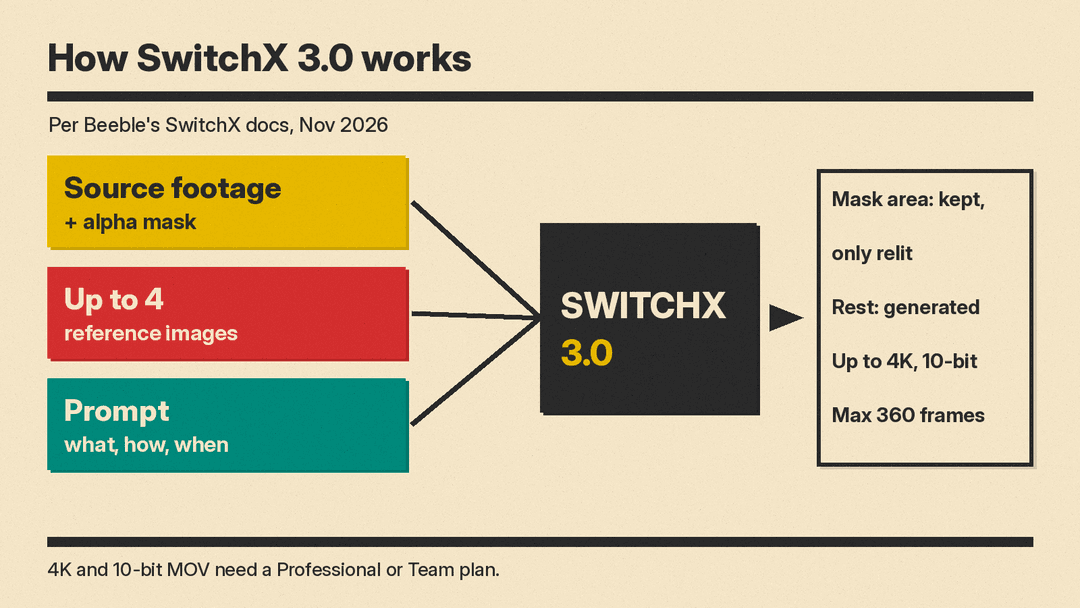
Most video-to-video tools regenerate the whole frame, so faces, hands and timing can drift from the original take. Beeble's pitch is the opposite. Its SwitchX documentation describes a method it calls Source-Locked Rendering, driven by an alpha mask:
- Inside the mask (white), your original pixels are kept frame for frame. Beeble says only the lighting changes, so the subject fits the new scene.
- Outside the mask (black), every pixel is newly generated from your prompt and reference images, background included.
That makes SwitchX closer to a virtual set than a text-to-video generator. You shoot an actor on a greenscreen or in an ordinary room, then move them to a subway car, a beach at sunset or a snowfield, and the actor's performance stays as shot.
The docs list four ways to build the mask. Auto finds and tracks the main subject. Select lets you click objects to keep (for example a face and hands while the clothes change), using interactive masking tools Beeble names as SAM3 and MatAnyone. Fill keeps the whole frame's geometry but changes the look. Upload takes a custom matte from tools such as Nuke or After Effects.
What is new in SwitchX 3.0?
Beeble lists four main updates in its research post and update notes:
- Up to four references. Earlier versions took one reference image. Version 3.0 takes up to four per job, and you name them in the prompt as @Image1 to @Image4. Beeble says the model reads almost any image: a finished frame, a location, a floor plan, a storyboard, a character sheet, a prop or a color palette. In one demo, four references (a plaza, two billboard cards and a storyboard) make a billboard play the cards in storyboard order behind a greenscreen performer.
- Dynamic backgrounds. Beeble says generated worlds now move "far more" than in 2.0: traffic passes, crowds walk, fire moves, snow falls.
- Camera tracking. The new background stays locked to the camera through handheld, orbit and running shots, with no tracking markers and no match move, according to Beeble. Tracking is now part of the model and always on. In 2.0 you could switch it on or off.
- Prompt control. Beeble says 3.0 follows prompts much more closely, so you can describe what happens and when. Its examples include "Make the pigeons take flight as he runs past" and "Turn the ceiling lights on one by one as he approaches."
Why build on MiniMax H3?
Beeble describes MiniMax H3 as "an open, general-purpose video model" that it "took apart and rebuilt" for one job, production video-to-video, using its own dataset and its own architecture. It also added a final pass up to 4K that, in Beeble's words, reads your original footage again for detail.
SwitchX joins a growing list of tools built on top of H3's open weights, after Viggle Remake and HyperFlow H3 Flash. The likely reason, in our view: an open base model lets smaller companies skip the cost of training a video model from scratch and spend their effort on one narrow, professional task.
Specs and limits
From the SwitchX docs, as of November 2026:
- Input: MP4 or MOV video, or PNG and JPEG stills. Native ProRes 422 ingest (Proxy, LT, 422, HQ). Files up to 2GB, or 4.5GB for ProRes. Up to 60fps.
- Length: up to 360 frames per generation, which is 15 seconds at 24fps.
- Resolution: 720p, 1080p or 2160p. Aspect ratio, frame rate and frame count match your source.
- Export: 8-bit MP4 and 10-bit MOV.
- Workflow: explore in 720p, then "Finish" a chosen take in 4K. Beeble says Finish re-renders from the original source footage rather than simply upscaling.
One step back: SwitchX 2.0 allowed up to 480 frames (20 seconds at 24fps). Version 3.0 caps clips at 360 frames, so long takes must be split or run on SwitchX 2.0, which Beeble's pricing page still lists at 480 frames. SwitchX runs only in the Beeble cloud app, as a standalone page or a node in Beeble's Canvas workflow builder. The docs say it is not available in Beeble Studio, the local desktop product.
How much does SwitchX 3.0 cost?
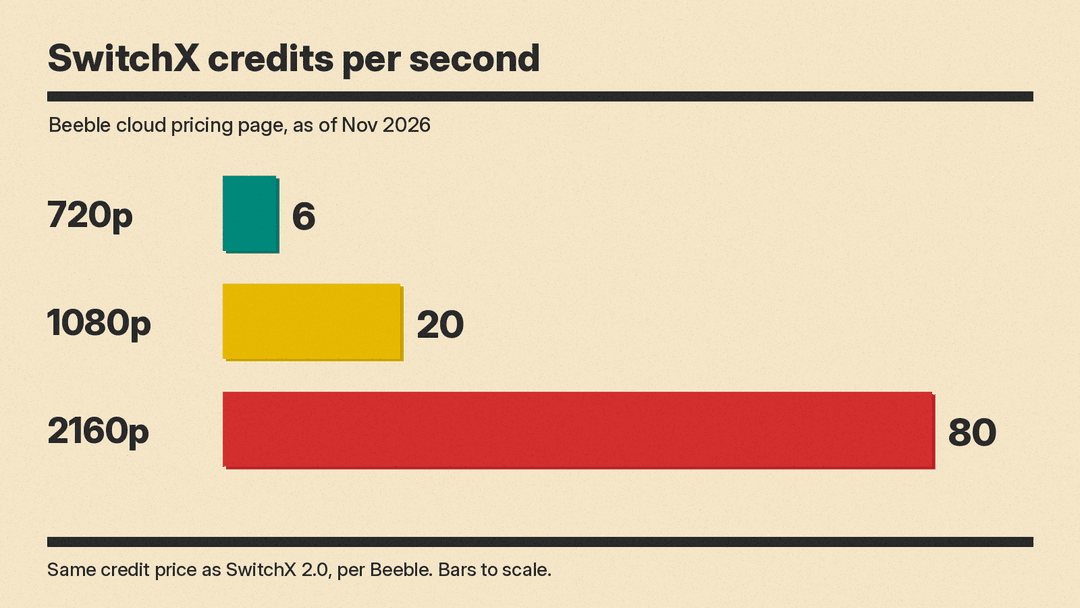
Beeble says 3.0 costs the same credits as SwitchX 2.0. Its cloud pricing page lists, as of November 2026:
- Creator: $19 a month, or $16 a month billed yearly, with 540 credits a month.
- Professional: $75 a month, or $60 a month billed yearly, with 2,400 credits a month, plus 4K and 10-bit output for SwitchX.
- SwitchX credits: 6 credits per second at 720p, 20 at 1080p and 80 at 2160p.
The free tier does not include SwitchX. 2160p generation and the 10-bit MOV download need a Professional or Team plan. By our math, one full 15-second clip at 2160p uses 1,200 credits, about half of a Professional month, which is why the explore-at-720p, finish-in-4K workflow matters.
Who is SwitchX 3.0 for?
Beeble's docs say SwitchX is designed for filmmakers, VFX artists and creators. It suits people who already shoot real footage and want to change the world around it. The docs list background replacement, relighting and virtual production as typical uses for the Auto mask. Beeble's paid plans include a full commercial license, and its pricing FAQ says it never trains on paid customers' content.
It is not a tool for making video from a text prompt alone. If that is what you need, a text-to-video generator is a better fit. All quality claims above come from Beeble's own demos. We have not tested the model, and results on difficult footage (fast motion, hair, glass, crowds in front of the subject) may vary.
