
"AI agent" is now a common term, but Anthropic notes that "agent" can be defined in several ways. This guide explains what the term actually describes, how an agent differs from a chatbot, how one works step by step, where agents are useful today, and what can go wrong. No coding knowledge needed.
The short answer
An AI agent is an AI system that is given a goal and then works out the steps itself: it decides what to do next, uses tools such as web search or a file editor, looks at the result, and repeats until the job is done or it needs your input.
Google Cloud's definition is a good plain version: AI agents are "software systems that use AI to pursue goals and complete tasks on behalf of users." IBM puts it as a system "that autonomously performs tasks by designing workflows with available tools."
Anthropic, which builds the Claude models, gives the most practical description in its engineering guide Building effective agents: agents "are typically just LLMs using tools based on environmental feedback in a loop." An LLM is a large language model, the kind of AI behind ChatGPT, Claude and Gemini.
That last word, loop, is the key idea. A chatbot answers once. An agent keeps going.
Agent vs chatbot vs AI assistant
The words overlap, so it helps to see them side by side. Google Cloud's explainer separates three levels by how much the software decides on its own:
- Bot: follows pre-defined rules and responds to triggers or commands. Google Cloud describes bots as the least autonomous, with limited or no learning.
- AI assistant: responds to your requests, can recommend actions, but "decision-making is done by the user." You stay involved at each step.
- AI agent: has "the highest degree of autonomy, able to operate and make decisions independently to achieve a goal," and can carry out complex, multi-step actions.
IBM draws a similar line between nonagentic and agentic chatbots. In IBM's description, a nonagentic chatbot has no tools, memory or reasoning, and needs continuous user input to respond. An agentic one can break a task into subtasks, use its tools to fill information gaps, and correct its own plan.
A useful rule of thumb: if the software can take several actions in a row toward a goal without you approving each one, it is behaving like an agent.
How an AI agent works
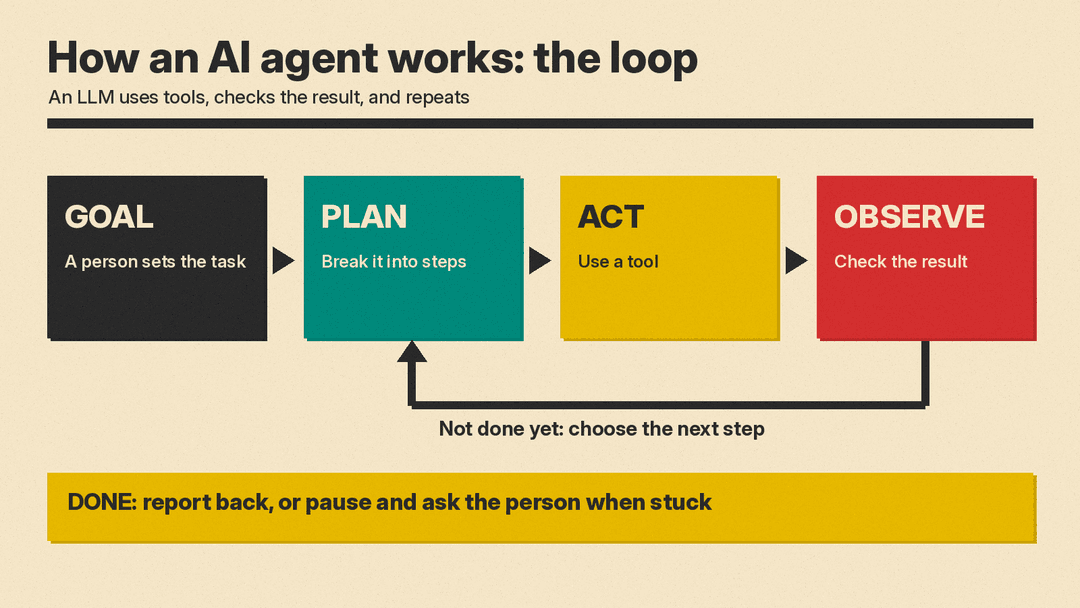
Strip away the branding and most agents run the same cycle.
Start with a goal
A person gives the agent a task, either as a single instruction or through a back-and-forth conversation. Anthropic's guide says agents "begin their work with either a command from, or interactive discussion with, the human user." IBM notes that even autonomous agents need goals and rules set by people: the developers who build the system, the team that deploys it, and the user who gives it a task.
Plan
For a bigger job, the agent breaks the goal into smaller subtasks. IBM calls this task decomposition and adds that for simple tasks, planning is not always needed.
Act with tools
Tools are what let an agent do things instead of only writing text. A tool can be a web search, a calculator, a database query, a code runner, an email or calendar connection, or another agent. Google Cloud describes tools as functions or external resources an agent uses to interact with its environment.
One common way to plug tools into an AI app is the Model Context Protocol (MCP), an open-source standard for connecting AI applications to data sources, tools and workflows. Its documentation compares it to "a USB-C port for AI applications" and lists Claude, ChatGPT, Visual Studio Code and Cursor among the apps that support it.
Observe the result
After each action, the agent checks what happened: the search results, the error message, the test that passed or failed. Anthropic calls this getting "ground truth" from the environment at each step, and says it is crucial for the agent to judge its own progress.
Repeat or stop
The agent then decides the next step and goes around the loop again. Per Anthropic, the task "often terminates upon completion," and builders commonly add stopping conditions, such as a maximum number of steps, to keep control. Anthropic adds that agents can pause for human feedback at checkpoints or when they hit blockers.
This think, act, observe pattern has a name in research. The 2022 paper ReAct: Synergizing Reasoning and Acting in Language Models had a language model alternate between reasoning steps and actions such as looking things up through a simple Wikipedia API. IBM's explainer describes ReAct loops as "Think-Act-Observe."
Memory
Many agents also keep some memory so they do not start from zero each time. Google Cloud lists short-term memory for the current task and long-term memory for past conversations and data. IBM says agents can store feedback and solutions to earlier problems to avoid repeating mistakes.
A simple example
IBM's explainer walks through a vacation request: find the week next year with the best surfing weather in Greece. A plain chatbot can only answer from what it learned in training. An agent, in IBM's example, pulls historical daily weather reports from an external database, then asks a second agent that specializes in surfing what conditions matter (high tides, sun, little rain), combines the two, and reports the likely best week.
The same shape applies to everyday office work. Ask an agent to "find three flights under my budget and add the best one to my calendar," and it would need a search tool, a way to compare results, and a calendar connection, plus a check-in with you before anything is booked.
Workflows vs agents
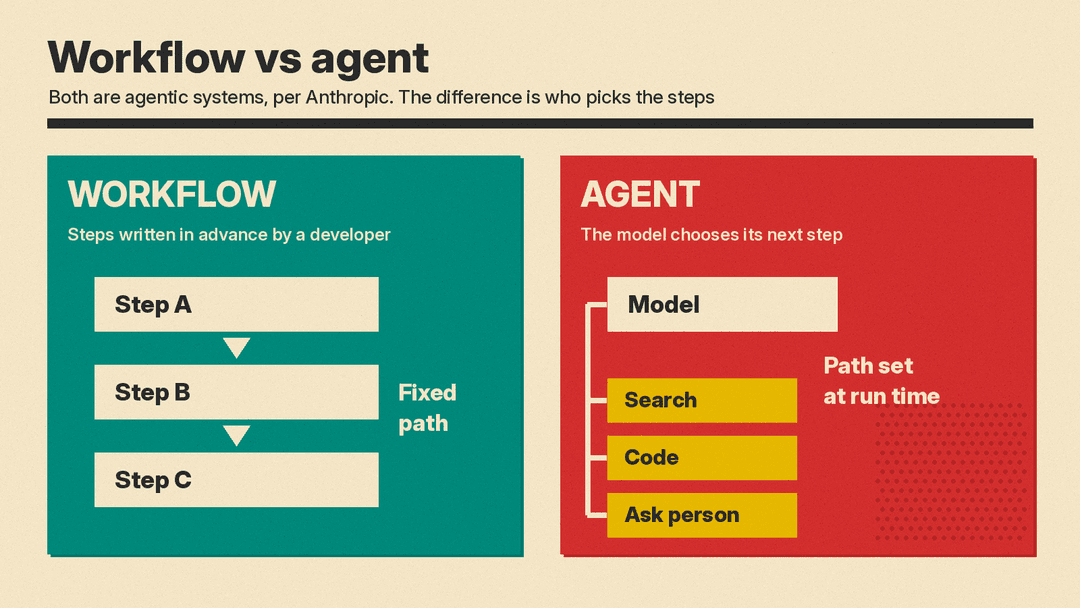
Not every "agentic" product is a true agent. Anthropic's guide draws a clear line:
- Workflows are "systems where LLMs and tools are orchestrated through predefined code paths." A developer wrote the steps in advance. Example from the guide: write marketing copy, then translate it.
- Agents are "systems where LLMs dynamically direct their own processes and tool usage." The model picks the steps.
Anthropic calls both "agentic systems." It recommends workflows for well-defined tasks because they are predictable, and agents for open-ended problems "where it's difficult or impossible to predict the required number of steps." It also says many apps need neither: "optimizing single LLM calls with retrieval and in-context examples is usually enough." (Retrieval is the idea behind RAG, covered in our What Is RAG explainer.)
Where AI agents are useful today
Anthropic's guide names two "particularly promising applications" for agents from its work with customers:
- Customer support. Support already follows a conversation, and an agent can be given tools to pull customer data, order history and help articles, and to take actions such as issuing refunds or updating tickets. Success is easy to measure: was the problem resolved?
- Coding. Coding agents can run automated tests, see what failed, and try again. Anthropic says its agents can solve real GitHub issues in the SWE-bench Verified benchmark from the pull request description alone, while noting that "human review remains crucial."
IBM lists software design, IT automation, code generation and conversational assistance among enterprise uses, and gives an example: Dynamiq built a multi-agent legal research assistant for an insurance client that routes simple queries to a low-cost classifier model and escalates complex ones. IBM reports it cut contract review time from 90 minutes to 45.
Anthropic's own summary of where agents fit best: tasks that "require both conversation and action, have clear success criteria, enable feedback loops, and integrate meaningful human oversight."
What can go wrong
Agents take actions, not only write text. That is why their mistakes can cost more.
- Errors compound. Anthropic warns that agent autonomy means "higher costs, and the potential for compounding errors," and recommends testing in sandboxed environments with guardrails.
- Loops that do not end. IBM notes that an agent that cannot plan or reflect well may keep calling the same tools, which it calls an infinite feedback loop. Human monitoring and step limits help.
- Prompt injection. The OWASP Gen AI Security Project lists prompt injection first, as LLM01, in its risk list for LLM apps. In the "indirect" form, hidden instructions sit in a website or file the AI reads, and they change what it does. OWASP says the impact depends heavily on "the agency with which the model is architected," meaning the more an AI can do, the more damage a hijack can cause. For a recent real case, see our report on how a planted AGENTS.md file hijacked Codex.
- Privacy and access. IBM warns that, if mismanaged, connecting agents to business processes and customer management systems can raise serious security concerns.
IBM's suggested safeguards are practical: give users a log of the agent's actions, let people interrupt the agent, and give each agent a unique identifier so its actions can be traced.
How to try an agent safely
If you are testing an AI agent at home or at work, a few habits follow directly from the advice above:
- Start with low-stakes tasks. Research and drafting before anything that spends money or sends messages.
- Give the fewest permissions that work. Connect only the accounts and tools the task needs.
- Keep a human approval step before purchases, emails to other people, deletions or anything you cannot undo.
- Read the action log if the product has one, so you can see what it did and catch errors.
- Be careful with untrusted content. Web pages, emails and files can carry hidden instructions, so watch what an agent does after reading them.
Key terms in one place
- Agent: an AI system that pursues a goal by choosing and taking actions in a loop.
- Agentic: having some of that ability; Anthropic uses "agentic systems" for both workflows and agents.
- Tool: anything an agent can call to act or look something up, such as search, code or a calendar.
- Tool calling: the model asking for a tool to be run, then reading the result.
- MCP: Model Context Protocol, an open standard for connecting AI apps to tools and data.
- Multi-agent system: several agents working together, often with one coordinating the others. Anthropic describes a related workflow, "orchestrator-workers," in which a central LLM breaks down tasks and delegates them to worker LLMs.
- Human in the loop: a person who reviews or approves steps along the way.
The bottom line
An AI agent is not a new kind of brain. In Anthropic's words, it is usually an LLM using tools based on feedback "in a loop." What makes it different from a chatbot is that it acts, checks the result, and keeps going toward a goal. That makes agents useful for open-ended tasks like support and coding, and it is also why permissions, approvals and logs matter more than they do with a chatbot.
