
Cron is the scheduler built into Linux and macOS servers, and its five-field syntax is easy to get almost right. That makes it a good job for an AI chatbot, and a risky one: a cron line that is slightly wrong does not throw an error. It just runs at the wrong time, or never.
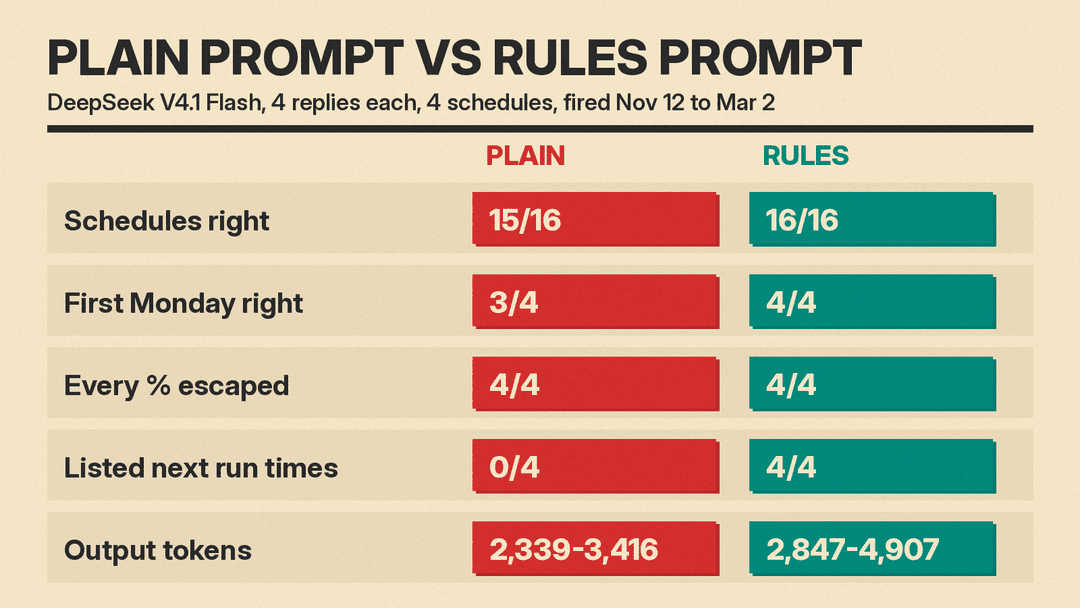
We asked an AI model for the same four crontab entries 8 times, then ran every line through a test harness that fired each job across a 110-day calendar and recorded when the command actually ran. The short version: the model got 31 of 32 schedules right. The one miss came from the plain request and would have run a monthly job 34 times in that window instead of 4. A short rules template fixed it and also made the model show its next run times, so you can check the answer yourself.
What we tested
We picked four schedules that people often ask for, from easy to tricky:
- Every weekday at 9:30 AM
- The first Monday of every month at 8:00 AM
- Every 90 minutes
- The last day of every month at 11:00 PM
The command was the same for all four, a backup script that writes a dated log file: /home/me/backup.sh > /home/me/logs/backup-$(date +%F).log 2>&1. That % sign is a planted trap, explained below.
- Model: DeepSeek V4.1 Flash through OpenRouter, low reasoning effort, no system prompt.
- Prompt A (plain): "Write crontab entries for my Ubuntu server for these schedules," followed by the list and the command.
- Prompt B (rules): the template shown below.
- Runs: 2 prompts x 4 runs = 8 calls, 8 replies, 32 schedules scored.
How we checked the answers
Reading a cron line and nodding is not a test. Our harness did what cron does:
- It pulled every crontab line out of each reply.
- It applied cron's
%rule to the command (more on that below). - It worked out every time each line would fire from November 12, 2026 to March 2, 2027, using the Python croniter library with standard Vixie cron day rules.
- At each of those times it actually ran the command in
/bin/shon Debian (which is dash, like Ubuntu), with a fake clock and a stand-in backup script that only records that it ran.
A schedule passed only if the backup script ran at exactly the expected times: 78 weekday runs, 4 first Mondays (December 7, January 4, February 1, March 1), 1,760 runs every 90 minutes, and 4 month ends (November 30, December 31, January 31, February 28).
The results
What both prompts got right
- Weekdays at 9:30. All 8 replies wrote
30 9 * * 1-5. - Every 90 minutes. Cron cannot step past 59 minutes, so
*/90does not work. All 8 replies used the standard fix: two lines on a 3-hour cycle, one at the top of hours 0, 3, 6 and so on, and one at half past hours 1, 4, 7 and so on. That gives 16 evenly spaced runs a day. - Last day of the month. Cron has no "last day" field in its standard form. All 8 replies ran the job on days 28 to 31 (or every day) and added a test that only lets it run when tomorrow is the 1st. This handled 30-day months and February in our window.
- The
%trap. All 8 replies escaped every%as\%. That matters: the crontab manual says an unescaped%is turned into a newline, and everything after it is sent to the command as input. An unescapeddate +%Fwould break the log file name.
Where the plain prompt failed
- The first Monday. One of 4 plain replies wrote
0 8 1-7 * 1, which looks like "days 1 to 7 that are also a Monday." Cron does not read it that way. The crontab manual says that when both the day-of-month and day-of-week fields are restricted, the command runs when either field matches. In our window that line ran 34 times: every Monday plus every day from the 1st to the 7th. The other 3 plain replies avoided it, and 2 of them explained the trap. All 4 rules replies avoided it, because the prompt names the rule.
Mistakes in the extra advice
Plain replies were longer and added tips we did not ask for. Some were wrong:
- One reply suggested a systemd timer with
OnCalendar=*:0/90and said it "behaves the same way." We checked it withsystemd-analyze calendar(systemd 257), which rejected it: "Failed to parse calendar specification." - Another suggested
OnCalendar=*-*-* 00/1:30for the 90-minute job. systemd-analyze shows that fires every hour at half past (00:30, 01:30, 02:30), not every 90 minutes. Its first-Monday timer,Mon *-*-1..7 08:00:00, was right. - One reply said the 90-minute job "appends to the same file 16 times a day." It does not:
>empties the file each time, so you keep only the last run of the day. Three other plain replies flagged this correctly, and one switched to>>. - One reply said you need
%-dinstead of%dso the test does not "choke on 08/09." In dash,[ 08 -le 7 ]simply returns false with no error. Two rules replies used plain%dand passed every check.
What the rules prompt cost and missed
- Tokens. Plain replies used 2,339 to 3,416 output tokens. Rules replies used 2,847 to 4,907, most of it hidden reasoning.
- The log overwrite. None of the 4 rules replies mentioned the
>problem. Our template asked for short explanations, and it did not ask about the command itself. The fix is to change the log name yourself (see the checklist). - A bonus you can check. Every rules reply listed the next 3 run times for each schedule, and all of those times matched our harness. None of the plain replies listed any dates.
The prompt template
This is Prompt B exactly as we sent it. Swap in your own schedules and command.
I need crontab lines for an Ubuntu server (standard Vixie/cronie cron: 5 fields, no Quartz extensions like L, W, # or ?). The server clock is the time zone I mean.

Schedules:
1. Every weekday at 9:30 AM
2. The first Monday of every month at 8:00 AM
3. Every 90 minutes
4. The last day of every month at 11:00 PM

Command for all of them: /home/me/backup.sh > /home/me/logs/backup-$(date +%F).log 2>&1

Rules:
- Give each line ready to paste into crontab -e.
- If a schedule cannot be written as one standard cron line, say so and give a working fix (a date test in the command, or more than one line).
- If you restrict both day-of-month and day-of-week, remember cron runs the job when EITHER field matches. Avoid that or handle it.
- Escape every % in the command as \%.
- After each line, list the next 3 run times starting from Thu 2026-11-12 00:00 so I can check them.
- Keep explanations short.
Why each part of the template matters
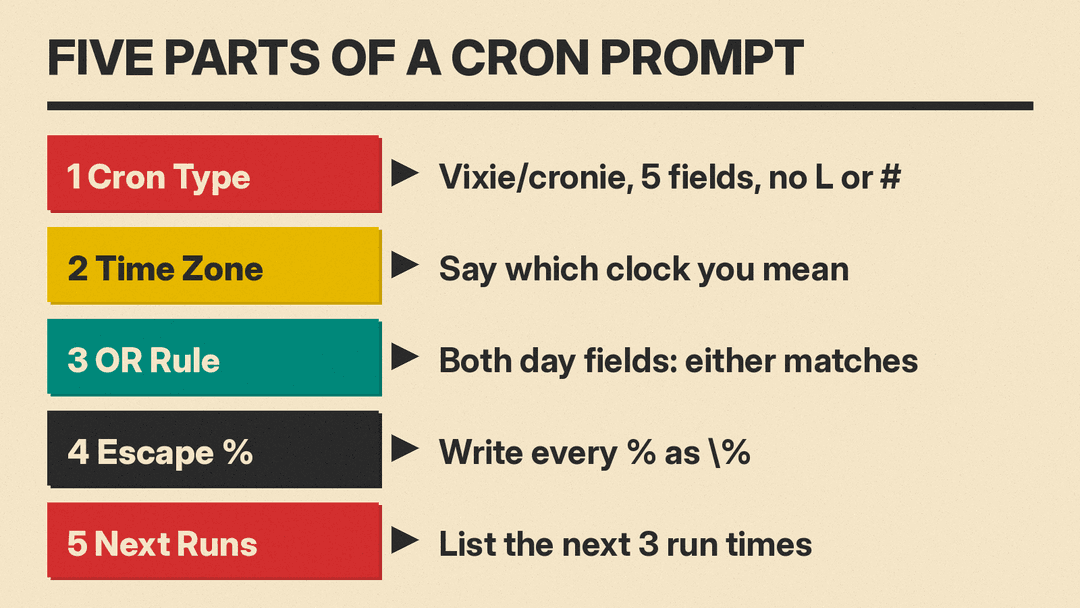
- Name the cron. "Standard Vixie/cronie cron, 5 fields, no Quartz extensions" stops the model from using
L(last day) or#(nth weekday). Those work in tools like Quartz and some cloud schedulers, but not in the cron on a standard Linux server. - Say which clock. Cron uses the server's time zone. If your server runs on UTC and you mean 9:30 AM in New York, tell the model, or the job runs at the wrong hour.
- Name the OR rule. This one line is what separated a 34-run mistake from a correct answer in our test.
- Ask for
\%. The model we tested escaped it every time, but other models and older answers online may not. - Ask for the next run times. This turns a wall of asterisks into dates you can check against a calendar in 10 seconds.
A checklist before you paste any AI cron line
These steps work no matter which chatbot wrote the line:
- Check the next run times. Paste the five time fields into a cron preview tool, or use croniter in Python, and compare them to what you wanted. Do not trust the model's own list blindly, even though it was right in our test.
- Look for both day fields restricted. If neither the third nor the fifth field is
*, the job runs when either one matches. Move one condition into a date test. - Search the command for
%. Every one needs a backslash in a crontab. - Run the command once by hand. Copy the command part (with
%instead of\%) into a terminal. Cron uses/bin/shwith a short PATH, so use full paths. - Check the log name. If a job runs more than once a day, put the time in the file name (
$(date +\%F-\%H\%M)) or use>>, or each run erases the last. - Make sure the log folder exists. Cron does not create it, and the job fails if it is missing.
- Test any systemd timer advice. Run
systemd-analyze calendar '<spec>' --iterations=3before you use anOnCalendarvalue an AI gave you.
Limits of this test
We tested one model, one set of four schedules, and 4 runs per prompt, so treat the numbers as a spot check, not a benchmark. The first-Monday mistake showed up once in 4 plain runs. That is enough to show the trap is real, not enough to give a reliable error rate. We ran the guards in dash on Debian with GNU date. The "tomorrow is the 1st" test uses date -d tomorrow, which works on Ubuntu but not with the BSD date on macOS. We did not test cron on macOS, cloud schedulers, or Kubernetes CronJobs.
If you write other scripts with AI, our tested guides to bash scripts, regex, SQL queries and jq commands follow the same approach: give the model your exact system and rules, then run what it writes before you trust it.
