
SynthID is Google DeepMind's watermarking tool for AI-generated content. It hides a signal inside images, video, audio and text made by Google's AI models, and Google's tools can later look for that signal to tell you whether a file came from Google AI. You cannot see or hear the watermark. You can, however, check for it yourself in the Gemini app.
This guide explains what SynthID is, how the watermark works for each type of media, how to check a file, what the results mean, and where the method stops working. It sticks to what Google's own pages say.
What SynthID is, in one paragraph
Google DeepMind describes SynthID as "our watermarking tool, designed specifically for AI-generated content." The page says SynthID "embeds digital watermarks directly into AI-generated images, audio, text or video." The watermarks are added across Google's generative AI consumer products and are "imperceptible to humans," but SynthID's own technology can detect them. The goal, in Google's words, is to help people identify AI-generated or AI-altered content and to "foster transparency and trust in generative AI."
Two ideas matter for everyone else:
- The watermark is part of the content itself. It is not a label in the file name or a sticker in the corner. It lives in the pixels, the sound or the word choices.
- It answers one narrow question. SynthID tells you whether something was made or edited by Google's AI (and, in Google's detector, by partners that use SynthID). It does not tell you whether a file is "real" in general.
Why Google built it
The Gemini Apps Help page on verification gives the reason plainly: generative AI is improving fast, and AI-generated content "is becoming harder to distinguish from content not created or edited by AI." Being able to identify AI content, it says, "helps increase transparency."
Google's developer documentation for SynthID Text adds the concern behind it. Most use of generative AI is legitimate, it says, but "there is concern that it could contribute to misinformation and misattribution problems." Watermarking is "one technique for mitigating these potential impacts."
Note the word "one." Google does not present SynthID as a complete fix. It sits next to other tools, which we cover below.
How the watermark works for each kind of media
SynthID uses a different method for each type of content. The DeepMind page describes all four.
Images and video
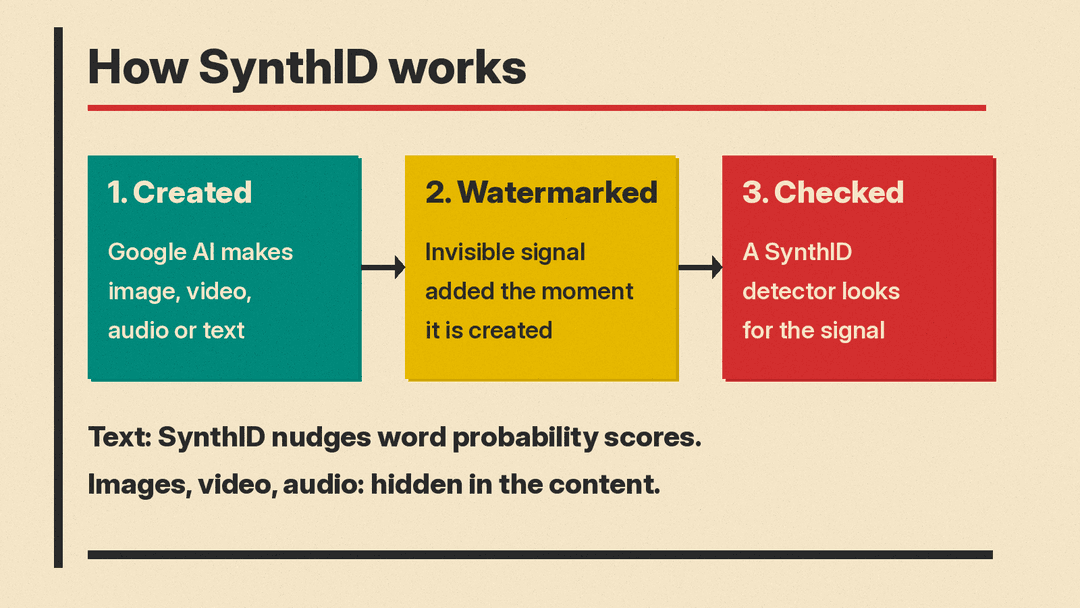
For an image, or a segment of video, SynthID "adds an invisible digital watermark." Google says the watermark "doesn't change the image or video quality." It is added "the moment content is created," not afterward.
Google also says it is "designed to stand up to modifications like cropping, adding filters, changing frame rates, or lossy compression." Lossy compression is the kind of shrinking that happens when you save a JPEG or a platform re-encodes a video.
Audio
For sound, Google says SynthID embeds a watermark into audio generated or published through its music model Lyria and the podcast-style audio feature of NotebookLM. The watermark is "inaudible to the human ear." Google says it can't be altered by common changes such as "adding noise, MP3 compression, or changing the speed of the track."
Text
Text is harder, because there are no pixels or sound waves to hide a signal in. SynthID works with how chatbots write.
A large language model writes one word, or "token," at a time. For each next word, it gives every possible word a probability score. DeepMind's own example: in "My favourite tropical fruits are mango and...", the word "bananas" gets a higher score than "airplanes."
SynthID "adjusts these probability scores to generate a watermark." The pattern of small nudges across many words forms the signal. Google says this is not noticeable to a reader and "doesn't affect the quality of the output." DeepMind says it has expanded SynthID to text generated by the Gemini app and web experience.
The full method is described in a peer-reviewed paper in Nature, Scalable watermarking for identifying large language model outputs.
SynthID Text is open source
Google has open sourced the text version so other developers can watermark their own models. The developer docs say a production-grade implementation is in the Hugging Face Transformers library, there is an official demo Space on Hugging Face, and a reference implementation is on GitHub.
A few details from those docs help explain how it behaves:
- No retraining needed. Developers do not need extra training. They pass a watermarking configuration to the model when it generates text.
- The settings are a secret key. Each configuration should be "stored securely and privately," the docs say, "otherwise your watermark may be trivially replicable by others."
- A trade-off between strength and fragility. One setting, the length of word sequences used, balances detection against robustness. Longer is more detectable but "more brittle to changes." The docs suggest 5 as a good default.
- Detection gives three answers. The detector says watermarked, not watermarked, or uncertain. Developers can tune it for a chosen rate of false positives and false negatives.
- Developers choose who can check. A company can keep its detector fully private, offer it through an API, or release it publicly.
For a regular reader, the takeaway is that text watermarks depend on who made the model and whether they chose to turn this on. A watermark from one company's model is only checkable with that company's detector or configuration.
How to check a file in the Gemini app
You do not need any developer tools to check images, video or audio. Google's verification help page describes the steps for the web version:
- Sign in and go to gemini.google.com.
- Click Add files, then upload a file from your device, Google Photos or Google Drive.
- Ask a question such as "Was this image/video/audio created or edited by Google AI?", "Is this AI-generated?" or "Is this a real video?"
Some practical tips from the same page:
- Check one file at a time. Google limits file size and length, and the help page lists the current limits.
- If you screenshot an image to check it, "crop tight around the image" and do not upload a collage of several images.
- There is a limit on how many checks you can run in each 24-hour period. The help page lists the current numbers, and Gemini tells you if you hit the limit.
The DeepMind SynthID page says Gemini, Search and Chrome can all check for a SynthID watermark when you upload a file and ask. It also describes the SynthID Detector, a separate verification portal Google launched in 2025 for journalists and media professionals. Google says it is expanding that portal to everyone, and that it can check whether a file was made with AI "from Google or our partners," which it names as including OpenAI, NVIDIA and Kakao.
What the results mean
Google's help page explains each outcome.
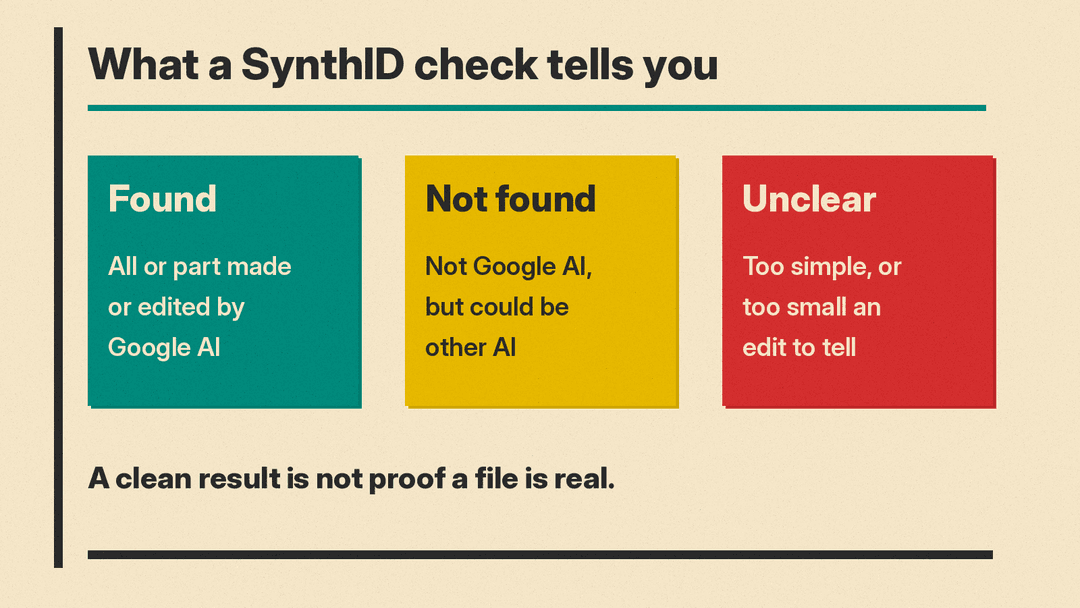
A watermark is found. This means "all or part of the image or video was created or edited by Google's AI models." Note "all or part." So a watermark can mean Google's AI made the whole file or only edited part of it.
No watermark is found. This means the file "wasn't created or edited by Google AI, but it could have been created by other AI systems." A clean result is not proof a file is authentic. The help page is direct: "Gemini can currently only recognize content created by Google AI tools," even though other companies have started to adopt SynthID watermarks.
It is unclear. Sometimes Gemini cannot say either way. The help page gives two common reasons: "Not enough details to watermark," such as very simple or abstract images, and "Likely too small an edit," where a minor change may not carry a detectable watermark.
For video, Gemini says which parts of the video had a watermark. Google adds that this "doesn't mean it was detected in all parts of that portion of the video."
Can a watermark be removed?
Google is careful here. For images, video and audio, the help page says the watermark "will usually still exist" even if the file is "re-scaled, re-colored, compressed or altered in other ways." It then adds: "there's still a chance that after many alterations the watermark won't be detected."
For text, the developer docs list clear limits:
- Text watermarks survive some changes, such as "cropping pieces of text, modifying a few words, or mild paraphrasing."
- Detection gets much weaker when AI text "is thoroughly rewritten, or translated to another language."
- The watermark is "less effective on factual responses," because there is less room to change word choices without hurting accuracy.
- SynthID Text "is not designed to directly stop motivated adversaries from causing harm." Google says it can make misuse harder and can be combined with other approaches.
So a watermark is strong evidence when it is present. Its absence, especially in edited or rewritten content, tells you much less.
SynthID vs Content Credentials vs metadata
Gemini actually checks two things when you ask it to verify a file. The help page explains the difference.
- SynthID is an invisible watermark inside the content. It checks whether Google's AI made or edited the file.
- Content Credentials are, in Google's words, "a technology that acts like a digital passport," recording a file's origin and edit history. They are an industry standard from the Coalition for Content Provenance and Authenticity (C2PA) and work for both AI and non-AI content. Google notes they do not tell you a file is "definitely AI-generated," but give history you can use to decide. They show which company signed the information, for example "Info by Google LLC."
- Plain metadata is extra information attached to a file, such as camera details. Google's help page says watermarks are embedded in the content for verification, while metadata lets creators "add additional context with original files."
The practical difference: Content Credentials are a signed record attached to the file, and Gemini will flag credentials that were modified without an update to that record or come from products it does not support. Google's help page also suggests checking metadata only on the original file, not a screenshot. A SynthID watermark is built into the content itself, and Google says it usually survives common edits.
Other ways to spot AI content
Google's own help page says a watermark check is not the whole answer. It suggests a few other checks:
- Look for visual errors, such as garbled text in an image, mistakes in hands, teeth or backgrounds, inconsistent shadows and lighting, and repeating patterns.
- Run a reverse image search to find the original source or similar images.
- Check the metadata if you have the original file, not a screenshot. For photos, this can include camera model, date and settings, and sometimes signs of editing software.
For checking AI-written answers rather than images, our 5-minute routine for fact-checking AI answers walks through a step-by-step method.
Who SynthID is useful for
- Everyday users who see a viral image or clip and want a quick check on whether Google's tools made it.
- Journalists and media professionals, who got first access to the SynthID Detector portal, according to Google.
- Teachers and editors who want to know whether text came from Gemini. The consumer checks described above are for image, video and audio files, not pasted text. Rewritten or translated text may also not test as watermarked.
- Developers who run their own language models and want to mark their output, using the open source SynthID Text.
The bottom line
SynthID is a practical, built-in way to tell whether Google's AI made or edited an image, video or audio clip. Google also watermarks text, but the consumer checks described here are for files, not text. A positive result is meaningful. A negative result mostly tells you Google's tools were not involved, not that the content is genuine. Use it as one check alongside Content Credentials, reverse image search and your own judgment.
If you use Google's newest models, our explainer on Gemini 4 Argon covers what the model does and who it is for.
Sources
- Google DeepMind: Google SynthID
- Gemini Apps Help: Verify AI-generated images, videos, and audio
- Google AI for Developers: SynthID, tools for watermarking and detecting LLM-generated text
- Nature: Scalable watermarking for identifying large language model outputs
- Coalition for Content Provenance and Authenticity (C2PA)
