
Chat apps such as ChatGPT, Claude and Gemini are one way to use an AI model. The other way is an API, which lets software send text to a model and get the reply back without a chat window. Anthropic describes its version as "a RESTful API at https://api.anthropic.com that provides programmatic access to Claude models" (Anthropic API overview).
This guide explains what an LLM API is, how it differs from a chat app, what you need to use one, how billing and limits work, and why an API "forgets" a conversation unless you send it again.
What is an API?
API stands for application programming interface. It is a set of rules that lets one program ask another program to do something.
A restaurant is a useful comparison. You do not walk into the kitchen. You read a menu, give your order to a server, and the server brings back the dish. An API is the menu and the server: it lists what you can ask for, takes your request in a fixed format, and returns a result.
What does an LLM API do?
An LLM API takes text (and sometimes images or files) from your program, sends it to a large language model, and returns the model's answer as data your program can read.
That makes it possible to build AI into other software:
- a support tool that drafts replies to customer emails,
- a script that summarizes a folder of reports,
- an app with its own chat screen,
- an agent that calls tools and runs multi-step tasks.
The model is the same kind of model that powers the vendor's chat app. The difference is that you control what goes in, what comes out, and what happens next.
How is an API different from a chat app?
- No ready-made interface. The API returns data. If you want a chat screen, you build it or use a tool that provides one.
- Separate account and billing. Anthropic says that to use the Claude API you need "A Claude Console account" and "An API key from the Console" (Anthropic API overview). That is separate from a Claude app subscription.
- Pay for what you use. API usage is billed by tokens, not by a flat monthly plan.
- You set the details. You choose the model, the instructions, and settings such as response length in each request.
What do I need to start?
Each vendor follows the same basic pattern: an account, an API key, and a billing setup for paid use.
- OpenAI: The OpenAI quickstart has you create an API key in the dashboard and says to "Store the key in a safe location." It then shows how to save the key as an environment variable, with separate commands for macOS or Linux (export) and for Windows PowerShell (setx). It says each OpenAI SDK reads that variable automatically.
- Anthropic: You need a Claude Console account and an API key from the Console, per Anthropic's API overview.
- Google: Google says "To use the Gemini API, you need to have an API key to authenticate your requests, enforce security limits, and track usage to your account" (Gemini API get started). Google adds that Google AI Studio "automatically creates a project and API key for new users," and that "Upgrading to the paid tier increases your rate limits and requires setting up Cloud Billing."
Why must an API key stay secret?
An API key works like a password tied to your account and your bill. Anyone who has it can send requests that you pay for.
Basic habits:
- Keep keys out of code you share or publish.
- Store them as environment variables or in a secrets manager, not in documents or chats.
- Delete and replace any key you think has leaked.
What does a request contain, and what comes back?
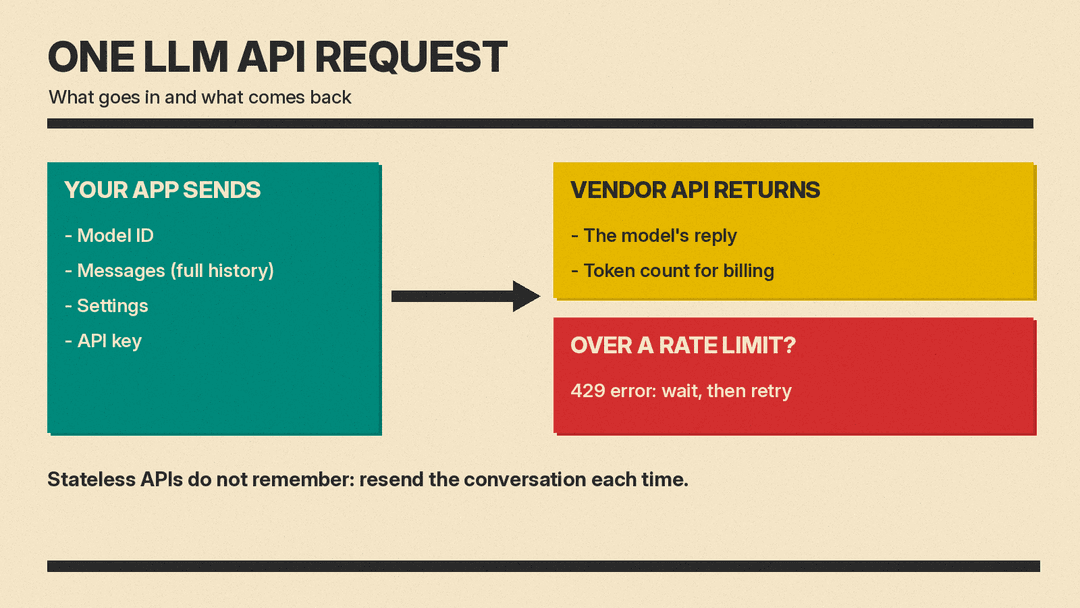
A typical request to a chat-style LLM API includes:
- The model ID. The exact name of the model you want, as listed in the vendor's docs.
- The messages. Your instructions and the conversation so far, marked by role (user or assistant).
- Settings. For example, a maximum response length.
- Your key. Sent with the request so the vendor knows who is calling.
The response contains the model's reply and usually a count of the tokens used, so you can track cost.
OpenAI, Anthropic and Google all offer official SDKs, which are code libraries that handle these details for you. Google says its Interactions API is available "through the Python and JavaScript SDKs, as well as through REST." REST means plain web requests, which any programming language can send.
Why does the API forget the conversation?
Many LLM APIs do not remember earlier messages on their own. Anthropic states it plainly: "The Messages API is stateless, which means that you always send the full conversational history to the API" (Anthropic: Using the Messages API).
In practice, your program keeps the conversation and sends all of it again with each new message. The chat apps do this for you behind the scenes.
Some APIs offer a server-side option. Google's Gemini API get started page describes two approaches:
- "Stateful (recommended)": the server keeps the history, and you link each new request to the last one with
previous_interaction_id. - "Stateless": you "Manage the conversation history on the client by passing all previous turns" in each request.
Either way, a longer conversation means more text for the model to read. Every message you resend counts toward the size limit of the model's context window. Our guide to tokens explains how that text is counted.
How is API use billed?
API use is billed per token. Tokens are small pieces of text. Vendors price input tokens (what you send) and output tokens (what the model writes) separately, usually per million tokens.
A few billing features are common:
- Batch processing. For work that does not need an instant answer, vendors offer batch APIs at a lower rate. Anthropic's pricing page lists a discount for Batch API requests.
- Prompt caching. If you send the same long text again and again, such as a manual or a long set of instructions, the API can reuse it. Anthropic's pricing page lists a lower price for prompt cache reads than for normal input.
- Spend limits. Anthropic says spend limits "set a maximum monthly cost an organization can incur for API usage" (Anthropic rate limits).
Check each vendor's pricing page for current rates. They change, and they differ by model.
What are rate limits?
Rate limits cap how much you can use the API in a set time. OpenAI defines them as "restrictions that our API imposes on the number of times a user or client can access our services within a specified period of time" (OpenAI rate limits).
Vendors measure them in different units:
- OpenAI: OpenAI lists metrics including RPM (requests per minute), RPD (requests per day), TPM (tokens per minute) and TPD (tokens per day). It says "Rate limits can be hit across any of the options depending on what occurs first."
- Anthropic: Anthropic says Messages API limits "are measured in requests per minute (RPM), input tokens per minute (ITPM), and output tokens per minute (OTPM) for each model class" (Anthropic rate limits).
If you go over a limit, the API refuses the request. Anthropic says: "If you exceed any of the rate limits, you get a 429 error describing which rate limit was exceeded." It adds that when the response has a retry-after header, you should "wait that many seconds before retrying."
Limits usually rise as you use and pay more. Anthropic says an organization "is placed on a tier automatically and can move to a higher tier over time." Google says upgrading to the paid tier "increases your rate limits."
Can an API model use tools?
Yes. Many LLM APIs let you describe functions the model can ask your program to run, such as looking up an order or checking the weather. The model replies with a request to use the tool, your program runs it, and you send the result back. Our explainer on function calling covers how this works.
Who uses LLM APIs?
- Developers building apps, websites and internal tools.
- Businesses automating tasks such as sorting emails or drafting documents.
- No-code tools that connect to an API on your behalf once you paste in a key.
- AI agents and coding tools that call a model many times to finish a task.
You do not need to write code to use some of these tools. Many no-code tools ask only for your API key.
Caveats
- Each vendor's API has its own model IDs, request format and rules. Check the docs for the vendor you use.
- API terms and data handling can differ from a vendor's consumer chat app. Read the vendor's API terms before you send sensitive data.
- Prices, limits and features change. Check the vendor's current docs.
- This guide was checked on November 11, 2026 (PST) against the pages below.
Sources
- Anthropic: API overview, checked on November 11, 2026
- Anthropic: Using the Messages API, checked on November 11, 2026
- Anthropic: Rate limits, checked on November 11, 2026
- Anthropic: Pricing, checked on November 11, 2026
- OpenAI: Developer quickstart, checked on November 11, 2026
- OpenAI: Rate limits, checked on November 11, 2026
- Google: Gemini API get started, checked on November 11, 2026
