
Every AI chatbot has a limit on how much it can take in at once. Paste in a very long report, keep a conversation going for hours, or upload a stack of files, and at some point the model starts to lose track of earlier details or tells you the input is too long. That limit is called the context window. This guide explains what it is, what fills it up, why a bigger window is not always better, and what you can do about it. No technical background needed.
The short answer
A context window is the amount of text an AI model can look at in one go when it writes a reply.
IBM's explainer on context windows defines it as "the amount of text, in tokens, that the model can consider or 'remember' at any one time." Anthropic, which makes the Claude models, uses a similar picture in its context windows documentation: the context window is "all the text a language model can reference when generating a response, including the response itself," and it represents a "working memory" for the model.
Google uses a related comparison in its long context guide for Gemini: "An analogy for the context window is short term memory. There is a limited amount of information that can be stored in someone's short term memory, and the same is true for generative models."
So the context window is not what the model learned during training. It is the material in front of the model right now: your messages, its replies, and anything you attached.
It is measured in tokens, not words
Context windows are counted in tokens. A token is a small chunk of text. It can be a whole word, part of a word, or a single character.
IBM notes that "there is no fixed word-to-token 'exchange rate,'" and that different models can split the same passage into tokens differently. That is why two models with the same advertised context window may not fit exactly the same amount of your text.
IBM also points out that languages are not treated equally. It describes a study in which the same sentence in Telugu had far fewer characters than in English but "resulted in over 7 times the number of tokens." In practice, this means the same window can hold less text in some languages than in others.
What actually fills the window
Most people think only about what they type. In reality, much more goes into the window.
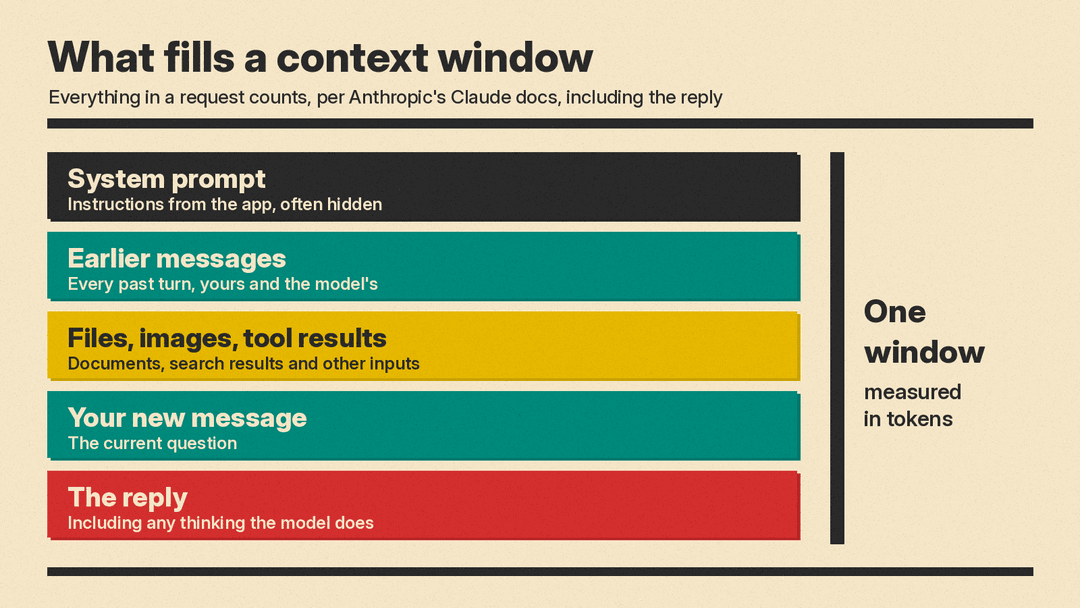
Anthropic's documentation lists what counts toward it for a request to Claude: "the system prompt, every message in messages (including tool results, images, and documents), and your tool definitions." It adds: "The output Claude generates for the turn, including its extended thinking, counts too."
IBM's explainer describes the same idea from the user's side:
- A hidden system prompt. Chatbots are often given instructions that the user never sees, which "conditions their behavior."
- Retrieved information. When a tool searches documents or the web and feeds the results to the model (a method called retrieval augmented generation, or RAG), that information "is likewise stored within the context window."
- Formatting. "Special characters, line breaks and other formatting measures also consume some portion of the available context."
Conversations grow with every turn
In a chat, the window fills up as you go. Anthropic's documentation explains that "each user message and assistant response accumulates within the context window," and each new turn's input "contains all previous conversation history plus the current user message." The reply then "becomes part of the input for the next turn."
This is why a long chat about many different topics can use up space faster than you might expect. Everything said earlier is still in the window until something removes it.
The reply needs room too
Because the reply sits inside the same window, a very long input leaves less room for the answer. Google's long context guide says that for some Gemini models the context window is "shared across input, thinking, and output tokens," while it describes other, earlier models as using "separate" input and output budgets. Either way, the takeaway is the same: models have limits on both what they read and what they write, and vendors list those limits on their model pages.
What happens when you hit the limit
When the input is larger than the window, something has to give. IBM says that when "a prompt, conversation, document or code base exceeds an artificial intelligence model's context window, it must be truncated or summarized for the model to proceed."
Different products handle this in different ways. Anthropic's documentation notes that chat interfaces such as claude.ai "can also manage the context window on a rolling 'first in, first out' basis," which means the oldest parts of a conversation are the first to go. For long-running conversations, the same page names "server-side compaction" as its main strategy for managing context.
For you as a user, the practical result can look like this:
- The model forgets an instruction you gave near the start of a long chat.
- It stops referring to details from a file you uploaded earlier.
- The app refuses a file or asks you to shorten your message.
Why a bigger window is not automatically better
Larger context windows let a model handle longer documents and longer conversations. IBM says that, generally speaking, a larger window "translates to increased accuracy, fewer hallucinations, more coherent model responses, longer conversations and an improved ability to analyze longer sequences of data." But it also lists several tradeoffs.
Quality can drop as the window fills
Anthropic is direct about this. Its documentation says that "more context isn't automatically better. As token count grows, accuracy and recall degrade, a phenomenon known as context rot." It concludes that this "makes curating what's in context just as important as how much space is available."
The middle gets less attention
A research paper, Lost in the Middle: How Language Models Use Long Contexts, tested how well language models found relevant information placed at different points in a long input. The authors report that "performance is often highest when relevant information occurs at the beginning or end of the input context, and significantly degrades when models must access relevant information in the middle of long contexts, even for explicitly long-context models."
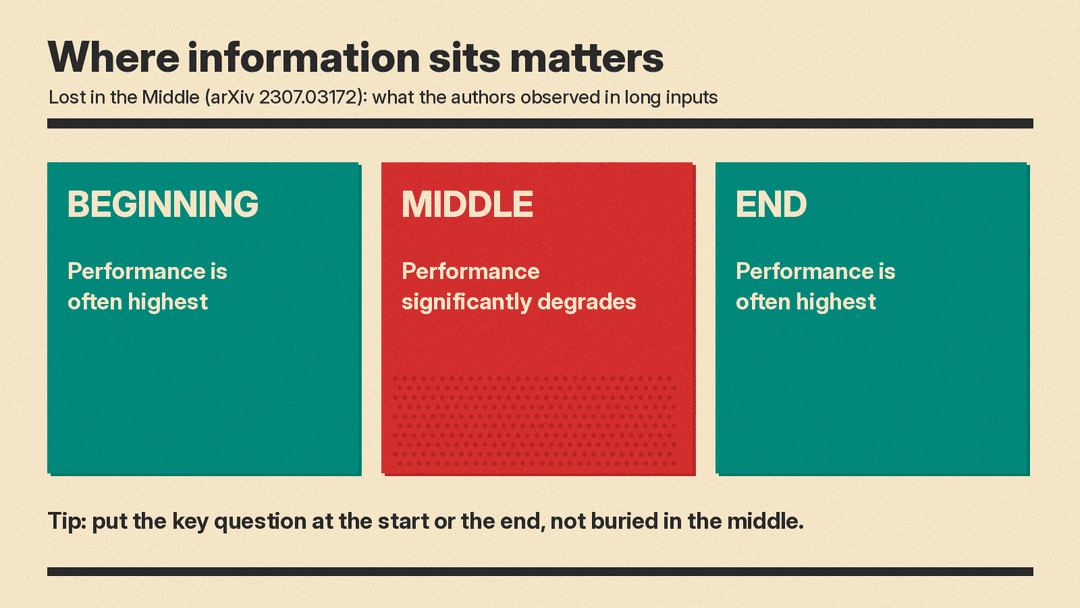
That paper tested specific models at a specific time, and newer models may behave differently. Still, it is a good reason not to bury the one sentence that matters in the middle of a long paste.
Long inputs cost more and can be slower
Processing a long input takes more computing work. IBM explains that compute requirements "scale quadratically with the length of a sequence," and gives the example that "if the number of input tokens doubles, the model needs 4 times as much processing power to handle it." It adds that increasing context length "can also slow down outputs." IBM also notes that recent techniques have been developed to offset some of these tradeoffs.
Since many AI services bill by the token, a longer input usually means a larger bill when you pay per use. Google's token guide says the cost of a call to its API "is determined in part by the number of input and output tokens."
A longer window can mean more room for attacks
IBM also flags a security angle: a longer context window "might also have the unintended effect of presenting a longer attack surface for adversarial prompts," and it cites Anthropic research that found increasing context length also increased a model's vulnerability to "jailbreaking."
Context window vs training data
These two ideas are easy to mix up.
- Training data is the large body of text a model learned from before you ever used it. Anthropic's documentation says the context window "is different from the large corpus of data the language model was trained on."
- The context window is what the model can see during your current request: your messages, its replies and attachments.
How to work well within a context window
You do not need to know the exact size of a model's window to use it well. A few habits help with any model.
- Start a new chat for a new task. Since earlier turns stay in the window, a fresh chat gives the model a clean slate and keeps unrelated material out of the way.
- Put the most important instructions at the start or the end. Given the "lost in the middle" findings, do not hide the key request inside a long block of pasted text. Restating the main question after a long document is a simple fix.
- Paste only what is relevant. Anthropic's point about context rot suggests that trimming is often better than adding. Cut boilerplate, old drafts and unrelated sections.
- Summarize long conversations. If a chat has run long, ask the model for a short summary of the decisions so far, then start a new chat with that summary.
- Split very large documents. Work on one chapter or section at a time, then combine the results.
- Check the model's documented limits. Vendors point to their own model pages for exact sizes: Google's long context guide sends readers to its Models page, and Anthropic's documentation points to its model comparison table. Use those pages rather than second-hand lists, which can go out of date.
Quick glossary
- Token: a chunk of text the model reads and writes, such as a word, part of a word or a character.
- Context window (or context length): the maximum number of tokens a model can consider at once, including its own reply.
- System prompt: instructions given to a model by the app or developer, often hidden from the user.
- RAG (retrieval augmented generation): a method where a tool finds relevant documents and adds them to the model's context.
- Context rot: Anthropic's term for accuracy and recall degrading as the token count grows.
- Truncation: cutting part of the input so it fits in the window.
The bottom line
A context window is the model's working memory for a single request: everything it can see, including your messages, any files, hidden instructions and its own reply. It is measured in tokens, and it fills up as a conversation grows. A bigger window lets a model handle longer material, but as Anthropic puts it, "more context isn't automatically better." Keeping inputs focused, putting key instructions where the model is most likely to use them, and starting fresh when a task changes will get you better answers from any model.
