
Claude is the AI assistant made by Anthropic. You type a question or a task in plain language, and Claude answers in plain language. It can also work with files, write drafts, and, with the right setup, work inside other apps. This guide explains what Claude is, where you can use it, how the different Claude models compare, and what to keep in mind when you rely on it.
If you already use a chatbot such as ChatGPT or Gemini, most of this will feel familiar. The differences are in the details: how Anthropic names its models, which apps it offers, and the written rules it uses to shape how Claude behaves.
The short version
- Claude is a large language model (LLM) built by Anthropic, a public benefit corporation that focuses on AI safety.
- You can use it in a web browser, in desktop apps and in phone apps, with one account.
- Anthropic offers several Claude model lines. The models page lists four current lines, Fable, Opus, Sonnet and Haiku, and each trades speed for capability in a different way.
- Anthropic trains Claude with a written "constitution" that sets out its values and priorities.
- Claude can be wrong. Check facts that matter.
What is Claude?
Anthropic's own help center puts it simply. In its Get started with Claude article, Anthropic says Claude "is a large language model (LLM) built by Anthropic" and that it is "trained to be a helpful, honest, and harmless assistant with a conversational tone."
A large language model is a program trained on very large amounts of text. It learns patterns in language well enough to predict useful replies. Anthropic's help center says prompts can range from simple questions to complex requests, such as multi-step projects, analysis, creative writing and coding.
Anthropic describes itself on its company page as "a public benefit corporation dedicated to securing" the benefits of AI "and mitigating its risks." The same page says the company aims "to build frontier AI systems that are reliable, interpretable, and steerable." In Claude's constitution, Anthropic calls Claude "Anthropic's production model" and "a direct embodiment of Anthropic's mission."
Where can you use Claude?
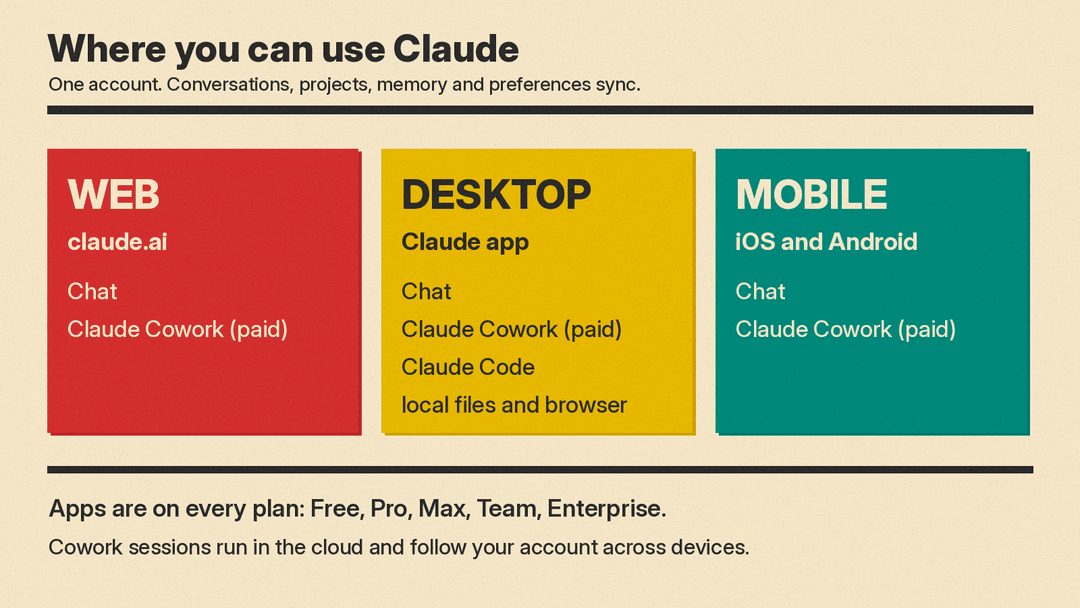
The help center lists three main ways to reach Claude:
- Web: go to claude.ai in a browser.
- Desktop: download the Claude Desktop app.
- Mobile: download Claude for iOS or Android.
The Claude download page adds detail. It sums up the apps as "Think, hand off tasks, and code, all in one place," and lists desktop downloads for macOS and Windows, with docs for Linux. The same page answers a few common questions:
- Do you need a paid plan for the apps? No. The download page says the apps "are available to all plan types," which it lists as Free, Pro, Max, Team and Enterprise. It adds that "some features are only available to paid plans."
- Does your history follow you? Yes. The page says your "conversations, projects, memory, and preferences sync across all devices" when you are signed in. One exception: in Claude Cowork, "local sessions stay on-device." Per Anthropic's Cowork help article, those are older tasks: since October 6, 2026, new Cowork tasks on Pro and Max plans run in the cloud.
- What does the desktop app add over the browser? The page says it is always reachable from your dock, has "quick entry" for fast access, and supports desktop extensions that connect Claude to local tools and files.
The help center also notes two access rules. You must be in one of Anthropic's supported locations, and you "must be at least 18 years old" to use its services.
Chat, Cowork and Claude Code
Most people start with chat: you type, Claude replies. Claude also offers two more ways to work.
Claude Cowork is for handing off tasks rather than asking single questions. Anthropic's help center says Cowork is available on paid plans (Pro, Max, Team and Enterprise) in the desktop app, on the web, in the mobile apps and in the Claude in Chrome side panel. On web and mobile it is in beta on Team plans, and on Enterprise plans an owner must turn it on. Cowork runs tasks in the cloud, on Anthropic's servers, so work continues if you close your laptop, and you can open the same session from any surface. For local files, browser use and computer use, the Claude Desktop app for macOS or Windows must be open and connected. Anthropic is also rolling out a combined experience in which chat and Cowork share one message box, so some accounts no longer see separate "Chat" and "Cowork" options.
Claude Code is aimed at software work. The download page lists the places it runs, including the desktop app, a terminal, VS Code, JetBrains and Slack. You do not need Claude Code to ask Claude coding questions in chat. It is a separate tool for people who want Claude to work directly in a codebase.
Anthropic's product overview sums up the broader pitch in one line: "Hand Claude a task, not just a question." Its examples include reading meeting transcripts and pulling out action items, grouping customer feedback into themes, and turning a rough idea into a draft "you can edit and put your name on."
Connecting Claude to your apps
On its own, Claude only sees what you type or upload. Connectors let it reach other tools. The download page says "Connectors allow Claude to work with tools like your apps and databases." It gives examples:
- Web-based connectors such as Google Drive and Slack work "wherever you're using Claude," on web, desktop or mobile.
- On mobile, Claude "can also connect to device-specific apps like Maps and iMessage."
- The desktop app also supports desktop extensions, which are installed on your computer and can reach local files, browsers and native apps.
Anthropic says its connectors are powered by MCP, the Model Context Protocol. MCP is an open standard that Anthropic introduced for linking AI apps to outside systems. For how that kind of access works, and what to watch for, see our explainer on how AI agents get into your accounts.
Opus, Sonnet and Haiku: the Claude model tiers
"Claude" is the name of the assistant, but behind it sit several models. Anthropic gives each model line a name and updates each line over time with new versions. The names stay the same, so it helps to know what each one is for.
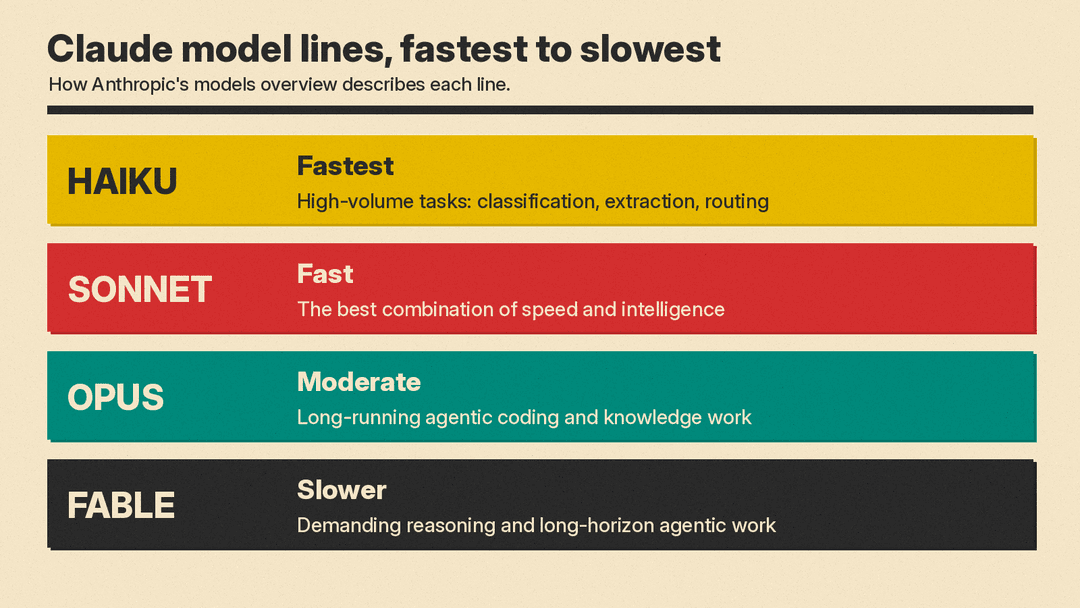
Anthropic's models overview for developers describes the lines this way:
- Haiku: "For high-volume, latency-sensitive tasks such as classification, extraction, and routing." It is listed as the fastest.
- Sonnet: "The best combination of speed and intelligence." It is listed as fast.
- Opus: "For long-running agentic coding and knowledge work." It is listed as moderate in speed. The page suggests developers who are unsure "start with" the current Opus model "for most workloads."
- Fable: a line that the same page lists "for demanding reasoning and long-horizon agentic work." It is listed as the slowest of the four.
The pattern is simple. Faster models such as Haiku suit quick, repetitive jobs where speed matters. Slower, more capable lines such as Opus and Fable suit harder problems where you can wait longer for a better answer. Sonnet sits in the middle. The same page says all current models "support text and image input, text output, multilingual capabilities, vision, and tool use."
Which model are you talking to?
In the apps, you do not need to pick a model to get started. The help center says the current model "is displayed either below your text input (on web and desktop) or at the top of your screen (on mobile)." You can click it to open the model selector and switch to another available model. The help center adds that you can also choose "how much effort Claude puts into each response and whether it uses extended thinking."
A practical rule: start with the default. Switch to a faster model for quick, simple tasks, and to a more capable one when an answer is not good enough.
How Anthropic shapes Claude's behavior
Anthropic trains Claude with a written document it calls Claude's constitution. Anthropic says on the constitution page that the document "plays a crucial role in our training process, and its content directly shapes Claude's behavior."
The constitution lists four properties Anthropic wants all current Claude models to have. In Anthropic's words, Claude should be:
- Broadly safe: "not undermining appropriate human mechanisms to oversee AI during the current phase of development."
- Broadly ethical: "being honest, acting according to good values, and avoiding actions that are inappropriate, dangerous, or harmful."
- Compliant with Anthropic's guidelines: following more specific guidance from Anthropic "where relevant."
- Genuinely helpful: "benefiting the operators and users they interact with."
When these conflict, the constitution says Claude "should generally prioritize these properties in the order in which they're listed."
Anthropic is also frank that training is imperfect. The constitution page says "Claude's behavior might not always reflect the constitution's ideals."
How to get good results
The help center's advice for new users is short. It suggests you speak to Claude "like you would a coworker or friend - naturally and conversationally." Its tips:
- Start simple. Ask straightforward questions to see how Claude responds.
- Be specific. "The more specific your request, the better Claude can assist you."
- Iterate. Refine your prompt or ask follow-up questions.
- Explore. Try different kinds of tasks, from basic questions to larger projects.
Prompts can be as simple as the help center's own example, "How do I hang a picture frame in my room?", or as large as a multi-step project. For more on writing prompts that work, see our beginner's guide to writing better AI prompts.
What to keep in mind
- Claude can be wrong. Anthropic's own constitution admits Claude's behavior does not always match its goals. Check names, numbers, quotes and anything you plan to act on. Our guide on how to fact-check AI answers gives a quick routine.
- Connected tools mean more access. When you link Claude to your email, files or calendar, it can read and sometimes act on that data. Connect only what a task needs.
- Features differ by plan and app. The download page says some features are for paid plans only. The help center lists Cowork as a paid plan feature.
- Model names are lines, not single models. Opus, Sonnet and Haiku each cover a series of versions. The models overview notes, for example, that two different Opus versions both belong to the "opus" line.
Why it matters
Claude is a general-purpose AI assistant, in the same category as ChatGPT and Gemini. Knowing how it is organized makes it easier to use well: a free account works across web, desktop and phone, the model tiers let you trade speed for depth, and the published constitution tells you what Anthropic intends Claude to do when values pull in different directions. That document gives you a public document to check Claude's behavior against.
Sources
- Get started with Claude (Claude Help Center)
- Download Claude (claude.com)
- Claude product overview (claude.com)
- Models overview (Claude Platform docs)
- Claude's constitution (Anthropic)
- Company (Anthropic)
- Donating the Model Context Protocol and establishing the Agentic AI Foundation (Anthropic)
- Get started with Claude Cowork (Claude Help Center)
