
Suno, the AI music generator, now makes video. On November 17, 2026, the company launched Visuals, a tool that turns a Suno song into a short video clip, a lyric video or a still image such as album art. It is live on web, iOS and Android, and it runs on its own credit balance, separate from the credits used to make songs.
The announcement came in a post by Jack Brody, Suno's Chief Product Officer. It follows Suno Speech, which Suno launched in October for poems, meditations and other spoken audio. Brody framed video as the next step and wrote that "until recently video generation was slow and too expensive for anyone to create but enterprises."
What is Suno Visuals?
The Verge reports that users find it in a new Visuals tab under Create mode, and web users can also reach it from the three dot menu on a song. Suno lists three uses in its post: "Lyric videos that move with the beat or make your music feel even more personal. Album art that matches the sound in your head. A photo re-imagined into an inspiring video clip."
The key claim is that the video is built around the music. In Suno's words: "Video clips follow your song's structure, pick up on your lyrics and lip sync right along with them." Clips can be up to 15 seconds long, and from there users can "extend, edit and re-prompt with text." To start, users can pick one of Suno's original characters or bring an image of their own.
The model is not built from scratch. The Visuals FAQ says it is "called H3 Move, based on H3 from MiniMax, which we optimized for our community including adding additional protections and safeguards." Our MiniMax explainer covers the company's models.
How do you make a music video with Suno Visuals?
Suno's help center guide lays out the steps. You can open a song's action menu and select Create Visual, then Video Clip. Or you can go to the Create page, select Visuals, then Video, and describe a scene.
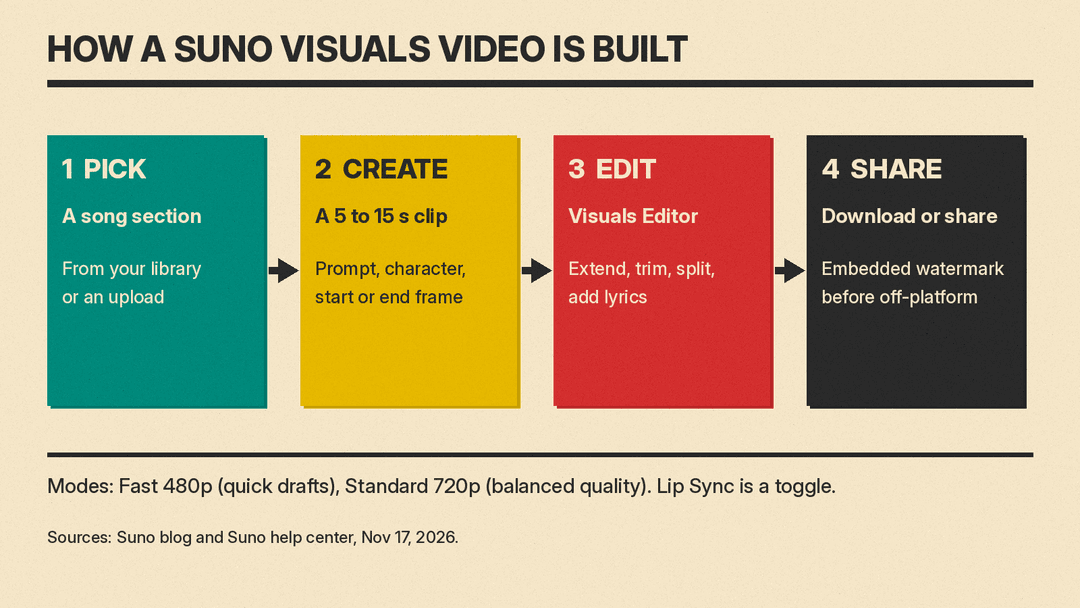
The options in the guide:
- Two video modes. Fast renders at 480p and is labeled "Quick drafts." Standard renders at 720p and is labeled "Balanced quality."
- Audio. Choose a song from your Suno library or upload audio, then select which part to feature.
- Characters and frames. Add a character from an image in your Visuals library or an uploaded reference. You can also set start and end frames to guide how the clip begins and ends.
- References. Add reference images and point to them in the prompt with @, as in "Use the forest setting from @image1 with the colors and lighting from @image2."
- Lip Sync. The guide says it will "Animate singing or speech using your audio." For best results, Suno suggests a section with clear singing or speech and a shot that keeps the character's face and mouth visible.
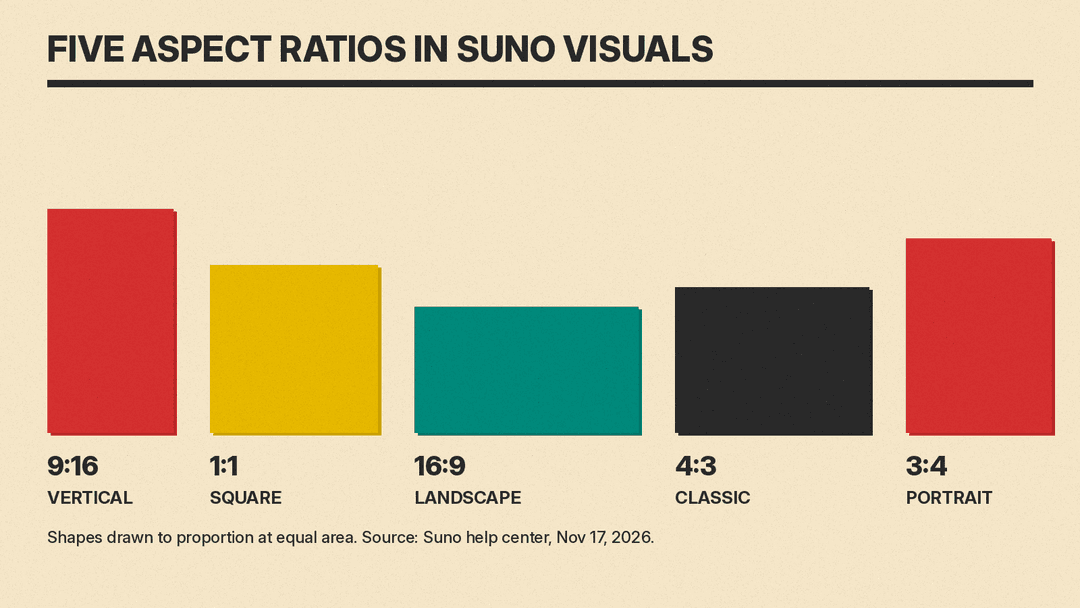
- Duration and shape. Clips run from 5 to 15 seconds. Aspect ratios are Vertical (9:16), Square (1:1), Landscape (16:9), Classic (4:3) and Portrait (3:4).
For lyric videos, you open a finished clip, select the Lyrics icon and turn on Show Lyrics. You can then choose the style, position, font and color of the words.
A single 15 second clip is short for a song, so the Visuals Editor matters. Selecting Extend opens a timeline where you can extend clips, generate new images or videos, pull in earlier creations, trim, split and rearrange footage, and lay scenes against the music and on-screen lyrics. The Verge reports that the reference image can be set as the start or end frame, "making it easier to edit the 15-second clips together."
How much does Suno Visuals cost?
Visuals uses Visual credits, and Suno does not publish a per-clip rate on its public Visuals pages. The FAQ says cost "is determined by a few variables like the duration (for videos) and quality you select," and that Fast "costs fewer Visual credits than Standard."
There are two ways to get credits:
- Trial grant. "For a limited time, Pro and Premier subscribers will have a limited number of Visual credits to try out the product." Suno's public pages do not give the number.
- Credit packs. "Any user can purchase packs of Visual credits" at suno.com/pricing/visuals, and "Any Visual credits you purchase don't expire." That page shows pack sizes and prices only after you sign in, so they are not listed here.
There is one wrinkle. Suno's main pricing page says "Purchased top up credits do not expire, but require an active subscription to use." The Visuals pages say any user can buy packs. Neither page says whether the subscription rule covers Visual packs, so check at checkout.
Suno's pricing page also lists a Platinum plan that bundles visual credits. As of November 2026, the plans read:
- Pro: $10 a month, or $8 a month billed $96 a year. 2,500 song credits a month.
- Premier: $30 a month, or $24 a month billed $288 a year. 10,000 song credits a month.
- Platinum: $120 a month, or $100 a month billed $1,200 a year. 15,000 song credits and 20,000 visual credits a month.
The pricing page lists no monthly visual credits for Pro or Premier.
What safeguards does Suno use?
Suno spends a large part of its post on guardrails. The company says it has "adopted a suite of new text and visual filters intended to block uploads and prompts that try to use or create visual representations of specific artists, public figures, copyrighted works and IP." It adds: "This means that prompts that work on other video platforms may not work on Suno and that's by design."
The other measures Suno lists:
- The same filters plus "additional third-party tools" check generated videos and images against its Community Guidelines before the user sees them.
- It continues to work with Audible Magic, ACRCloud and Musixmatch "to block uploads that contain copyrighted audio."
- It "will use our labeling tools to apply embedded watermarks to Visuals before they can be shared off-platform."
- The first time a user uploads a video or image for Visuals, Suno reminds them the tool is for original creation and asks them to confirm they have the rights to the file.
The Verge notes that Suno's music generator "attracted a number of high-profile lawsuits," and describes the video push as another attempt to diversify the platform. We covered one of those cases, a suit from Elvis Presley and Eminem rights holders.
What it means for musicians and creators
For people already making songs on Suno, Visuals puts the video step in the same app as the song. A clip can lip sync to the vocal, show the lyrics on screen and come out vertical, square or widescreen. Suno's product page says users can pick duration and aspect ratio "to get content tailored for anywhere you share your music." The Verge also notes that the image tools can make thumbnails and album artwork.
The limits are real. Clips top out at 15 seconds, so a full-length video means extending and stitching many clips in the editor. Output is 720p at the Standard setting. And credits are a second budget: The Verge points out that separate Visuals credits mean "Suno users will have additional expenses to pay in order to use this new feature."
Not every user welcomed the launch. The Verge quotes a YouTube comment on the launch video, "FIX AUDIO BEFORE ADDING CRAP NOBODY ASKED FOR," and says other commenters echoed it. For a look at where Suno's audio stands now, see our Suno v6 explainer.
Suno says "Visuals will keep evolving as we see what you make with it." We will update this post if Suno publishes Visual credit costs per clip or the size of the trial grant.
Sources
- Suno: Introducing Visuals (Nov 17, 2026)
- Suno Visuals product page and FAQ
- Suno help center: How do I create videos with Suno Visuals? (Nov 17, 2026)
- Suno help center: Suno Visuals FAQ (Nov 18, 2026)
- Suno help center: What are Visual Credits?
- Suno pricing
- Suno Visuals credit packs
- The Verge: Suno now lets you make AI videos for your AI music (Nov 18, 2026)
