
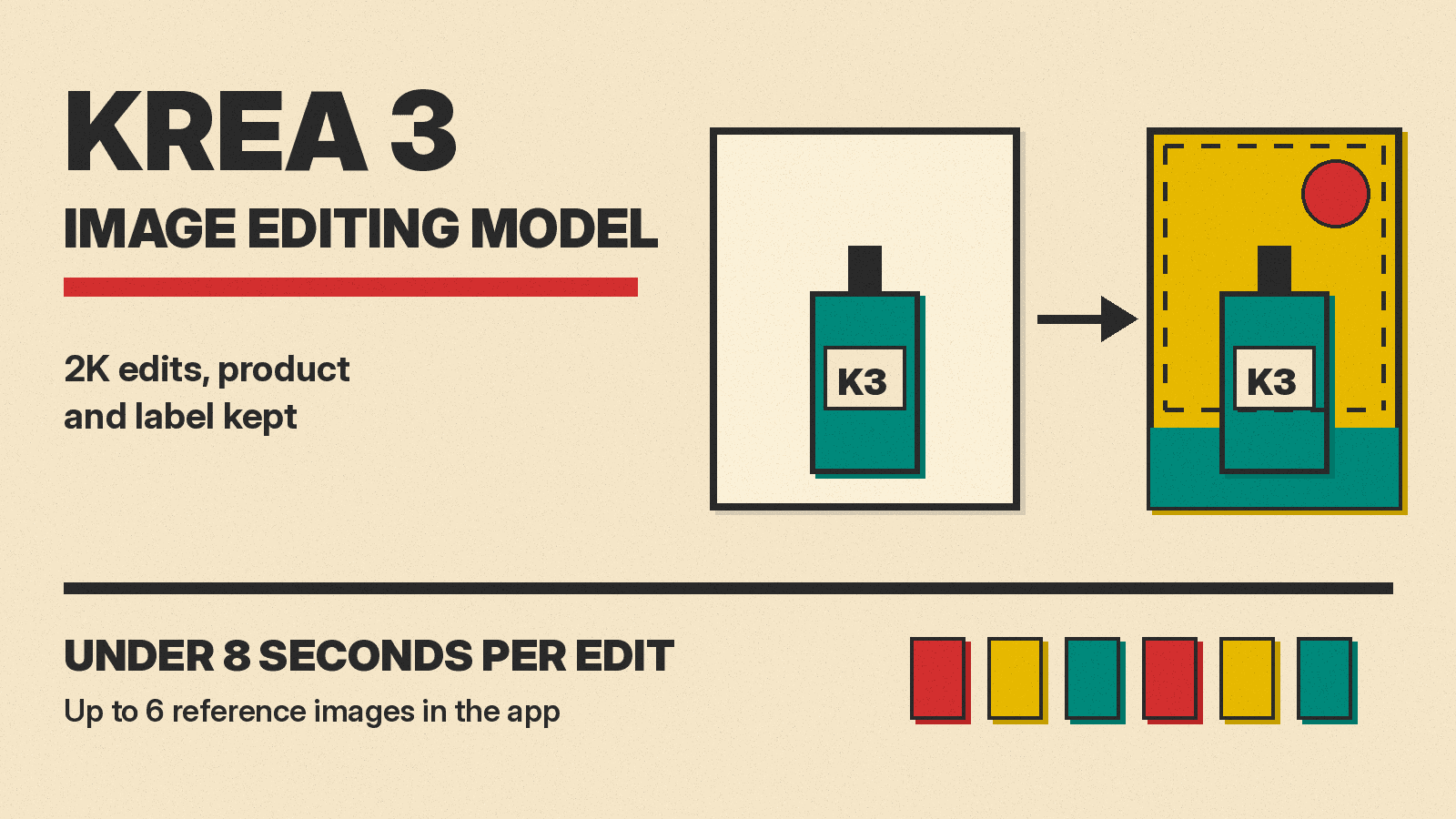
Krea, a creative platform that brings image, video and other AI models together in one app, has released its own image editing model. Krea 3 went out on October 15, 2026, and a day later it became the default image model in the Krea app. The pitch is narrow and practical: edits at native 2K that come back in under 8 seconds, for $0.06 per image, while the parts of the picture you did not ask to change stay put.
This explainer covers what Krea 3 does, how its speed and price compare in Krea's own numbers, what the API offers today, how to prompt it, and what is still missing.
What Krea 3 is
Krea calls Krea 3 an image editing model first. You give it an image and a plain-language instruction, and it changes only what you asked for. It also does ordinary text-to-image generation. Krea's user guide lists five jobs it is built for:
- Product photography: put a product in a new scene while keeping its shape, label and logo.
- Consistent characters: use references to keep the same person or character across poses, places and lighting.
- Precise edits: change an object, material, color or piece of text and leave the rest alone.
- Sketches and concepts: turn a sketch or visual reference into a finished image, with instructions for materials and light.
- Text-to-image: make a new image from a description.
In the launch post, Krea shows a room where it swapped the sofa, chairs and table while the rug, the view and a woman reading in the corner stayed the same. Another example turns a line drawing and a six-color palette into an architectural photo, with each color placed where the brief said. Krea says the model keeps Krea 2's handling of style, so paintings, vector art and ink drawings stay in their own medium.
The app takes up to 6 reference images per edit. Krea's advice is to say what each image is for, for example "image 1 is the room, image 2 is the sofa."
Speed and price, in Krea's numbers
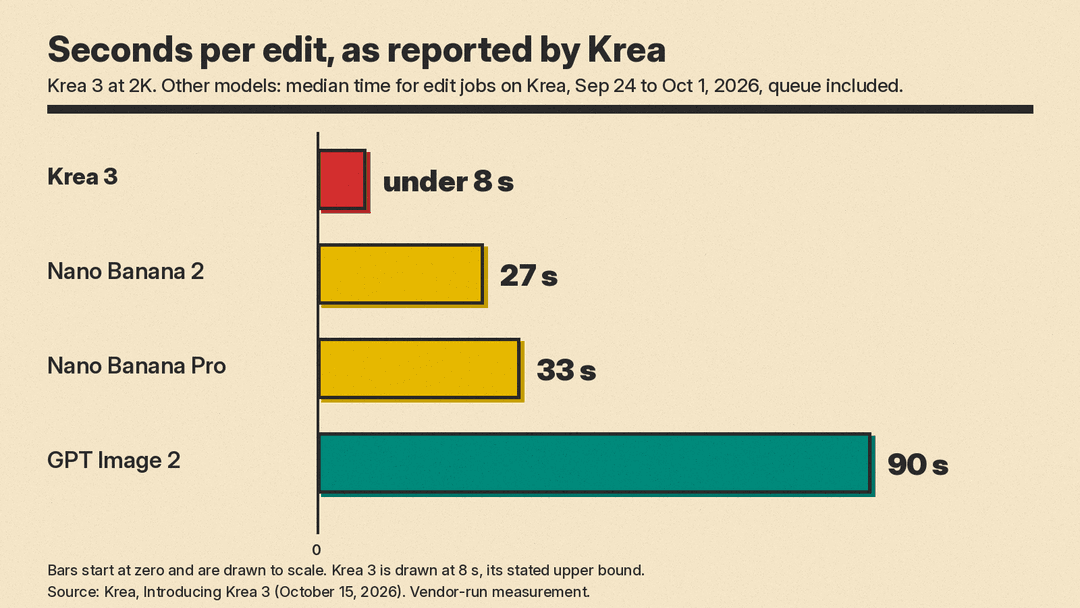
Krea's headline claim is speed. It says most edits finish in under 8 seconds end to end at 2K. For comparison, it reports median times for edit jobs run on its own platform from September 24 to October 1, 2026, with queue time included: 27 seconds for Nano Banana 2, 33 seconds for Nano Banana Pro and 90 seconds for GPT Image 2.
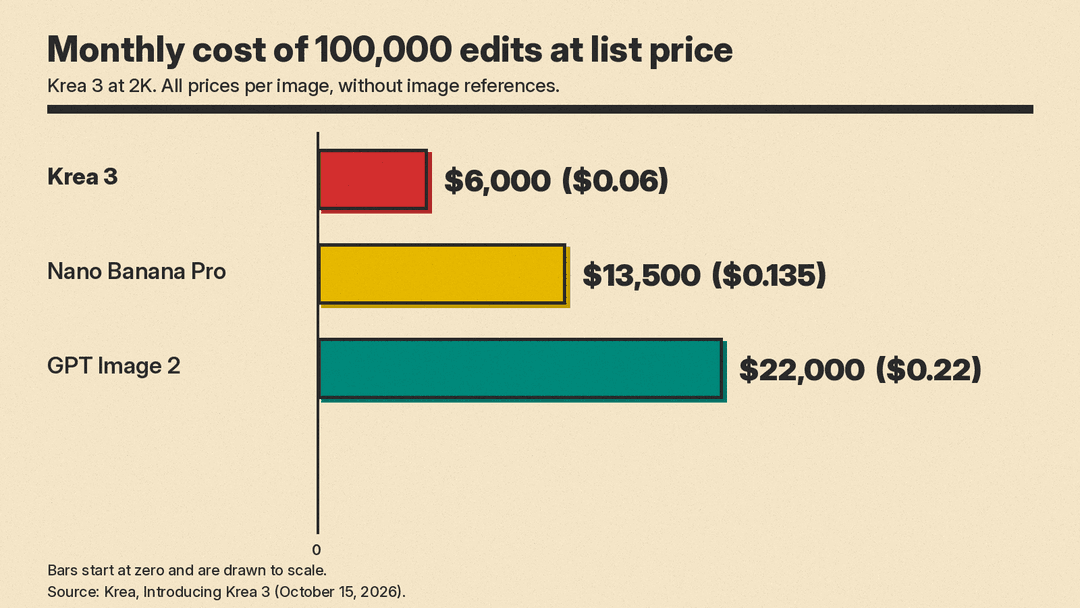
Price is the second claim. Krea 3 costs $0.06 per image at 2K and $0.03 at 1K. Krea compares that with list prices of $0.135 per image for Nano Banana Pro and $0.22 for GPT Image 2, both without image references. At 100,000 edits a month, Krea puts the bills at $6,000, $13,500 and $22,000.
Read these numbers with three caveats:
- They are Krea's own measurements, taken on Krea's platform. We have not seen an independent benchmark yet.
- The comparison table names GPT Image 2, not the newer GPT Image 2.5. Krea's LinkedIn announcement separately says quality is "on par with Nano Banana Pro and GPT Image 2.5", but the launch post does not publish a quality score to back that up.
- The price comparison excludes image references, and reference-heavy edits are a main use case.
If you are choosing between the big two general models, our GPT Image 2.5 vs Nano Banana 2.1 comparison covers them in more depth.
Where you can use it
Krea says Krea 3 is live on krea.ai for its 30 million users and is also served by fal, Hedra, Together AI, Nous Research, OpenRouter and Replicate.
In the Krea app, the user guide says Krea 3 is available to everyone and is charged in compute units like other models. The model picker shows the cost for your settings. A higher tier, Krea 3 Ultra, is available on Max plans and above.
Krea's own API is a separate matter. The guide says the Krea 3 API is in early access and that you request it through sales@krea.ai. The changelog says it is open to workspaces in the Krea 3 beta.
What the API does
The changelog entries for October 15 to 17 give the most concrete picture of the developer side:
- Endpoint:
POST /generate/image/krea/krea-3, covering text-to-image, image references and regional edits. - References: up to 8 reference images per request. That is more than the 6 the app allows per edit.
- Thinking modes:
fastfor everyday edits andhighfor complex, multi-step edits. The old valuesinstantandmediumstop working on October 23, 2026, so update any code that sends them. - Regional edits: change one part of an image and keep the rest pixel-exact, which Krea says lets you chain edits without losing quality.
- Resolution: 1K or 2K. If you leave resolution out, you get 1K. Width and height must be set together and not mixed with aspect ratio or resolution.
- Priority: low, normal (the default) or high.
- Zero Data Retention: available for enterprise workspaces, with references sent as base64 data URIs. The limit rose from 4 to 8 references on October 16.
- Not yet supported: style references and LoRAs. The API now returns a clear "coming soon" response for both.
That last point matters if you read the launch coverage. The launch post says you "can also add style references" for a consistent look across a series, and a Creative Boom article, published in partnership with Krea, presents style references as a headline feature. Per Krea's own changelog, the API does not support them for Krea 3 yet.
How to prompt Krea 3
Krea published a short prompt pattern with the launch. In plain terms:
- Start with what stays. "Keep the product exactly as it is" works. Name what matters, such as the label or the logo.
- Describe the change like a photographer. Give the scene, the light and the camera.
- Label your references. With several images, say what each one is for.
- Use "only" for small edits. For example, "Remove only the woman in the red coat."
The user guide adds two examples worth copying: "Change the mug to red, keeping everything else the same," and, with several references, "Put the sneaker from the second image on the person in the first image." Choose 2K over 1K when small text, product details or a final deliverable need more definition.
For text-heavy layouts such as posters, a model built for typography may still suit you better. See our MOSS-Image explainer for one open option.
Who it is for
Krea aims Krea 3 at people who edit many images, not one hero shot. Its examples include:
- turning a phone snapshot of a product into a studio packshot, or into a set of colorways
- localizing a poster, or adapting one ad to a new format
- trying materials and light on a building before it is built
- keeping the same model or cast across a fashion or film campaign
The argument is about volume. Krea writes that a minute and a quarter of a dollar per edit is fine for one image but adds up across a catalog. If you run thousands of product edits a month, the claimed per-image price and turnaround are the numbers to test. If you make a few images a week, speed matters less than which model gets your picture right first time.
Krea also frames the model as a tool for working creatives rather than a replacement for them. "We're not replacing creatives, and we don't want to replace creatives," Krea product engineer Felix Gil told Creative Boom. That article also says Krea plans three specialised versions of Krea 3: one for e-commerce, one for filmmaking and a real-time version made with fal.
Limits and what comes next
Krea is direct about what Krea 3 does not do yet:
- It is not real time. Krea says its fastest setup finishes an edit in about 4 to 5 seconds and it wants that lower.
- Resolution tops out at 2K. Krea says training at 2K was one of its biggest wins this cycle and that it will look at architectures that handle high resolution more cheaply. Compare that with FLUX 3 Image, which offers native 4K.
- Instructions are text only for now. Krea says it wants the model to understand circling something or writing the instruction on the image, and that it is building training data for that.
- Style references and LoRAs are not in the API yet, as noted above.
Should you try it
If your work is repeat editing (product shots, ad variants, campaign sets), Krea 3 is worth a test on your own images, because Krea's claims are mainly about speed and cost at volume, and those are easy to check. Run the same five or ten edits through Krea 3 and your current model, and time them. Check whether labels, logos and faces really stay intact. If you mainly generate new images from scratch, see our roundup of the best AI image generators as of October 2026 first.
