
Image-to-video is one of the most practical ways to use AI video today. Instead of hoping a text prompt lands on the right look, you start from a picture you already like (a product shot, a character design, a drawing, a family photo) and ask the model to move it. The picture fixes the look. The prompt only has to describe the motion.
This guide covers ten real image-to-video tools as of October 2026: what each one does with your image, how long and how sharp the clips are, and what each company lists for price. Every spec comes from the company's own page, linked inline. We did not run our own quality test, so the tools are grouped by the job they suit, not ranked by a score.
Quick picks
- Best for casual creators already on a Google AI plan: Gemini Omni Flash in the Gemini app and Google Flow
- Best for long single shots from your images: Kling 4.0
- Best for editors who want simple, predictable settings: Runway Gen-4.5
- Best for animating your own art: Midjourney Video
- Best for storyboard-driven work: Luma Ray3.2
- Best low API price per second: Grok Imagine Video 1.5 Lite
- Best for drafts you can finish in 4K: Pika H3 Flex
- Best open weights you can run yourself: MiniMax H3
- Best for teams with documents as well as images: Wan3.0
- Best for many reference images at once: Seedance 2.5
Three ways tools use your image
Not every tool treats your picture the same way, and that changes what you get.
- First frame. Your image becomes frame one, and the model animates forward from it. xAI's docs describe this plainly: "The still you pass as
imagebecomes the first frame, and the prompt describes what happens next." Midjourney works the same way. - First and last frame. You give a start image and an end image, and the model fills in the motion between them. Pass the same image twice and you get a loop.
- Reference. The image supplies a character, product or location, but it does not fix the first frame. The model builds a new shot around it. This is the better choice when you want the same character in many different scenes.
Most of the stronger tools now do all three. Google's Omni guide adds a twist: when you pass an image, "the model will decide how to use the image" based on your prompt, unless you tag it as a first frame or a reference.
The 10 best image-to-video AI tools
1. Gemini Omni Flash (Google)
Gemini Omni Flash is Google's current video model. Google said at launch it was rolling out to all Google AI Plus, Pro and Ultra subscribers in the Gemini app and Google Flow, and at no cost on YouTube Shorts and the YouTube Create app. It accepts images, text, video and audio as input, and you can edit the result through conversation, one instruction at a time.
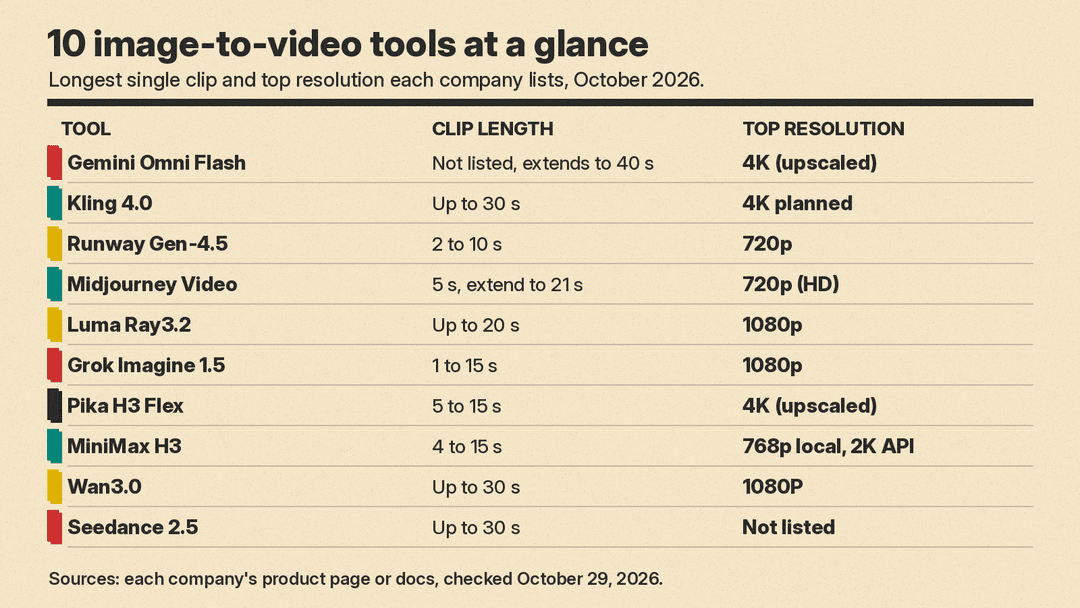
For image-to-video, the developer guide lists three modes: animate a single image, interpolate between a first and a last frame, and use images as subject references. Google's own example turns a drawing of a fish jumping out of water into realistic footage, "using the drawing only as a guide for movement." The default is 720p; 1080p and 4K output are upscaled. You can extend a clip 10 seconds at a time, up to 40 seconds in total. In the API, the pricing page works out to "approximately $0.10 per second" at 720p. All output carries Google's SynthID watermark.
One limit to know: the guide says uploading images that contain "certain recognizable people" is not supported.
Use it for: bringing a sketch, illustration or product shot to life, then fixing details by asking for changes.
2. Kling 4.0 (Kuaishou)
Kling 4.0 launched on October 15 and generates up to 30 seconds in a single pass, the longest single clip on this list along with Wan3.0 and Seedance 2.5. Its Omni Reference system takes up to 15 references in one task, including up to 10 images, and it supports up to 10 keyframes to pin specific moments. Kuaishou lists subject images, three-view character sheets, grid images, storyboards and wireframes as image references it understands.
Kuaishou says Kling 4.0 outputs up to 10-bit HDR and "will also support" 4K, 1080p and 21:9, so check what is live on your account. Besides Kling's own app, Kling 4.0 is available inside Runway: Runway's pricing page lists Kling 4.0 at 1080p for 118 credits per 5 seconds, with 25% off (89 credits) until November 30.
Use it for: long, continuous shots built from a character sheet or storyboard.
3. Runway Gen-4.5
Runway's Gen-4.5 offers text-to-video and image-to-video. Image-to-video supports six aspect ratios (16:9, 9:16, 1:1, 4:3, 3:4 and 21:9), output is 720p at 24 or 25 fps, and clips run 2 to 10 seconds. It costs 12 credits per second and needs a Standard plan or higher. Runway lists the Standard plan from $12 a month billed annually, with 625 credits a month, which Runway says equals 52 seconds of Gen-4.5.
Runway's advice for image-to-video is useful for any tool on this list: the prompt "should focus on describing the motion of the scene," because the image already shows what things look like.
Use it for: editors who want clear settings and access to other models (including Kling 4.0) in the same account.
4. Midjourney Video
Midjourney's video feature is image-to-video at its simplest. Any image in your gallery, or one you upload, can be the first frame. A text prompt is optional. Clips start at 5 seconds and you can extend them by 4 seconds at a time, up to 21 seconds. You can also set an end frame, or reuse the start image to make a loop.
There are two motion settings. Low motion (the default) "is more likely to result in still scenes," while high motion gives bigger camera and character movement but "may also create unrealistic or glitchy movements." Output is 480p, or 720p on Standard, Pro and Mega plans in Fast mode. By default each prompt makes 4 videos; you can cut that to 1 or 2 to save GPU time.
Use it for: artists who already make images in Midjourney and want them to move.
5. Luma Ray3.2
Luma's Ray3.2, released June 9, is built for studios and agencies. It allows up to 16 keyframes in a single clip, which gives you the most control here over how a shot moves from beat to beat. Clips run up to 20 seconds at 1080p, with native HDR and 16-bit EXR export for post-production. A Reframe tool can change the aspect ratio or replace a background after the take, and the model is also available through an API.
Use it for: storyboards where each frame of the board has to show up in the shot.
6. Grok Imagine Video 1.5 (xAI)
xAI's Grok Imagine video models do image-to-video with generated audio and lip-synced speech. On grok-imagine-video-1.5, your image sets the first frame, you can add a last frame and up to four mid-video keyframes, and you can pass up to 14 reference images and 3 voice references. Clips run 1 to 15 seconds at up to native 1080p. The output always matches your image's aspect ratio.
The Lite version, grok-imagine-video-1.5-lite, handles plain text-to-video and image-to-video without references or keyframes, and reaches 1080p by upscaling from 720p. xAI's models page lists video from $0.02 per second. The video docs give 480p prices of $0.08 per second for Video 1.5 and $0.02 for Lite, and 1080p prices of $0.25 and $0.14. xAI itself recommends Lite "for simple videos."
Use it for: developers who animate images in bulk, and short talking clips.
7. Pika H3 Flex
Pika H3 Flex, launched October 29, is post-trained on MiniMax H3. It supports first and last frame image-to-video and reference-to-video with up to 12 assets (up to 9 images, 3 videos and 3 audio clips). It generates at 480p or 768p and can then upscale your chosen take to 1080p, 2K or 4K. Clips run 5 to 15 seconds, and it can export five separate audio stems. Through the Pika API, text, image and keyframe generation is listed at $0.04 per second at 768p and $0.16 per second at 4K (regular prices). Pika also lists launch prices at half those rates, with no end date. Pika API Club members get 15 free H3 Flex generations a day from October 29 to November 5. Image and audio references are free of charge. The weights are open, though the 4K upsampler and stem separation stay on Pika's hosted service.
We covered the launch in detail in our Pika H3 Flex explainer.
Use it for: testing many cheap drafts from one image, then finishing the best one.
8. MiniMax H3
MiniMax H3 is the open-weight base that Pika H3 Flex and others build on. MiniMax ships it as two checkpoints. The FL2VA checkpoint takes zero, one or two images: no image gives text-to-video, one gives first-frame or last-frame video, and two give first-and-last-frame video. The Ref2VA checkpoint takes up to 9 reference images. Clips run 4 to 15 seconds at 24 fps with 32 kHz stereo audio.
The open release has limits. Local runs output 768p; 2K needs MiniMax's hosted regeneration API, because that module is not open source yet, and MiniMax "strongly" recommends its hosted prompt pre-processing system, which is not in the open release. The weights use the MiniMax H3 Community License, not a standard open-source license.
Use it for: technical teams that want to run image-to-video on their own hardware.
9. Wan3.0 (Alibaba)
Wan3.0 generates up to 30 seconds natively and accepts text, images, audio and video, plus documents such as PDF and PPT files, as references. That makes it a fit for a team that wants to start from a product photo and a product deck at the same time. Standard API pricing is $0.05 per second at 480P, $0.10 at 720P and $0.20 at 1080P, which Alibaba works out to about $1.50 for a 30-second 480P draft and about $6.00 for a 30-second 1080P final. Alibaba says audio texture and on-screen text rendering are "still maturing."
Use it for: marketing and training teams that want predictable per-second costs.
10. Seedance 2.5 (ByteDance)
Seedance 2.5 takes the most references in one pass: up to 30 images, 10 video clips and 10 audio clips. It generates up to 30 seconds with audio and supports multiple rounds of extension. It also accepts clay render (textureless 3D) references to block out camera moves and poses. ByteDance rolled it out on Jimeng AI and Doubao Pro, with API access via BytePlus ModelArk listed as coming soon at launch.
Use it for: scenes with many characters or products that all need to stay consistent.
How to get a better result from your image
A few tips taken straight from the vendors' own guides:
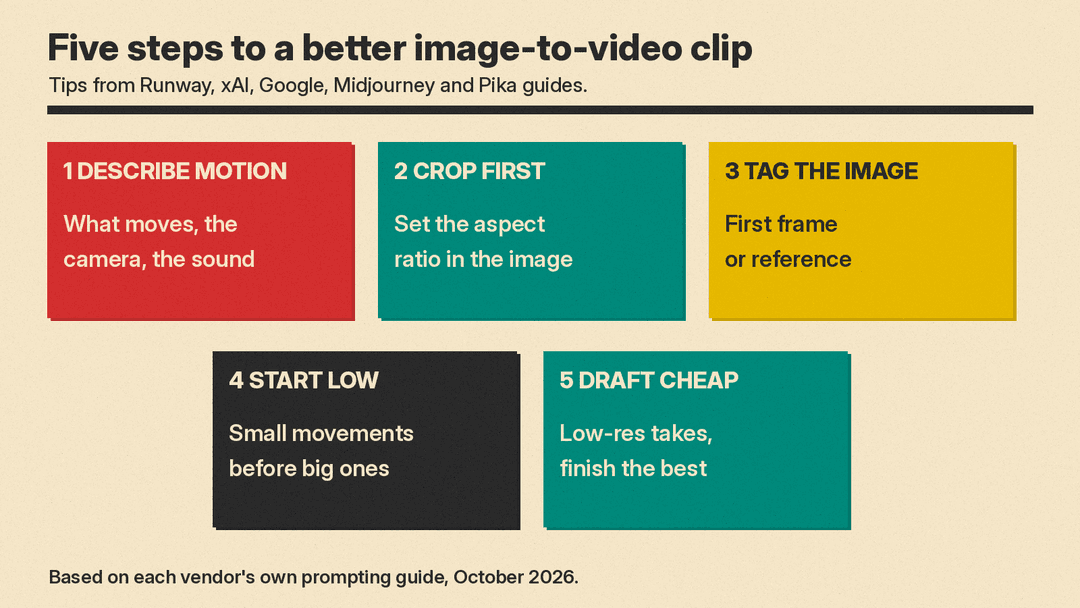
- Describe motion, not the picture. Runway says image-to-video prompts should focus on motion, because the image already sets the look. Say what moves, how the camera moves, and what you hear.
- Pick the aspect ratio first. Grok Imagine matches the output to your image and ignores the aspect ratio setting, and Midjourney sizes the video from the starting image. Crop your image to 9:16 before you start if the clip is for Shorts or TikTok.
- Tell the model how to use the image. Gemini Omni Flash supports tags such as
<FIRST_FRAME>and<IMAGE_REF_0>so you can say whether a picture is the opening frame or only a reference. - Start with low motion. Midjourney warns that high motion can look "unrealistic or glitchy." Ask for small movements first, then push further.
- Draft cheap, finish once. Pika's 768p drafts and Wan3.0's 480P rate exist for this reason. Find the take you like at low resolution, then pay for the high-resolution version.
For more prompt structure, see our beginner's guide to AI video prompts. If you want a wider view that includes text-to-video, our AI video generators roundup covers the same models from that angle.
A note on photos of people
Animating a photo of a real person raises consent and policy issues. Google's Omni guide says uploads of "certain recognizable people" are not supported, and Midjourney's rules say you must have the rights to images you upload and must not manipulate images of people in ways that are abusive or offensive, including sexualized deepfakes. Use photos of yourself, of people who agreed, or of characters you designed.
Bottom line
If you already pay for a Google AI plan, try Gemini Omni Flash first. For long single shots from a character sheet, look at Kling 4.0 or Wan3.0. For simple, art-first animation, Midjourney is the easiest. Developers watching cost should compare Grok Imagine 1.5 Lite ($0.02 per second at 480p) with Pika H3 Flex drafts ($0.04 per second at 768p, regular price).
Specs and prices are as of October 29, 2026, and vendors change both often. Check the linked pages before you commit a budget.
Sources
- Google: Introducing Gemini Omni
- Google AI for Developers: Generate and edit videos with Gemini Omni Flash
- Google AI for Developers: Gemini API pricing
- Kuaishou: Kling AI officially launches Kling 4.0
- Runway Help Center: Creating with Gen-4.5
- Runway: Pricing
- Midjourney Docs: Video
- Luma: Introducing Ray3.2
- xAI Docs: Video overview
- xAI Docs: Models and pricing
- Pika: Pika H3 Flex
- MiniMax: MiniMax H3 is now open source
- Alibaba Cloud: Wan3.0 at general availability
- ByteDance Seed: Introducing Seedance 2.5
