
Kandinsky Lab has released Kandinsky S2V 1.0, a family of speech-to-video models that turn one reference image and one speech track into a talking-avatar video. The code and weights are public under the MIT license, and the whole figure is animated, not only the face. This post covers what the models do, the two sizes, what they need to run, and what the license does and does not cover, as of November 2026.
What Kandinsky S2V 1.0 does
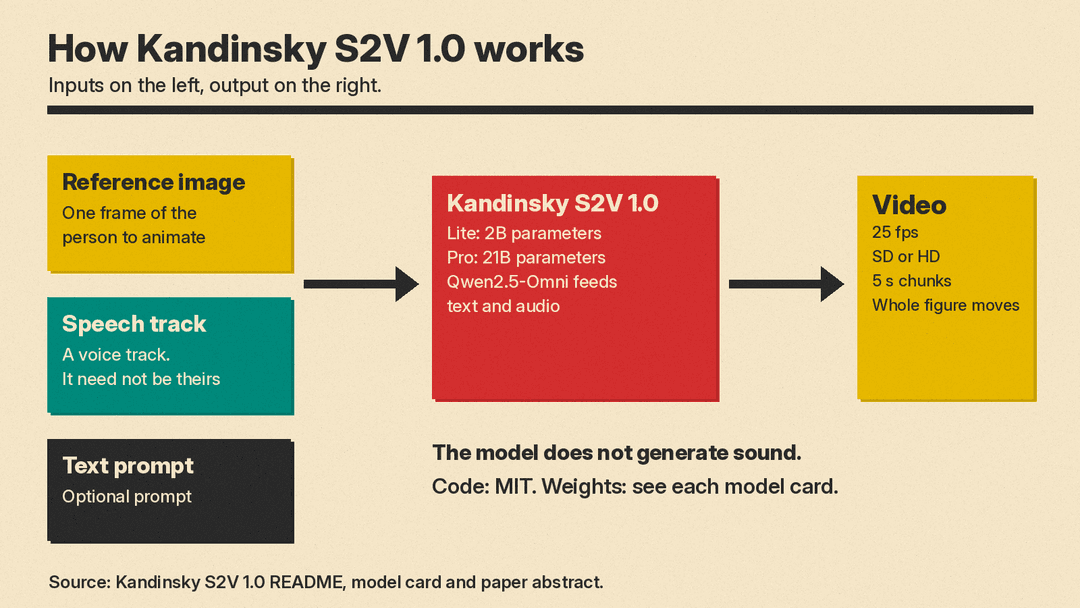
The GitHub README describes the job in one line: an avatar video generated from a reference frame and a speech track. The output is 25 frames per second, in SD or HD, at the aspect ratio of the reference frame. The README lists HD configurations for Pro only. Long speech is generated in 5-second chunks.
The audio is a condition, not an output. The model card says the model does not generate sound. It animates the person in the reference frame to match the speech it is given. That makes it a different tool from an all-in-one video model such as the one in our Wan 3.0 explainer, which generates a whole scene with its own sound.
According to the paper abstract, the models take a single reference image, a speech waveform, and a text prompt. Lip motion, expression, pose, and gesture follow the speech. The project page says the reference can also be a cartoon character or an animal, with examples in other languages.
Two sizes, plus distilled versions
The family has two models:
- Kandinsky S2V 1.0 Lite, with 2 billion parameters.
- Kandinsky S2V 1.0 Pro, with 21 billion parameters.
Each has a distilled variant that uses the pi-Flow sampler. The Lite model card says the distilled model runs 16 sampling steps with classifier-free guidance built into the weights, so it needs no negative pass. It calls this roughly 5 times faster than the 50-step base model.
The paper abstract says the distilled Pro model reaches a 5.4 times end-to-end speedup over the base Pro model, while matching or exceeding it on nearly all reported benchmark metrics. The README gives its own measured speedups: roughly 5.1 times on Lite, 4.5 times on Pro, and 5.6 times on Pro in HD.
Under the hood, the authors say the model draws both text and audio conditioning from one Qwen2.5-Omni model. It adds a three-scale visual memory so the identity of the reference person holds over long clips. The training set has 1.17 million single-speaker clips, with captions generated in English and Russian.
What it costs to run
There is no hosted API or price list in the sources I checked. This is a code and weights release, and a Hugging Face demo space is linked from the README. Running it yourself takes a large GPU. The README says it needs one NVIDIA GPU with 48 GB or more of memory, and 80 GB for HD. A setting called offload.vae_tiling brings the peak down to about 28 GB, at the cost of faint tile seams.
The README also lists time per 1 second of video on one H100, measured at 512 by 768 pixels for SD and 1280 by 768 for HD, on a warm run:
- Lite distilled: 8.7 seconds, peak memory 57 GiB.
- Lite base: 44 seconds, peak memory 57 GiB.
- Pro distilled: 41.5 seconds, peak memory 46 GiB.
- Pro base: 189 seconds, peak memory 46 GiB.
- Pro distilled, HD: 137 seconds, peak memory 55 GiB.
- Pro base, HD: 773 seconds, peak memory 55 GiB.
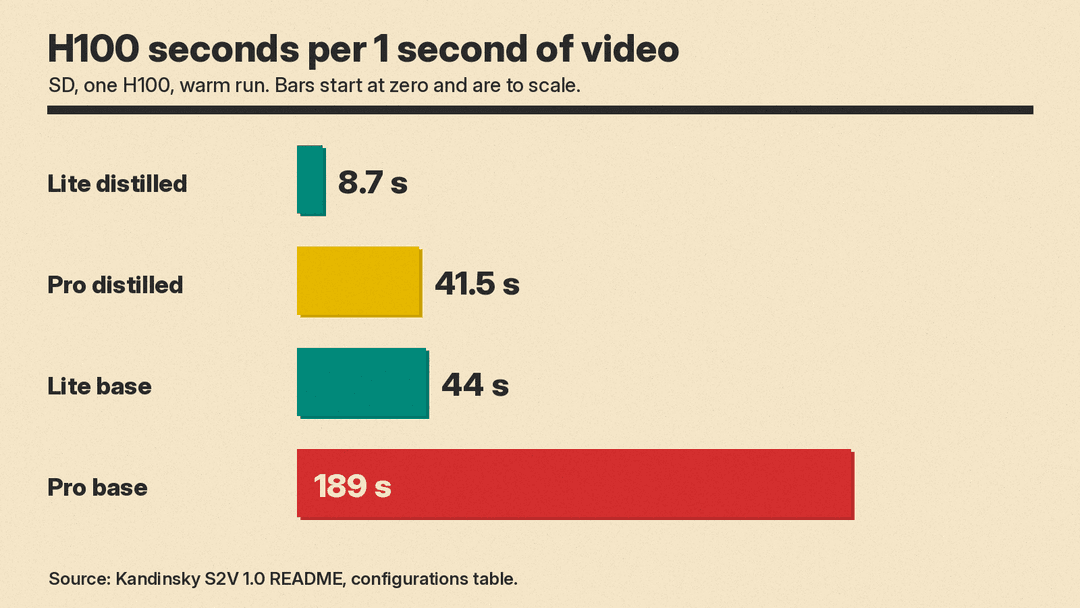
By simple multiplication, a 10-second clip from Lite distilled takes roughly 87 seconds of H100 time, and the same clip from Pro distilled takes roughly 415 seconds. Splitting the work across several GPUs cuts this. The README lists 3.8 seconds per second of video on 4 GPUs for Lite distilled and 11.4 seconds on 8 GPUs for Pro distilled, counting the diffusion step alone.
The 57 GiB peak for Lite is above the 48 GB minimum the README gives. The Lite model card says the peak comes mostly from the VAE decode, and that tiling the decode cuts it at the cost of faint tile seams.
The first run downloads the weights from the Hugging Face Hub: about 25 GB for Lite and about 65 GB for Pro. That includes three third-party parts: the HunyuanVideo VAE, Qwen2.5-Omni-7B, and CLIP ViT-L/14. A Diffusers version exists as a modular pipeline. The README notes it was merged in a Diffusers pull request but is not in a release yet, so you install Diffusers from the main branch. Lite and Pro distilled can also run in ComfyUI.
How it compares, according to the authors
The paper abstract reports a side-by-side human evaluation against the strongest open-source baseline and two proprietary commercial models. It says Pro performs comparably to or better than these models on average, and is also preferred for lip synchronization. It also says Lite and Pro rank among the top performing models by mean rank over five reported metrics on common speech-to-video benchmarks.
These are the authors' own results. I did not run the models, and the abstract does not name the commercial models in the text quoted here. Treat the comparison as a claim to check against the full paper and your own clips.
The license
The README says the code is MIT licensed. It also says the published weights carry their own license, stated on each model card. The Hugging Face model cards for the Lite distilled and Pro models list MIT. The Neural Brew write-up says the MIT terms allow commercial use. For a business use, read each model card yourself. The README also lists three third-party parts that the code fetches from other repositories, so check their terms too.
Consent and responsible use
The model animates a real person from a single photograph, driven by a voice that need not be theirs. The README asks users to use a reference frame they have the subject's consent to animate, and not to present the result as a genuine recording of anyone. The project page says its demo clips use public-domain references or outputs of the team's own models.
That matters for creators who want a talking presenter without filming. It also matters for anyone who finds their photo in someone else's input. With an open model, the README leaves that choice to whoever runs it. Our lip sync tools guide covers hosted options, and our Tavus Griffin explainer covers a live-call avatar product.
Who should look at it
Kandinsky S2V 1.0 suits people who can run a large GPU, or rent one, and who want a talking avatar they control. Researchers get code, weights, and a paper to build on. Creators without that hardware have no hosted option from this release, so a commercial lip sync or avatar tool is the simpler path for now.
We covered another open-weight video model in Pika H3 Flex. A related open release, TaoMate-HD, adds streaming speech and avatar video on top of MiniMax H3. What to watch next is whether hosts add an API for Kandinsky S2V, and whether independent tests match the paper's lip sync claims.
