
Much of sales prospecting is research and writing: find the right companies, learn enough about each one to say something relevant, write a first email, and follow up. AI tools can speed up all of that. They can also help a small team send a lot of bad email very quickly, and Gmail and Yahoo now publish sender rules that such email can break. This guide covers where AI helps in prospecting, the sending rules Gmail and Yahoo publish, a six-step workflow, and prompts you can adapt.
It is written for founders, small sales teams and anyone who does outreach as part of a wider job. It does not cover any one sales platform. The steps work with general assistants such as ChatGPT and with the AI writing tools built into Gmail and Outlook.
Where AI helps, and where it does not
Think of prospecting in three parts.
- Research. Who is a good fit, and what is going on at each company. AI research tools can read many web pages and return a summary with links.
- Drafting. First emails, follow-ups and replies. AI writing tools in Gmail and Outlook can draft from a short prompt and rewrite for tone and length.
- Sending. Who gets the email, how many, and how often. This part should stay under your control. AI does not change the rules inbox providers apply to you.
The risk in every part is the same: an AI tool can be wrong. OpenAI's help article Does ChatGPT tell the truth? says ChatGPT "can produce incorrect or misleading outputs" and lists examples such as incorrect facts and "fabricated quotes, studies, citations or references to non-existent sources." In a sales email, one wrong fact about a prospect's company can cost you the reply.
The rules your outreach has to pass
Before you write a single prompt, know the rules your email has to pass. Gmail and Yahoo both publish requirements for senders, and both began enforcing them in February 2024. Google's rules cover email sent to personal Gmail accounts (addresses ending in @gmail.com or @googlemail.com).
From Google's email sender guidelines for personal Gmail accounts:
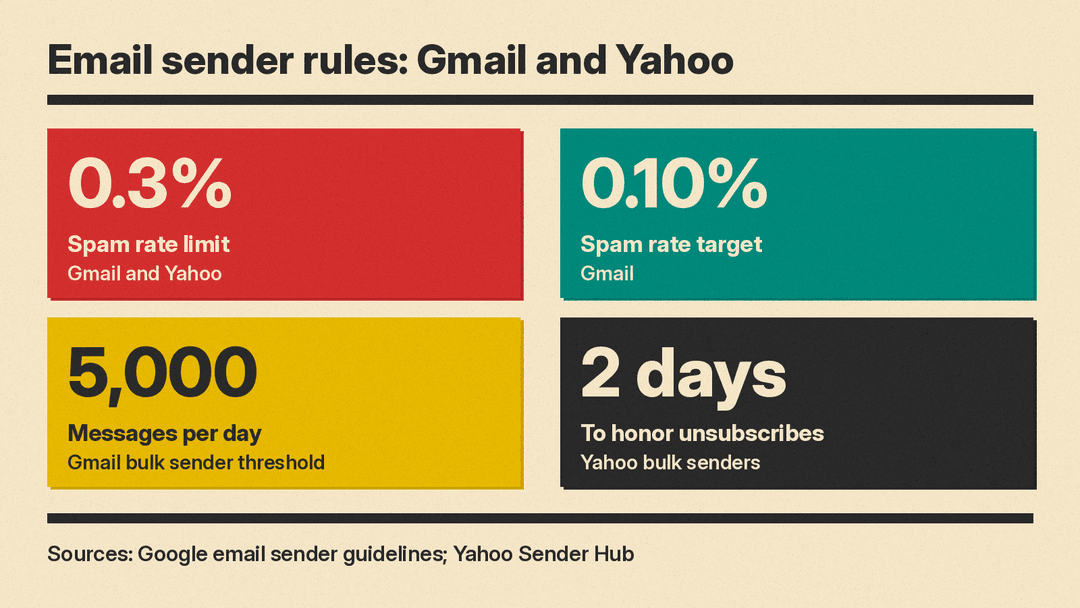
- All senders must set up SPF or DKIM email authentication, have valid forward and reverse DNS records, use a TLS connection, and keep spam rates reported in Postmaster Tools below 0.3%.
- Senders of more than 5,000 messages per day to Gmail accounts must also set up SPF, DKIM and DMARC, and marketing and subscribed messages must support one-click unsubscribe with a clearly visible unsubscribe link in the body.
- Google's target is stricter than its limit. It says to keep spam rates below 0.10% and to "avoid ever reaching a spam rate of 0.30% or higher."
- Under sending practices to avoid, Google lists "Don't purchase email addresses from other companies" and "Don't send messages to people who didn't sign up to get messages from you."
- Subject lines must not mislead. Google says not to start subject lines with Re: or Fwd: "unless the messages are actual replies or forwards."
- Volume should grow slowly. Google warns that "immediately doubling previously sent volumes suddenly could result in rate limiting or reputation drops."
Yahoo's sender requirements match the 0.3% spam rate limit and the authentication rules. For bulk senders, Yahoo adds that unsubscribes must be honored within 2 days. The same page tells senders to adhere to the requirements of the US CAN-SPAM Act "regardless of where in the world you're sending your mail." Check the email rules that apply in the places where you sell.
What this means for AI outreach: Gmail's rules are about authentication, spam reports and sending practices, not about which tool wrote the email. Google says that if messages from your domain are frequently reported as spam, future messages are more likely to be marked as spam. An AI that helps you send 500 generic emails instead of 50 good ones raises that risk. Use AI to make each email better, not to multiply the list.
A six-step AI workflow for prospecting
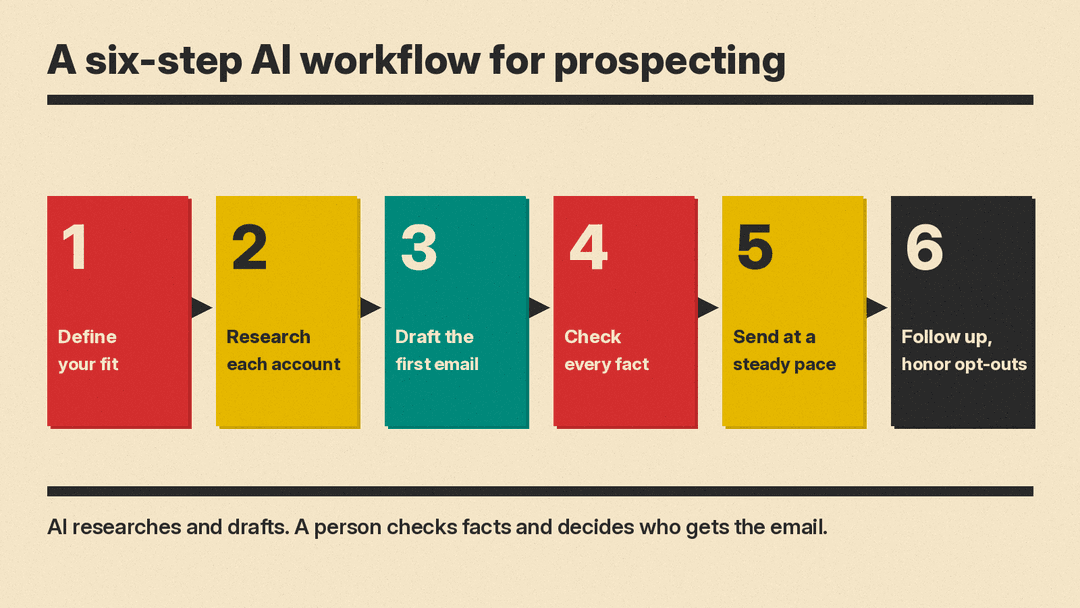
1. Define your fit
Start by writing down, in plain words, who you sell to and why they buy. Include the industry, company size, the job title of the person you want to reach, and the problem you solve. This is your own knowledge. An AI tool can help you tidy it up, but it cannot invent it for you.
Paste the description into an assistant and ask it to find gaps: "Here is who we sell to. What questions would a new sales rep still have after reading this?" The answers tell you what to add.
2. Research each account
Research tools that read many sources and cite them are useful here, because you can check each claim.
ChatGPT's deep research is one example. OpenAI's deep research help article says it researches and synthesizes "information into a documented report," and that "All deep research outputs include citations or source links so you can verify the information." ChatGPT creates a proposed research plan you can review and modify, and you can restrict it to sites you choose through Sites > Manage sites. The finished report includes a sources used section. OpenAI also says to "use search for quick facts, and use deep research for depth and thoroughness."
For prospecting, that suggests a simple split:
- Use a quick web search for one fact, such as a company's head office city or what it sells.
- Use deep research for a short account brief before an important email, for example a company's recent public announcements and the products it lists on its own site.
Restrict research to the company's own website and press pages when you can. Primary pages are easier to check than blog summaries.
3. Draft the first email
Use the writing tool inside the mail app you already use. Gmail has Gemini's Help me write, and Outlook has Draft with Copilot. Our guide to Gmail Help me write vs Copilot in Outlook covers the steps in each app.
Give the tool the facts, not just the goal. A weak prompt is "Write a sales email to a marketing agency." A stronger prompt names the person's role, one fact from your research, what you offer, and the one thing you want them to do next. Ask for a short email. Then use the shorten or tone options to cut it down further.
Google's Help me write page says the feature can take details from your other emails and Drive files to personalize a draft, and that you can click Sources to see which ones it used. Check them. A sales draft should not pull in details from another customer's thread.
4. Check every fact
Read the draft as the prospect would. For each claim about their company, open the source link from your research and confirm it. Delete anything you cannot confirm. Also delete any promise the draft makes that you did not decide, such as a discount, a deadline or a free trial.
Check the subject line against Google's rule: no Re: or Fwd: unless it is a real reply or forward. Check that the sender name is your real name or company, as Google's display name guidelines ask.
5. Send at a steady pace
Send from your normal work account, to people you have a real reason to contact, and in small batches. Google's guidelines recommend sending at a consistent rate, starting with low volume, and increasing slowly. If messages start to bounce, Google says to reduce volume until the error rate drops.
Do not buy lists. Both Google and Yahoo name purchased lists as a practice to avoid.
6. Follow up and honor opt-outs
AI is useful for follow-ups too. Paste your first email and ask for a short follow-up that adds one new piece of information instead of repeating the first message. Use the summarize features in Gmail or Outlook to catch up on a long thread before you reply.
When someone says no or asks you to stop, stop. Remove them from your list at once. Yahoo asks bulk senders to process unsubscribe requests within 2 days, and Google says that if messages from your domain are often reported as spam, future messages are more likely to be marked as spam.
Prompts you can adapt
These are starting points. Replace the brackets with your own details, and paste in your own research rather than asking the AI to recall facts from memory.
- Fit check: "We sell [product] to [type of company]. Here are notes on [company name]: [paste notes]. Based only on these notes, list reasons they might or might not be a fit. Say which notes each reason comes from."
- Account brief: "Using only [company website] and its press page, summarize what [company] sells, who it sells to, and any announcements from the last six months. Link each point to its source."
- First email: "Write a first email to [name], [job title] at [company]. Mention this fact: [fact with source]. Explain in one sentence how [product] helps with [problem]. Ask for a 15-minute call. Under 100 words. Plain language, no hype."
- Follow-up: "Here is my first email: [paste]. Write a two-sentence follow-up that adds this new point: [point]. Do not repeat the first email."
- Reply to an objection: "The prospect replied: [paste reply]. Draft a short, polite answer that responds to their concern directly. If they asked to stop, write a one-line confirmation that they will not hear from us again."
Common mistakes to avoid
- Trusting research without links. If the AI cannot point to a source for a fact, do not put the fact in an email.
- Fake familiarity. Do not let a draft claim you met, spoke or worked together if you did not. Google's rules also ban subject lines that pretend to be a reply.
- Scaling the list instead of the quality. More generic emails mean more spam reports. Gmail's limit is a spam rate of 0.3%, and its target is 0.10%.
- Sharing private data with the wrong tool. Before you paste customer lists or CRM notes into an assistant, check your company's rules on which AI tools are approved for that data.
- Letting the AI promise things. Prices, discounts and dates in a sales email are commitments. Write them yourself.
Why it matters
For a small team, AI can speed up two parts of prospecting: reading about a company and writing a first draft. That leaves more time to talk to people. The rules have not changed: email people with a real reason, tell the truth, make it easy to opt out, and keep spam reports low. Use AI to send fewer, better emails, not more of the same one.
If your team is also choosing an office suite, see our Microsoft 365 Copilot vs Gemini in Google Workspace comparison. For AI voice agents that call sales leads, see our monday.com Harmony explainer. If your team also answers formal buyer RFPs, see our guide to using AI for proposals and RFP responses.
