
Microsoft is pushing Copilot deeper into the finance department. In a Microsoft Copilot Blog post on October 29, 2026, Brian Jones, who leads the Excel product group, said the company is adding "more than 25 new finance skills and partner-built plugins across Microsoft Copilot, purpose-built for accounting, capital markets, and broader finance work."
The update builds on the finance skills Microsoft put into Copilot in Excel in June 2026. The difference now is scope. Instead of helping inside one spreadsheet, Copilot is meant to handle work that spans files, systems and conversations, such as a month-end close package or an investment committee memo.
It follows a separate October Excel update that added get data and clean data skills, which we covered in Copilot in Excel Adds Get Data, Clean Data and Skills. This post is about the finance layer on top.
What is in the update
The announcement has four parts: accounting capabilities, two new plugins for Cowork (Copilot's mode for delegating multistep work), connections to finance systems and data, and review tools for tracing what Copilot changed.
Microsoft also says you no longer have to start in Excel. With what it calls Office in Copilot, Excel is embedded in the Copilot app, so you can "analyze, edit, and co-author workbooks without leaving Chat or Cowork." A feature called Work IQ grounds Copilot in organizational knowledge, with examples such as "the close calendar or deal-team conversations."
Accounting: reconciliations, journal entries and reporting
The new accounting capabilities are available in Frontier, Microsoft's early-access program, for Copilot in Excel and Cowork. Microsoft lists three main jobs:
- Reconcile accounts: compare balances and transactions, identify discrepancies, and prepare reconciling items for review.
- Prepare journal entries: draft accruals, reclassifications, allocations, reversals and recurring entries, "with checks for required inputs and balanced entries."
- Report on results: analyze performance against plan, identify key drivers, and prepare reporting that explains what changed and why.
Microsoft says additional capabilities cover audit, tax, financial planning and analysis (FP&A), compliance and training.
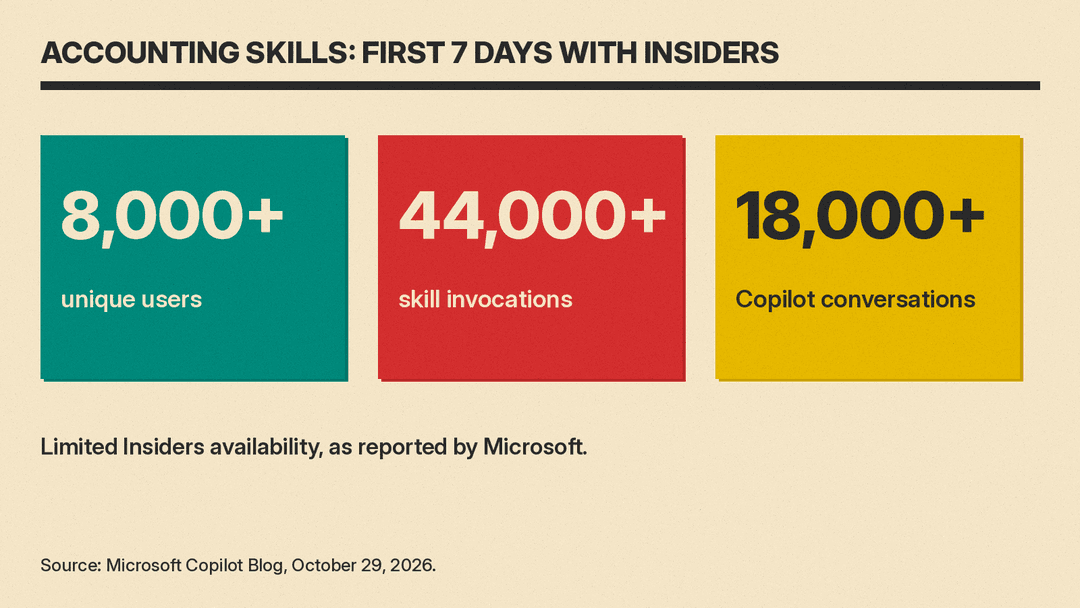
It also shared early usage numbers. In seven days of limited Insiders availability, Microsoft says, "more than 8,000 unique users invoked accounting skills more than 44,000 times across more than 18,000 Copilot conversations."
One practical addition: Microsoft says that in Excel, finance professionals will have the option to start an audit trail when they use an accounting capability. If they do, Copilot will record in the chat history what it changed and why.
Two new Cowork plugins
Finance plugin. This one is for corporate finance teams. Microsoft's examples are preparing a close review package (pulling together close updates, flagging blockers and risks, investigating variances that need explanation, and drafting commentary) and carrying a forecast review to leadership with supporting spreadsheets, a presentation and follow-up messages. It also covers stakeholder Q&A, quarterly workbacks, audit evidence packages, expense itemization and dataset analysis.
Capital Markets plugin. This is aimed at banking, research, private equity and wealth management. Microsoft says it can prepare an investment case from financials, filings and market data, and test an acquisition thesis by building trading comparables and a leveraged buyout (LBO) model, "with sourced inputs and analyst assumptions kept distinct for review." Other listed tasks include three-statement models, discounted cash flow (DCF) valuation, merger models, earnings notes and investment committee memos.
Microsoft's Cowork plugin documentation adds that the Finance and Capital Markets plugins provide role-specific skills only. They do not by themselves connect Cowork to an ERP system or a financial market data service. That is the job of the connections below.
Connections to finance systems
Microsoft is connecting Copilot to the places finance data lives:
- Dynamics 365 ERP apps plugin: brings finance and operations data into Copilot, for example to prepare journal entries from the system of record.
- Fabric IQ: makes governed Microsoft Fabric data usable, starting with Power BI reports and semantic models.
- Partner plugins: Microsoft names Intuit QuickBooks, Xero and Zoho Books for accounting; FactSet, Morningstar, Orion, Quartr, Reflexivity, Rogo and Samaya for investment analysis; LSEG, S&P Global, Statista, Zacks and others for market data; CB Insights, Moody's, Fitch Solutions and others for company and credit intelligence; and Mercury for spend management and business banking.
Microsoft notes that third-party services "may require separate licensing, subscriptions, authentication, or administrator enablement from the respective provider." So a partner plugin may need your own account with that provider, such as a FactSet or Morningstar subscription. The plugin documentation also says partner plugins come through the Microsoft 365 App Store, and your IT admin must make them available before you can add them.
What is available today
Availability differs by piece. According to Microsoft:
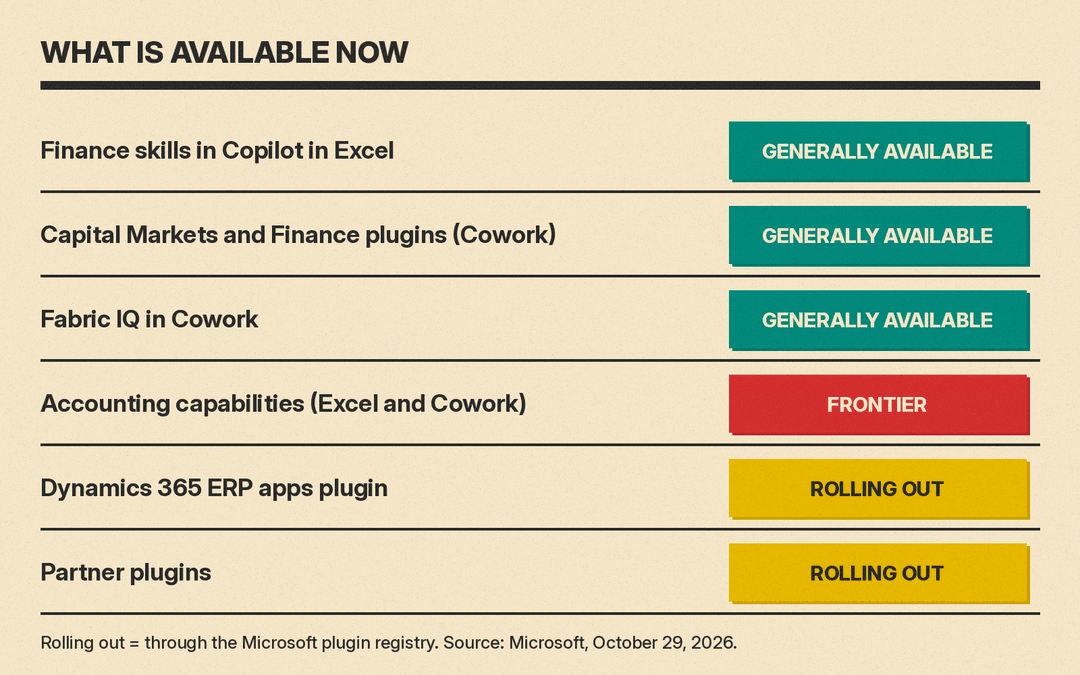
- Finance skills in Copilot in Excel: generally available.
- Capital Markets and Finance plugins in Cowork: generally available.
- Fabric IQ in Cowork: generally available.
- Accounting capabilities in Excel and Cowork: available in Frontier.
- Dynamics 365 ERP apps plugin and partner plugins: beginning to roll out through the Microsoft plugin registry.
Why it matters for finance teams
Small and mid-size businesses that run their books on QuickBooks, Xero or Zoho Books are the group to watch. Microsoft has not said which accounting tasks each partner plugin supports. The Xero listing in its plugin documentation says only "Check your P&L, cash position, and top customers." If the plugins bring ledger data into Copilot, a bookkeeper could work from live accounting data instead of exporting CSV files into Excel first. For AI features already built into those ledgers, see our guide to the best AI tools for accountants.
The review features matter as much as the drafting. Microsoft says Copilot in Excel can now summarize a workbook's recent activity, identify "when specific changes were made and by whom," and selectively reverse individual edits. For finance work, where every number has to trace back to a source, that kind of change history is what makes AI output reviewable.
Microsoft's own framing is careful here: "Finance professionals retain control of the recommendations, decisions, approvals, and actions that follow." It also says Copilot works only with content each user can access, honors existing permissions and sensitivity labels, and does not use prompts, responses or documents to train the underlying foundation models.
The broader context is adoption. As CFO Dive reported, CEO Satya Nadella said on Microsoft's earnings call on Wednesday, October 28, that automated tasks in Copilot had nearly doubled since July, and that daily users rose nearly 50% from the previous quarter.
How to try it
If your organization already has Microsoft 365 Copilot, the finance skills in Excel and the two Cowork plugins are listed as generally available. Cowork has extra conditions. Microsoft's Cowork setup page lists an active Microsoft 365 Copilot license and usage-based billing turned on by an admin. Microsoft's pricing page says Cowork is billed by usage in Copilot Credits rather than included in the license. Microsoft's Cowork admin guide says access is granted through a spending policy that selects Cowork. The accounting capabilities need Frontier access. For partner plugins such as QuickBooks or Xero, check with your Microsoft 365 admin, since they roll out through the plugin registry and may need the partner's own account.
Start with a low-stakes task, such as a variance explanation for last month, and turn on the audit trail so you can check every change before it reaches a report.
Sources
- Microsoft Copilot Blog: Microsoft Copilot for finance: Purpose-built for the way finance teams work
- CFO Dive: Microsoft expands Copilot's reach in finance workflows
- Microsoft Copilot Blog: Copilot in Excel: Built for the era of Frontier Finance (June 2026)
- Microsoft Learn: Available plugins for Copilot Cowork
- Microsoft Learn: Get started with Copilot Cowork
- Microsoft: Microsoft 365 Copilot pricing
- Microsoft Learn: Manage Copilot Cowork for your organization
