
There are now many AI models to choose from, and each company offers several of its own: fast ones, cheap ones, ones that "think" longer and ones built for coding or images. Picking one can feel like guessing. It does not have to. This guide gives you a simple, repeatable way to choose an AI model for a specific task, based on the advice AI companies themselves give in their documentation. It does not rank models, because rankings change quickly. Instead, it shows you how to find the right one for your work.
The short answer
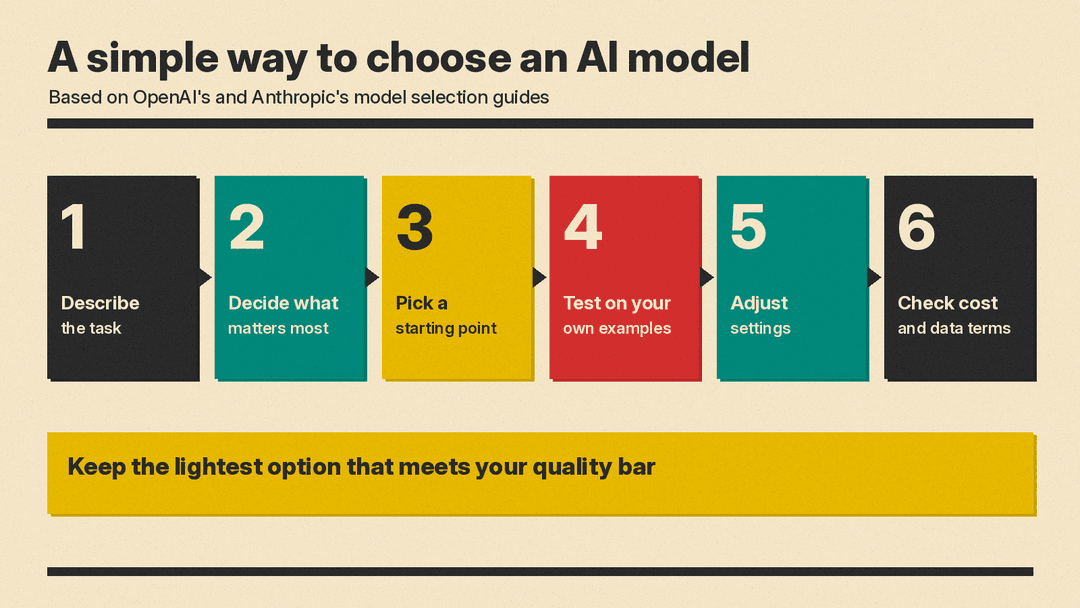
Start with the task, not the model. Decide what a good result looks like, pick a sensible starting model, test it on real examples of your work, and keep the lightest option that meets your bar.
That is close to what OpenAI recommends. Its model selection guide says: "Treat the guidance on this page as a starting point. The best way to find the right model for your workflow is to experiment with different models and reasoning settings to see what works." It adds: "If you can, experiment using the same inputs to compare results and keep the lightest setting that meets your quality bar."
Step 1: Describe the task clearly
Before you look at any model list, write down in one or two sentences what you want done. For example:
- "Summarize long customer feedback emails into three bullet points each."
- "Draft a first version of a product description from a short brief."
- "Read a contract and list the dates and payment terms."
- "Help me fix a bug in a small script."
A clear task makes the rest of the decision much easier. A short, simple, repeated task needs different strengths than a one-off, complex project.
Step 2: Decide what matters most
Anthropic's guide to choosing a model says that choosing means "balancing capabilities, speed, and cost." It lists questions to ask first:
- Capabilities: "What specific features or capabilities will you need the model to have to meet your needs?"
- Speed: "How quickly does the model need to respond in your application?"
- Cost: "What's your budget for both development and production usage?"
OpenAI's guide suggests a similar set of questions:
- "How often does your workflow run?" It notes that "a frequent automation makes usage and cost add up faster than an occasional project."
- "How quickly do you need the result?" A task you wait on "may need a faster setting than one that runs overnight."
- "How will you use the output?" A draft for your own review "may need less polish than something you'll share externally."
- "How important is the quality of the result?" Depending on your use case or industry, "you might want to use a stronger model to put an emphasis on quality."
It also helps to add a few practical questions of your own:
- What kind of input? Text only, or also images, documents, audio or video? Check that the model accepts the formats you need.
- How long is the input? Long reports or large codebases need a model with a large enough context window, the amount of text a model can consider at once. IBM's context window explainer describes it as "the amount of text, in tokens, that the model can consider or 'remember' at any one time."
- Where can your data go? If your material is sensitive, check how each service handles it before you choose.
Step 3: Pick a starting point
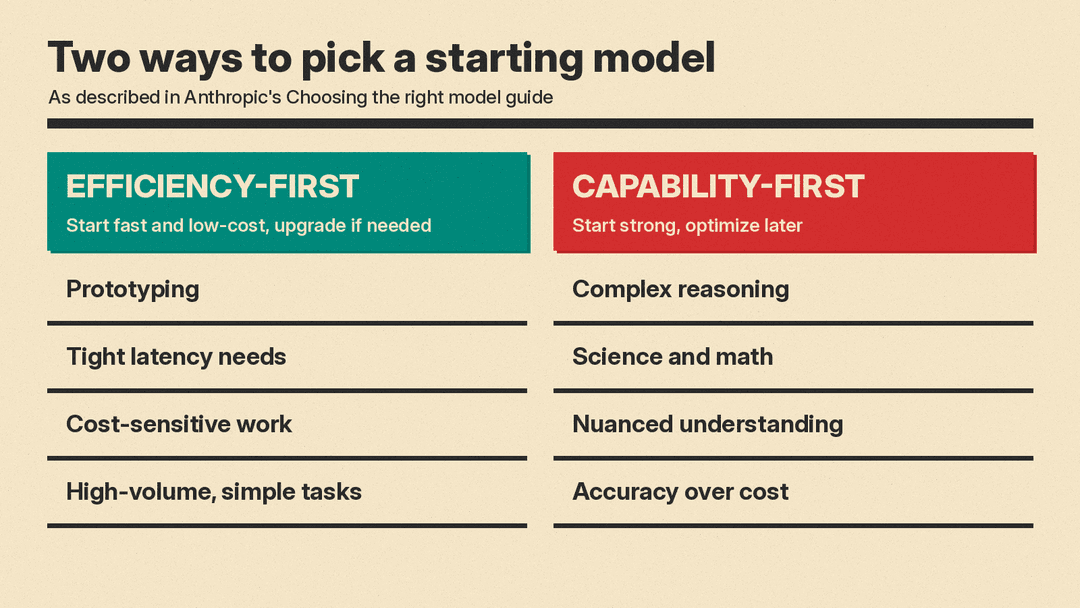
You do not need to find the perfect model on the first try. Anthropic's guide describes two ways to start.
Option 1: Start efficiency-first
Begin with a faster, lower-cost model, test it, and move up only if needed. Anthropic's steps are to start with a fast model, "test your use case thoroughly," "evaluate if performance meets your requirements," and "upgrade only if necessary for specific capability gaps." It says this approach is best for:
- "Initial prototyping and development"
- "Applications with tight latency requirements"
- "Cost-sensitive implementations"
- "High-volume, straightforward tasks"
Option 2: Start capability-first
Begin with a strong model, get the results right, then look for savings. Anthropic describes this as implementing "with the strongest starting point for your task, then optimize to more efficient models later." It says this approach is best for:
- "Complex reasoning tasks"
- "Scientific or mathematical applications"
- "Tasks requiring nuanced understanding"
- "Applications where accuracy outweighs cost considerations"
A simple rule of thumb follows from this: for frequent, simple jobs, start small; for rare, hard or high-stakes jobs, start strong.
Step 4: Test on your own examples
Benchmarks and online leaderboards can help you build a shortlist, but they measure someone else's tasks. Anthropic advises you to "create benchmark tests specific to your use case" and to test "with your actual prompts and data."
OpenAI's guide gives clear advice on how to compare:
- Set the bar first. "Choose acceptance criteria before comparing models." For writing, it suggests you "check required facts, qualifications, audience, and voice."
- Use the same inputs. Compare models on the same material so the difference you see comes from the model, not the prompt.
- Test more than once. "Repeat the comparison across representative tasks."
- Count your own time. "Measure completion time alongside quality, including time spent reviewing or repairing the result."
That last point is easy to miss. A cheaper or faster model that produces work you have to fix by hand may cost you more overall than a stronger one.
A simple test you can run today
- Pick five to ten real examples of the task, including at least one tricky case.
- Write down what a good answer must include.
- Run the same prompt on two or three models.
- Score each answer against your list, and note how long you spent fixing it.
- Keep the lightest model that passes.
Step 5: Adjust settings before you switch
Many AI tools now offer settings that change how hard a model works, often called reasoning effort, thinking or effort levels. These can matter as much as the choice of model.
Anthropic's guide says that its effort setting "trades intelligence for latency and cost within a single model," and that "tuning effort is often a better lever than switching models." OpenAI's guide suggests that, after comparing models, you "vary reasoning effort while keeping the model and inputs fixed."
In practice: if a model is close but not quite good enough, try a higher effort setting before you move to a bigger model. If it is more than good enough, try a lower setting to save time and cost.
Step 6: Check cost and data terms
Cost
If you use AI through a pay-per-use service, the bill depends in part on tokens, the small chunks of text that models read and write. Google's token guide says the cost of a call to its API "is determined in part by the number of input and output tokens." Reasoning adds to that: Google's pricing page labels output prices as "including thinking tokens." Check the vendor's pricing page for current rates rather than relying on lists elsewhere.
Data
Terms can differ between plans from the same company. For example, Google's Gemini API pricing page lists "Content used to improve our products" for its free tier and "Content not used to improve our products" for its paid tier. Read the data terms of the exact plan you will use.
If your data must stay on your own systems, an open-weight model may be an option. A report from the U.S. National Telecommunications and Information Administration (NTIA) says open models "enable users to leverage models without sharing data with third parties, increasing confidentiality and data protection."
Common mistakes to avoid
- Picking by name or hype. A model that tops a leaderboard may not be the best fit for your task, budget or data rules.
- Always using the biggest model. For simple, frequent tasks, a smaller model may meet your bar at lower cost and higher speed, as Anthropic's efficiency-first approach suggests.
- Testing on one example. One good answer can be luck. Use several real cases.
- Ignoring review time. As OpenAI notes, time spent "reviewing or repairing the result" is part of the cost.
- Choosing once and never checking again. Models and prices change. Re-run your simple test when a new option appears or your needs change.
A quick checklist
Before you settle on a model, check that you can answer yes to each of these:
- I wrote down the task and what a good result looks like.
- I know whether speed, cost or quality matters most for this task.
- The model accepts my input type and length.
- I tested it on several real examples with the same inputs.
- I tried adjusting effort or reasoning settings.
- I checked the current price and the data terms for my plan.
The bottom line
Choosing an AI model is less about finding "the best" model and more about finding the right fit for one task. Define the task and your quality bar, decide whether speed, cost or quality matters most, pick a sensible starting point, and test on your own examples. As OpenAI puts it, keep "the lightest setting that meets your quality bar." Then check back when your needs or the options change.
Sources
- Model selection, OpenAI API documentation
- Choosing the right model, Claude Platform Docs (Anthropic)
- What is a context window?, IBM Think
- Understand and count tokens, Gemini API documentation (Google)
- Gemini Developer API pricing, Google
- Dual-Use Foundation Models with Widely Available Model Weights Report, NTIA
