
Google is rolling out Guided Learning inside Google Classroom, so a teacher can attach it to an assignment. Guided Learning is a Gemini app mode that coaches students step by step instead of giving the answer. Google announced the Classroom version on Nov 3, 2026, alongside two studies it ran. Google's Workspace Updates blog added rollout details on Nov 4.
This post covers what teachers can do, what the studies say, and where Google's own pages differ. All numbers below come from Google.
What Google announced
In its Nov 3 post, written by Sofie Cornelis (Senior Product Manager, Google for Education) and Asha Johnson (Product Manager, Google DeepMind), Google says it is starting to roll out teacher-led Guided Learning globally in Google Classroom. Teachers assign a Guided Learning experience tied to their course materials, and they can track student progress through insights.
Google describes the tool this way: "Guided Learning is designed to help students work through complex concepts step by step, prioritizing deep understanding over providing direct answers."
The Workspace Updates post from Nov 4 says the integration lets teachers add Guided Learning to any assignment. It says the feature is rolling out globally in all Gemini-supported languages. It also says the work is grounded in Google's LearnLM research, which Google describes as stimulating curiosity, providing scaffolding, facilitating productive struggle and offering graduated hints.
How a teacher sets it up
Google's Classroom Help page lists the steps:
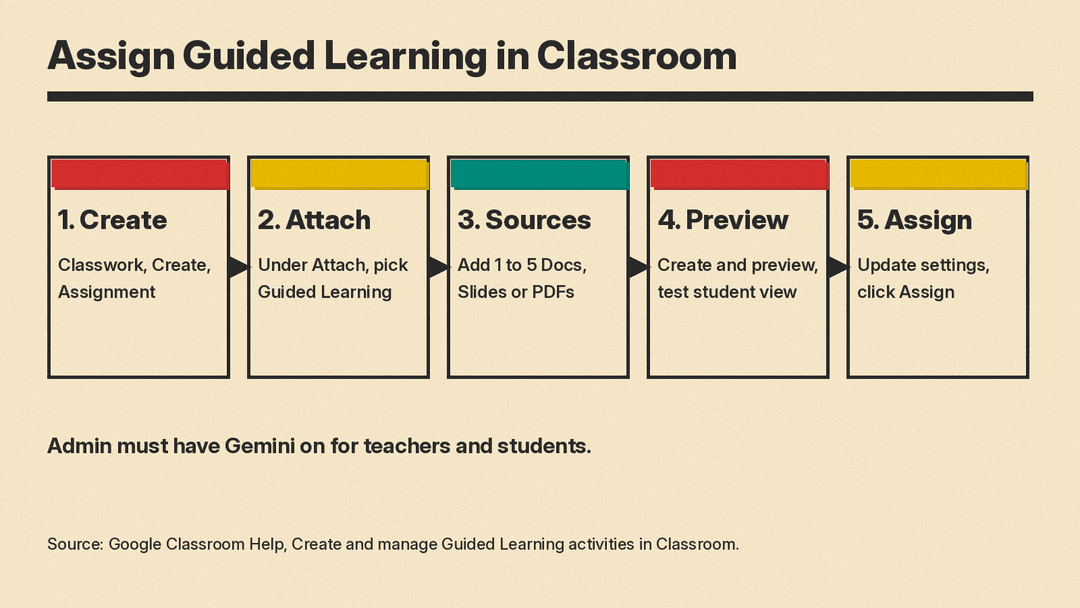
- Go to classroom.google.com and select a class.
- Click Classwork, then Create, then Assignment.
- Under "Attach," select Guided Learning and name the activity.
- Add sources, such as Docs, Slides or PDFs, either from the class or by upload.
- Click Create and preview, then assign.
The page tells teachers to use 1 source for the best product experience, and says they can add up to 5. Students must have access to every source the teacher chooses. The preview tab lets a teacher test the student experience before assigning.
One detail matters for lesson design. The Help page says the Instructions box on the assignment is for students and is not referenced by Gemini in the Guided Learning activity. The sources you attach are what give the AI its context.
What students see
Per the Workspace Updates post, when a student opens an assigned Guided Learning activity from Classroom, the Gemini side navigation panel is hidden, new chats are disabled within the tab, and the student stays in Guided Learning mode. On Chromebooks that use Class Tools, the activity can be launched in a locked-down view, and teachers can remotely view student screens.
The Help page adds that students can open their assigned conversations only from the Classwork tab in Classroom. That history does not appear in the Gemini app.
What teachers see: insights and transcripts
Teachers get AI-generated insight summaries at the class level and for each student, plus individual chat transcripts. The Help page says the class view shows how many students opened the activity or started a conversation, with themes such as areas to support, areas of strength and common questions.
Google attaches several limits to this, all on the Help page:
- Insights are generated by AI and can make mistakes. They are "intended as an aid and are not intended for assessment or placement."
- Teachers see only Guided Learning that they assigned through Classroom. Chats that students start on their own in Gemini are not visible to teachers.
- If an admin lets students delete chat history, deleted chats no longer appear in the teacher's transcript view.
- Summaries have usage limits. If student conversations exceed them, no summary is generated, but teachers can still read the transcripts.
Teachers can reuse activities across classes. If a teacher copies a class or material, the activity is duplicated. Deleting a Classroom post removes student access to the activity, but it does not delete past conversations.
The two studies
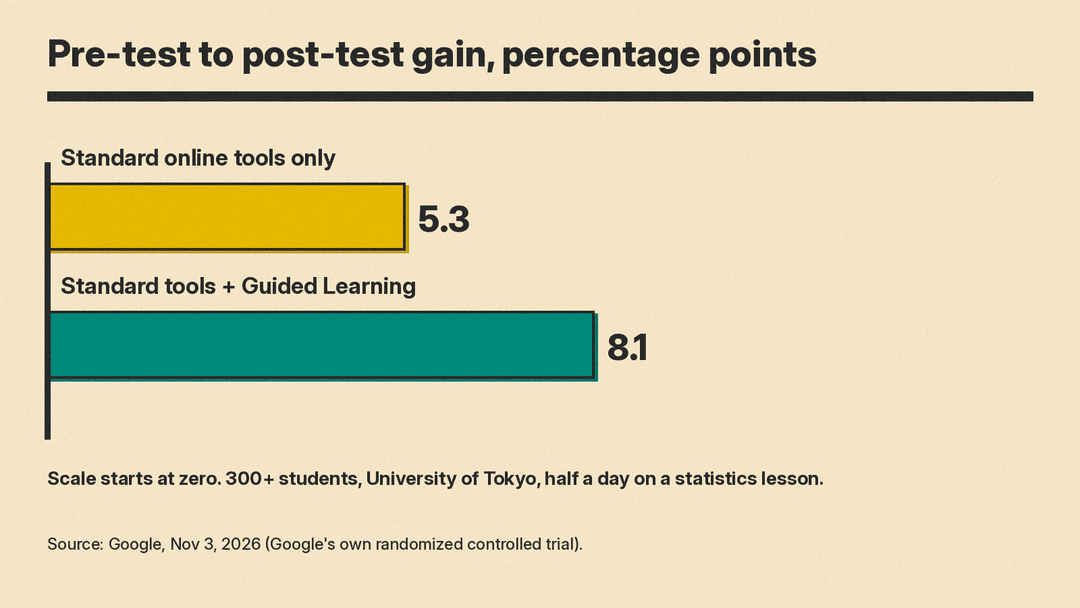
Google says it ran a randomized controlled trial with more than 300 students at the University of Tokyo. Each student got half a day to study a statistics lesson with standard online resources. Half of the group also had access to Guided Learning in the Gemini app.
Google reports that students with standard web tools improved their scores by 5.3 percentage points, measured from pre-test to post-test. Students with Guided Learning improved by 8.1 percentage points. Google calls that 1.5x higher learning gains in a single study session. Google itself says the number might seem modest, and notes that the gains came from half a day of study.
The second study was a four-week pilot with Ark across three UK secondary schools and four subjects. Google reports these results from post-pilot surveys and interviews:
- Teachers found that Guided Learning handled initial student questions effectively during independent work, which left them more time for targeted one-on-one help.
- The majority of surveyed students said they felt comfortable asking Gemini for help when stuck.
- Over half of surveyed students said it helped them solve problems on their own.
Google also lists feedback from the pilot. Some teachers wanted clearer visibility into how students used the course materials. Others wanted to keep students focused on specific assignments during class. Google says it added educator insights and improved the ability to anchor conversations on uploaded curriculum in response.
What to check before you rely on it
Google's two pages differ in how they describe availability, so check both.
- The Nov 3 blog post says Google is starting to roll out the feature globally.
- The Workspace Updates post says Rapid Release and Scheduled Release domains have an extended rollout, longer than 15 days for feature visibility, that started on Nov 3, 2026.
- Workspace Updates lists availability for Education Fundamentals, Standard and Plus. The Help page says Guided Learning insights are available to teachers on all Google Workspace for Education editions.
Admin settings also gate use. The Help page is written for teachers with a Google Workspace for Education account, and a teacher who has not used Gemini before must complete Gemini onboarding to continue. Teachers and students must be in a group or organizational unit with Gemini set to On. The Help page says that if an admin has turned the Gemini app off for all students in a class, the teacher sees a notice but can still create an activity.
Google also changed school controls in a separate Nov 3 post. It says Gemini, Gemini Notebook, Gemini in Classroom and Google Search will be off for K-12 student accounts until administrators turn them on. We cover the details and the reaction in our post on Google turning off Gemini and Search for K-12 by default.
The study numbers are Google's own, and the blog post gives only the summary described above. The pilot findings come from surveys and interviews, so they report opinions, not test scores. Google also ran an earlier trial of Guided Learning with Fab AI in Sierra Leone, covered in our post on Gemma teacher tools in Africa. Readers who want to compare this with earlier Google results can read our post on Google's Gemini tutoring study from UK and Italian classrooms. For other options, see AI tutors for students, and for the Gemini tools teachers already have in Classroom, see best AI tools for teachers. The Workspace Updates post says teachers can already assign Gemini Notebooks in Classroom, and our explainer on Gemini Notebook covers that tool.
