
Kling 4.0 and Seedance 2.5 look alike on paper. Both generate up to 30 seconds of video with sound in a single pass, and both take mixed image, video and audio references in one request. Kuaishou makes Kling, and ByteDance's Seed team makes Seedance.
The differences show up in the details. Seedance 2.5 accepts far more references, has a working developer API, and ranks well above Kling's previous models on the Artificial Analysis preference leaderboard. Kling 4.0 offers more precise timeline control with up to 10 keyframes, stereo audio, longer prompts, and higher resolutions on its roadmap, but its API is not out yet and it has no independent ranking so far. This guide compares the two using each company's own documentation, as of October 2026.
The short answer
- Pick Seedance 2.5 if you need an API now, want to feed a shot dozens of reference images, or plan to edit video by timestamp, swap backgrounds with green screen, or extend clips several times.
- Pick Kling 4.0 if you want to pin exact frames at set moments, need two-channel stereo sound, write very long prompts, or work mainly in the Kling app and want its 4K and 10-bit HDR options as they roll out.
- If you are deciding on quality alone, test both with your own prompt. Neither company has published head-to-head results, and Kling 4.0 is not yet on the Artificial Analysis leaderboard.
For the wider field, including Veo, Runway, Luma and Grok Imagine, see our guide to the best AI video generators in October 2026.
Release dates and where you can use them
ByteDance's Seed team launched Seedance 2.5 on July 31, 2026, first on Jimeng AI, Doubao Pro and other platforms. On August 3, ByteDance's creative platform Dreamina announced a global launch of the model through Dreamina. Developers can now call it through BytePlus ModelArk: the API reference says Seedance 2.5 "is now fully available" under the model ID dreamina-seedance-2-5-260628.
Kuaishou says Kling 4.0 officially launched on October 15, after an early access period that Kling AI announced on September 30. It is available in the Kling creation app and through Kling's MCP server and CLI, so AI agents can drive it. Kuaishou says API access for enterprises and developers will come "soon".
Clip length and extension
Kling starts at 3 seconds per clip and Seedance at 4, and both top out at 30:
- Kling 4.0: 3 to 30 seconds, adjustable in 1-second steps, with a 10-second default, according to the Kling 4.0 user guide. Multi-shot is on by default, so the model can split a clip into shots on its own. Video extension of up to two minutes is listed as coming soon.
- Seedance 2.5: 4 to 30 seconds through the API, or
-1to let the model choose. ByteDance says it supports multiple rounds of extension while keeping characters and scenes consistent; its product page describes extending twice. Inside Dreamina, a Long Video Mode handles projects of up to three minutes.
On length, Seedance 2.5 is ahead today because its extension tools are live and Kling's are not.
References and control
This is the biggest practical difference. Seedance 2.5 takes up to 30 reference images, 10 reference videos and 10 reference audio clips in one request, with video and audio each capped at 30 seconds in total. Kling 4.0 takes up to 10 images, 5 videos (30 seconds in total), 3 voice profiles and 7 elements, with a hard limit of 15 references combined.
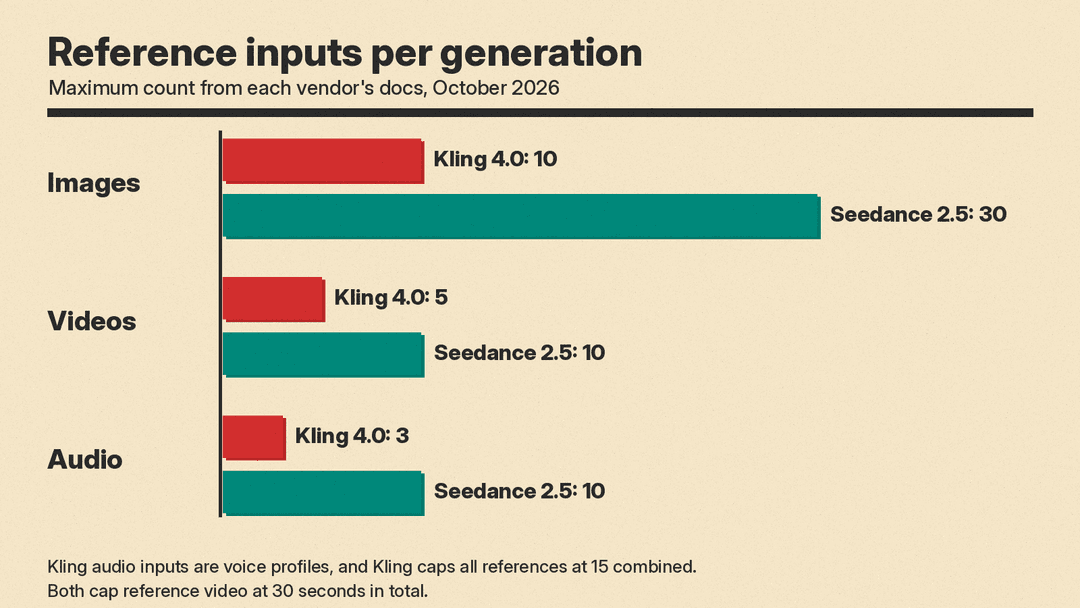
Kling makes up for the lower count with timeline control. Its Keyframes mode accepts up to 10 images placed at specific moments, such as a first frame, a last frame and middle frames at any point. You can tell it a character turns around at 7 seconds or the sky darkens at 5 seconds. The catch: Keyframes and Omni Reference are separate entry points, and the guide says their capabilities "cannot be combined within a single generation task." Kling also accepts prompts of up to 8,000 tokens.
The Seedance 2.5 API offers first-frame and first-and-last-frame modes, and it does not list a middle-keyframe mode. Its timing control comes through the prompt instead: ByteDance says it supports "timestamp-level control," and its example prompts split a clip into time ranges such as 0 to 4 seconds and 4 to 7 seconds. BytePlus recommends keeping prompts to about 1,000 English words. It also accepts clay renders, untextured 3D scenes that set blocking and camera paths.
One restriction matters for anyone working with real actors. The BytePlus API does not allow direct uploads of reference images or videos containing real human faces. BytePlus offers workarounds: face-containing outputs from certain Seedance models, preset digital characters, or authorized real-person assets.
Resolution, color and sound
- Kling 4.0: The user guide lists 720p, 1080p and 4K, 10-bit HDR at 1080p and 4K, and aspect ratios of 21:9, 16:9, 1:1, 9:16 and Auto. The guide also marks 4K and 1080p with 10-bit HDR as "coming soon," and Kuaishou's release says Kling 4.0 "will also support" 4K, 1080p and 21:9, so check what your account shows. Audio is two-channel stereo with lip sync.
- Seedance 2.5 (API): 480p, 720p and 1080p, with 1080p output in 10-bit color and H.265 encoding. Aspect ratios are 16:9, 4:3, 1:1, 3:4, 9:16, 21:9 and adaptive. It can output MOV files with 4:4:4 color for grading and compositing. The docs say all generated videos with audio are mono.
Kling's languages for speech include Chinese, English, Japanese, Korean, Spanish, Portuguese, German, French and Hindi, plus accents such as Cantonese and Indian English. Dreamina says Seedance 2.5 supports more than 10 languages, with subtitles and lip sync.
Editing
Both models edit existing video, not only generate new clips. Kling 4.0 can make targeted edits to expressions, movements, camera angles, style and backgrounds while keeping the rest of the scene stable, and its "creative recreation" mode copies the pacing and composition of a reference video while swapping in your product or character. Seedance 2.5 offers timestamp-based edits after generation, green screen background replacement, camera perspective edits and reference-based edits. Through the API, an edit keeps the original clip's aspect ratio and roughly its length.
Price
Seedance 2.5 has a public rate card. BytePlus bills it by tokens and lists these examples for a 5-second, 16:9 clip without video input:
- 480p: $0.103 per second
- 720p: $0.231 per second
- 1080p: $0.569 per second
Clips that use video as input cost more, because the input video's length counts toward the bill and minimums apply. You are charged only for successful generations. Before you can enable Seedance 2.5, BytePlus requires an account balance above $30, a $30 AI Savings Plan, or a Seedance resource pack. In the consumer app, Dreamina advertised launch promotion pricing "starting from $0.097 per second" in August, with prices that depend on plan, offers and region.
Kling 4.0 runs on Kling's credit-based subscription plans, and neither Kuaishou's release nor the user guide lists a price per second. CinemaDrop, citing a logged-out pricing check by Quantslant on October 15, reported 15 credits per second at 1080p and 10 credits per second at 720p, with Kling 4.0 included from the Pro plan up. Kling's prices change often, so confirm in your own account. There is no Kling 4.0 API price yet because there is no public API.
Quality: what the evidence shows
There is no head-to-head benchmark from either company. The closest independent signal is the Artificial Analysis text-to-video leaderboard, which ranks models on generating video with audio from a text prompt, by Elo from pairwise human preference votes. On October 19, Dreamina Seedance 2.5 ranked third with an Elo of 1160, from 5,939 samples. Kling 4.0 was not listed. The newest Kling entries were Kling 3.0 Omni 1080p (Pro) at 1019 and Kling 3.0 1080p (Pro), which the board fixes at 1000 as its reference point. So Seedance 2.5 ranks well above Kling's previous generation on that board, but the board says nothing yet about Kling 4.0.
Each company makes claims about its own model. Kuaishou says Kling 4.0 delivers steadier large-scale motion and complex camera moves such as tracking and orbit shots. ByteDance says Seedance 2.5 improves textures, skin, lighting and shot transitions, and it names its own weak spots: "the physical plausibility of complex motions and the stability of scenes involving interactions among multiple subjects." If your project is fight scenes or crowds, test those cases first.
Which should you pick?
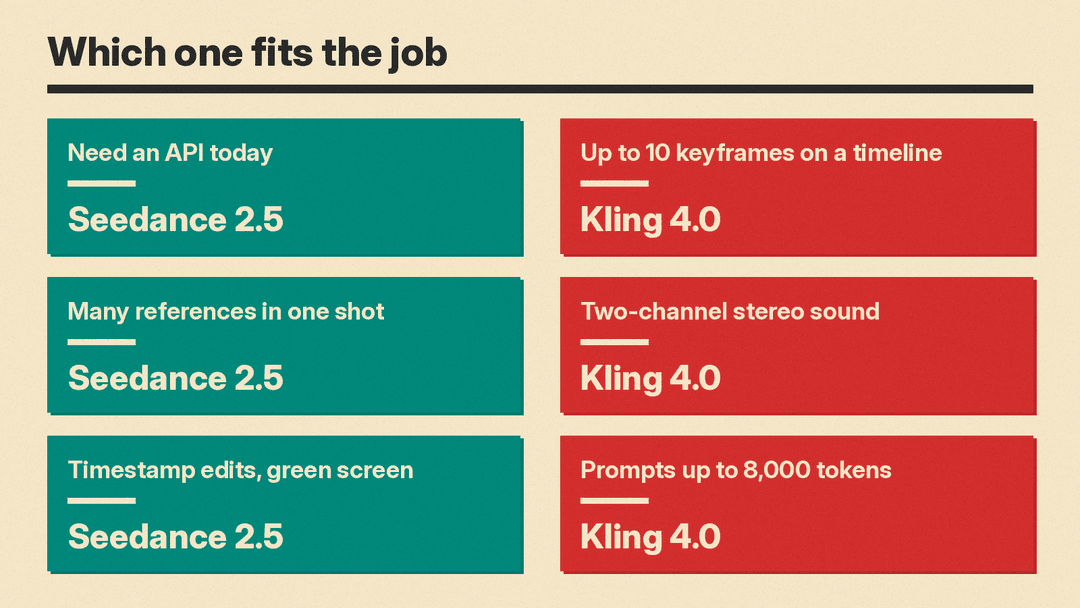
- Developers and automated pipelines: Seedance 2.5, because its API is live with published prices. Kling 4.0 is usable by agents through MCP and the CLI, but not through a developer API yet.
- Brand and product ads: Either. Seedance 2.5 handles more product and wardrobe references per shot. Kling 4.0's creative recreation mode is built for swapping a product into a proven ad format.
- Storyboarded narrative scenes: Kling 4.0 if you have exact frames you need to hit, thanks to its 10 keyframes. Seedance 2.5 if you want to describe beats by timestamp and extend the scene past 30 seconds today.
- Work that needs stereo mixes or ultrawide delivery: Kling 4.0 for stereo. Both list 21:9.
- Shots built around real actors' faces: Check the face rules first. The Seedance API blocks direct uploads of real faces without an approved route.
Whichever you choose, the prompt does much of the work. Our beginner's guide to writing better AI prompts covers the basics. For references, Kling's guide says to state each asset's role, with examples such as "@Image1: preserve the character's appearance" and "@Video1: reference the action pacing." Seedance's example prompts tag references the same way. If you want to run open models yourself instead, see our comparison of open-source video diffusion models.
Sources
- Kuaishou: Kling AI officially launches next-generation Kling 4.0
- Kling AI: Kling 4.0 user guide
- Kling AI: Introducing Kling 4.0
- ByteDance Seed: Introducing Seedance 2.5
- ByteDance Seed: Seedance 2.5 product page
- Dreamina: Seedance 2.5 global launch
- BytePlus ModelArk: Create a video generation task
- BytePlus ModelArk: Pricing
- Artificial Analysis: text-to-video leaderboard
- CinemaDrop: Kling 4.0 guide
