
A speech is hard to start and easy to put off. AI can help with the blank page, but it knows nothing about your life. It does not know the story about the lamp, the road trip or the long week at work. This guide gives you nine steps, eight copy-paste prompts and the results of a small local test. It works for a wedding toast, a work talk, a graduation speech or a personal speech for a family event.
The short version: you supply the facts and the feelings, and the AI helps with structure, wording and trimming. The speech has to sound like you when you say it out loud.
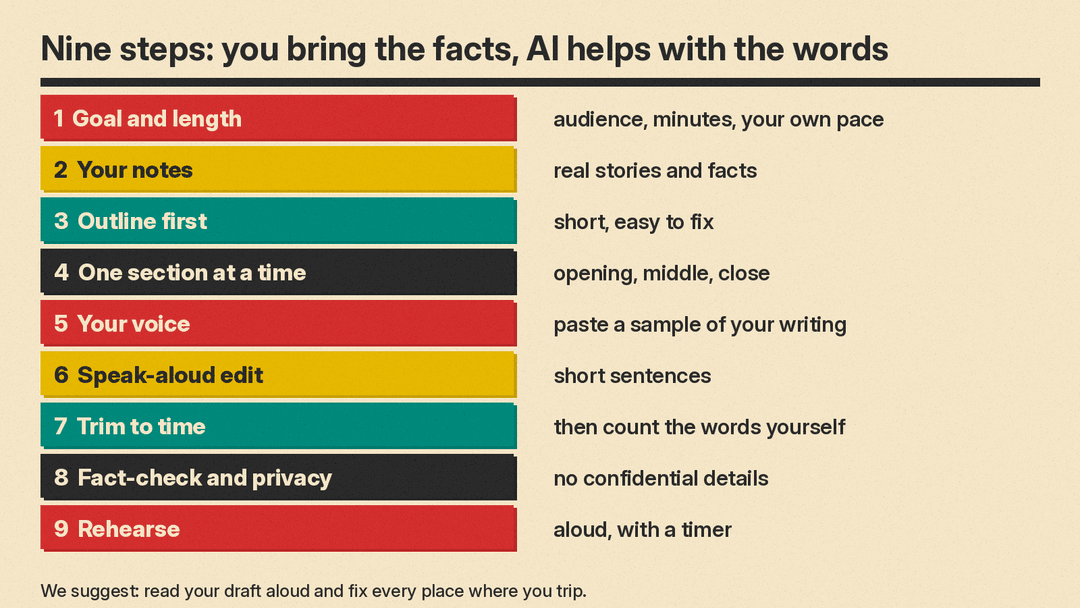
Step 1: Decide the goal, the audience and the length
Before you open any AI app, write three lines on paper.
- Goal: what should people think, feel or do when you sit down?
- Audience: who is in the room, and what do they already know about you?
- Length: how many minutes do you have?
Length matters more than most people expect. We suggest you do not trust a word count from the internet. Read a page of your own writing aloud with a timer, count the words, and work out your own pace. Then use that number to set your target.
Step 2: Gather your own stories and facts first
This is the step that makes the speech yours. The AI cannot invent a true memory for you, and it should not try. Write down, in messy notes:
- two or three short stories with real names, places and what was said
- one fact the audience may not know
- one thing you want to say that is hard to say
- anything you must not mention
Bullets are fine. Spelling does not matter. You will paste these notes into the prompts below. If a detail is not in your notes, the AI may fill the gap with something made up, so check every line in step 8.
Step 3: Get an outline first, not a full speech
Ask for a plan before you ask for words. A plan is short, so you can fix it quickly. OpenAI's help page on prompt best practices says to be clear and specific: "Ensure your prompts are clear, specific, and provide enough context for the model to understand what you are asking." Your notes from step 2 are that context.
Here is a prompt you can copy.
I am giving a [length]-minute [type of speech, for example wedding toast] for [who it is for].
My relationship to them: [for example, college roommate].
My goal: [what I want the audience to feel or do].
My notes, use only these facts:
[paste your notes]

Write an outline with exactly [5] lines. Each line starts with one of these labels, in this order: Opening, Story, Turn, Wish, Toast.
After each label, write one short sentence about what goes in that part.
Do not invent any facts that are not in my notes. Output nothing else.
Change the labels to fit your speech. For a work talk you might use Problem, Evidence, Plan, Ask. Read the outline and move things around. This is your speech, so you decide the order.
Step 4: Draft one section at a time
A full speech in one go can sound generic, so we suggest you work in pieces instead. Ask for the opening, read it, then ask for the next part. Our post on prompt chaining shows how to split a big task into smaller prompts.
OpenAI's help page also says: "Start with an initial prompt, review the response, and refine the prompt based on the output." Treat each draft as a first try. Say what you did not like, and ask again.
Prompt for an opening. It asks for options so you can pick one:
Write 3 different openings for my [type of speech]. Each opening is 2 to 3 sentences and under 40 words.
Option 1 starts with a short true story from my notes.
Option 2 starts with a question to the audience.
Option 3 starts with a simple, honest statement.
Do not use jokes about topics that could offend. Use only facts from my notes:
[paste notes]
Prompt for a wedding toast:
Write the middle of a wedding toast, about [number] words, in the first person.
It tells this story: [your story, with names and what was said].
Then it links the story to what I admire about the couple: [your point].
Tone: warm and a little funny, not formal. Short sentences.
Do not add any story, name or detail that is not above. If you need a detail, write [ASK ME] instead.
Prompt for a work presentation section:
I am presenting to [audience, for example my team of 12] for [number] minutes.
Write the "[section name, for example The problem]" section, about [number] words.
Facts and numbers you may use: [paste them]. Do not add any other numbers.
End the section with one sentence that leads into the next part: [next part].
Plain words. No buzzwords. Write it as I would say it, not as a slide.
The "write [ASK ME]" line is a small trick. It is meant to give the AI a way out when it lacks a fact, instead of guessing. We did not test how well it works.
Step 5: Make it sound like you
AI drafts often sound generic. We suggest you show the AI how you write. Paste a short sample, such as a text message, an email or a page you wrote yourself. Showing examples is the same idea as few-shot prompting, which we cover in our guide to examples in prompts.
Here is a sample of how I write and talk:
"""
[paste 100 to 200 words you wrote yourself]
"""
Describe my style in 5 short bullet points (sentence length, humor, favorite words, how formal I am).
Then rewrite the draft below in that style. Keep every fact. Do not add anything new.
Draft:
"""
[paste draft]
"""
OpenAI's page also covers tone. It says: "Use descriptive adjectives to indicate the tone. Words like formal, informal, friendly, professional, humorous, or serious can help guide the model." If the first rewrite is still off, add words such as "dry", "warm" or "plain" and try again. If you plan to reuse the same instructions often, our guide on how to write a system prompt shows how to write standing instructions for an assistant.
Step 6: Edit for speaking aloud
A speech is heard once, so the ear cannot go back and reread. Long sentences with many commas are hard to follow when spoken. We suggest these rules:
- one idea per sentence
- short words
- repeat the one point that matters
- no sentence you cannot say in one breath
Edit this speech so it is easy to say out loud.
Rules: no sentence longer than 20 words. Keep every fact and name. Keep my first-person voice.
Do not add new stories, jokes or numbers. Output only the edited speech.

[paste speech]
Then read the result aloud, standing up if you can. Mark every place where you trip, run out of air or want to change a word. Fix those by hand. Your mouth is a better editor than any prompt.
Step 7: Trim to time
First drafts often run long. Use your own pace from step 1 to work out your word target, then ask the AI to cut. Be ready to cut more by hand.
Here is my speech. It has [current word count] words. Cut it to about [target] words.
Keep: [the story or point you must keep] and the final line.
Cut: the weakest example first. Keep my first-person voice.
Output only the shortened speech.

[paste speech]
Count the words yourself afterward. The next section shows why.
What a small local model did with these prompts
We ran close versions of three of the prompts on Gemma 3 1B, a small model that runs on a local computer through llama.cpp. This is not a test of ChatGPT, Claude or Gemini. Gemma 3 1B is a small model, so treat the results as a warning about what can go wrong, not as a ranking. Each prompt ran four times (seeds 0 to 3, temperature 0.7) on a made-up wedding toast of 212 words.
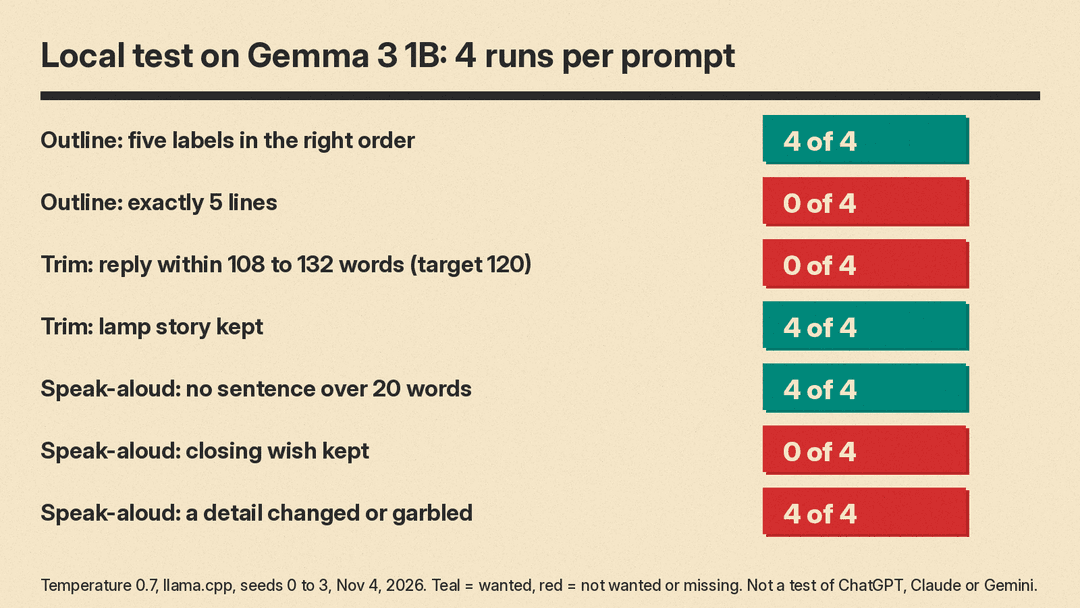
Outline prompt. We asked for exactly 5 lines starting with the labels Opening, Story, Turn, Wish and Toast. All 4 replies used the five labels in the right order. None of the 4 was exactly 5 lines. Each reply had 11 non-empty lines. The first one we read had a lead-in sentence and put each label on its own line.
Trim prompt. We asked it to cut the 212-word toast to about 120 words and keep the lamp story. The four replies had 153, 145, 154 and 156 words, counting the whole reply. None landed within 10 percent of 120 (108 to 132 words). All four kept the lamp story, and each began with a lead-in sentence that starts "Okay, here’s a shortened toast".
Speak-aloud prompt. We asked for no sentence longer than 20 words. The longest sentence in the original was 70 words. The longest in the four replies were 16, 19, 19 and 14 words, so all four followed the rule. But the facts drifted in all four. One reply turned Luis into "a toast master", and another said "a toaster". None kept the closing wish. The words lamp, soup and six appeared in all four replies, and the word knife in three.
What this shows is simple. A small model followed the sentence-length rule well, missed the word target by 21 to 30 percent, and changed details when it shortened the text. A larger model may do better, but we did not test one, so check every output.
Step 8: Fact-check and protect your privacy
Read the final speech against your notes, line by line. Check names, dates, numbers and quotes. Google's Gemini privacy page warns that AI answers can be wrong: "LLM experiences (Gemini Apps included) can hallucinate and present inaccurate information as factual." We suggest you treat every chat tool the same way and keep your notes next to the speech when you check.
Privacy matters too, especially for a work talk or a personal speech. Do not paste anything confidential or anything you would not want strangers to read.
- Gemini: Google's privacy page says: "Please don’t enter confidential information that you wouldn’t want a reviewer to see or Google to use to improve our services, including machine-learning technologies."
- ChatGPT: OpenAI's help page says that for individual plans (Free, Plus, Pro) "we may use your content to train our models. You can choose whether your conversations help improve our models." It also says temporary chats "are not used to improve OpenAI models while they remain temporary." Our post on ChatGPT data controls shows how to opt out of model training.
- Claude: Anthropic's privacy center says that on consumer plans, "Your Incognito chats are not used to improve Claude, even if you have enabled Model Improvement in your Privacy Settings."
Settings can change, so check the current page for the app you use. We suggest you replace real names and company details with placeholders such as "my manager" or "Client A" when you draft, then put the real names back by hand. For a eulogy-style speech about someone who died, remember that you are sharing private family stories with a company's servers. Decide what you are comfortable sharing before you paste it.
Step 9: Rehearse, with the AI as your audience
Rehearsal is where a draft becomes a speech. Say it aloud at least three times, with a timer. Then, if you want, use the AI to play a listener or to prepare for questions.
Act as a friendly audience member at my [type of speech]. I will paste my speech.
Ask me 5 questions the audience might have, one at a time. Wait for my answer before the next question.
After my fifth answer, tell me which of my answers was unclear and suggest a clearer one-sentence version.

Speech:
[paste speech]
We suggest this for work talks, where a Q&A follows. For a toast or a graduation speech, you may prefer to rehearse in front of a friend or a mirror. Practice with the real setting in mind: the microphone, the glass in your hand, the notes on a card.
A quick checklist before you go on stage
- The speech fits your own timed pace, with a little room to spare.
- Every story and fact is true and comes from your notes.
- You read it aloud and fixed the places where you tripped.
- No confidential details went into the chat, or you removed them.
- You have a printed copy or note cards, and you know your first and last lines by heart.
If you want to go further and write something longer, see our guide on how to use AI to write a book. It uses the same idea: you plan first, keep your own facts in a file and let the AI help with the edit.
Sources
- Prompt engineering best practices for ChatGPT, OpenAI Help Center
- How your data is used to improve model performance, OpenAI Help Center
- Gemini Apps Privacy Hub, Gemini Apps Help
- Is my data used for model training? Anthropic Privacy Center
- google/gemma-3-1b-it model card, Hugging Face
- llama.cpp, GitHub
- Our own test: Gemma 3 1B through llama.cpp, four runs per prompt, November 4, 2026. The replies are not published.
