
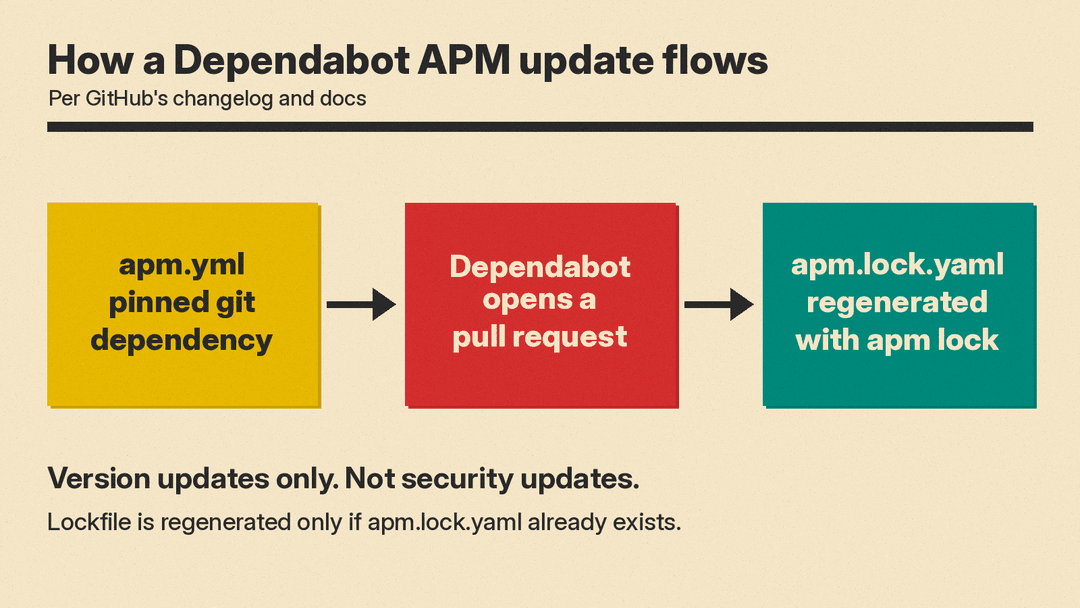
GitHub says Dependabot version updates now support Agent Package Manager (APM), a dependency manager for AI agent skills, prompts and instructions. GitHub announced it in its changelog on November 3, 2026. Dependabot opens pull requests to update supported git dependencies declared in apm.yml, and it regenerates apm.lock.yaml when that file is present. GitHub says this covers version updates, not security updates.
What APM manages
According to the APM documentation, APM is a dependency manager for AI agent context: skills, prompts, instructions, hooks and MCP servers. It borrows the manifest-plus-lockfile shape from npm, pip and cargo. The manifest is apm.yml. The lockfile is apm.lock.yaml, which the docs say pins every resolved package to an exact source ref and content hash.
The APM repository is on GitHub. The dependency guide says the lockfile records the resolved git commit SHA and a SHA-256 content hash of the package for each dependency. It also says to commit the lockfile, so that a teammate who runs apm install gets byte-identical primitives.
The APM docs say the compiled output goes into the directories each tool already reads, such as .github/ for Copilot and .claude/ for Claude Code. That is how the same manifest can serve several coding agents. The docs also list MCP servers as a managed type. Our plain-English MCP guide explains that protocol.
What Dependabot now does
The APM docs tell users to think of apm update as "Dependabot-style review for AI packages" when dependencies are pinned to SHAs. Dependabot's new support covers SHA pins too: GitHub's docs say it moves them to the commit of the latest annotated, non-prerelease release tag.
GitHub's supported ecosystems page says Dependabot updates git dependencies in apm.yml files, under both dependencies.apm and devDependencies.apm. If the repository has an apm.lock.yaml file, Dependabot regenerates it by running apm lock. Dependabot does not create a lockfile if one does not exist.
How the pin decides the change
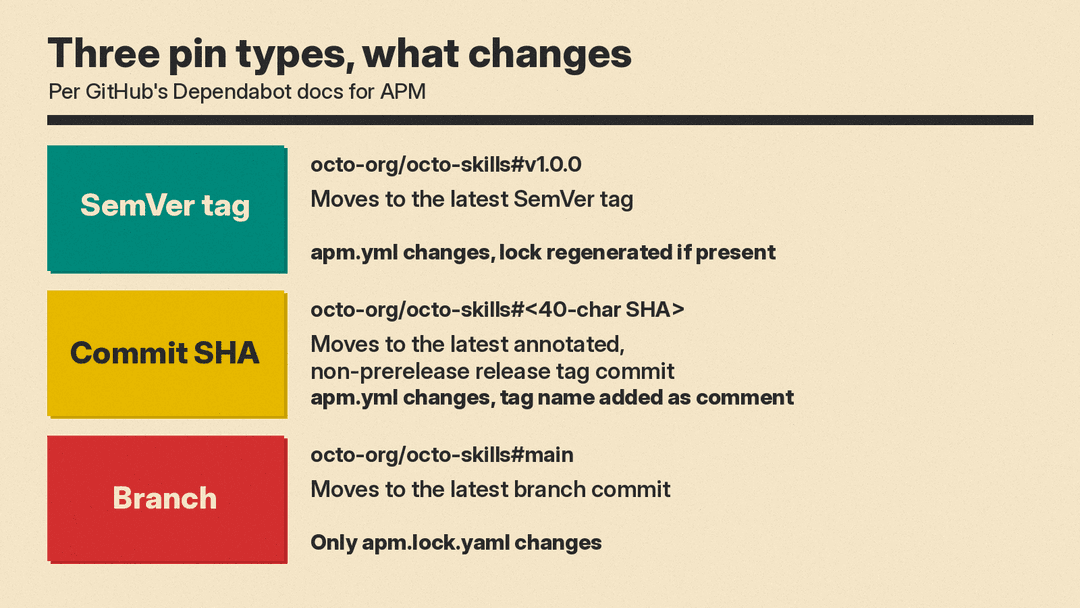
GitHub's docs say how Dependabot updates a dependency depends on how it is pinned. The page gives three cases.
- SemVer tag, such as
octo-org/octo-skills#v1.0.0: updated to the latest SemVer tag. Plain tags such asv1.4.0work, and so do package-scoped tags. A package-scoped tag must start with the package name, which is the repository name or the last component of a virtual package path. The docs giveocto-org/octo-skills/skills/review#review-v1.4.0as an example. - Commit SHA: updated to the commit of the latest annotated, non-prerelease release tag. Dependabot adds the tag name as a comment, for example
# v1.4.0. - Branch, such as
octo-org/octo-skills#main: updated to the latest commit on the branch. Onlyapm.lock.yamlchanges, because the manifest still names the branch. This case requires an existingapm.lock.yamlfile.
What Dependabot skips
The same GitHub docs page lists entries that Dependabot does not update:
- Object-form entries (
git:,registry:,id:orpath:maps) andmcp:entries. - Entries without a ref, such as
octo-org/octo-skills. - Local path entries, such as
./my-package. - Entries hosted on Azure DevOps.
- Entries that use an
http://orgit://clone URL. - Entries written as YAML block scalars (
>or|) or as quoted strings that use escape sequences. - Abbreviated commit SHAs.
- Shorthand entries when the manifest sets
registries.default. Entries that use an explicit clone URL are still updated.
The APM dependency guide lists several of these forms, such as local paths and object form, as valid APM syntax. Valid APM syntax and Dependabot coverage are separate questions.
For private sources, the docs say private registry support uses git registries. Access is configured by specifying a git registry in dependabot.yml.
Turning it on
GitHub's changelog says to add an apm entry to .github/dependabot.yml, specify the directory that contains apm.yml, and choose an update schedule. The options reference lists apm as a package-ecosystem value and lists the required keys: version, updates, package-ecosystem, directory or directories, and schedule.interval. A minimal file built from those keys looks like this. It assumes apm.yml is at the repository root.
version: 2
updates:
  - package-ecosystem: "apm"
    directory: "/"
    schedule:
      interval: "weekly"
This example combines the documented required keys with the apm value. GitHub's docs do not print an APM-specific sample file. The options reference lists weekly among the supported interval values.
Availability
GitHub says APM support is generally available on github.com for all GitHub plans and will be available in GitHub Enterprise Server 3.24. That statement covers Dependabot's APM support, not APM itself. The supported ecosystems table lists the supported versions for APM as "Not applicable".
What to check
- Look at how each entry in
apm.ymlis pinned. - Keep
apm.lock.yamlin version control. Branch pins need it, and Dependabot does not create one. - Read the skip list before relying on automation.
- Read each pull request closely. The APM docs say "Agent context is executable".
GitHub Copilot is one of the tools APM writes files for, and we covered its JetBrains Air and Xcode support separately.
