
GitHub has added GitHub Copilot to two more places where developers run coding agents. GitHub's November 3 changelog says Copilot is now available in JetBrains Air. Its November 4 changelog says Copilot is in public preview in Xcode's built-in coding assistant, starting with Xcode 27.3 beta.
Copilot in JetBrains Air
GitHub says the Air integration uses the Agent Client Protocol (ACP) and supports tasks in a JetBrains IDE or in the cloud. The changelog lists three changes:
- Copilot appears in Air's agent picker and uses the developer's existing Copilot subscription.
- Developers can track multiple agent sessions, use project context and IDE tools, and review changes next to their code.
- Cloud tasks run in isolated environments through Air Teams, from the IDE or a browser, and use the Copilot plan rather than JetBrains AI credits.
JetBrains' own post says Air runs the official GitHub Copilot CLI over ACP, and that Copilot appears in the same task list as Claude, Codex and Junie. It says local use needs a Copilot subscription but not Air Teams.
Cloud tasks have more requirements, according to GitHub: a JetBrains account in an Air Teams-enabled business organization, a Copilot subscription, and Copilot enabled by the Air administrator. A browser task starts by connecting GitHub under Settings > VCS Providers. An IDE task uses the Air plugin and the Cloud option in the environment selector.
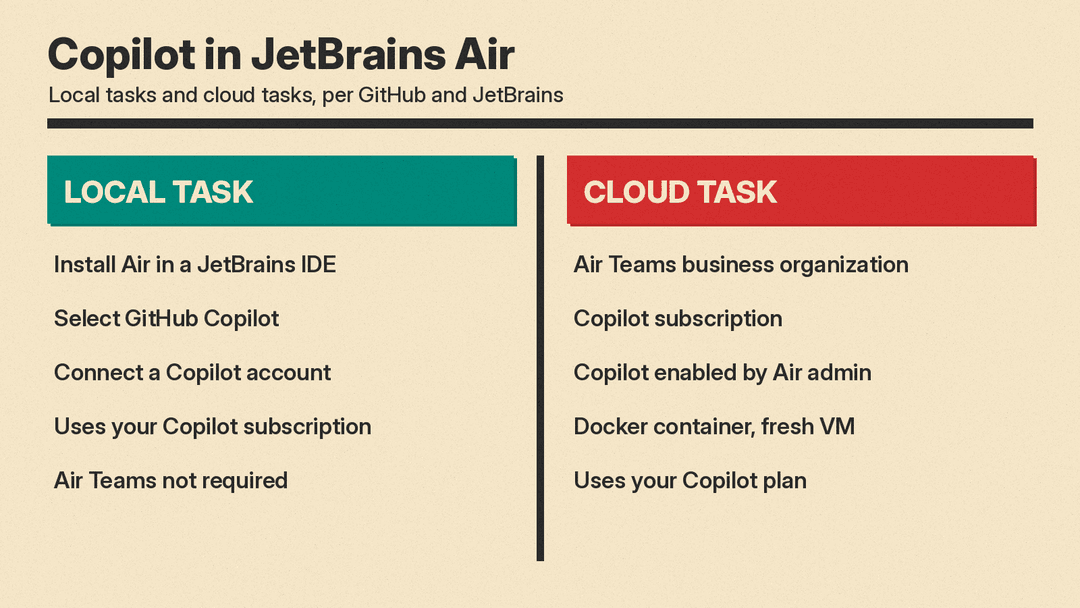
GitHub says a cloud task works in a Docker container on a fresh virtual machine. All traffic goes through a proxy, and no state carries over between tasks. GitHub adds that Copilot can build, test and install packages without changing the local environment.
Limits GitHub and JetBrains list
The changelog has a section of cloud task considerations. Four of them concern cost and control:
- Air may only check whether a subscription or credits are available when the cloud environment starts. If they are not, the task fails and an error appears in the session.
- A developer cannot choose whether a task uses a personal Copilot plan or an organization plan.
- Air's governance and analytics features do not include Copilot usage.
- Air administrators can disable Copilot with a governance policy, but they cannot set Copilot spending limits in Air.
JetBrains' FAQ says GitHub, not Air, handles the Copilot account. It says to check usage on GitHub, because Air does not track Copilot credits and cannot set a spending limit.
Plugin or Air
Three Microsoft authors, one of them a product manager for GitHub Copilot for JetBrains, wrote a Microsoft Developer Blogs post on how the two options differ. It says the Copilot plugin remains the authors' recommended experience for developers who want deeper IDE integration, advanced capabilities and Copilot enterprise controls. It lists these items as included in the plugin and not included in Air:
- Customizations and agent debug logs
- Inline agentic chat
- Enterprise managed settings and policy diagnostics
- Local Sandbox
- Copilot Code Review and commit message generation
The post says both options share agentic coding, parallel sessions, IDE tools, project context and model selection. It also says that from JetBrains IDE version 2026.2.4, Copilot can be chosen as a provider for the IDE's Next Edit Suggestions feature.
Copilot in Xcode
GitHub's Xcode changelog says the integration is in public preview and requires a Mac running macOS Tahoe 26.6 or later. To set it up, a developer opens Xcode > Settings > Intelligence. GitHub says all Copilot plans are supported, and that the existing GitHub Copilot for Xcode extension remains a separate option.
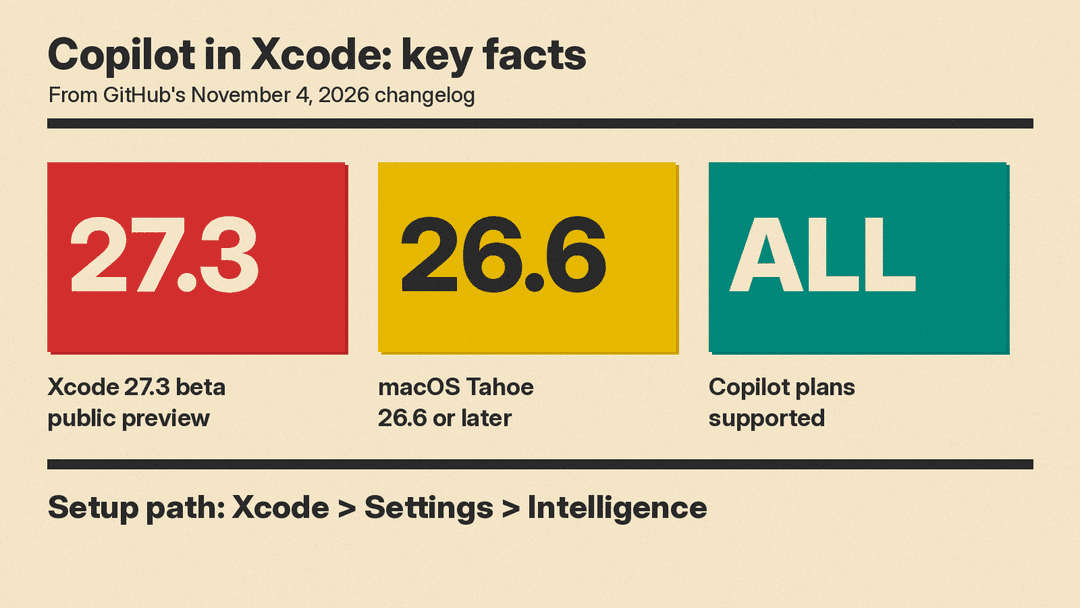
9to5Mac reports that the Xcode 27.3 beta 1 release notes list one item under Coding Intelligence: GitHub Copilot is now available in the coding assistant. Apple's page Setting up coding intelligence says Claude or ChatGPT can be turned on, and that an agent that supports ACP can be added through Add an Agent. GitHub's changelog does not say whether the Copilot integration in Xcode uses ACP.
Apple also says an agent set up in the Intelligence settings may access project files and other information when it processes a request.
What ACP is
The Agent Client Protocol documentation says ACP standardizes communication between code editors or IDEs and coding agents, for local and remote use, and compares the idea to the Language Server Protocol. It says full support for remote agents is a work in progress.
Our earlier post on Android Studio's support for Claude, Codex and more than 40 agents covers another IDE that lets developers bring their own agent. GitHub's separate Copilot app is covered in GitHub Copilot App Adds Projects and Computer Use.
The changelogs give no price for either integration and do not say when Xcode's Copilot support leaves preview.
Sources
- GitHub Changelog: GitHub Copilot is now available in JetBrains Air (November 3, 2026)
- GitHub Changelog: GitHub Copilot is now available in Xcode's coding assistant (November 4, 2026)
- JetBrains Blog: Use Your GitHub Copilot Plan in JetBrains Air
- Microsoft Developer Blogs: GitHub Copilot in JetBrains Air, Plugin vs. Agent
- 9to5Mac: Xcode 27.3 adds GitHub Copilot to its built-in coding assistant
- Apple: Setting up coding intelligence
- Agent Client Protocol: Introduction
