
Cursor has made Projects, its workspace for running a group of coding agents through one coordinator, a shared space for teams. In a Nov. 10 blog post, the company said Projects "is now multiplayer": you can invite teammates into a Project and plan, build and ship together, alongside all of your agents. Cursor says the update is "rolling out in beta to all users in Cursor starting today."
The Projects documentation adds limits: sharing needs a team account and Cursor 3.26.13 or later.
What a Cursor Project is
Cursor introduced Projects in September as a way for one engineer to direct a fleet of agents through a single coordinator. The docs describe the setup this way: you chat with a coordinator agent, and "the coordinator doesn't write code itself." It plans the work, delegates it to agents that write the code, and brings the finished work back to you to check.
Per the docs, a Project runs on its own computer in the cloud, so closing your laptop doesn't stop it. When something needs testing on your machine, the coordinator starts a local agent to run it there.
The coordinator model is similar to Claude Code Projects. Projects run on the same Cloud Agents that Cursor recently let build and host live apps from chat.
What changes with multiplayer
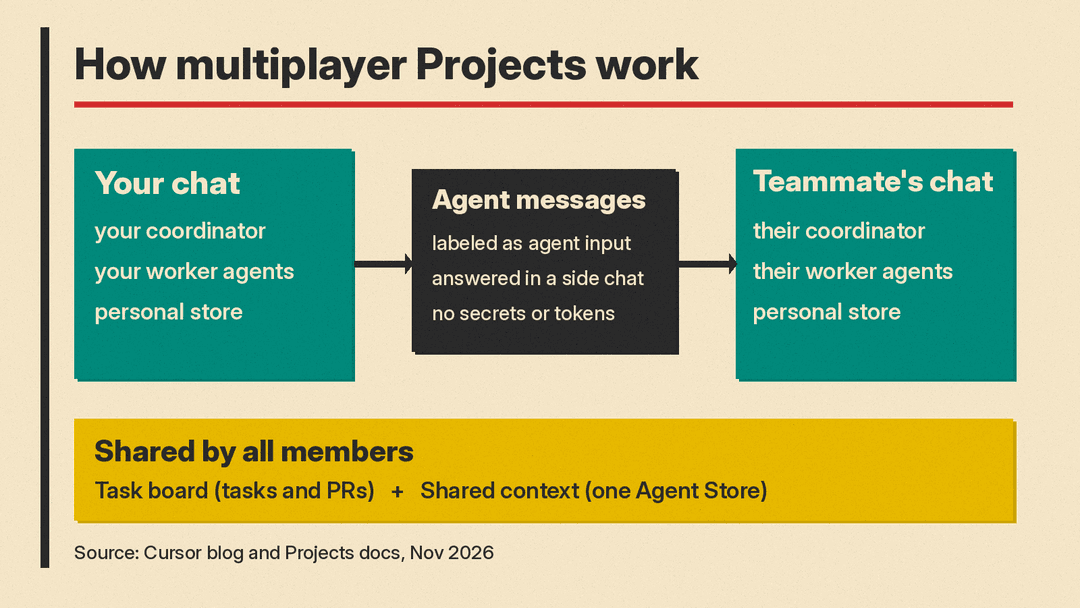
According to the docs, each person who joins a Project gets their own chat in it, with their own coordinator and worker agents. Members share two parts of the Project:
- The task board. Everyone works from the same tasks in the Project's list and board. The blog post says the board shows who's doing what, what everyone's agents are working on, and the PR behind each task.
- Shared context. Shown as Context in the app, this is one Agent Store that every member's agents read and write. Cursor says it holds requirements docs, diagrams, tech specs, mockups and more, and that "a decision made in one chat is accessible to every agent in the Project."
Each person also keeps a personal store that a teammate's agents never see. The docs say it holds your preferences and skills, which follow you between Projects without reaching your teammates.
Agents that message each other
The update also adds agent-to-agent messaging across teammates. When your coordinator needs something from a teammate's work, the docs say, it messages their coordinator directly, so you don't have to relay it.
Cursor gives two examples in its blog post. If an engineer is adding reviews to a product page while a designer redesigns it, their coordinators "spot the overlap early and sync up." If your feature reads from a database while a teammate changes the schema, Cursor says your agents agree on the order of work up front, "so neither of you hits a merge conflict at the end." The post does not include data on how often this works in practice.
The company also says several of its own teams now run their on-call rotations in a shared Project, and that in-progress work can be handed over directly to the new person's agent.
The guardrails Cursor lists
The docs set these rules for every message:
- Messages are labeled as agent input. The receiving agent is told which teammate's agent sent it, and treats the text "as untrusted input to weigh, not as a request from the person it works for." It asks before sharing that person's personal files or connector data.
- Your chat isn't interrupted. A teammate's message goes to a side chat forked from yours, called "Chat with {name}'s agent." Your chat gets a note about the exchange on its next turn.
- Side chats only answer. You can read, stop or archive a side chat, but you can't message it. The docs say it never shares secrets, credentials or tokens, can read the task board but not change it, and can't ask you questions, request access, connect source control or manage routines.
Who can join, and what it costs
Per the docs, Projects are shared within a Cursor team, and joining takes an invite. Someone on a personal account, or on another team, can't join. A teammate also needs access to the Project's repository. Joining isn't available with Privacy Mode (Legacy), on a Project that runs on a self-hosted machine, or on an archived Project.
Projects is available on every plan that includes Cloud Agents: Premium and higher, Teams, Enterprise, and legacy paid Cursor plans. It isn't available on Free, Plus or the legacy Hobby plan. On Cursor's pricing page as of November 2026:
- Premium: $30 per month.
- Super: $100 per month.
- Ultra: $200 per month.
- Teams: listed as "$30+/user/month."
- Enterprise: custom pricing through sales, with invoice billing.
Self-serve plans are paid by card and can be canceled at least 24 hours before renewal, per the same page. It says prices exclude taxes and that third-party model usage in Cursor is not included and is billed separately by usage. In a shared Project, the docs say each member's chat "runs and bills as them," so every teammate's agents draw on that person's own usage.
To try it, Cursor says to create a Project from the left-hand nav, then invite teammates.
