
CapCut announced a plugin for ChatGPT at its CapCut World event in Los Angeles. The idea: you plan a video in a ChatGPT conversation, CapCut builds a first cut on a real editing timeline, and you keep refining it by chatting or by hand in CapCut's web editor. CapCut's post on X on October 24, 2026 said the plugin is "coming soon" to ChatGPT. An early version, which CapCut's page calls CapCut × ChatGPT, can already be installed in the ChatGPT desktop app.
This guide covers what the plugin does, how the early access works, what is still unknown, and the other CapCut World announcements that matter for creators.
What the CapCut ChatGPT plugin is
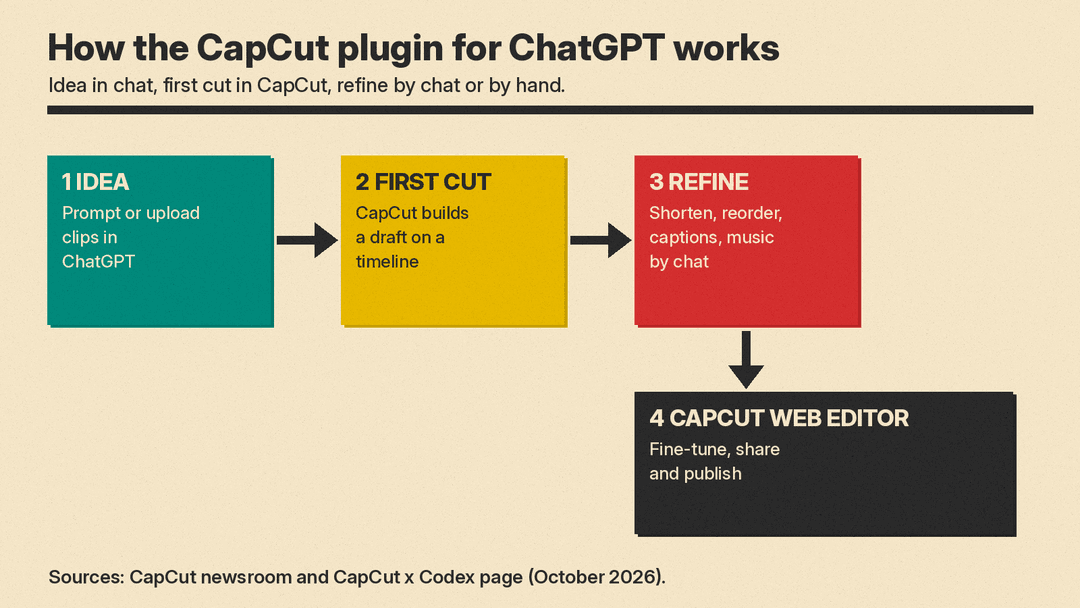
CapCut describes the plugin as a way to bring "CapCut's video editing and generation tools alongside ChatGPT." In its X post, CapCut laid out three steps: start with an idea in ChatGPT, bring it to life with the CapCut plugin inside the chat, then take the draft video to CapCut's web editor to refine, share and publish.
CapCut's newsroom post gives examples of the kind of feedback you can type once a first cut exists: hold a shot longer, make captions easier to read, or keep music underneath a voiceover. It also says you can make a hands-on edit yourself and then continue the conversation "with that change understood." In other words, the chat and the timeline are meant to stay in sync.
CapCut is large. The same post says it serves more than 700 million users every month across 170+ markets and 30 languages.
What it can do
The CapCut × ChatGPT page lists the current features:
- Generate images and video. Describe an idea in plain language to generate images, video material and an early draft.
- Start from your own media. Upload an existing draft and supporting media and keep developing it.
- Edit the timeline in chat. Shorten scenes, reorder clips, replace visuals, change text timing, update music, or revise the structure.
- Open the full editor. Launch the CapCut editor from the conversation to adjust tracks, timing and assets yourself.
- Find templates. Describe the story you want to tell, and the plugin narrows CapCut's template library to options that fit.
- Captions and effects. Generate subtitle text, prepare language versions, adjust caption timing and style, and add transitions, filters, stickers and animations.
Tech site Techiexpert describes a demo in which a user uploads soccer clips and asks for a highlight reel. The plugin writes a short project plan covering format, pacing, visual style and story, then opens a live CapCut project with a timeline in a side panel.
Reseller site Pay2GPT, in a guide to the plugin, reports that the plugin generates media with CapCut's own models such as Seedream and Seedance, and that the result is saved as a CapCut cloud draft rather than an MP4 file. You export the finished video from CapCut. If you want to compare Seedance with other video models, see our guide to the best AI video generators.
How to get early access today
Pay2GPT says the early version runs in a Codex task inside the ChatGPT desktop app. CapCut's page says it "is applied for the ChatGPT desktop app on PC, rather than as a browser-only ChatGPT video editor online," and that "availability may vary by app version, account, and region." Pay2GPT says the early version works on Mac and Windows.
The setup, as CapCut's page and Techiexpert describe it:
- Open the ChatGPT desktop app and start a task.
- Get the setup prompt from CapCut. The CapCut × ChatGPT page shows it at the top. Techiexpert says you can also find it from the plugin icon in the Video Editor on CapCut Web.
- Paste the prompt into the task. It tells ChatGPT to download CapCut's install instructions and follow them to install and authorize the plugin.
- Approve the connection and sign in to your CapCut account.
CapCut says you can start the workflow for free. Two practical notes: the setup prompt asks an AI agent to run install steps on your computer, so copy it only from CapCut's own page. And Pay2GPT reports that a sign-in error such as "invalid_request" probably means your CapCut account region does not match your connection.
When the full version arrives
The dates are not fully settled, so here is what each source says:
- CapCut's X post (October 24): the plugin is "coming soon" to ChatGPT, with no date.
- CapCut's newsroom post: "in the coming months" creators will be able to use the full idea-to-first-cut-to-chat workflow.
- Techiexpert: an open beta is launching in November 2026 across mobile, desktop and web.
- Pay2GPT: CapCut's launch video promises the November open beta, and copy shared by partner creators says ChatGPT mobile and web support should follow in mid-November.
Treat November as the expected window, not a confirmed date.
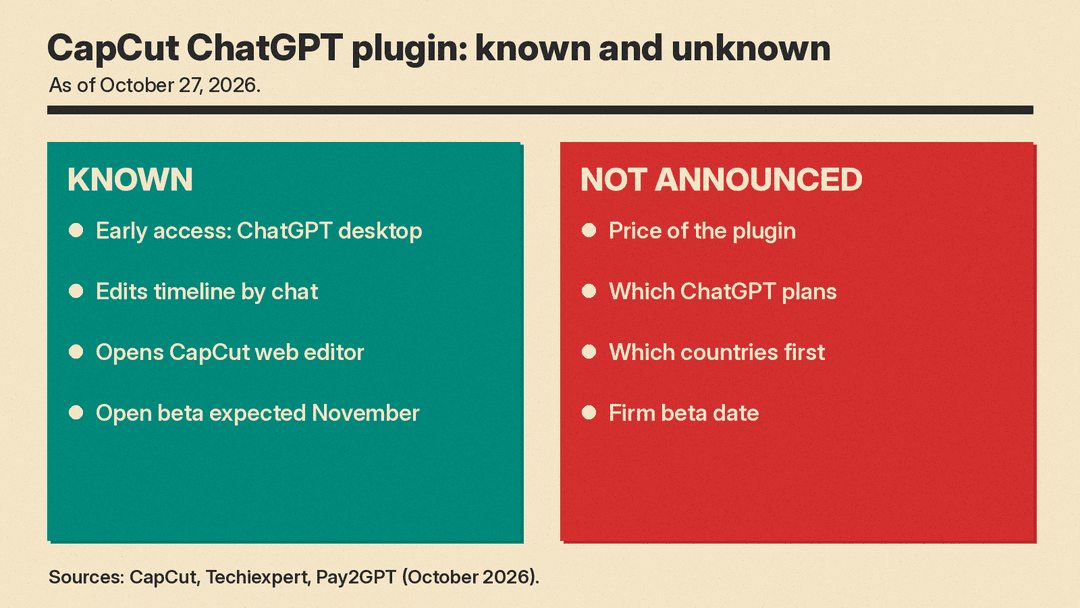
What is still unknown
Techiexpert notes that CapCut has not shared pricing, which ChatGPT subscription plans are required, or which countries get the beta first. Pay2GPT adds that neither CapCut nor OpenAI has said which plans the plugin is for. Because the early version runs in Codex, Pay2GPT points out that your Codex allowance matters: it says ChatGPT's pricing page lists Codex as limited on the Free and Go plans. It also reports that AI generation uses CapCut credits and that some features, such as watermark-free export, need CapCut Pro.
Quality is also an open question. The public examples so far come from CapCut's own demo. How well the plugin handles real footage, long projects and precise edits will be clearer once more people use it in the beta.
Why it matters
Runway's App Studio lets teams describe a creative tool and get a working app, and HeyGen's new Video 1 model generates clips with dialogue and sound. CapCut's angle is different: it does not stop at generating a clip. It hands you an editable timeline.
CapCut's page pitches the plugin at several kinds of creators. It says high-volume creators and teams can use it to "reduce repeated setup across deliverables," and that creative explorers can start from a concept, prompt or script without all the footage.
The plugin keeps CapCut's editor in the loop, so the final cut still happens in CapCut.
Other CapCut World announcements
CapCut's newsroom post listed several other updates:
- EditPilot on CapCut Desktop: describe edits in natural language to handle complex or repetitive timeline tasks, for example changing the color of one object in a shot while keeping the rest intact.
- Generative and Interactive Edit: select what you want to change directly in the preview window instead of rebuilding a sequence or reshooting.
- Web and mobile upgrades: the web editor gets AI image, video and audio generation, and Interactive Edit, AI Extend and Intelligent Audio are coming to it. On mobile, AI Lab gives a conversational space to turn photos and clips into projects such as vlogs or social recaps.
- An agentic pilot: a more agentic creation experience, from creative goal to first draft, will roll out "in the coming months" on desktop, web and mobile.
- AI transparency tool: a pilot that checks whether an uploaded file was made with the help of CapCut, Dreamina, Pippit or Hypic AI tools. CapCut also cites AI labels, C2PA Content Credentials and invisible watermarks.
- Skills Marketplace on the web: creators can share a visual style, workflow or technique as a reusable Skill.
- Visual Creator Program: a new program for creators in graphic design, animation, visual design, and AI prompts and Skills.
CapCut says the next and final CapCut World event of 2026 takes place in London in November.
Bottom line
The CapCut plugin for ChatGPT turns a chat into the start of a real edit: a plan, a first cut on a timeline, and changes by conversation, with CapCut's web editor for the finish. You can try an early version in the ChatGPT desktop app now. A wider open beta is expected around November, but pricing, plan requirements and regions are not announced yet.
