
Most "best ChatGPT prompts" lists are one-liners like "act as a marketing expert." They fail at work for the same reason a one-line email to a new colleague fails: no context, no audience, no shape for the answer. This list is 50 copy-paste prompts for everyday office jobs, each built to the three-part structure OpenAI teaches in its own prompting guide: say the task, give the context, and describe the output you want.
Sixteen of the prompts are adapted from OpenAI Academy's ChatGPT for any role prompt pack (last updated September 17, 2026) and are marked "Adapted from OpenAI." The other 34 are ours. They are plain text with no ChatGPT-only features, so you can paste them into Claude, Gemini, or Grok as well.
A note on testing: we did not run these prompts against a model for this article, so this post quotes no model outputs. Treat each one as a starting template. Fill in the brackets, read the answer, and follow up.
All product details are as of October 2026.
How to use these prompts
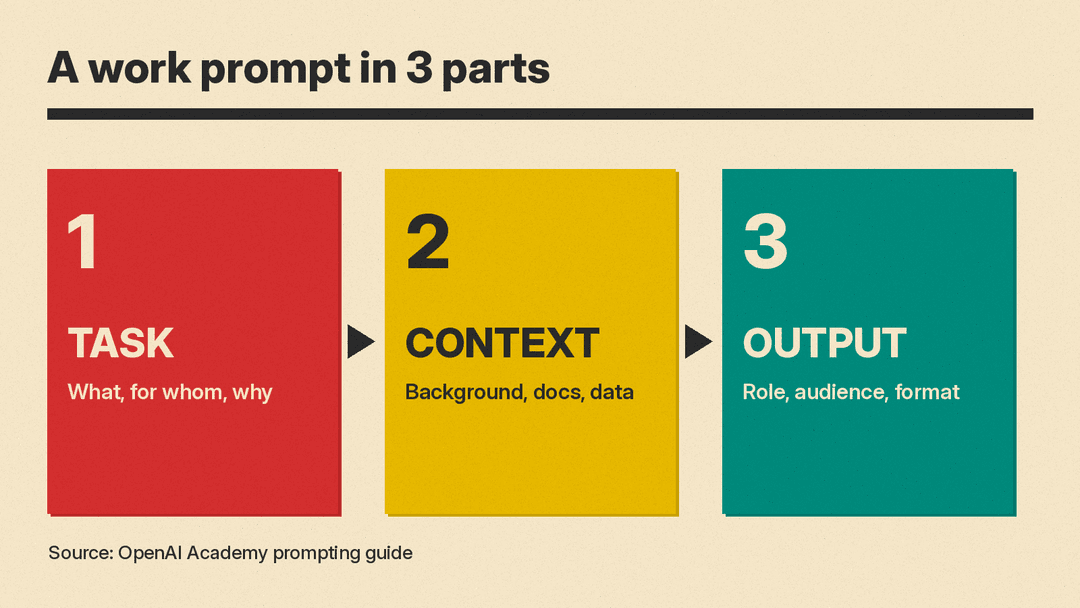
OpenAI's guide breaks a good prompt into three steps:
- Outline the task. What you want, who it is for, and why it matters.
- Give helpful context. Background, documents, or data the model should use.
- Describe your ideal output. Role, audience, and format.
The same guide adds a few habits worth keeping. Break big tasks into smaller steps. Be specific, but leave out detail that does not matter. Ask for options when you want choices. Set priorities, such as accuracy over speed, and if you want more careful reasoning, say so ("think carefully"). Name the format, since the model can return tables, outlines, or JSON when asked.
OpenAI's ChatGPT 101 resource guide makes one more point that matters for work: "You do not need a perfect prompt before you begin." Start with what you know, then follow up, add context, attach a file, or push back when an answer feels generic. The last section of this list is prompts for exactly that.
Two rules before you paste anything:
- Check your company's AI policy before you paste customer data, contracts, or internal numbers into any chatbot.
- Check the facts. A model can state wrong numbers with confidence. Anything that goes to a customer or an executive gets a human read first.
If you are new to prompting, our beginner's guide to writing better AI prompts covers the basics in more depth.
Email and writing (8 prompts)
1. Write a professional email
Adapted from OpenAI.
Write a professional email to [recipient and their role]. The email is about [topic]. I need them to [the one action you want]. Keep it polite, clear, and under 150 words. Give me a subject line and a short closing.2. Rewrite for clarity
Adapted from OpenAI.
Rewrite the text below so it is easier to understand. It will be read by [audience] in a professional setting. Keep the meaning and all facts the same. Use short sentences and plain words. After the rewrite, list any sentence you changed in meaning, if any.

Text: [paste text]
3. Adapt a message for a new audience
Adapted from OpenAI.
Reframe this message for [executives / peers / customers]. It was originally written for [original audience and context]. Adjust tone, word choice, and level of detail for the new audience. Keep it the same length or shorter.

Message: [paste text]
4. Say no without burning the bridge
Draft a reply declining [request] from [person and relationship]. The reason is [real reason]. I want to keep a good relationship and, if possible, offer [alternative]. Keep it warm, direct, and under 120 words. Do not apologize more than once.5. Shorten a long draft
Cut the draft below to about half its length without losing any decision, number, date, or request. Put the main ask in the first two sentences. Return only the shortened version.

Draft: [paste text]
6. Fix the tone of a tense email
I am replying to the email below. I feel [frustrated / rushed / defensive], and I want my reply to sound calm and professional. Here is my rough reply. Keep my points, remove anything that reads as blame or sarcasm, and flag any line that could still be read badly.

Their email: [paste]
My rough reply: [paste]
7. Write a clear announcement
Write a short internal announcement about [change]. Readers are [team or company]. Cover what is changing, when, why, and what they need to do. Use a headline, three short paragraphs, and a final line with who to contact for questions.8. Turn bullet notes into a polished paragraph
Turn these notes into one clear paragraph for [audience]. Keep every fact. Do not add claims that are not in the notes. If a note is unclear, ask me about it instead of guessing.

Notes: [paste bullets]
Meetings (6 prompts)
For recorded calls, a dedicated tool may do the transcript part for you. See our roundup of AI meeting note takers. These prompts cover the rest.
9. Build a meeting agenda
Adapted from OpenAI.
Create an agenda for a [length]-minute meeting about [topic] with [attendees and roles]. The goal of the meeting is [decision or outcome]. Break it into sections with time estimates and a goal for each section. End with what attendees should prepare in advance.10. Summarize rough meeting notes
Adapted from OpenAI.
Summarize these meeting notes into a structured recap. The notes are rough and informal. Organize them under three headings: key decisions, next steps, and owners. If something was discussed but not decided, list it under a fourth heading, open questions.

Notes: [paste text]
11. Pull out action items
Adapted from OpenAI.
Turn the meeting notes below into a task list grouped by owner. Include deadlines only if they were mentioned. Mark any task that has no clear owner as "Owner needed."

Notes: [paste text]
12. Prepare smart questions
Adapted from OpenAI.
I have a meeting about [topic] with [who]. The purpose is [purpose]. My role is [your role]. Suggest 7 questions I could ask that show I prepared, and mark the 2 that matter most for [your goal].13. Write the follow-up email
Adapted from OpenAI.
Write a follow-up email after a meeting about [topic]. Recap the key points, list who owns what, and give next steps with deadlines. Use the notes below as the only source of facts. Keep it under 200 words.

Notes: [paste notes]
14. Decide whether a meeting is needed
Here is what I want to accomplish: [goal]. People involved: [names or roles]. Tell me whether this needs a live meeting, a short async message, or a document for comments. Give a one-line reason, then draft whichever you recommend.Planning and productivity (6 prompts)
15. Prioritize today's tasks
Adapted from OpenAI.
Here is my task list for today: [paste tasks]. I have about [hours] of focused time and these fixed commitments: [meetings]. Put the tasks in priority order, say which ones to do first and why, and tell me which ones I could defer or delegate.16. Plan the week
Adapted from OpenAI.
Build a weekly plan for me. My role is [role]. This week I have these deadlines: [list], these meetings: [list], and I need [hours] of focus time for [project]. Return a day-by-day plan with the top priority for each day.17. Break a big project into steps
I need to deliver [project] by [date]. Break it into milestones and tasks, with a rough time estimate for each and any dependencies between them. Flag the step most likely to slip and suggest how to protect it.18. Write a project status update
Adapted from OpenAI.
Draft a short project update for [stakeholders]. The project is [description]. Include progress since last update, current blockers, and next steps. Use three short sections with headings, and keep it under 200 words.

Facts to use: [paste progress notes]
19. Draft a standard operating procedure
Write a step-by-step procedure for [recurring task] so a new team member can do it alone. Use numbered steps, note the tools needed for each step, and add a short "common mistakes" section at the end. Ask me questions first if any step is unclear from this description: [describe how you do it now].20. Find what to automate
Here is a typical week of my work: [list recurring tasks and how long each takes]. Which three tasks are the best candidates to automate or template, and why? For each, suggest a simple first step I could take this week.Analysis and decisions (6 prompts)
21. Find the root cause
Adapted from OpenAI.
Analyze this workplace problem: [describe issue]. It has happened [how often] since [when]. List the most likely root causes, from most to least likely, and for each one give a question I can ask or a check I can run to confirm it.22. Compare options
Adapted from OpenAI.
Compare these options: [list options]. The decision needs to be made by [date], and what matters most is [priority: cost / speed / risk / quality]. For each option, give pros, cons, and risks. Finish with a short table comparing them on the criteria that matter most.23. Set decision criteria
Adapted from OpenAI.
I need to decide [decision]. Stakeholders are [list], and they care about [their concerns]. Propose 4 to 6 decision criteria with suggested weights that add up to 100, and explain each in one line.24. Assess the risks of a plan
Adapted from OpenAI.
Here is a plan: [describe plan]. It starts on [date]. List the main risks, rate each by likelihood and impact (low, medium, high), and suggest one mitigation for each. Put the highest-risk items first.25. Argue the other side
Here is my proposal: [paste]. Act as a skeptical [CFO / customer / senior engineer]. Give me the five strongest objections they would raise, and for each, the best short answer I could give.26. Run a quick pre-mortem
Imagine it is [date six months from now] and [project] has failed. Write the five most likely reasons it failed, based on this description: [paste]. Then suggest one early warning sign to watch for each reason.Research and summarizing (6 prompts)
27. Summarize a long document
Adapted from OpenAI.
Summarize the document below into 5 key points and 3 recommended actions. It is a [report / plan / policy]. My role is [role], so focus on what affects [your area]. Quote the document directly for any number you include.

Document: [paste or attach]
28. Explain a topic fast
Explain [topic] to me as a smart beginner in about 300 words. Then give 5 terms I will hear in meetings about it, each with a one-line definition. Say clearly if any part is uncertain or disputed.29. Compare two documents
Compare these two versions of [document type]. List every change that affects [cost / obligations / dates / scope], quoting the old and new wording side by side. Ignore formatting-only changes.

Version A: [paste]
Version B: [paste]
30. Prepare a competitor brief
Using only the material below, write a one-page brief on [competitor]: what they sell, who they sell to, how they price, and where they look stronger or weaker than us. If the material does not answer something, write "Not in sources" instead of guessing.

Material: [paste notes, pages, or reports]
31. Turn a report into talking points
Turn this report into 6 talking points I can use in a 5-minute update to [audience]. Each point should be one sentence plus one supporting number from the report.

Report: [paste]
32. Draft a research plan
I need to answer this question for work: [question]. Suggest a research plan: what sources to check, what questions to ask colleagues, and what a good answer would look like. Keep it to one page.Spreadsheets and data (5 prompts)
33. Write a formula
I use [Excel / Google Sheets]. Column A has [data], column B has [data]. I want column C to [result you want]. Give me the formula, explain how it works in two sentences, and show what it returns for this example row: [example].34. Clean messy data
Here is a sample of messy data: [paste 10 to 20 rows]. Describe each problem you see (duplicates, formats, blanks, typos), then give me step-by-step instructions to clean the full sheet in [Excel / Google Sheets].35. Find the story in the numbers
Here is a table of [what the data is]: [paste or attach]. Tell me the three most important patterns or changes, with the numbers that support each. Then list one thing in the data that looks odd and should be double-checked.36. Pick the right chart
I need to show [message] to [audience] using this data: [describe columns]. Recommend the best chart type and explain why in one line. Suggest a title that states the takeaway, not just the topic.37. Build a simple tracker
Design a simple spreadsheet to track [what you are tracking]. List the columns, the data type for each, and any formulas or dropdowns that would help. Keep it to 10 columns or fewer.Managing a team (5 prompts)
38. Write a one-on-one agenda
Write an agenda for a 30-minute one-on-one with [direct report's role]. Recent context: [projects, wins, concerns]. Include questions about workload, blockers, and growth, and leave room for their topics first.39. Give clear feedback
Help me write feedback for [role] about [specific behavior]. Here is what happened: [facts]. The impact was [impact]. I want to be direct and kind and end with a clear next step. Keep it to what I would say out loud in about one minute.40. Draft a job description
Write a job description for [role] on a [team] at a [company type]. The main outcomes for the first year are [list]. Must-have skills: [list]. Nice-to-have: [list]. Use plain language and avoid jargon and buzzwords.41. Create interview questions
Create 8 interview questions for [role] that test [skills]. For each question, describe what a strong answer includes and what a weak answer looks like.42. Plan a new hire's first week
Plan the first week for a new [role] joining [team]. Include who they should meet, what they should read, one small task they can finish, and a check-in at the end of the week. Return it as a day-by-day list.Career and self-review (4 prompts)
43. Write your self-review
Help me write my self-review for [period]. Here are my main projects and results: [list with numbers where you have them]. Turn them into 4 or 5 achievement statements that start with a verb and include the impact. Do not add any numbers I did not give you.44. Prepare for a raise conversation
I want to ask for [raise / promotion]. Here is my case: [results, new responsibilities, market info]. Help me plan the conversation: an opening line, my three strongest points, and calm answers to the two objections I am most likely to hear.45. Update your LinkedIn summary
Rewrite my LinkedIn summary for [target role]. Here is my current summary: [paste]. Here are my top three results: [list]. Keep it under 150 words, written in first person, with no buzzwords.46. Learn a new skill at work
I need to get good at [skill] for my job in about [weeks]. I can spend [hours] a week. Build a week-by-week learning plan with one practice task per week that uses my real work: [describe your work].Follow-ups that fix a weak answer (4 prompts)
These are the prompts you send second. OpenAI's 101 guide says to push back "when something feels generic." These give you ways to do that.
47. Ask it to ask you first
Before you answer, ask me up to 5 questions about anything you need to know to do this well. Then wait for my answers.48. Make it specific
That answer is too generic. Rewrite it for my situation: [add the missing detail: industry, audience, numbers, constraint]. Cut anything that would apply to any company.49. Check its own work
Review your last answer. List any claim that might be wrong or that I should verify, any assumption you made, and anything I asked for that you skipped. Then give a corrected version.50. Give options, not one answer
Give me three different versions: one very short, one detailed, and one in a different tone ([tone]). Label each and say in one line when I would choose it.Where these prompts fit
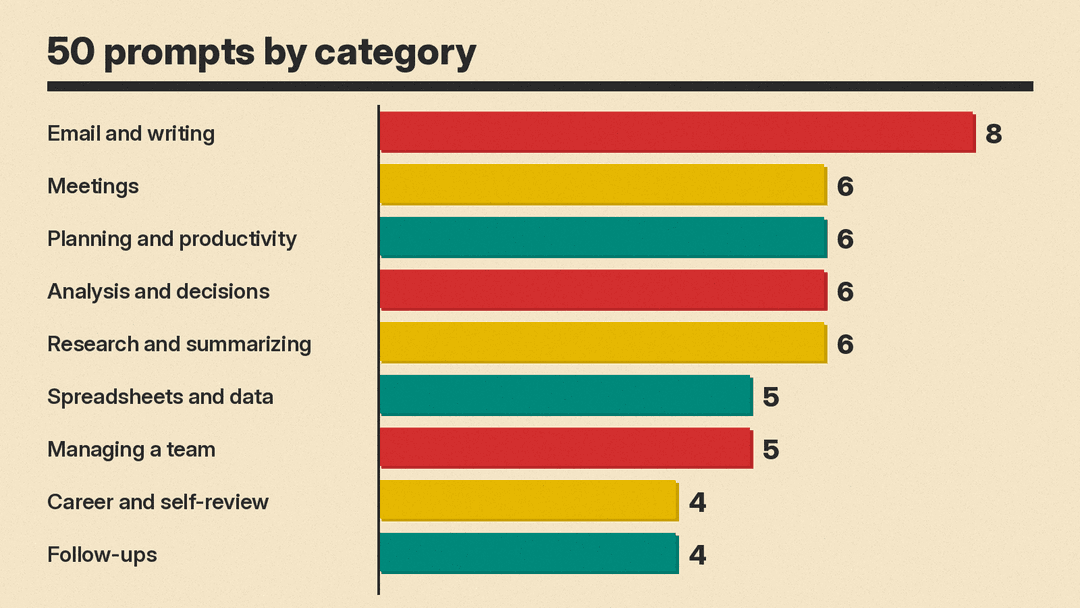
Email and writing has the most prompts in this list, with 8. For bigger deliverables, the same three-part structure still applies. A deck works the same way: our guide to ChatGPT Slides covers that feature. For building pages and sites, see our prompts to build a website with AI.
OpenAI also publishes role-specific packs, such as ChatGPT for sales and ChatGPT for managers. They are worth a look once the general prompts above become habit.
