
Bria has released Fibo 2.0, an 8B image model that does text-to-image and image editing in one set of weights. The company announced it on October 20 and published two checkpoints on Hugging Face: Fibo 2.0 Dev, the full base model, and Fibo 2.0 Edit Turbo, a distilled version for fast edits.
Two things stand out. Bria says it is trained only on licensed data, and it is driven by long structured JSON prompts rather than a single sentence. The catch for most readers is the license: the weights are free for non-commercial use only. Here is what the release includes, how the JSON prompting works, what it costs, and who it fits.
What Fibo 2.0 is
Fibo is Bria's image model family. According to the Dev model card, Fibo 2.0 is the first version where "image editing and image generation live in a single unified model." The card says the new version adds general-purpose editing and "a leap in text rendering, texture and anatomy," which it describes as gains in legible in-image typography, realistic surface texture, and hands, faces and poses.
The architecture details on the card:
- 8B-parameter flow-matching model that works in the latent space of the FLUX.2 VAE.
- Prompts are encoded by Qwen3-VL-4B-Instruct. When editing, the source images are encoded by both that vision-language model and the VAE.
- A two-layer Perceiver resampler compresses the text encoder output into 256 to 512 "gist" tokens, with more tokens for longer prompts.
- A single-stream DiT with 44 blocks does the image work. Internal layers of the vision-language model also feed five of those blocks through cross-attention.
- Training data is curated from Bria's dataset of about 1 billion images, paired with long structured captions.
Bria trains at about one megapixel. The card recommends sizes that are multiples of 16 near that area, such as 1024x1024, 1424x800 (16:9) or 1248x832 (3:2).
Five ways to use one model
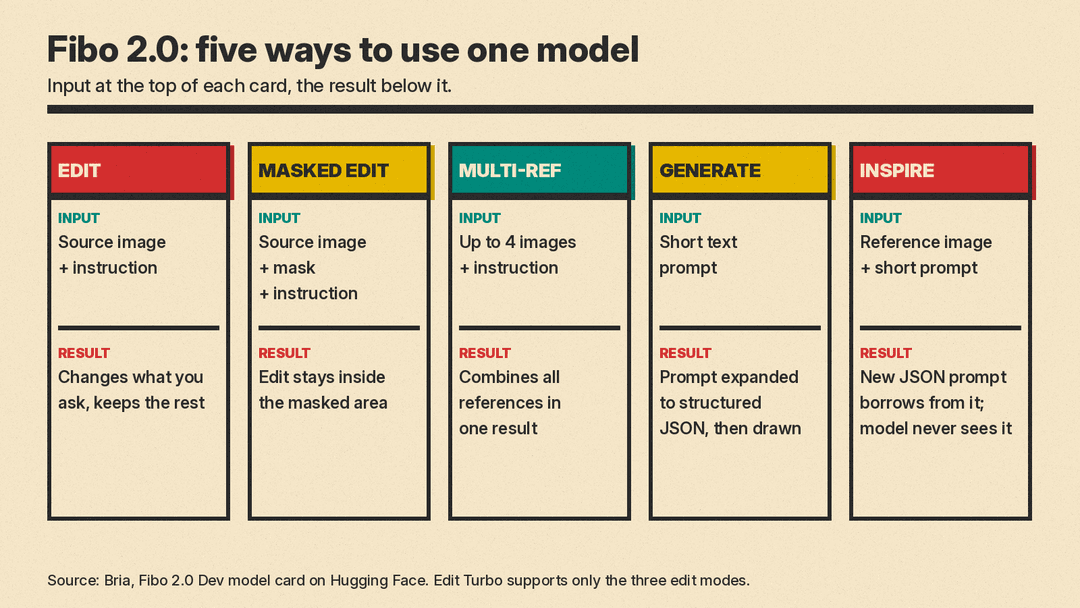
The model card lists five modes:
- Edit. A source image plus an instruction. You can add, remove or replace objects, or change style, lighting, background, materials or text. Bria says everything you did not ask to change is preserved.
- Masked edit. A source image, a mask and an instruction. The edit stays inside the white area of the mask.
- Multi-reference. Up to four images plus an instruction, combined into one result. Bria lists reference-guided composition, virtual try-on, product integration, and style or appearance transfer as uses. In the prompt you refer to the images as
<image_1>,<image_2>and so on. - Generate. A short text prompt. A vision-language model expands it into a full structured prompt, and Fibo 2.0 renders it. You get back both the image and the JSON.
- Inspire. A reference image plus a short prompt. The helper writes a new structured prompt that borrows the subject, style, colors or composition you ask for, and Fibo 2.0 generates from that prompt alone. Per the card, the model "never sees the image," so the result is inspired by the reference rather than a copy of it.
Edit Turbo handles only the three editing modes. For text-to-image you use Dev.
How the JSON prompts work
The core idea behind Fibo is what Bria calls Visual GenAI Language, or VGL. Instead of a loose sentence, each image is described by a JSON object in which lighting, composition, style, camera parameters and every object in the scene are separate fields. Bria's earlier paper on the approach is titled "Generating an Image From 1,000 Words," and the model card says Fibo was trained on structured captions "of up to 1,000+ words."
The practical claim is control. The card says you can change one attribute, such as the camera angle, the time of day or an outfit, "without the rest of the scene drifting." It frames generation as "render this blueprint" and editing as "apply this diff to the blueprint." Because the JSON comes back with every result, you can edit a field and render again with the same seed. Bria's launch notes show this with an example where only a tank top's color is changed to hot pink.
You do not write the JSON by hand. The open-source bria-vgl package turns a short prompt or a plain edit instruction into the full structure. One detail worth knowing before you plan a fully local setup: the model card says bria-vgl "runs on Gemini" and asks for a Gemini API key. So the prompt-writing step calls an outside API even when the image model runs on your own GPU. You can skip it by writing or editing the JSON yourself, and Bria links a caption guide for that.
A smaller detail from the card: Fibo 2.0 "sees each text in the caption drawn as a small image," and the pipeline downloads two font files for this. That is part of how it handles in-image typography.
Dev vs Edit Turbo
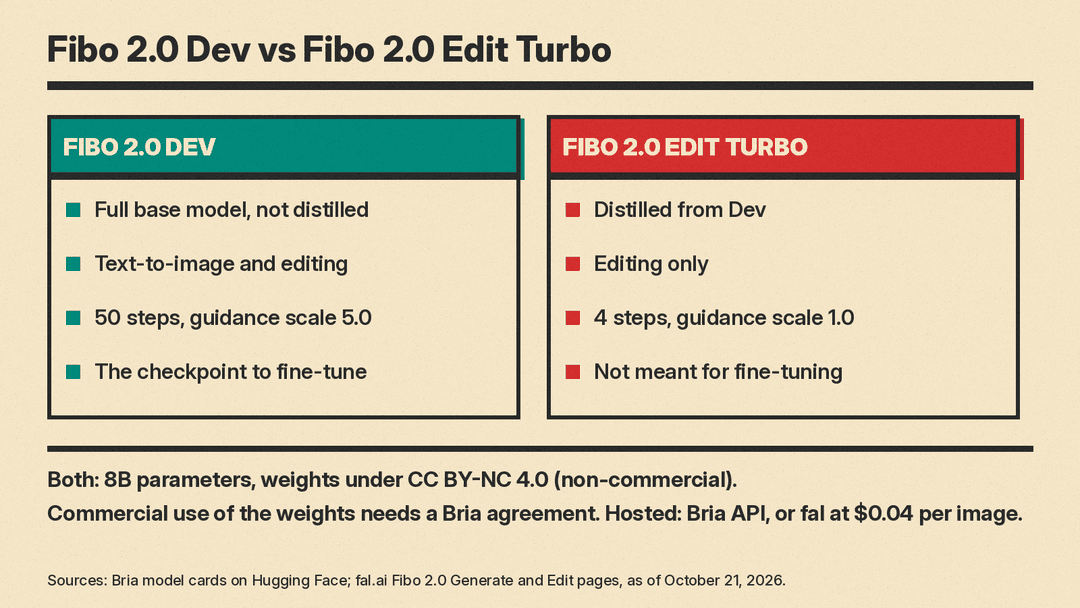
- Fibo 2.0 Dev is the full, non-distilled model. It does both generation and editing. Bria recommends 50 steps with a guidance scale of 5.0. This is the checkpoint to fine-tune, and the repository includes a single-GPU LoRA trainer for editing and text-to-image.
- Fibo 2.0 Edit Turbo is distilled from Dev for editing. It runs in 4 steps with a guidance scale of 1.0, and the Turbo card says negative prompts have no effect. It is not meant for fine-tuning.
Both share the same architecture and size. Bria does not publish local speed figures on the cards. On fal, Bria reports under 2 seconds for the model and under 5 seconds end to end through the Bria API, and fal notes that it has not independently verified latency on its own platform.
To run it locally today you need a branch of Diffusers. The BriaFibo2Pipeline is in Diffusers PR #14991, and until it merges the model card tells you to install Diffusers from that PR branch. Bria also lists ComfyUI nodes and Hugging Face Spaces for both generation and editing.
Benchmarks: what Bria claims
Bria's headline is the Artificial Analysis image arena. The model card says Fibo 2.0 is "#1 in image editing and #2 in text-to-image among open-weights models," with rankings as of October 20, 2026. The fal edit page shows a leaderboard snapshot from the same date with Fibo 2.0 at an Elo of 1087 on the AA-Image-Editing v2.1 open-weights board.
Bria's claims against closed models are broader. On image editing, its launch post on X says: "Ahead of 33 closed models from leading labs, and trained only on licensed data." Its docs say it "edits better than closed models from Ideogram, ByteDance and Black Forest Labs." Those are Bria's readings of the arena. Bria does not say it beats every closed model, and arena rankings move as new models and votes arrive, so check the live leaderboard before you rely on a rank.
License and price
This is where readers need to slow down.
- Weights: Both checkpoints are under Creative Commons Attribution-NonCommercial 4.0 (CC BY-NC 4.0). The Hugging Face repos are gated behind a short form, and the card says commercial use "is subject to a commercial agreement with BRIA." You can download and test it, but you cannot ship a product on the self-hosted weights without that agreement.
- Hosted: On fal, Fibo 2.0 Generate and Fibo 2.0 Edit each cost $0.04 per image as of October 21, 2026. That is $0.40 for ten images. Bria also serves it through its own API and its Bria Create app. Bria's notes say existing API users get Fibo 2 with "nothing to change in your code."
The fal pages describe the model as trained only on licensed data "with clear commercial rights." That licensed-data pitch is Bria's main argument for brand and e-commerce teams that worry about training data. It is a claim from the vendor. Bria's model card says the data is curated from its own dataset, and it does not list the licensors.
What the hosted API adds
The launch notes list two API features on top of the base model:
- 21 aspect ratios, adding 12 new ones such as 21:9, 3:1, 4:1, 5:1 and their vertical versions. They apply to generation and to edits with two or more reference images.
- Four photographic styles, passed as a
stylevalue:kodak_film,hard_flash,hazy_dreamyandrough_realism. Styles work only with plain text prompts, not with a structured prompt or reference images.
On fal's edit endpoint, a request takes the source image first and up to three references, four images in total. Masks work only on single-image edits, and a masked edit keeps the original pixels outside the mask.
What is coming
Bria lists several add-ons built on Fibo 2.0 as "coming soon," with no dates: a multi-turn local editing LoRA for chained edits, background removal, a product-shot LoRA, a "Boring Reality" photo style, an eraser by mask, and image expansion (outpainting).
How it compares to this month's other open releases
October has been busy for open image models. Our FLUX 3 Image explainer covers Black Forest Labs' Klein release and its bounding-box prompts. MOSS-Image is a 5B Apache 2.0 model aimed at text-heavy posters and UI. Krea 3 is a hosted image editor with an API.
Fibo 2.0's angle is different from all three: structured JSON control, one model for both jobs, and a licensed-data story aimed at commercial teams, paired with a non-commercial license on the weights themselves.
Who it fits
- Researchers and hobbyists who want an open editing model to study or fine-tune, and who are fine with non-commercial terms.
- Brand and e-commerce teams that want product restaging, background swaps and on-brand variants, and that care where training data came from. For them the hosted API or a Bria agreement is the route.
- Developers building pipelines who want repeatable results. The JSON that comes back with every image makes it easier to change one detail and keep the rest.
It is a weaker fit if you need a fully offline stack with no outside API, since the default prompt helper calls Gemini, or if you want to ship commercially on self-hosted weights without talking to Bria. For a wider view of the field, see our guide to the best AI image generators.
