
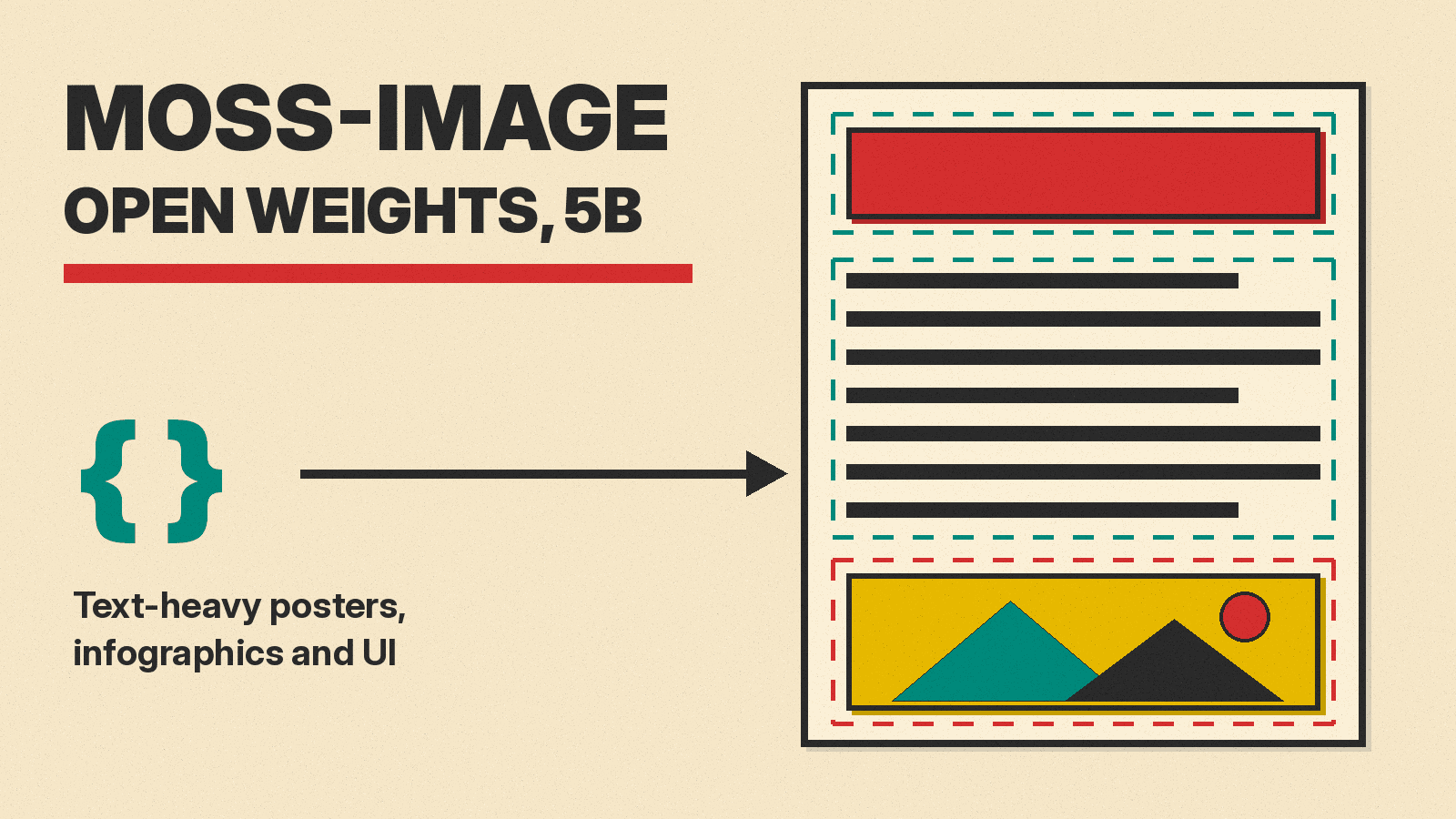
Open-weight image models have long had a weak spot: dense text. A model can paint a convincing poster, then fill it with misspelled words, broken lines and a layout that falls apart. MOSS-Image, released by the OpenMOSS team on October 16, 2026, is built for exactly that job. It is a 5B-parameter text-to-image model aimed at posters, infographics, user interfaces and other designs where the words have to be right. The weights for both versions, MOSS-Image-Base and MOSS-Image-SFT, are on Hugging Face under the Apache 2.0 license. The team announced its technical report on arXiv on October 19.
This explainer covers what the model is, what the benchmark numbers do and do not show, how its JSON layout prompts work, and what you need to run it.
What MOSS-Image is
According to the technical report, MOSS-Image has two parts:
- A 5B diffusion transformer, trained from scratch. It is a single-stream DiT with 42 blocks. It reads text through a frozen Qwen3.5-9B text encoder and works with image latents from a frozen FLUX.2 VAE. The team trained it with a hybrid Muon and AdamW optimizer.
- An "agentic" prompt enhancer. This turns a short request, such as a travel poster with a given title, into a detailed content and layout plan before the image model runs. In the paper, this planner is GPT-6.
The team's GitHub README lists the main features: layout control over where text and objects go, clear and accurate text rendering, prompts of up to 4K tokens, anime and photorealistic styles, and a base model meant to be easy to fine-tune. The technical report is credited to MOSI.AI.
There are two checkpoints:
- MOSS-Image-Base has no post-training or distillation. The user guide says this is on purpose, to make it easier for the community to train LoRAs on top of it. It needs careful inference settings to look its best.
- MOSS-Image-SFT is fine-tuned from Base on curated data. The model card says it produces clearer text grouping and a more organized layout in the team's whiteboard example.
If you only want to make images, start with SFT. If you want to train a style or a product LoRA, start with Base.
What the benchmarks say
The report introduces two new benchmarks, both built by the same team. Keep that in mind when you read the scores below.
LongLongTextBench (LLTB) tests long text rendering: 240 tasks, 120 in English and 120 in Chinese, with target passages that average 1,339.8 characters. That is page-length text, not a headline. MOSS-Image scores 96.3 on the benchmark's Mean-6 text coverage metric. The report says this is the best result among open-weight models and puts Qwen Image 2512 at 64.9, a gap of 31.4 points.
RealLayoutArena (RLA) tests complete design requests: 61 tasks made of 20 posters, 20 infographics and 21 user interfaces. Human raters compare two outputs for the same short request with model names hidden, and the results become Elo-style ratings.
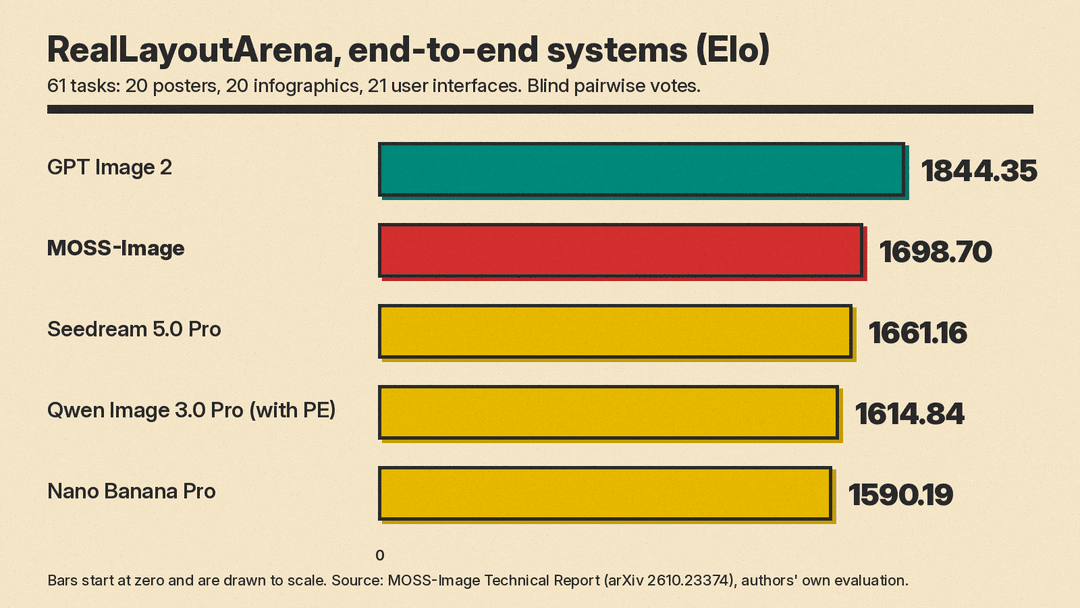
In that end-to-end comparison, MOSS-Image (with its GPT-6 prompt enhancer) rates 1698.70. That puts it second, behind GPT Image 2 at 1844.35 and ahead of Seedream 5.0 Pro (1661.16), Qwen Image 3.0 Pro with prompt enhancement (1614.84) and Nano Banana Pro (1590.19).
The report also runs a second comparison that separates the planner from the painter. Nine image models got the same enhanced prompts, with no extra rewriting. There, the MOSS-Image backbone rates highest at 1807.34, followed by ERNIE Image (1748.51) and SenseNova-U1 (1689.23).
On layout control, the report's 7Bench table shows a large gap. MOSS-Image reaches a mean IoU (how closely objects land in the boxes you asked for) of 0.6788. The next best model in the table, Ideogram 4.0, scores 0.2433, and GPT Image 2 scores 0.1431. The report adds that Ideogram's own report lists a 7Bench mIoU of about 0.69, and that differences in model variant, prompt format and evaluation setup may account for the gap.
Three caveats:
- The OpenAI and Google models in these tests are GPT Image 2 and Nano Banana Pro, not the newer GPT Image 2.5 and Nano Banana 2.1. We compared those two in GPT Image 2.5 vs Nano Banana 2.1.
- The second-place end-to-end result uses GPT-6 as the planner. If you run MOSS-Image fully locally without a strong planner, expect your results to depend on how detailed your own prompts are. The report itself says detailed specifications "substantially improve human preference over concise requests."
- These are the authors' own benchmarks and evaluations, not an outside leaderboard.
How layout prompts work
The most unusual feature is that you can hand MOSS-Image a JSON layout instead of a sentence. The README gives a travel poster example. A layout has two parts:
summary.captiondescribes the whole scene and style, for example "a minimalist travel poster with a cream background".itemslists each element: alabel(text or object), acaption, abboxbox, and atextfield for the exact words to render, such as "EXPLORE".
Boxes use [y_min, x_min, y_max, x_max] order in pixels, measured from the center of the canvas. On a 1024 by 1024 canvas, each axis runs from -512 to +512. To convert ordinary coordinates, subtract half the width from x and half the height from y. The coordinates must match the image size you request. The user guide calls layout prompts experimental, and says you can mix natural language and structured input.
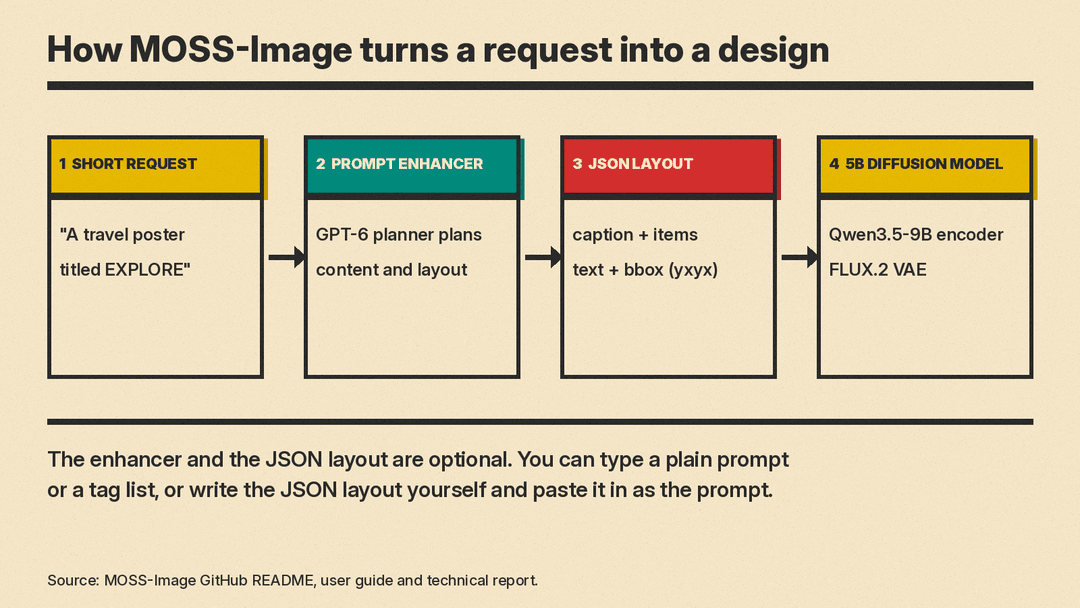
You do not have to write the JSON by hand. The team ships a prompt enhancer skill that turns an idea into a detailed caption or a layout prompt. The README says it is designed for GPT-6-family agents with local file and Python tools, and that its bundled script only converts pixel coordinates into compact JSON; it does not call an image service. The guide also says a fine-tuned open-source layout enhancer is coming.
Layouts also enable a simple kind of editing. The report shows that changing the text or boxes in a layout and generating again can replace content or rearrange elements while keeping the overall design. This is regeneration, not true editing: the model does not look at the original image.
Prompt tips from the user guide
- Language: English works best because it has the most training data. Chinese and other languages are supported.
- Line breaks: the model wraps text on its own, but to control line breaks exactly, put
\nor real line breaks in the prompt. - Negative prompt: the guide suggests
nsfw, worst quality, bad anatomy, watermark, jpeg artifact. - Tag prompts: for tag-style prompts, it recommends the order quality, score, meta, year, character, series, artist, general.
- CFG: the default of 3.0 is usually enough for long prompts. For short prompts, raise it, within the recommended range of 3.0 to 6.0.
For more general prompt structure that carries across models, see our FLUX 3 Image explainer, which also covers bounding-box prompts.
How to run it
The model card asks for Python 3.10 or later, an NVIDIA GPU with CUDA, PyTorch 2.9 or later, and recent versions of Diffusers and Transformers. The model loads through Diffusers with a custom pipeline. The team does not publish a minimum VRAM figure. The Gradio app offers three memory modes, from keeping the whole model on the GPU down to a slower sequential mode, and the README says to pick sequential mode or reduce image size if you run out of GPU memory.
Default settings, from the README:
- Flow-matching Euler sampler, 50 steps (the guide says 50 or more gives the best results)
- CFG 3, shift 5
- Skip-layer guidance on the negative branch at layer 22, which means two transformer passes per step
- Width and height in multiples of 16
The guide recommends outputs of 1, 1.5 or 2 megapixels, and says the model can stretch from 512 by 512 up to about 4 megapixels (2K), at any aspect ratio. Turning off skip-layer guidance makes images look very realistic, it says, but some details may collapse.
Other ways in:
- Browser demo: a Hugging Face Space, if you want to try it without a GPU.
- ComfyUI: search for MOSS-Image in ComfyUI Manager to install the team's plugin, or use the Comfy-Org repackaged files, which include bf16 and int8 versions of both models and of the Qwen3.5-9B text encoder. The README says integration into the official ComfyUI repository is in progress.
- Serving: the README lists day-0 support in SGLang and vLLM-Omni.
The team says it is working on few-step distillation. Community uploads already exist on Hugging Face, such as an 8-step DMD version of SFT. These are not official releases, so test them before you rely on them.
What it cannot do yet
The report's limitations section is direct: the current backbone "does not directly condition on reference images or support image editing." So there is no image-to-image, no style reference and no inpainting today. The guide says simple fine-tuning can add features such as GIF generation and reference-based generation, marked "stay tuned." The report also warns that the prompt enhancer depends on outside language models, whose errors in taste or facts can carry into the image. The paper says the training recipe and evaluation framework will be released; as of October 19 the code and weights are out.
Why it matters
The report opens by saying open-weight models "still struggle with dense text and intricate layouts," while closed systems have moved into infographics and interfaces. If its numbers hold up in outside testing, MOSS-Image narrows that gap for anyone who wants to run a model locally, fine-tune it on a brand, or build it into a product under a permissive license. Its JSON layout input is also a practical idea for design tools: a layout editor can drive the model directly instead of hoping a sentence lands the title in the right place.
For a wider view of today's image tools, including closed options, see our guide to the best AI image generators.
