
AI tools now cover several stages of a small video project: drafting shots from text, keeping a character's look consistent across scenes, editing footage with a prompt, and adding sound. The tools below cover those stages. Each one is a real product with its own site, and every feature listed here comes from the company's own pages or help docs.
This list is about workflow, not about which video model ranks first this month. For a model-by-model view, see our guide to the best AI video generators.
The tools at a glance
- Google Flow: a filmmaking workspace with reusable "ingredients" and a Scenebuilder for sequencing clips.
- Runway: video generation plus editing of existing footage (Aleph and Edit Studio) and performance capture (Act-Two).
- Kling: image-to-video with detailed motion controls, Elements for consistent characters, and lip sync.
- Luma: agents that work across video, image, audio and text, plus Luma's own Ray3.2 video model.
- Pika: a set of creative apps for video, image and sound that run Pika's own models and models from other providers.
- ElevenLabs: sound effects and ambient audio from a text prompt.
- Descript: text-based editing for video and audio, with captions, AI voices and audio cleanup.
Google Flow: a workspace built around scenes
Google calls Flow an "AI filmmaking tool" built with creatives and designed for its Veo, Imagen and Gemini models. Its help page says you can create videos from text prompts, ingredients, frames and other videos.
What makes Flow useful for a story, rather than a single clip:
- Ingredients. You add reference images or videos of a character, an object or a location, then describe how they should appear. Google says this lets you use "the same images for your character and key objects from one clip to the next." You can also type
@and a character's name in a prompt. - Start and end frames. You can set the first and last frame of a clip.
- Scenebuilder. Flow's scene tools let you arrange clips in a sequence, reorder them, trim each one, preview the whole sequence and download the scene.
- Prompt edits. You can select a segment of a video and describe a change, such as "Change the lighting to a cinematic sunset."
Google's tips for good results: use subject or product references on a plain background, and make sure your text prompt does not contradict your reference images.
Runway: generate, then edit what you have
Runway covers generation and post-production. Its Gen-4.5 model, per its Gen-4.5 help page, offers text to video and image to video.
For filmmakers, two Runway tools go beyond generation:
- Edit Studio with Aleph. Runway's Edit Studio guide says it changes "existing traditional or generated footage" with prompts. Listed uses include replacing characters, transforming shots, removing or replacing backgrounds, and removing unwanted objects, across single shots or multi-shot sequences.
- Act-Two. The Act-Two help page says you record a "driving performance" of someone acting out a scene, add an image or video of a character, and Act-Two transfers the movement "with realistic motion, speech, and expression." For a solo creator, that means you can act every role yourself. Runway's multi-character guide shows how to generate each character's performance separately and then combine the clips in your own video editor.
Runway's pricing page also lists third-party models, including Kling, that its plans can run.
Kling: fine control from a still image
Kling documents several tools for directing motion inside a shot. Its quickstart guides cover them:
- Elements. Upload 1 to 4 images and pick subjects in them. Kling's Elements guide says this is useful for keeping "consistent looks on a character across different shots."
- Motion Brush. Select parts of an image and draw where they should move, for up to six elements at once, per the Motion Brush guide.
- Start and End Frames. Generate a transition between two similar images.
- Lip Sync. Sync a character's lips to an uploaded voiceover or to text-to-speech. Kling's lip sync guide says it works on human characters with a complete face.
- Extend with Prompts. Kling's extension guide says a clip can be extended a few seconds at a time, up to 3 minutes in total.
One thing to check before you publish: Kling's credit guide says content from the free Basic plan is not for commercial use, while paid plans allow it.
Luma: agents plus its own video model
Luma calls itself "your creative partner." Its site says Luma Agents "research, generate, and refine across video, image, audio, and text," and that Luma builds the models underneath, including Ray3.2, which it says "holds continuity across every cut."
Details on Luma's site and pricing page that matter for a film project:
- Storyboards. One of the example requests on Luma's home page is "Storyboard a 30-second brand anthem spot with cinematic lighting."
- Many models. The pricing page says plans include "Luma and third-party image and video models," and it lists Kling, Seedance and Veo models among them.
- EXR output. The pricing page lists an "HDR+EXR" option for Ray3.2 video at three times the base credit cost.
- Team plan. Shared team credits, team-wide sharing and usage analytics, useful if you work with a small crew.
Pika: many models behind simple apps
Pika takes an app-first approach. Its help center says you choose an app for what you want to make, add a prompt or your own media, and generate. The apps use "Pika's own models and models from other providers," and some let you pick the model yourself.
For filmmakers, the relevant pieces in Pika's catalog include:
- Video Studio for making clips from a prompt and references.
- Swap Anything to change the subjects or background in a clip.
- Pikaframes to animate between still images.
- Audio apps for music, speech and sound effects, including Pika Soundtrack to "score anything to picture."
That makes Pika a reasonable single place to try several video models before you settle on one.
ElevenLabs: sound effects from text
Picture is only half a film. ElevenLabs' sound effects tool creates "custom sound effects and ambient audio" from a text description. ElevenLabs says you get four samples per generation and that the effects are royalty free, "with no licensing fees or royalties."
Its own examples show the range: rain heard inside a tent, footsteps on sand, a spaceship engine. We covered its scoring tool in our explainer on ElevenLabs Instant Soundtracks.
Descript: edit like a document
Once you have clips and audio, you still need to cut them together. Descript says editing video in its app "is as easy as using docs and slides." Its feature list includes:
- Automatic transcription and one-click captions.
- AI speech, with a voice clone or stock AI voices.
- Studio Sound and tools to remove filler words and retakes.
- Green Screen and Eye Contact effects.
- Generate media from a prompt.
A simple workflow that uses these tools
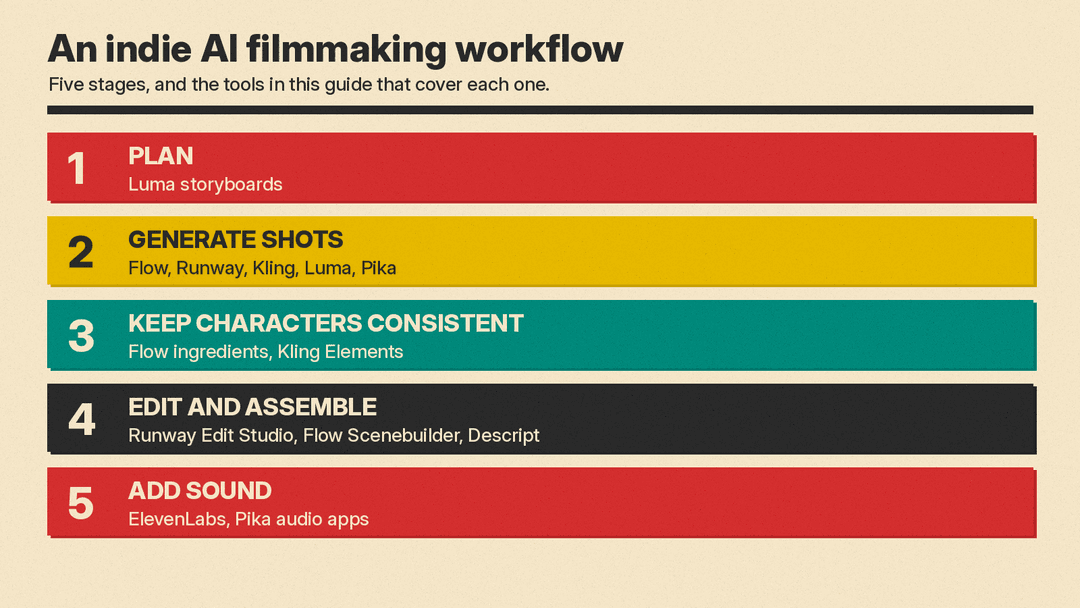
Here is one way to combine them for a short film, based on what each tool's own docs describe:
- Plan. Sketch your story and shot list. Luma's home page gives a storyboard as an example request.
- Build your cast. Create reference images for each character and location. Use them as ingredients in Flow or as Elements in Kling, so the same faces return from shot to shot.
- Generate shots. Make each shot as its own short clip. Use start and end frames where you need a clip to land on a set image.
- Add performance. For dialogue, use Kling's lip sync on a generated character, or record yourself and use Runway's Act-Two.
- Fix and adjust. Use Runway's Edit Studio or Flow's prompt edits to change lighting, remove objects or swap backgrounds.
- Assemble. Order and trim clips in Flow's Scenebuilder, or cut the film in Descript.
- Add sound. Generate effects and ambience with ElevenLabs, or score the cut with Pika's audio apps.
How to choose
You do not need every tool on this list. Start from the stage that slows you down most:
- You need a whole scene with the same character: start with Google Flow (ingredients and Scenebuilder) or Kling (Elements).
- You have live footage and want to change it: Runway's Edit Studio.
- You want to act the parts yourself: Runway's Act-Two.
- You want to try many models in one place: Pika, or Runway's third-party models.
- You want help with storyboards or need EXR output: Luma.
- You need sound and a final cut: ElevenLabs for effects, Descript for the edit.
Plans and prices change often, so check each pricing page before you commit. Our AI video generator pricing comparison has dated figures for the main video tools.
Sources
- Google: Introducing Flow
- Google Flow Help: Create videos in Google Flow
- Google Flow Help: Edit videos and build scenes
- Runway: Creating with Gen-4.5
- Runway: Creating with Edit Studio
- Runway: Performance Capture with Act-Two
- Runway: Creating Multi-Character Dialogues with Act-Two
- Runway: Pricing
- Kling AI: Quickstart guides
- Kling AI: Elements
- Kling AI: Motion Brush
- Kling AI: Lip Sync
- Kling AI: Extend with Prompts
- Kling AI: Credit Cost Guide
- Luma
- Luma: Plans and Pricing
- Pika Help Center
- ElevenLabs: AI Sound Effects
- Descript
