
AI fitness apps now plan workouts, read your wearable data and talk back during a run. This list covers eight real apps and features as of November 2026, with what the AI part does, what you need to use it, and where it falls short. None of these apps is medical advice, and several say so on their own pages.
How we picked
Every app here has an AI or algorithm-driven planning, coaching or insight feature described on the vendor's own page or help center. We did not test them hands-on, and the list is not a ranking. It is grouped by what each tool is best at, so you can match it to the device you already own and the kind of training you do.
Fitbod: AI workout planner for strength training
Fitbod is a strength training app for Android and iOS. It builds a personalized workout plan that updates with your body, recovery and progress. You tell it what equipment you have, including just bodyweight, resistance bands or limited gear, and it builds sessions around that, your schedule and your preferences. It uses your training history and recovery to recommend which muscles to train next, and applies progressive overload over time.
Fitbod describes the engine as a "proprietary algorithm" and does not use the word AI for it on its home page. Its FAQ says the app is "built exclusively for resistance and strength training", so it primarily recommends weight training. It fits gym-goers and home lifters who want the app to choose the exercises, sets and weights. Fitbod also says it is now covered by HSA and FSA plans, with an eligibility check on its site.
The caveat: if your main goal is running, cycling or general cardio, Fitbod is the wrong tool.
Freeletics: AI fitness coach for home and bodyweight workouts
Freeletics calls itself "The AI Coach for busy people". The app offers HIIT, calisthenics, gym, weights, cardio, running, strength and weight loss workouts tailored to your needs, goals and fitness level. The coach adapts when your schedule changes, and you choose where you train: at home, at the gym or outside. Many workouts need no equipment.
Freeletics says its digital fitness coaching is "trusted by 60 million users". It suits people who want short, structured sessions without a gym membership or a wearable.
The caveat: the Freeletics home page describes the coach in general terms. Check the app store listing for which features need a paid plan before you commit.
Peloton IQ: AI training for Peloton bikes and treadmills
Peloton IQ adds AI-powered personalized training to Peloton. On any Peloton device you get Personalized Plans (weekly workout roadmaps), Performance Estimates, Insights and Analysis (weekly summaries after a few workouts) and Personalized Recommendations. It can also pull in your Apple Health, Garmin or Fitbit data.
The most advanced features are limited to the Cross Training Bike+, Tread+ and Row+. These include a Workout Generator (pick time, muscle group and level), rep tracking and form feedback through an optional Movement-Tracking Camera, suggested weights and hands-free voice control. Peloton says camera images and videos are not recorded or stored.
Peloton says there is no additional charge for Peloton IQ, but an All-Access Membership is required for all content and features on its hardware. Personalization must be turned on in Settings.
The caveat: the most advanced features need specific Peloton hardware, the Cross Training Bike+, Tread+ or Row+.
Google Health Coach: AI fitness coach for Fitbit and Pixel Watch
The Fitbit app is now the Google Health app, and Fitbit Premium is now Google Health Premium. Its Google Health Coach is built with Gemini. According to Google's help page, the coach can help you build a personalized fitness plan with daily workout recommendations, send a morning message about sleep and readiness, break down a workout after you finish, give sleep tips and chat about your health metrics.
Google's May 2026 announcement lists Premium at "$9.99 per month or $99 per year", and says Google AI Pro and Ultra subscribers get Google Health Premium at no extra cost.
The caveat: the help page says the coach currently works only for people over 18 with a Fitbit or Pixel Watch, in supported countries. Google also says these tools "aren't intended for medical purposes" and that you should check generated responses for accuracy.
Apple Workout Buddy: AI voice coach on Apple Watch
Workout Buddy is an Apple Intelligence feature in the Workout app on Apple Watch. During a workout it speaks encouragement through your headphones, based on real-time analysis of your fitness history and the current session. It calls out milestones, gives progress updates on pace, distance and duration, and summarizes the workout when you finish.
It works with outdoor and indoor runs, walks and cycling, hiking, elliptical, stair stepper, HIIT, and functional and traditional strength training. On watchOS 27 or later it needs a watch paired with an Apple Intelligence-enabled iPhone, Bluetooth headphones, and device and Siri language set to English or Spanish. With Wi-Fi or cellular, it works without the iPhone nearby. Apple notes that Apple Intelligence is not available in all regions or languages.
The caveat: Workout Buddy is motivation and feedback during a session. It does not build a training plan for you.
Garmin Connect+: AI insights for Garmin watch owners
Garmin Connect+ is a premium plan in the Garmin Connect app. Its Active Intelligence feature, powered by AI, gives personalized insights and suggestions that adjust to your activities and performance metrics. The plan also adds nutrition tracking (with Active Intelligence insights on how nutrition affects training), a performance dashboard, live activity and extra coaching guidance for the Garmin Run Coach, Cycling Coach and Triathlon Coach plans.
Garmin's plan comparison lists Garmin Coach training plans as part of the free Garmin Connect app (the CIRQA Smart Band needs a paid plan), so for most Garmin devices Connect+ is an add-on, not a requirement for a structured plan.
The caveat: you need a compatible Garmin device for most of this.
Strava Athlete Intelligence: AI workout summaries for runners and cyclists
Athlete Intelligence uses generative AI to analyze your activity data, including health and location data, and writes a summary on each activity. It covers runs, trail runs, rides, gravel rides, mountain bike rides, walks and hikes. Tap "Say More" for a more detailed analysis of the activity, with further analysis of stats such as pace, heart rate and heart rate zones below it. The focus you set in Strava, meaning what you are working toward, shapes the insights.
It is available to Strava subscribers and free-trial users, on mobile only. Strava says the insights are visible only to the account owner, and you can hide them. If you also use Gemini, we covered how Strava data now works inside Gemini.
The caveat: it explains workouts you already did. It is not a full plan builder.
WHOOP AI: AI coaching from 24/7 wearable data
WHOOP AI is the coaching feature in the WHOOP app. It combines your Sleep, Strain, Recovery, goals, routines and other health data to explain trends, answer questions and suggest next steps. WHOOP says it is included with every membership tier: WHOOP One, WHOOP Peak and WHOOP Life.
It suits people who care as much about recovery and sleep as about the workout itself, and who want to ask questions in plain language.
The caveat: it only works with a WHOOP wearable and membership.
How to choose an AI fitness app
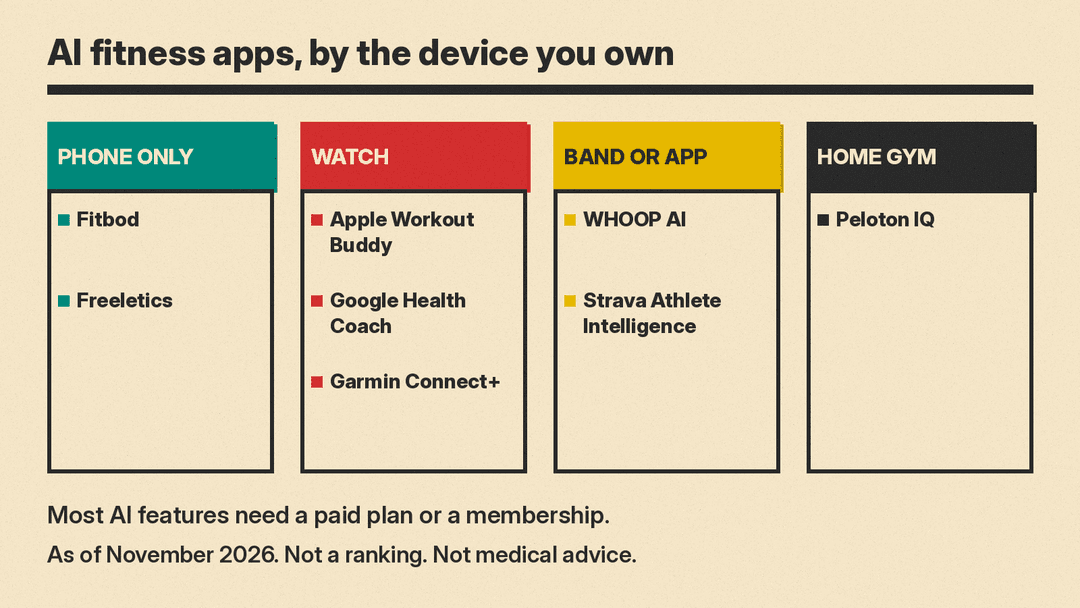
- Start with the device you own. Apple Watch points to Workout Buddy, Fitbit or Pixel Watch to Google Health Coach, Garmin to Connect+, WHOOP to WHOOP AI, and Peloton hardware to Peloton IQ.
- Match the app to your training. Fitbod is for lifting. Freeletics covers bodyweight, HIIT and running. Strava and Garmin lean toward endurance sports.
- Decide if you want a plan or feedback. Fitbod, Freeletics, Peloton IQ and Google Health Coach build plans. Workout Buddy and Athlete Intelligence comment on workouts you do.
- Count the subscriptions. Most of these AI features sit behind a paid plan or a hardware membership. Check the vendor's pricing page before you sign up.
- Read the privacy settings. Several of these apps use health and location data. Look for the settings that turn personalization or AI features off, as Strava and Peloton describe.
If you are building a broader AI routine for work as well as training, see our list of AI tools for productivity.
FAQ
Do I need a wearable to use an AI fitness app?
No. Fitbod and Freeletics work from your phone and what you log. Google Health Coach, Workout Buddy, Garmin Connect+ and WHOOP AI depend on their own wearables.
Are AI workout plans safe for beginners?
Fitbod says it recommends weights, reps and sets for beginners and shows exercise demos. Still, if you have a health condition or an injury, talk to a doctor before you start a new program. Google states its coaching tools are not intended for medical purposes.
Can a free app work?
Some of these features need a paid plan, such as Strava Athlete Intelligence (subscribers and free-trial users) and Google Health Coach (Google Health Premium). Garmin Coach training plans are in the free Garmin Connect app, except on the CIRQA Smart Band.
Sources
- Fitbod
- Freeletics
- Peloton IQ
- Google: Google Health Coach announcement
- Google Health Help: Google Health Premium
- Apple Support: Use Workout Buddy on Apple Watch
- Garmin: What is the Garmin Connect+ performance dashboard
- Garmin: Garmin Connect+ plan comparison
- Strava Help: Athlete Intelligence
- WHOOP: How WHOOP AI guidance works
