
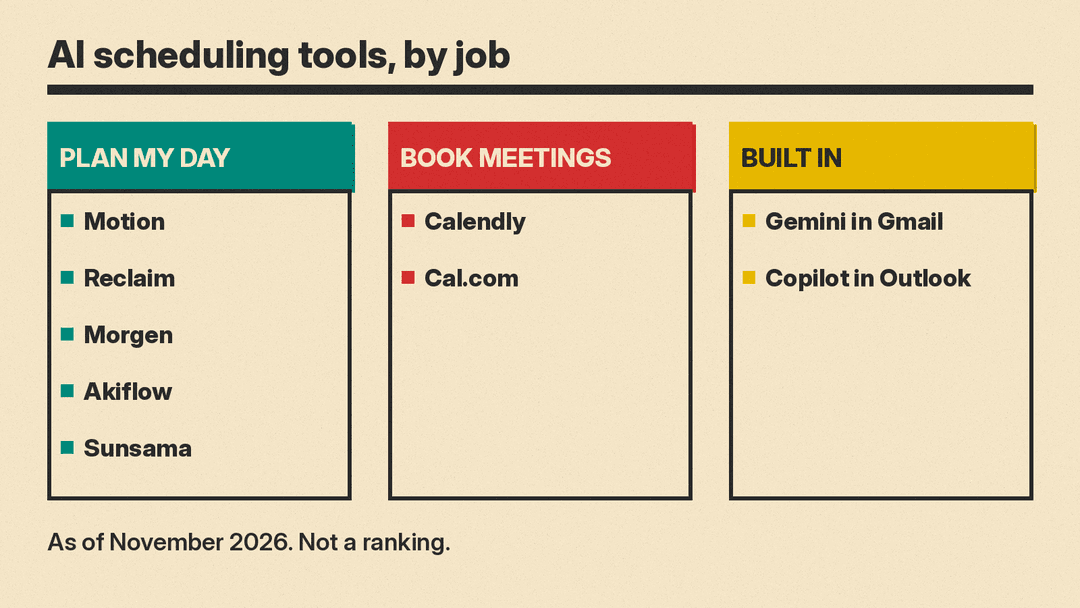
The phrase "AI scheduling assistant" covers three different kinds of product. The first plans your day automatically: it takes your tasks and projects, puts them on your calendar as time blocks, and moves them when plans change. The second books meetings with other people, using scheduling links or an email agent so nobody has to trade lists of times. The third is AI built into the calendar and email you already use, such as Gemini in Gmail or Copilot in Outlook.
This guide groups the tools by job, as of November 2026, so you can find the kind you actually need. Nothing here is a ranking. Each description below relies on what the vendor itself says the product does.
Best AI calendar that plans your day automatically
Motion describes itself as an AI-powered superapp for work, with AI projects, tasks, calendar, meetings, docs and notes. Its AI Calendar Assistant takes your projects and tasks, prioritizes them, time blocks them on your calendar, and re-plans automatically when things change. Motion combines Outlook, Google and iCloud calendars into one view and also creates meeting booking pages. Motion says it is SOC 2 Type 2 compliant. Motion's pricing page, as of November 9, 2026, lists Pro AI at $19 per seat per month for teams or $29 per month for one person, billed annually ($29 and $49 on monthly billing). Business AI is $29 per seat or $39 for one person, billed annually, and both plans start with a free trial.
Good fit if you want a single app that plans tasks across several calendars and adjusts the plan on its own.
Reclaim calls itself an AI calendar for work that runs on Google Calendar or Outlook Calendar. It schedules focus time, habits (recurring events that flex around the rest of your calendar), tasks synced from task apps, and buffer time around existing events. It also offers AI scheduling links, Smart Meetings that move internal meetings to better times, calendar sync across Google and Outlook to block availability, Slack status sync, and a chat assistant to find time and resolve conflicts. Reclaim says it does not train AI on your data, and it offers team analytics on focus and meeting time. Reclaim's pricing page, as of November 9, 2026, lists a free Lite plan, plus Starter at $10, Business at $15 and Enterprise at $22 per seat per month billed yearly. On monthly billing, Starter is $12 and Business is $18.
Good fit if you live in Google Calendar or Outlook and want focus time, habits and buffers placed for you, plus reporting for a team.
Morgen is a daily planner that combines calendars from Google, Outlook, Apple, Fastmail and more with tasks from tools like Notion, ClickUp, Linear and Todoist. Its AI Planner shows recommendations on your calendar using Frames, which are templates of your ideal week, and you accept or adjust each suggestion. It flags tasks at risk of being late and includes scheduling links, travel time and buffer time. Apps are available for Windows, Mac, Linux, web and mobile. Morgen's pricing page, as of November 9, 2026, lists the individual plan at $15 per month billed yearly or $30 billed monthly, and the team plan at $10 per seat per month billed yearly or $25 billed monthly (minimum 2 seats), after a 14-day free trial.
Good fit if you want AI suggestions you approve yourself, built around a weekly template, on almost any device.
Akiflow combines calendars, tasks and a universal inbox that collects tasks from other tools. Its AI assistant, Aki, can be messaged or spoken to in natural language to create events and plan your day, and it sends daily briefings and reminders. Akiflow also auto-schedules tasks into time slots on your calendar. Akiflow's pricing page, as of November 9, 2026, lists one Pro plan at $19 per month billed yearly or $34 billed monthly. It says there is no free plan: the 7-day trial needs a card, and team pricing is handled by its sales team.
Good fit if your tasks arrive from many places and you want one inbox plus an assistant you can talk to.
Sunsama is a daily planner, task manager and calendar. You plan each day by choosing tasks and time-boxing them on your calendar, pulling tasks from tools like Asana, Trello and Jira and turning emails and Slack or Teams messages into tasks. It syncs two ways with Google, Outlook and Apple calendars. Sunsama is built around a guided daily planning routine and a realistic workload, and Sunsama says it is SOC 2 compliant. Sunsama's pricing page, as of November 9, 2026, lists the Pro plan at $17 per month billed yearly or $22 billed monthly, after a 14-day free trial.
Good fit if you want a guided daily planning routine that keeps your workload realistic.
Best AI meeting scheduler for booking calls
Calendly provides booking links with meeting templates, email and text reminders, website embeds and routing forms. Its AI scheduling assistant, Callie (labeled beta and available in English only), works inside email: you add callie@calendly.com to a thread and it coordinates times using your Calendly availability, checking with you before one-off changes. Calendly also offers a Notetaker that produces recaps for Zoom, Google Meet and Teams meetings, and payment collection for bookings. Calendly's pricing page, as of November 9, 2026, lists a free plan, Standard at $10 and Teams at $16 per seat per month billed yearly ($12 and $20 billed monthly). Standard Plus and Teams Plus add Notetaker and Callie for $18 and $24 per seat per month billed yearly ($24 and $32 billed monthly). Enterprise starts at $15,000 per year.
Good fit if you book meetings by email and want an assistant to negotiate the time inside the thread.
Cal.com offers booking links that check your connected calendars for conflicts. It supports round-robin and collective team events, routing forms, and workflows for reminders. Its AI features include Cal.ai, an AI phone agent that calls attendees to confirm or remind them of bookings and calls leads to help them book, and Cal.com agents for Slack and Telegram that check availability and book meetings. A separate open-source edition, Cal.diy, can be self-hosted, and Cal.com recommends it for personal, non-production use. Cal.com's pricing page, as of November 9, 2026, lists a free plan for individuals, and Teams at $12 and Organizations at $28 per user per month billed yearly ($15 and $37 billed monthly). Cal.com's AI page says each Cal.ai phone call costs $0.29 per minute.
Good fit if you need team routing, AI reminder calls, or booking from Slack or Telegram.
AI scheduling inside the calendar and email you already use
Gemini in Gmail and Google Calendar (Calendar help, Gemini help). In Gmail, the "Help me schedule" feature uses Gemini to suggest times when you and your guests are available and inserts them into the email; the recipient picks a slot and a Calendar invite is created. This requires an eligible Google Workspace or Google AI plan. Google's Gmail features page, as of November 9, 2026, lists Help me schedule for eligible Workspace plans, in English and in the US only, on the web. Separately, in the Gemini app, you can ask Gemini to create, find, edit and reschedule Google Calendar events once Google Workspace is connected.
Good fit if your work already runs on Google Workspace and you want scheduling help without adding another tool.
Copilot in Outlook (schedule a meeting, FAQ). You can ask Copilot in chat to schedule a meeting, for example a 30 minute Teams meeting about a report, and it checks attendees' calendars and recommends a time. Microsoft's FAQ says chat scheduling works with up to two other people and can also add events such as focus time. A separate "Schedule with Copilot" button on the ribbon creates a meeting invitation from an email thread. Microsoft says chat with Copilot in Outlook needs a work or school account and a Microsoft Copilot (work) license.
Good fit if you work in Outlook and want to set up small meetings from chat or directly from an email thread.
For drafting and answering email in the same two apps, see our comparison of Gmail Help me write and Copilot in Outlook.
What happened to Clockwise
Clockwise, an AI calendar tool, shut down after its team joined Salesforce. Its site says the product stopped being available on March 27, 2026, that Focus Time blocks and other Clockwise events are removed from calendars, and that Clockwise Scheduling Links no longer work. It suggests moving links to another service, such as Reclaim. If you used Clockwise, treat any remaining Clockwise links as inactive.
How to choose an AI scheduling assistant
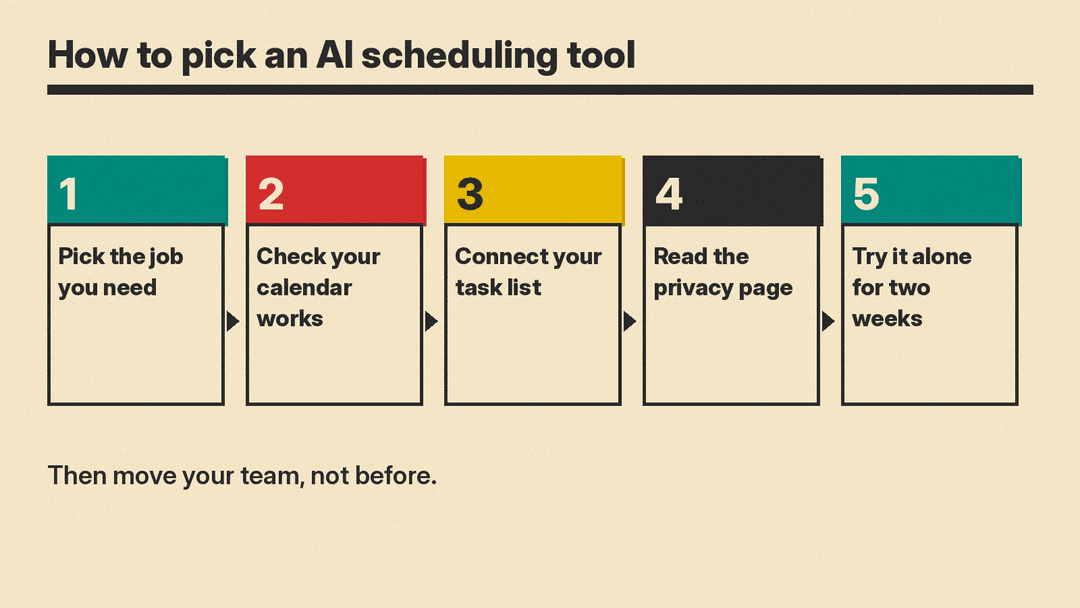
- Decide which of the three jobs you need: auto-planning your day, booking meetings with others, or AI inside your existing calendar and email. Some tools cover more than one job.
- Check calendar compatibility first. Some tools support Google, Outlook, Apple, Fastmail and iCloud calendars, while others run only on Google Calendar or Outlook.
- Auto-planners are only useful if your task list is connected. Confirm the tool syncs with the task app, project tool or inbox where your work already lives.
- Check what calendar and email data the tool can read, and read its privacy page. Vendors make different statements about whether AI is trained on your data and about certifications such as SOC 2.
- Try one tool yourself for two weeks before moving a team onto it. Scheduling habits are hard to change back once a whole team depends on them.
FAQ
Can AI chat assistants manage my calendar? Yes, with limits. Gemini can create, find, edit and reschedule Google Calendar events once Google Workspace is connected. Copilot in Outlook can schedule a meeting through chat and recommend a time based on attendees' calendars, and it can add events like focus time. ChatGPT can connect to calendars too: OpenAI added iCloud Calendar to ChatGPT in October 2026.
What is the difference between an AI calendar and a booking link tool? An AI calendar plans your own time: it puts tasks, focus blocks and buffers on your calendar and reshuffles them when conflicts appear. A booking link tool lets other people choose a slot when you are free. Motion, Reclaim and Morgen offer both: they plan your time and also include booking pages or scheduling links.
Is it safe to give an AI tool access to my calendar? Read the vendor's own privacy and security page before connecting an account, since practices differ. Reclaim says it does not train AI on your data. Motion and Sunsama say they are SOC 2 compliant.
Sources
- Motion
- Reclaim
- Morgen
- Akiflow
- Sunsama
- Calendly
- Cal.com
- Gemini and Google Calendar
- Gemini app and Google Workspace
- Schedule a meeting using Copilot in Outlook
- Copilot in Outlook FAQ
- Clockwise
- Motion pricing
- Reclaim pricing
- Morgen pricing
- Akiflow pricing
- Sunsama pricing
- Calendly pricing
- Cal.com pricing
- Cal.com agents and Cal.ai
- Cal.diy on GitHub
- Gemini features in Gmail
