
You can use AI to write a book, but two outside rules shape how. Amazon asks you to say when AI created the text. The U.S. Copyright Office says a prompt alone does not make you the author. This guide gives you a seven-step workflow that keeps you in charge of the book, with copy-paste prompts and a small local test.
Two rules to know first
Amazon KDP asks you to disclose AI-generated text. Amazon's Kindle Direct Publishing content guidelines say: "We require you to inform us of AI-generated content (text, images, or translations) when you publish a new book or make edits to and republish an existing book through KDP." The page defines the two terms. "AI-generated" means text "created by an AI-based tool," and that holds "even if you applied substantial edits afterwards." "AI-assisted" means you wrote the content and used AI "to edit, refine, error-check, or otherwise improve" it, or to brainstorm ideas that you then write up yourself. The page says: "You are not required to disclose AI-assisted content." It also says you are responsible for checking that all of it follows the content guidelines, including intellectual property rights.
A prompt alone is not authorship, per the U.S. Copyright Office. In Part 2 of its report on copyright and AI, the Office concludes: "The use of AI tools to assist rather than stand in for human creativity does not affect the availability of copyright protection for the output." It also says: "Copyright does not extend to purely AI-generated material, or material where there is insufficient human control over the expressive elements." And: "Based on the functioning of current generally available technology, prompts do not alone provide sufficient control." Whether your own contribution is enough "must be analyzed on a case-by-case basis." The Office's announcement of the report says human-authored work can be protected where it is perceptible in an AI output, or where a human makes creative arrangements or modifications. This is not legal advice. Ask a lawyer if the rights to your book matter to you.
What this means in practice: the more of the book you write, shape and rewrite yourself, the safer you are on both counts. The steps below use AI as an interviewer, outliner, editor and continuity checker. You write the sentences. For a shorter piece, such as a talk or a toast, see our guide on how to write a speech with AI.
Step 1: Write a one-page plan yourself
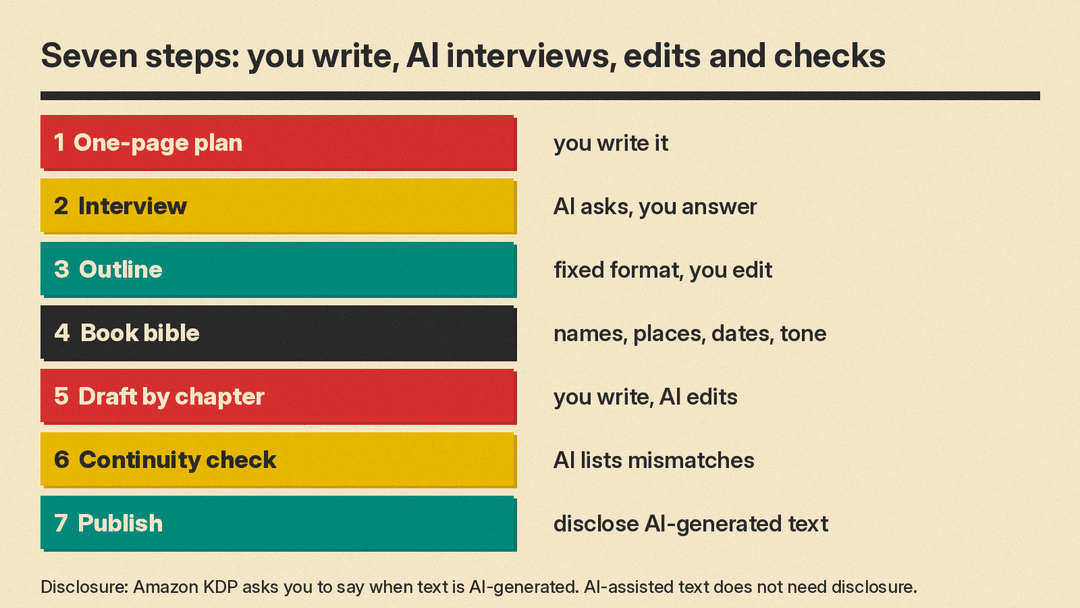
Before you open a chatbot, write down four things: who the book is for, what the reader gets, the rough length, and what makes your book different. A fiction book needs the premise, the main character and the ending. If you cannot fill the page, the AI will fill it with the most average answer, and the book will read that way.
Step 2: Let the AI interview you
Ask the AI to question you instead of writing. This pulls out your own stories, which is the part a model cannot supply.
I am writing a book for [reader]. Interview me about it. Ask one question at a time, wait for my answer, and do not suggest answers. After 10 questions, summarize what you learned in 10 bullet points using my words.Paste the bullets into your one-page plan.
Step 3: Build the outline in a fixed format
Ask for the outline in a format you can check. Our small test (see below) used this prompt, and a close version works for any topic:
Write a chapter outline for a 10-chapter nonfiction book called "Sourdough for Busy People". Output exactly 10 lines. Each line must start with "Chapter N:" and give a title and one sentence. Output nothing else.We suggest that you treat the result as a draft. Move chapters, cut the ones that repeat, and add the stories from Step 2.
Step 4: Build a book bible and keep it in a project
A book bible is one short file of facts that must stay true: names, places, dates, the reader, the tone, and words to avoid. Both major chat apps let you attach files and instructions to a workspace. Claude's help center says projects "allow you to create self-contained workspaces with their own chat histories and knowledge bases," and that free users can create a maximum of five. OpenAI's help center says projects in ChatGPT keep "related chats, files, and instructions together." As of November 2026 that page lists these file limits per project: Free 5, Go and Plus 25, and Edu, Pro, Business and Enterprise 40.
Put the bible in the project files and a short rule in the project instructions. Our guide to writing a system prompt shows how to word that rule. Our second brain with Claude and Obsidian guide shows another way to keep notes the AI can read. If you want software built for novels, see our guide to AI tools for authors and novelists.
Step 5: Draft one chapter at a time
Do not ask for the whole book. Work chapter by chapter, and split each chapter into small jobs. This is prompt chaining: the output of one prompt becomes the input of the next.
Using the book bible and the outline, here are my notes for chapter 3: [your notes]. Ask me three questions about anything unclear. Then wait.Then write the chapter yourself, even if the first draft is rough. Use AI after that, as an editor:
Here is my draft of chapter 3. Do not rewrite it. List the five weakest sentences, say why each is weak, and suggest one fix per sentence. Keep my voice.Under KDP's wording, that is "AI-assisted." If you ask the AI to write the chapter text and then edit it, KDP calls that "AI-generated," so disclose it.
Step 6: Check continuity and facts
Run a continuity pass after each chapter and again at the end.
Compare chapter 3 with the book bible. List every place where a name, date, place or fact differs from the bible. Quote the line. Do not fix anything.For nonfiction, check every fact, quote, number and source yourself. A model can state a wrong detail in a confident sentence. Never keep a citation you have not opened.
Step 7: Publish and disclose
If you publish on KDP, tell KDP about AI-generated text when you publish or republish the book. Re-check the guidelines on the day you publish, because the page can change. We suggest that you keep your notes, interview answers and dated drafts, so you can show what you wrote.
What we saw in a small local test
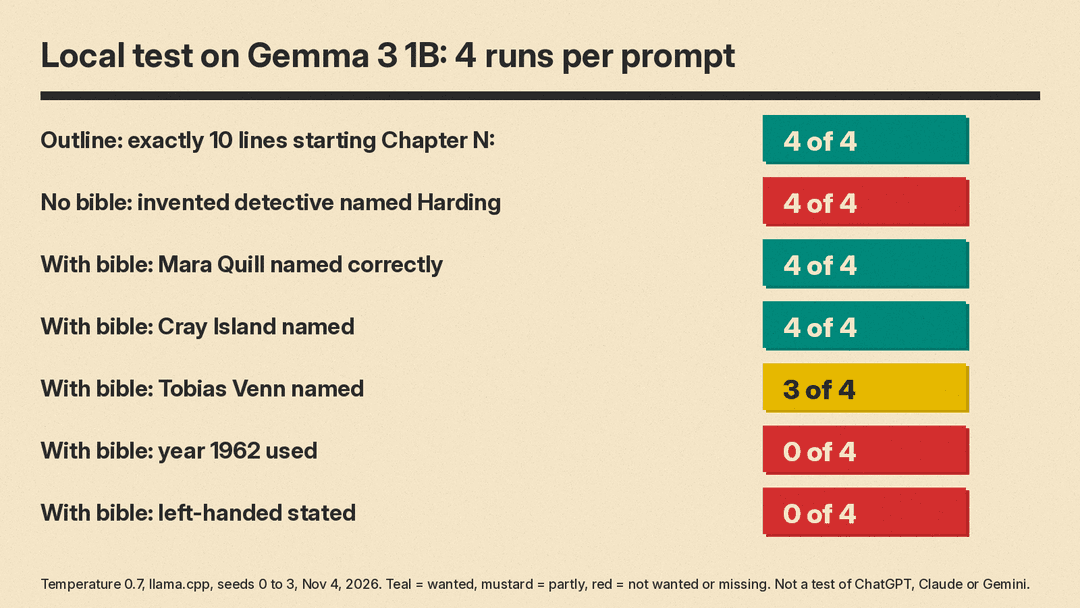
We tested two of these steps on Gemma 3 1B running locally through llama.cpp. This is a small model, not ChatGPT, Claude or Gemini. We used temperature 0.7, four runs per prompt (seeds 0 to 3), and a short output limit, on November 4, 2026. Treat it as an illustration, not a benchmark.
Outline format. With the prompt in Step 3, all four runs gave exactly 10 lines that start with "Chapter N:". A format request this strict is easy for a small model to follow. The content is another matter. The outlines were generic and the chapter lists differed from run to run, so check the ideas, not just the shape.
Book bible. We asked for the first paragraph of chapter 2 of a mystery, with and without a short bible. The bible named the detective (Mara Quill, left-handed, afraid of boats), the place (Cray Island lighthouse, winter 1962) and the keeper (Tobias Venn).
- Without the bible, all four runs invented a detective named Harding. Two runs contained the same sentence: "Detective Harding pulled his collar tighter, the dampness seeping into his bones."
- With the bible, the detective's name was right in 4 of 4 runs, "Cray Island" appeared in 4 of 4, and "Tobias Venn" appeared in 3 of 4.
- The year 1962 appeared in 0 of 4 runs. "Left-handed" was not stated in any run, and boats were never mentioned. One run wrote: "Detective Mara Quill, her left foot perpetually betraying her, stepped onto the weathered stone path."
So the bible fixed the names, but the model bent or dropped the smaller facts. That is why Step 6 exists. Run the continuity check, and read for details that sound plausible but are not in your notes.
A short checklist
- Write the one-page plan yourself.
- Have the AI interview you, not write for you.
- Ask for outlines in a format you can check.
- Keep the book bible in a project.
- Write chapters yourself, then use AI to edit.
- Run a continuity check on each chapter.
- Check every fact and source by hand.
- Disclose AI-generated text on KDP, and keep your drafts.
