
Magnific, the company that was called Freepik until its 2026 relaunch, has its own image model. Magnific One launched on October 8, 2026, and its pitch is different from most image models. Instead of following a prompt word for word, it is designed to make the choices an art director would make, and to apply a company's brand rules to every finished image.
This explainer covers what the model does, how its two modes and the new Brand Kit work, what the company says about quality, how to prompt it, and what it costs.
What Magnific One is
Magnific describes Magnific One as "an image model with art direction built in." According to the product page, every prompt passes through a "creative direction layer" before the image is made. That layer decides things a user may not have written down, such as composition, light and camera angle.
The company's launch post, written by Chief Experience Officer Martin LeBlanc, frames the problem bluntly: "Every AI image now looks like every other AI image. Same light. Same faces. Same posters." In the press release, LeBlanc put the goal this way: "Most image models are very good at making the picture you described. Magnific One makes the picture you would have arrived at with a good art director in the room."
The model makes photos, illustrations and layouts, at up to 4K resolution, per the product page.
Why it matters: Magnific already sells access to many outside models. Its own pricing page lists Google Nano Banana, GPT 2.5, FLUX.2, Recraft and Grok image models next to Magnific One. LeBlanc wrote that users "had thirty models and no way to choose." Building an in-house model that targets marketing and brand teams is a bet that taste and brand control matter more to those teams than raw prompt accuracy.
Draft and Final: two modes
Magnific One has two modes, described in the official prompting guide:
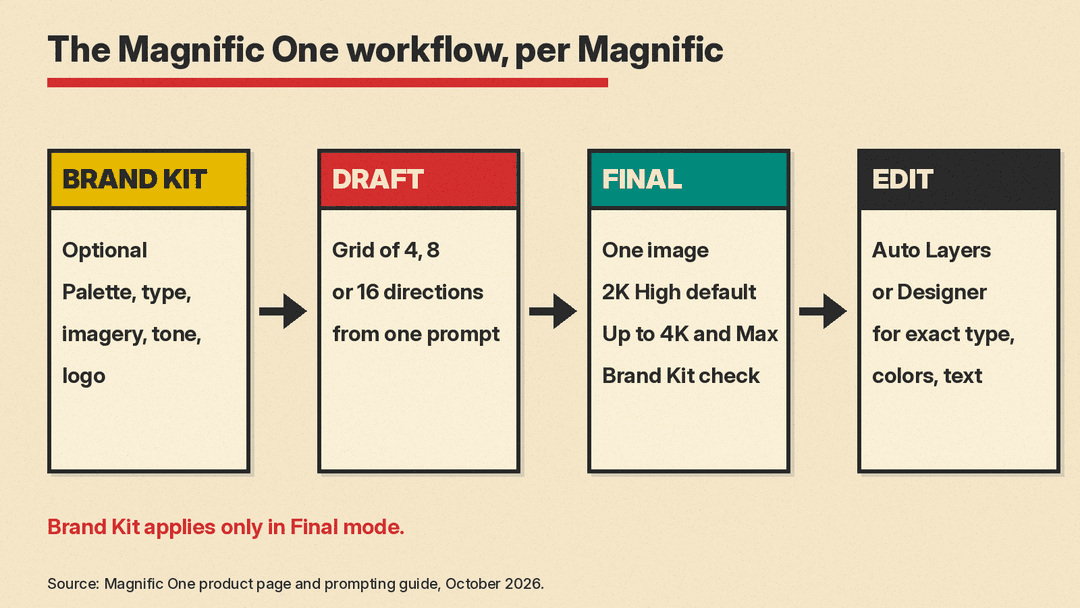
- Draft returns a grid of different directions from one prompt. The guide says 4, 8 or 16; the launch post says 8 or 16 directions cost the same as one image. The point is to compare concepts before you spend credits on a finished version.
- Final makes one image for delivery. It defaults to 2K at High quality and goes up to 4K and a Max quality setting. Brand Kit applies only in Final.
Once you have a Final image, the product page says you can fix exact type, colors and text on it. A feature called Auto Layers splits the image into editable layers, or you can open it in Magnific's Designer tool for vector control.
Brand Kit: the feature aimed at teams
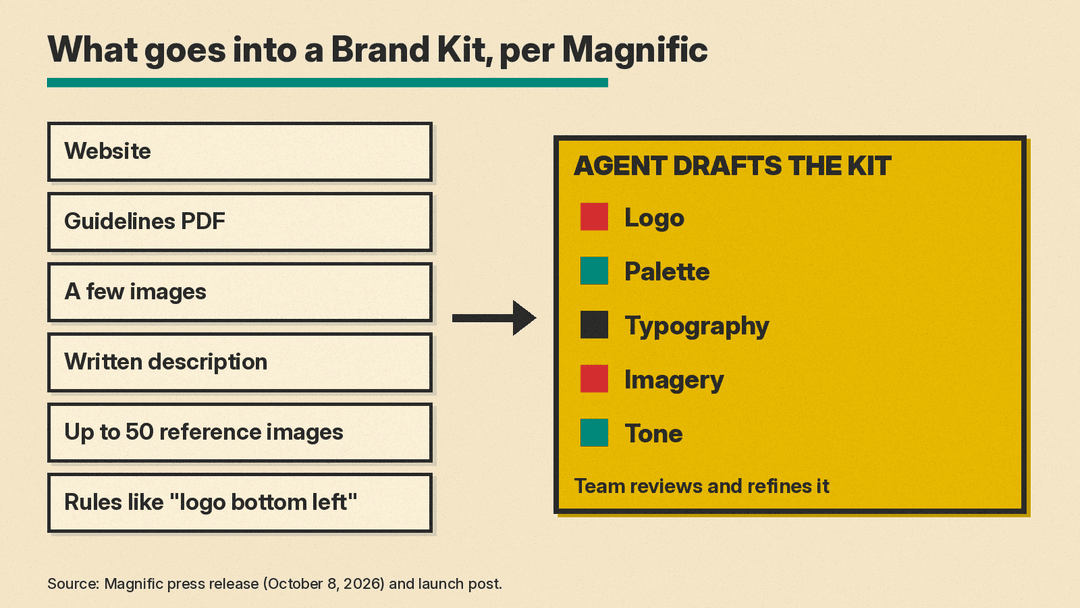
Brand Kit launched alongside the model. The press release describes the setup: give it a website, a guidelines PDF, a few images or a written description, and an agent extracts the logo, palette, typography, imagery and tone into a first version of the kit. The team then reviews and refines it.
According to the launch post, a kit can also hold a written guideline, up to 50 reference images, and simple rules such as "logo bottom left."
What makes this different from a saved style is the checking step. The product page says that in Final, "every image in Final is checked against it, whoever made it," and that you can see whether each image is on brand. For agencies, the page lists a few specific behaviors:
- Each client gets its own Brand Kit, shared with the team.
- New projects and freelancers start on brand.
- If you mark an image as off-brand once, it becomes a rule.
Brand Kit is optional. Without it, Magnific One still runs as a general image model.
What Magnific says about quality
Before launch, Magnific ran a blind test, described in the launch post. Voters saw two images made from the same prompt by different models and picked the one they preferred without knowing which model made which. Five models took part: Magnific One, Midjourney, GPT Image 2, Nano Banana 2 and Seedream 5 Pro. The test was open to creators, partners and business customers outside Magnific.
Magnific says its model was the only one to win more than half of its matchups, and that people preferred its image "almost two times out of three." VentureBeat reports this as a company-reported 68.5% private blind-comparison win rate and notes it has not been independently verified.
Treat this as a vendor claim. The test was run by Magnific, the prompts were not published in the launch post, and the comparison did not include every current model.
How to prompt Magnific One
The prompting guide, written by Magnific creative technologist Melissa Diago, gives advice that differs from what works with most models:
- Short prompts are fine. The launch post says some favorite images "started with a single word, like 'cinematic' or 'documentary'." The guide shows one idea at four levels of detail, from the single word "gossip" to a full scene with setting, angle, light and palette.
- Say each thing once. The guide warns that if you describe the same idea three times in different words, "the model starts dropping details instead of following them."
- Name the medium first. Photo, illustration, 3D or poster sets the look. The guide adds: "Describe causes, not effects: 'premium' gives it nothing, brushed steel and a single window light do."
- Quote exact text. For posters and type, put the words in quotes.
- Use Styles for a consistent series. Upload 1 to 5 images that share a palette, texture or technique in the Style tab. The guide notes that images added as normal references are read as content, not as a look.
The guide also lists fix-up lines to paste at the end of a prompt. Two examples: "Reproduce the text exactly as written. No other logos or text." for exact type, and "Keep everything in the image exactly as it is. Change only the light" for relighting an image.
Where you can use it and what it costs
The press release says Magnific One is available on all paid Magnific plans worldwide, on the web, in the desktop and mobile apps, and through the Magnific MCP, a connector that lets AI assistants use Magnific tools. The prompting guide also lists Spaces, Magnific's shared canvas for linking images, Brand Kit and video tools.
Magnific prices it in credits. As of October 2026, the pricing page lists Magnific One High 2K at 180 credits per image and High 4K at 250 credits per image. For comparison, the same page lists Nano Banana 2 at 2K at 75 credits and GPT 2.5 Medium 2K at 180 credits. How many images that buys depends on your plan.
Who it is for
Magnific One is aimed at two groups. Agencies and in-house brand teams get the most from Brand Kit, because the problem it solves is many people prompting while one brand has to stay consistent. Individual designers get Draft mode, Styles and the art-direction layer for exploring looks.
If you need full control over every detail of a prompt, a model that adds its own direction may get in the way. The prompting guide shows how to take that control back by writing the subject, story, light and angle yourself. The fair test is the one Magnific itself suggests: run the same prompt through Magnific One and the model you use today, and compare.
Sources
- Magnific press release: Magnific One, an AI image model with art direction built in (PR Newswire)
- Magnific launch post by Martin LeBlanc
- Magnific One product page
- Magnific One prompting guide
- Magnific pricing page
- VentureBeat: Magnific One launches to give teams an image generator that avoids the AI look
