
According to the JetBrains AI blog, JetBrains has shipped Air inside its IDEs with the 2026.3 release. Air is a workspace for running coding agents, tracking their progress and reviewing their changes inside the IDE. JetBrains also made its Junie agent free in a Lite configuration.
What Air in JetBrains IDEs is
JetBrains describes Air as "the workspace inside your JetBrains IDE where you run coding agents and review their work." Junie is JetBrains' own agent, which you can use through Air, but Air is not tied to it.
Air already existed as a separate product; earlier this month GitHub said its Copilot agent was available in JetBrains Air. The 2026.3 release bundles that workspace with the IDEs.
According to the quickstart, the Air plugin is bundled with the IDE from version 2026.3, so there is nothing to install. On 2026.2 it is a separate plugin from JetBrains Marketplace. The quickstart says "The plugin itself is free, but the agent you use may require its own account or subscription."
Which agents it runs
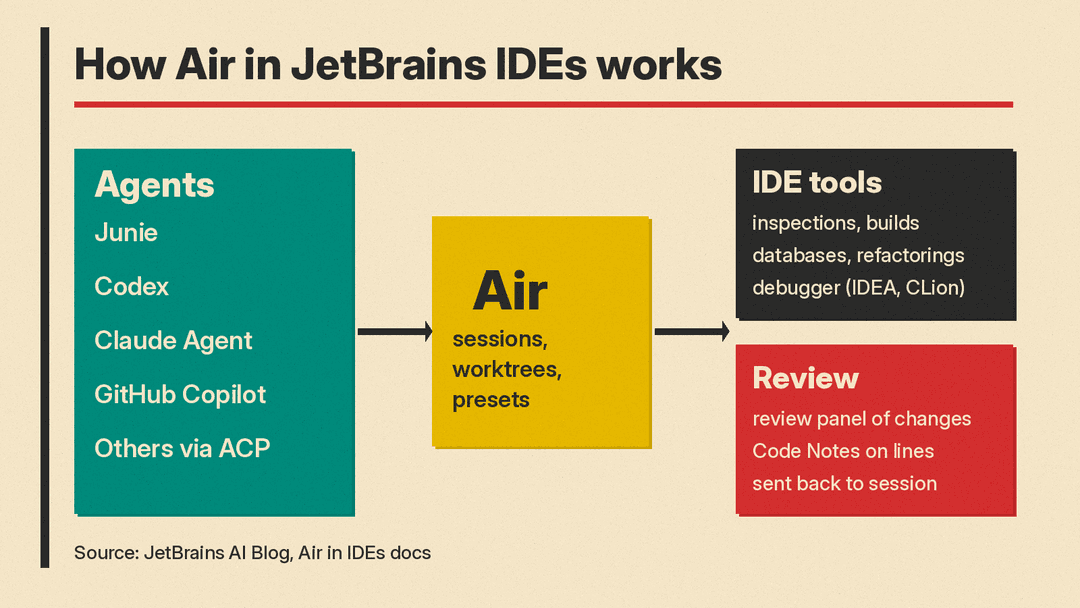
The blog post says Air works with agents such as Junie, Codex, Claude Agent and GitHub Copilot, and connects to other compatible agents through ACP, the Agent Client Protocol. Its FAQ lists Codex, Claude Agent (in the chat), Claude Code (in the terminal), Gemini, GitHub Copilot, DeepSeek, OpenCode, Cursor, Pi, Grok, Kimi, Kilo "and many more through ACP."
You can bring installed agents or add them from a registry. JetBrains says access can come from an existing provider subscription, an API key, or JetBrains AI, and that "A paid JetBrains AI subscription is not required."
Claude is a special case. Per the FAQ, a Claude Pro or Max subscription works with Claude Code in Air's terminal surface, which opens as a full-screen IDE tab. Claude Agent in Air's chat view "requires a JetBrains AI subscription or an Anthropic API key."
Key features
JetBrains lists these features for Air in its IDEs:
- Parallel sessions. One view shows which agents are working and which need your input.
- Worktrees. Each agent can get its own local Git worktree so parallel sessions do not collide. JetBrains notes that worktrees agents create on their own "aren't tracked in Air yet."
- Presets. Save an agent, model and instructions for a type of task.
- IDE tools for agents. Through the IDE's MCP server and built-in skills, agents can check inspections, run builds and run configurations, query databases and use the IDE's refactorings. In IntelliJ IDEA and CLion, the post says they can also drive the debugger.
- Code Notes. After a session, a review panel shows what changed. You can leave notes on specific lines and send them back to the session with the code context attached.
- Usage view. Air shows the cost of the current session in tokens or money, and your remaining JetBrains AI quota and reset date. JetBrains says it is working on the same view for Codex, Claude and Copilot subscriptions.
In its announcement, JetBrains cites the Atlassian State of Developer Experience Report 2026 for a figure that 49% of developers spend four or more hours a week reviewing AI output and correcting prompts. For background on that kind of work, see our explainer on what AI code review is.
Junie Lite: the free tier
The blog post says JetBrains has made Junie "free to use with its Lite configuration," with no JetBrains AI subscription required. It adds: "Fair use applies. Terms and available models may change."
The Junie Lite documentation gives more detail:
- It is "a free baseline model tier" and "not a trial" that expires.
- The model behind it is currently Qwen 3.6 27B. JetBrains says it may change the model "without notice."
- No quota number is published. JetBrains says "Virtually unlimited" describes normal use, "not literally uncapped requests", because the underlying model has its own capacity ceiling.
- If the model's capacity limit is reached, requests stop. There is no fallback to another model.
- Inference "runs exclusively on JetBrains infrastructure," and JetBrains says your code is not used to train the underlying model.
- It works in Air and Junie CLI, not in JetBrains AI Assistant.
To turn it on, the authorization docs say to open AI | Air | Accounts in settings, log in with your JetBrains Account, select Junie Lite Only, and start a session with Junie.
What happens to AI Assistant
JetBrains says AI Assistant "is still available and supported as a separate plugin until early 2027." AI Chat has moved into Air as agent sessions, and earlier AI Chat conversations are converted to Junie sessions.
Code completion keeps working and does not count against the JetBrains AI quota, per the blog post.
Control and data
The FAQ says Air "does not automatically start agents or send your code to an AI provider." You choose and authorize an agent first, and data handling then depends on that agent's provider and terms. If you want limits on what agents can do, our guide to AI agent permissions and approvals covers the basics.
You can disable Air in Settings | Plugins and restart the IDE. With remote development, Air and your agents run on the remote backend.
