
AI tools can now draft a blog post, a product description or a meta description in seconds. That raises a common question: will Google punish pages made with AI? Google has answered it in its own documentation. This guide explains what Google Search says about AI content, where the line into spam sits, and a five-step workflow for using AI in SEO without crossing it.
The short answer: Google judges the content, not the tool
In February 2023, Google's Search team published its guidance on AI-generated content. The core rule is that Google's ranking systems aim to reward "original, high-quality content" that shows what Google calls E-E-A-T: expertise, experience, authoritativeness and trustworthiness. Google says its focus is on "the quality of content, rather than how content is produced."
The same post answers the most common questions directly:
- Is AI content against the guidelines? No. Google says "appropriate use of AI or automation is not against our guidelines," as long as it is not used to generate content primarily to manipulate search rankings.
- Does AI content rank higher? No. "Using AI doesn't give content any special gains. It's just content." If it is useful, helpful and original, it might do well. If not, it might not.
- Should you use AI to write content? Google's answer: if AI is an essential way to help you produce helpful, original content, it might be worth considering. If you see it as "an inexpensive, easy way to game search engine rankings, then no."
Google also points out that automation has produced useful content for years, such as sports scores, weather forecasts and transcripts. Google draws the line at purpose: using automation, including AI, "to generate content with the primary purpose of manipulating ranking in search results" violates its spam policies.
Where the line is: scaled content abuse
The rule that matters most for AI users sits in Google's spam policies. Google defines scaled content abuse as "when many pages are generated for the primary purpose of manipulating search rankings and not helping users," and adds that this applies "no matter how it's created."
Google's examples include:
- Using generative AI tools or similar tools to generate many pages without adding value for users
- Scraping feeds, search results or other content to generate many pages, including through automated transformations such as synonymizing, translating or other obfuscation, where little value is provided
- Stitching or combining content from different web pages without adding value
- Creating many pages that make little or no sense to a reader but contain search keywords
Google's separate page on using generative AI content on your website repeats the point. It says generative AI "can be particularly useful when researching a topic, and to add structure to original content," but that generating many pages without adding value "may violate Google's spam policy on scaled content abuse."
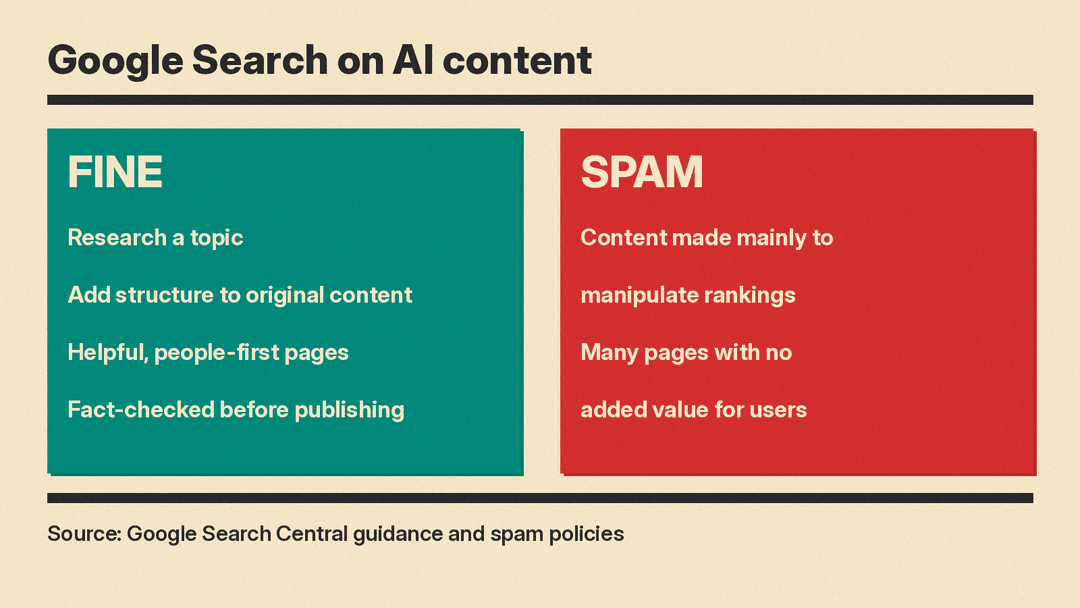
In plain terms: one helpful page written faster with AI is fine. Many pages generated without adding value for users, or other sites' content reworded at scale, are the patterns Google's spam policy describes.
A five-step workflow for using AI in SEO
The steps below follow the uses Google itself names as helpful (research and structure) and the checks it says are critical (fact-checking and review). They work with any general AI assistant, such as ChatGPT, Claude or Gemini.
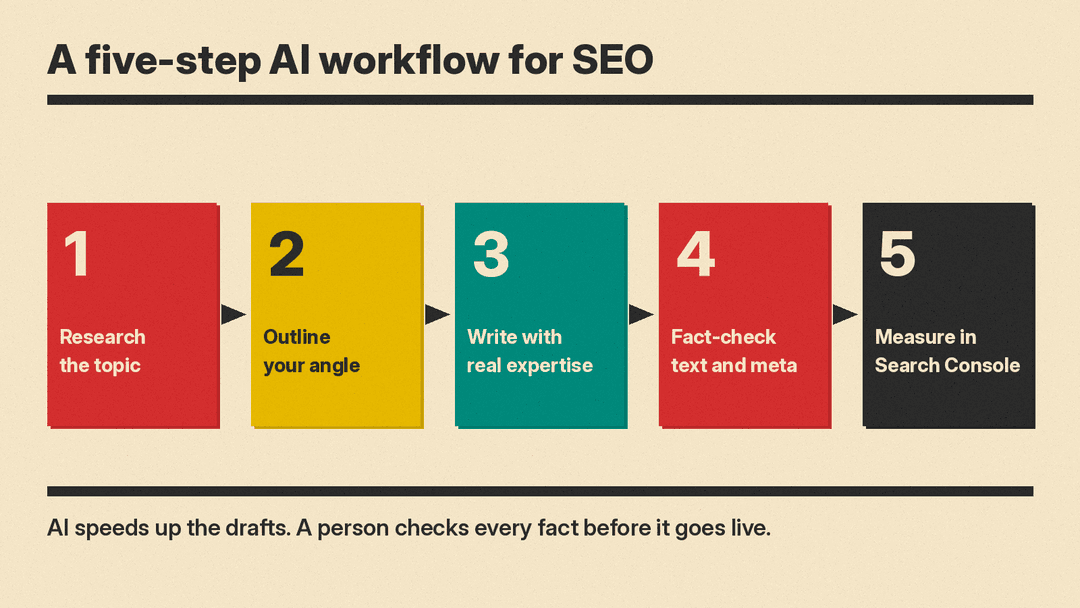
1. Research the topic
Google lists research as a good use of generative AI. Ask the assistant what questions people usually have about your topic, what subtopics a complete guide should cover, and which terms a beginner might not know. Treat the answer as a list of leads, not facts. Then check what actually ranks for your search today, and read the pages yourself.
A useful prompt: "I run a small bakery and want to write a guide on how to store sourdough bread. List the questions a home baker would ask, grouped by topic. Do not add facts or numbers."
2. Outline your angle
Adding structure to original content is the second use Google names. Give the AI your own notes, your experience and what makes your take different, and ask for an outline. The key word is original. If the outline could have come from any site, you have not added anything yet. Ask yourself what you know that a generic page does not: a real test, a customer question you answer every week, a mistake you made and fixed.
3. Write with real expertise
Google's guidance asks for content that demonstrates experience and expertise, so this is where a person matters most. You can let AI tidy up your sentences or suggest a clearer order, but the substance should come from you: your examples, your numbers, your photos and your judgment. For tools that help with drafting and editing, see our list of the best AI tools for writers.
Google also suggests thinking about "Who, How, and Why" when you produce content. On bylines, Google says you should consider accurate author bylines where readers would reasonably expect them, and that giving AI an author byline "is probably not the best way" to make clear that AI was part of the process. On disclosures, it says they are useful where someone might ask "How was this created?"
4. Fact-check the text and the metadata
Google's generative AI guidance explains why this step matters: generative models "don't retrieve facts, but predict a likely sequence of words," so outputs may contain inaccuracies, also called hallucinations. Google says it is "critical to manually factcheck and review all AI-generated content for accuracy and trustworthiness before publishing."
That review covers more than the article body. Google names the title element, the meta description, structured data and image alt text, because all of these can appear in search results. If an AI tool wrote your meta descriptions or alt text in bulk, read them before they go live. Our routine for fact-checking AI answers works for these checks too. For structured data, Google says to validate the markup and follow the policies for each search feature.
Online stores have one extra rule. Google's page says Google Merchant Center has its own policies for AI-generated content: AI-generated images must carry IPTC DigitalSourceType TrainedAlgorithmicMedia metadata, and AI-generated product titles and descriptions must be specified separately and labeled as AI-generated.
5. Measure in Search Console
Publish, then watch the results. Google's page on AI features and your website says traffic from AI Overviews and AI Mode is included in the Performance report in Search Console, under the "Web" search type. Google suggests verifying your site in Search Console and also tracking conversions and time on site in a tool such as Google Analytics.
What about AI Overviews and AI Mode?
Google also has a page for site owners on its AI features in Search, AI Overviews and AI Mode. Its guidance is short: "There are no additional requirements to appear in AI Overviews or AI Mode, nor other special optimizations necessary."
To be shown as a supporting link, Google says a page must be indexed and eligible to appear in Search with a snippet. Google also says you do not need new machine-readable files, "AI text files," or special schema.org markup to appear in these features. Google says existing SEO fundamentals are still worthwhile, and gives these examples (for how links show up inside AI Mode answers, see our AI Mode link changes explainer):
- Allow crawling in robots.txt and in any CDN or hosting setup
- Make content easy to find through internal links
- Provide a good page experience
- Keep important content in text form
- Support text with high-quality images and videos where they help
- Make sure structured data matches the visible text on the page
- Keep Merchant Center and Business Profile information up to date
If you want to limit what Google shows from your pages, Google points to the nosnippet, data-nosnippet, max-snippet and noindex controls. For limiting AI training and grounding in some of Google's other systems, it points to a separate control called Google-Extended.
Common mistakes to avoid
- Publishing first drafts. Google says generative AI outputs may contain inaccuracies and that all AI-generated content, including metadata, should be fact-checked before publishing.
- Mass-producing pages for keywords. Google's spam policy lists generating many pages without adding value for users as scaled content abuse.
- Rewording other sites. Google's spam policy lists automated transformations of other content, such as synonymizing and translating, where little value is provided, as an example of abuse.
- Expecting an AI bonus. Google says AI content gets no special gains in ranking. It is judged like any other page.
- Chasing special AI Overview tricks. Google says no special optimization or markup is needed.
Why it matters
For small teams, the practical takeaway is that AI can save real time on the slow parts of SEO: research, outlines, first drafts of descriptions and tidying up copy. What it cannot supply is the part Google says it rewards: original experience, accurate facts and pages written for people. Use AI to get to a draft faster, then spend the saved time making the page better than what already ranks.
