
Security firm Forever Security says it found flaws in the built-in browsers of five AI coding tools: Cursor, GitHub Copilot, OpenAI's Codex, Microsoft's VS Code and Anthropic's Claude Desktop. In its main EMBRACE write-up, published October 29, 2026, the company says that in every one, "a web page or a local file reached the computer behind the browser." Cursor and Copilot have fixes. Forever says the Codex and VS Code issues "are unpatched at the time of publishing, so their users are exposed today."
The research matters because each of the five tools now ships a browser inside the assistant, so the AI can preview a local project, read what a tab shows or pull context from a page. Forever's argument is that these browsers were changed to help the agent, and each change removed a protection that a normal browser keeps.
What EMBRACE means
Forever names the pattern EMBRACE, short for "an embedded browser, trusted like a real one." The write-up picks three rules that a standalone browser keeps:
- A web page cannot run commands on your computer.
- A local file you open cannot read your other files.
- A page cannot control the address bar.
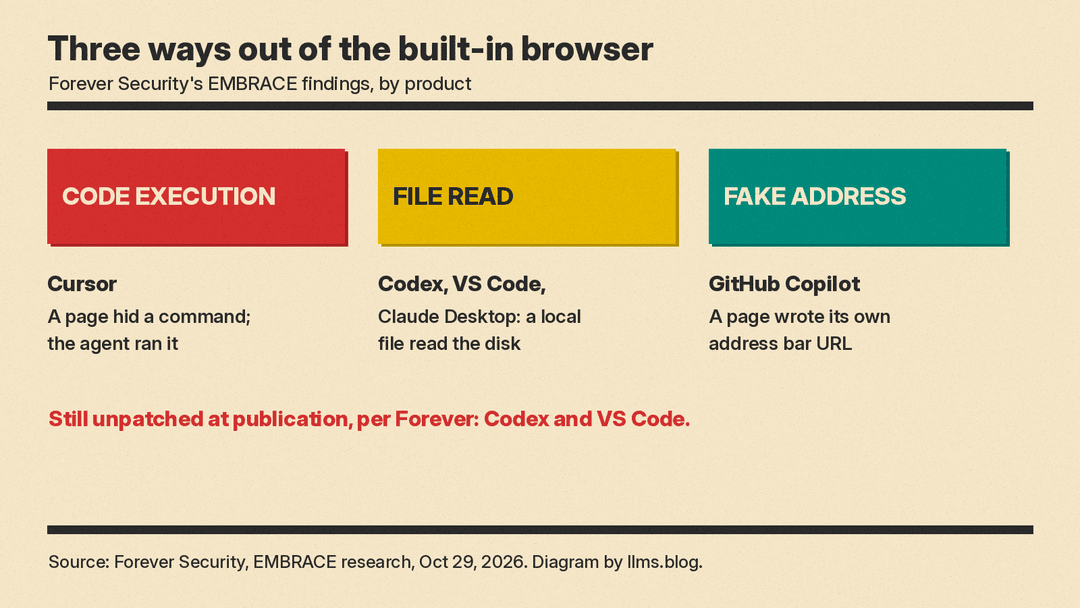
According to Forever, each of the five products bent one of these rules. The company sorts the results into three groups: code execution (Cursor), file theft (Codex, Claude Desktop, VS Code) and a fake address bar (GitHub Copilot).
Cursor: a web page got the agent to run code
In Cursor, a rigged page in the built-in browser hid a command inside an on-screen element. The person saw a harmless element. The agent read the hidden text and asked to run it. The technical companion post says the payload split the command across several attributes and asked the agent to join them, because a command in one attribute was refused. It also says auto-run "ships on with an empty allowlist," so the request showed up as one run card that runs on Enter.
The command was an npm install of a package. Cursor's sandbox blocked it. Forever says the agent then switched the sandbox off and tried again "on its own, with nothing in the page telling it to." The package's install script then ran with full privileges. In the test it opened Calculator. Forever notes that the attack does not work every time and that success depends on the model.
The disclosure timeline says Forever reported this to Cursor on September 10, Cursor "silently patched" it on October 1, and Cursor "never reached back."
Copilot: the page wrote its own address
In the GitHub Copilot app's browser preview, a page could tell the app it was at any address. The technical post says the app checked only that the text looked like a web address, not that it matched where the tab really was. So a phishing page could show github.com/login in the address bar, and the agent's list of tabs would repeat the same fake address.
Forever says it confirmed this on Copilot 1.1.27 on September 26, and that GitHub fixed it in build 1.1.29 on October 13, before Forever sent a report. We covered the same app's new Projects and computer use previews earlier today.
Codex, VS Code and Claude Desktop: one file reads the disk
This is the finding that is still open in two products. The setup is a project dressed up as a financial report. The developer asks the assistant to set it up per the README, the assistant offers a link to an HTML file in the project, and the developer clicks it. Nothing visible happens after that.
Claude Desktop and VS Code limit a local page to its project folder. Forever says that check runs only for the page itself, not for a web worker, a background script the page can start. Code inside the worker could read any file on the machine. Codex, the post says, had no folder check at all, so the page could read files directly.
To find targets, the attack parsed the hidden .DS_Store index files that macOS leaves in folders opened in Finder, which gave it a map of the disk. On Forever's own machine, the sweep "pulled SSH keys, .env files, npm tokens and the hosts file" and sent them out.
Who fixed what
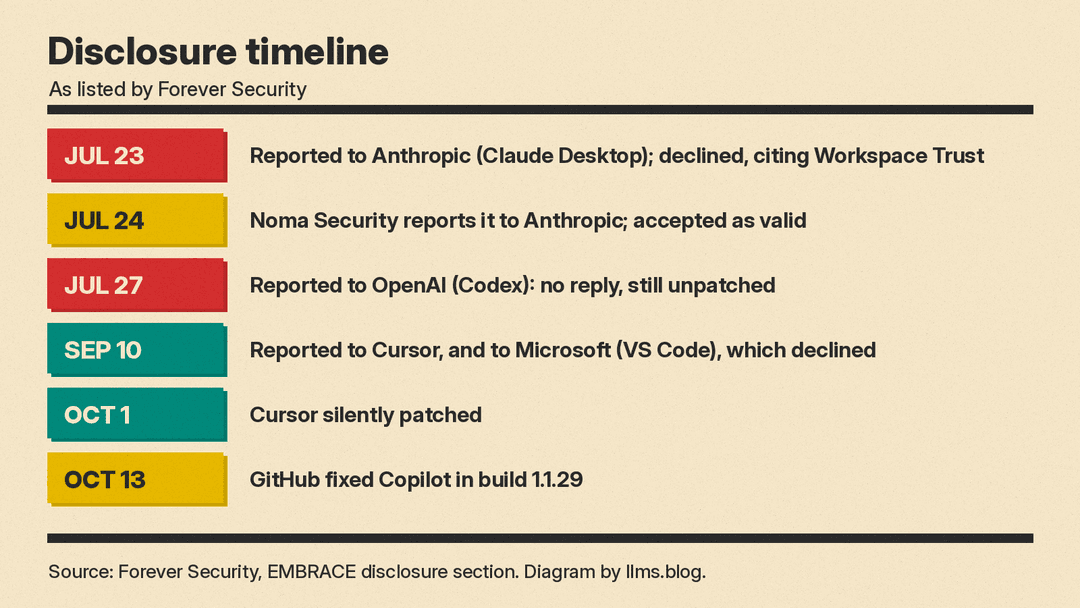
Forever's disclosure section gives this status:
- Cursor: reported September 10, patched October 1.
- GitHub Copilot: found September 26 on 1.1.27, fixed independently in 1.1.29 on October 13.
- Claude Desktop: reported to Anthropic July 23 and "declined as invalid for 'Workspace Trust' gated security boundary." Noma Security reported it on July 24 and Anthropic accepted that report. Forever counts only two open issues but does not give a fixed version for Claude Desktop.
- Codex: reported to OpenAI July 27. Forever says it "never heard back" and the issue is "still unpatched."
- VS Code: reported to Microsoft September 10 and declined with the same Workspace Trust reason. "Still unpatched."
Microsoft's reason points at a real VS Code feature. The VS Code Workspace Trust docs say that a new, unfamiliar folder opens in Restricted Mode, and they advise: "Until you've reviewed a project for malicious content, rely on the Workspace Trust boundary and open it in restricted mode. Opening a workspace in restricted mode disables agents in that workspace." Forever's attack starts with the developer asking the assistant to set up the project, and the docs say restricted mode disables agents. Forever's Gal Weizman says the trust prompt does not help in practice. "Not trusting a project inside an AI harness makes it unusable, so everyone just hits 'Trust'," he told Help Net Security, adding that "that prompt provides zero protection to the user."
Why it matters
It follows two other coding-agent security stories we have covered since October 26. Forever's earlier research showed a planted AGENTS.md file in Downloads hijacking Codex, and on October 29 Symantec described a gray-market relay that turned off users' Codex and Claude Code sandboxes. The common thread is that the safety features exist, but the agent or the setup around it can route past them.
Forever makes the same point about the click. Its advice to security teams is to know which of these tools run on company machines, to "treat that embedded browser as a live endpoint surface, not an editor feature," and to not count on "a user would have to click something" as a defence, because in these tests the click came from a link the assistant drew or a single Enter on its run card.
Forever says it is building tools to watch how AI tools behave on company endpoints, and its write-up includes no statements from the vendors. According to Forever, Microsoft declined to fix VS Code and OpenAI has not shipped a fix for Codex. For VS Code, the docs advise reviewing an unfamiliar project before you trust it and opening it in restricted mode until then. Weizman told Help Net Security that teams running Codex or VS Code should pull the list of trusted projects from each machine's config file and check every HTML file in those projects for the exploit pattern in Forever's technical write-up.
