
Making a podcast is a chain of small jobs: record the conversation, clean up the sound, cut the dead air, write show notes, pull clips for social, and maybe reach listeners in other languages. AI tools now cover each of those jobs, and some try to cover all of them. This guide groups nine real tools by the job they do, with the free tier and starting price each vendor lists as of October 2026.
Prices change often, so check each pricing page before you buy. Every feature below comes from the vendor's own page, linked in place.
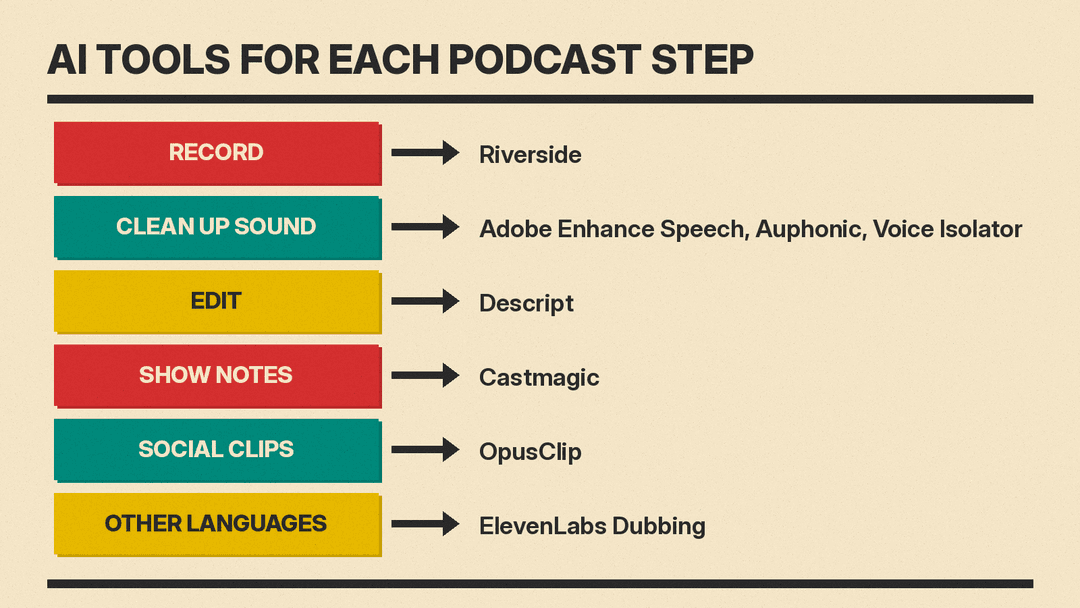
Quick picks
- Record remote interviews: Riverside
- Edit audio by editing a transcript: Descript
- Fix a bad recording for free: Adobe Enhance Speech
- Level, denoise and master every episode: Auphonic
- Pull a voice out of loud background noise: ElevenLabs Voice Isolator
- Show notes, newsletters and quotes: Castmagic
- Short vertical clips for social: OpusClip
- Translate an episode in the host's own voice: ElevenLabs Dubbing
- Turn documents into a two-host audio summary: Gemini Notebook Audio Overviews
Recording
Riverside
Riverside is a browser and app studio for remote interviews. Its key feature for podcasters is multitrack recording: each guest gets a separate audio and video track, so you can fix one voice without touching the others.
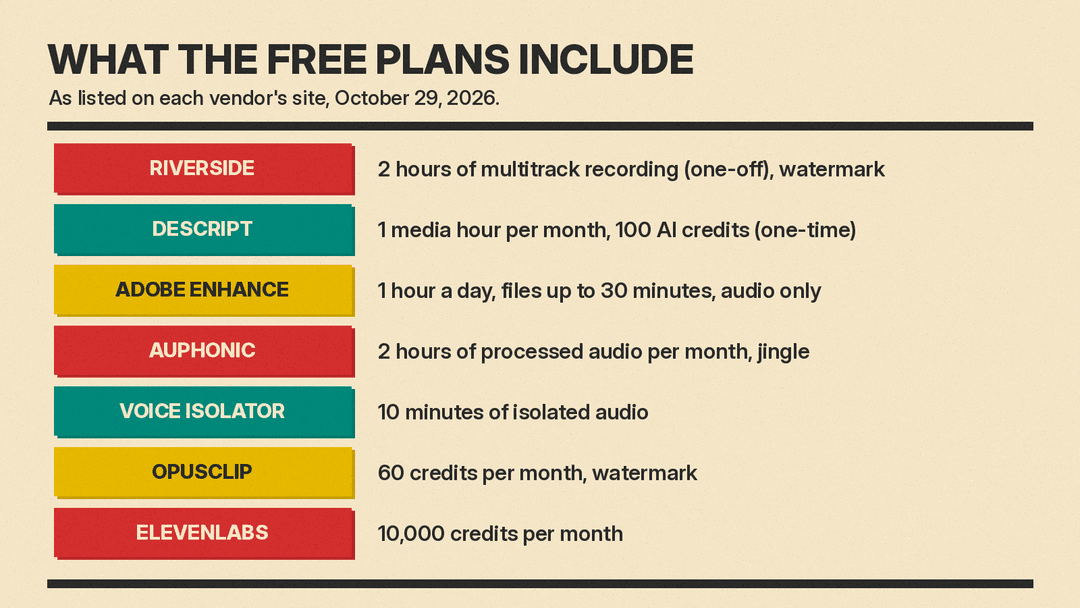
The free plan includes a one-off 2 hours of multitrack recordings, unlimited single-track recording and editing, video up to 720p, 44.1 kHz audio, and Magic Clips, with a Riverside watermark on everything. Pro costs $24 per month billed annually ($288 a year) or $29 billed monthly, as of October 2026, and lists up to 4K video, 48 kHz audio, no watermark, unlimited transcriptions, text-based editing, removal of silences and filler words, Magic Clips and show notes, audio enhancement, and podcast hosting with analytics. Riverside also lists publishing to YouTube, Spotify, Apple, Instagram and LinkedIn from the same account.
Pick it if your show is mostly remote conversations and you want recording, editing and hosting in one place.
Editing
Descript
Descript edits audio and video through a transcript. You delete a sentence in the text and the matching audio is cut. Its AI tools include Studio Sound (voice cleanup), Remove Filler Words, Remove Retakes, Create Clips, show notes and YouTube descriptions, plus an assistant called Underlord that Descript describes as an "AI video co-editor."
Descript's free plan includes 1 media hour per month and 100 AI credits (one-time). The Hobbyist plan is $16 per person per month billed annually, or $24 billed monthly, and includes 10 media hours and 400 AI credits per month, 1080p export without a watermark, and AI Speech with custom voice clones. The Creator plan ($24 annually, $35 monthly) raises that to 30 media hours and 800 AI credits per month.
Pick it if you want to edit by reading, not by staring at waveforms. AI Speech with a custom voice clone, included from Hobbyist up, can also patch a misspoken word.
Cleaning up the sound
Adobe Enhance Speech
Adobe Enhance Speech is a web tool from Adobe Podcast with a free plan. Adobe describes it as an AI filter that "improves spoken audio to make it sound like it was recorded in a soundproofed studio." You sign in, upload a file and download the cleaned version. The free plan handles audio only, files up to 30 minutes (500 MB) and 1 hour a day. The Adobe Firefly Pro plan ($19.99 per month as of October 2026) adds video files, bulk uploads, a strength control and up to 4 hours a day.
Pick it for a one-off rescue: an interview recorded on a laptop mic, or in a room with echo.
Auphonic
Auphonic is post-production on autopilot. You upload an episode and it applies noise and reverb reduction, an "Intelligent Leveler" that balances loud and quiet speakers, filler word, cough and silence cutting, multitrack processing, and loudness targets for podcast platforms. It also lists speech-to-text with automatic show notes, chapters and subtitles.
Auphonic is free for 2 hours of processed audio per month, and free productions come with an Auphonic jingle. Paid recurring plans run from 9 to 250 hours per month. The smallest, S (9 hours), is $13 per month, or $11 per month billed yearly, before tax, as of October 2026. One-time credit packs never expire. Recent updates on its site include a Zoom integration (October 23, 2026) and an n8n integration (September 25, 2026).
Pick it if you want every episode to come out at the same volume and loudness without learning a mastering chain.
ElevenLabs Voice Isolator
ElevenLabs Voice Isolator separates speech from background noise. ElevenLabs says it removes "ambient noise, mic feedback, and street sounds" and can strip out background music and overlapping conversations. It accepts WAV, MP3, FLAC, OGG and AAC files, and the page offers 10 minutes of isolated audio free.
Pick it for field recordings, street interviews, or a guest who called in from a cafe. For separating music stems rather than voices, see our guide to AI stem splitters and vocal removers.
Show notes and written content
Castmagic
Castmagic turns recordings into written content. You import a file, link or feed, and it produces a speaker-labelled, timestamped transcript in 60+ languages, then drafts show notes, newsletters, quotes, action items and audiograms. It also cuts captioned vertical clips in its Studio, and lists an API and a Claude MCP connection for working with your back catalog.
As of October 2026, the Hobby plan is $19 per month billed annually ($239 a year) or $29 billed monthly, and includes a library of 30 transcribed hours. Starter is $48 per month billed annually ($69 monthly) with 100 hours, and Team is $139 per month billed annually ($199 monthly) with 400 hours and 5 seats. The pricing page lists no free plan.
Pick it if writing show notes and newsletters is the part of the job you put off. If you only need a transcript, our AI transcription tools comparison covers cheaper options.
Clips for social
OpusClip
OpusClip cuts a long video into short vertical clips. It picks segments, scores them with what it calls a "Virality Score," reframes them for each platform and adds animated captions.
The free plan gives 60 credits per month, clips up to 1080p with a watermark, no editing, and clips that can no longer be exported after 3 days. Starter is $15 per month (monthly billing only) with 150 credits, captions in 20+ languages, filler and silence removal, and auto-posting to YouTube Shorts, TikTok and Instagram Reels. Pro is $29 per month on monthly billing or $14.50 per month billed annually ($174 a year), as of October 2026, with 300 credits per month, and adds AI B-roll, a social scheduler, export to Adobe Premiere Pro and DaVinci Resolve, and video dubbing.
Pick it if your show is on video and you want a steady stream of short clips without a separate editor.
Reaching other languages
ElevenLabs Dubbing
ElevenLabs Dubbing translates audio and video into 90+ languages. ElevenLabs says "each translation is delivered in a voice clone of the original speaker," and that its Dubbing v2 model conditions on the source performance so tone, emotion and timing carry across.
ElevenLabs plans start at $0 with 10,000 credits per month, then Starter at $6, Creator at $22 and Pro at $99 per month. As of October 2026, the dubbing page lists 0.4, 2, 9 and 44 included minutes of Dubbing v2 per month on those four plans, plus extra-minute costs.
Pick it if you have an audience in another language and want episodes that still sound like you. Get your guests' permission before you clone their voices. For text-to-speech narration instead of dubbing, see our list of the best AI voice generators.
AI-hosted audio from your documents
Gemini Notebook Audio Overviews
Google's Audio Overviews turn sources you upload into a conversation between AI hosts. Google's help page lists four formats: Deep Dive (two hosts, the default), The Brief (a single speaker, under two minutes), The Critique (constructive feedback on material like an essay) and The Debate. You can choose a language, pick Shorter, Default or Longer length (English only), and add a prompt to focus the hosts.
This is not a replacement for your show. It is useful for prep: listen to a summary of a guest's book or a long report before you interview them. Google warns that Audio Overviews "may contain inaccuracies or audio glitches," so check facts against the sources before you repeat them on air.
How to choose
Start with the step that costs you the most time. If raw audio quality is the problem, try the free cleanup tools first (Adobe Enhance Speech, Auphonic's 2 free hours, or 10 free minutes of Voice Isolator) before you pay for anything. If editing takes too long, Descript's transcript editing or Riverside's built-in editor change the job more than any filter. If the episode is done but nobody finds it, Castmagic and OpusClip handle the written and social pieces.
A few things to check on any plan:
- Watermarks: Riverside, OpusClip and Auphonic all mark free output in some way.
- Monthly limits: Descript, OpusClip and Auphonic count media hours, credits or processed hours per month. Auphonic says unused free and recurring credits do not stack up, so check each plan's terms.
- Voice cloning consent: Descript and ElevenLabs both offer voice clones. Only clone voices you have permission to use.
