
Duolingo, Speak, Praktika and Babbel now offer an AI conversation partner you can talk to out loud, and Google Translate and ChatGPT can do the same. The hard part is that each app does it differently, and the feature you want is often locked to one plan or still labeled beta.
This guide covers six real options for practicing Spanish with AI, what each one actually does according to its maker, and who it suits. Features and plan names below are as described on each company's own pages as of October 2026. We have left out prices on purpose: they change often and differ by country, so check the app store listing before you pay.
What an AI Spanish tutor can and cannot do
What these tools offer is speaking practice. You can repeat the same café order ten times, ask for a word you forgot, or stumble through a sentence without anyone watching. Most of the apps below also give feedback after a conversation, on pronunciation, grammar or the words you used.
What it is not good at is being right every time. Google's own help page for its Translate practice tool warns that "Generative AI is experimental and can be inaccurate." Treat AI feedback as a helpful second opinion, not a final answer, and check anything important against a dictionary or a teacher.
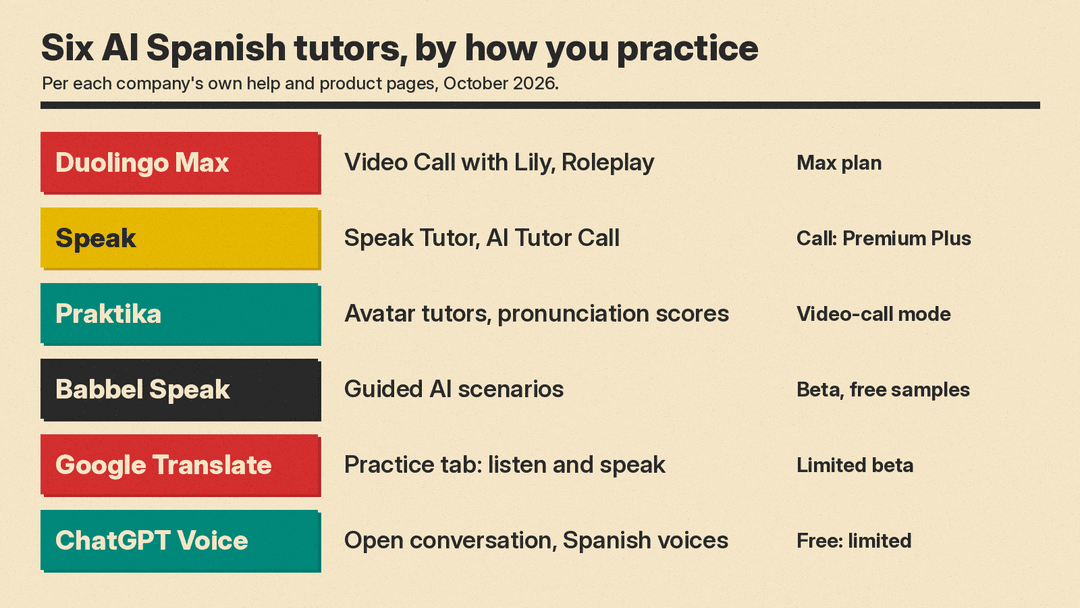
1. Duolingo Max: Video Call with Lily and Roleplay
Duolingo's AI features sit in its top subscription tier, Duolingo Max. According to Duolingo's help center, Max includes two AI conversation features:
- Video Call with Lily. You "call" Duolingo's character Lily and have an open conversation. Video Call is available to Max subscribers on iOS and Android (versions 13 and up) learning Spanish and several other languages. You find it on the learning path and in the Practice Hub.
- Roleplay. You practice real-world scenarios with the app's characters, such as ordering coffee or going furniture shopping. Spanish is one of the supported courses.
On its Video Call announcement, Duolingo says Lily adjusts to your skill level, lets you ask her to repeat herself or slow down, and does not correct your grammar during the call. Early calls last about a minute and can run up to 3 minutes as you advance. Duolingo's Max launch post adds that Lily remembers what you discussed on your next call, that you can read a transcript after you hang up, and that Roleplay gives AI feedback on the accuracy and complexity of your answers after each conversation.
Best for: people who already use Duolingo daily and want short, low-pressure speaking practice tied to their lessons.
2. Speak: Speak Tutor and AI Tutor Call
Speak is built around speaking from the start. It teaches Spanish among other languages, and its site says it gives real-time feedback on pronunciation and phrasing. The company also says it has a partnership with OpenAI and is backed by the OpenAI Startup Fund.
Two AI features matter here:
- Speak Tutor. According to Speak's help center, you can ask it grammar, vocabulary or pronunciation questions, practice everyday conversations, play word games and ask it to build a custom conversation lesson on any topic. The help center says Premium users get a limited number of custom lessons per day and Premium Plus is unlimited. Speak's plan FAQ lists the Speak Tutor lesson creator under Premium Plus, so check the plan screen in the app.
- AI Tutor Call. Announced on October 20, 2026, this is an open-ended, hands-free voice session. You can talk about any topic and ask for help in your native language. Speak says the tutor remembers past sessions, keeps track of mistakes you repeat and turns your session feedback into practice lessons. Sessions average eight to ten minutes. It is available to English and Spanish Premium Plus learners, and Premium learners can try one call.
Speak's site mentions a 7-day free trial.
Best for: learners whose main goal is to speak, especially adults practicing for travel, work or a specific conversation.
3. Praktika: avatar tutors with pronunciation scores
Praktika is an app built around AI tutors. Its help center says that besides English you can now also study Spanish, German, French, Italian, Portuguese, Korean, Japanese and others. For Japanese, see our guide to learning Japanese with AI.
What it offers, per the help center:
- Real-time grammar analysis and vocabulary suggestions while you practice.
- Pronunciation feedback on everything you say. Tap the question mark on your own message to see an overall and per-word score for pronunciation, fluency, completeness and rhythm, then play the tutor's version next to yours.
- A video-call mode where you talk to an animated avatar without pressing a button.
- A "Study in native language" setting for beginners who want instructions in their own language.
Praktika's 4.0 update in February 2026 added tutors built on generative AI animation and a Practice tab tailored to your interests, level and goals, including role-play scenarios.
Best for: people who want detailed pronunciation scores and like the feel of talking to a face on screen.
4. Babbel Speak: guided AI conversations (beta)
Babbel added an AI conversation partner called Babbel Speak in its own tab in the mobile app. It is still labeled beta, and Babbel says its availability may change and that it may charge for it in the future.
According to the Babbel help center:
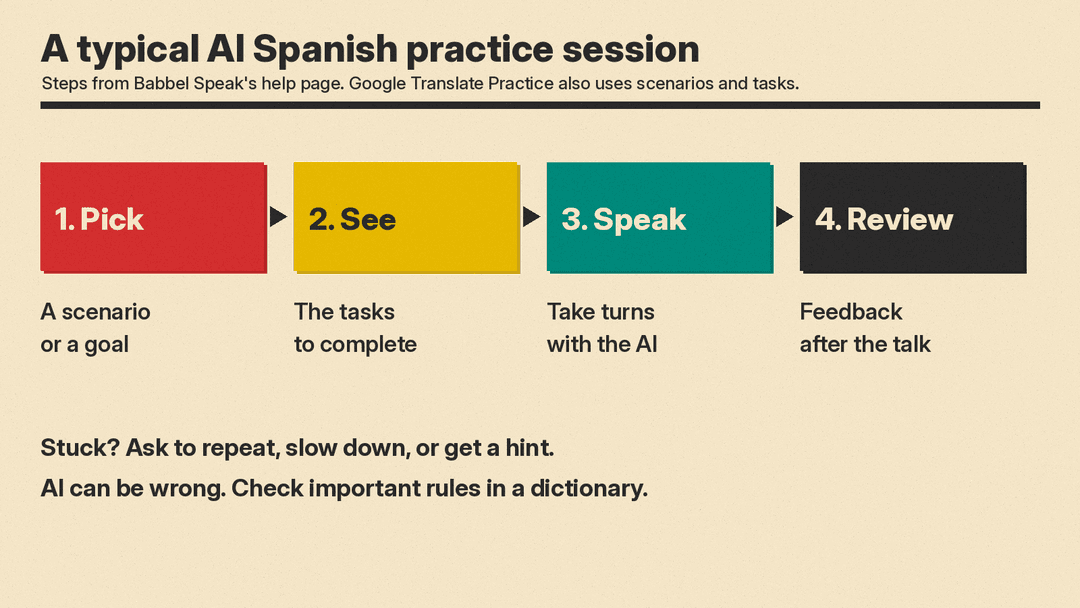
- You pick an everyday scenario, see the tasks you need to complete, and then take turns speaking with the AI partner.
- During the conversation you can repeat or slow down responses, see translations or ask for a hint.
- It will not stop or correct you mid-sentence. After each conversation you get feedback on the tasks you completed and the vocabulary you used.
- It works only in the mobile app, not on desktop.
Babbel's page says registered users can try sample lessons for free, and a subscription unlocks all lessons. It offers both Spanish (Spain) and Spanish (Mexico). The help center notes that which Spanish you get depends on your display language: with American English you practice Mexican Spanish, and with British English you practice Spanish.
Best for: nervous beginners who want structure and clear goals instead of open-ended chat.
5. Google Translate Practice (beta)
If you already have Google Translate on your phone, you may already have an AI tutor. Google added a Practice tab to the Translate app as a beta, and Spanish was one of the first languages.
Per Google's help page, it works like this:
- Tap Practice, choose Spanish, and pick Basic, Intermediate or Advanced.
- Describe why you are learning, or choose a goal such as travel, school, work or family.
- Choose a scenario. Each one has a listening activity (hear a short clip and tap the words you heard) and a speaking activity (a conversation with AI to complete tasks).
- The app tracks your daily progress, and Google's blog post says hints are available when you need them.
Google calls it a limited beta, and the help page lists which countries and language pairs have it, so you may not see it yet.
Best for: casual learners and travelers who want quick practice without installing another app.
6. ChatGPT Voice: a flexible conversation partner
ChatGPT is not a language course, but its voice mode can be a useful practice partner if you tell it what you want. According to OpenAI's help page:
- You can ask ChatGPT during a voice conversation to speak a different language, and set your preferred language under Settings, Voice, Language.
- The Live voice option can listen and speak at the same time, so you can interrupt it, much like a real conversation.
- Live includes two Mexican Spanish voices, Tinta and Arrullo.
- You can ask it to speak faster or slower.
- A transcript is added to the chat after the conversation, so you can review it. OpenAI notes it may not exactly match what was said.
- Free accounts get limited access, and OpenAI says the limits may change.
The catch is that you are the curriculum. ChatGPT Voice is not a structured course, so you set the topic, the level and the kind of feedback you want. It can work alongside one of the apps above. You could open with a request such as: Talk to me in simple Spanish about my weekend, and after each answer, tell me one mistake I made. For a tested prompt that keeps ChatGPT in role and adds a correction line, see our guide on how to learn a language with ChatGPT.
Privacy note: OpenAI says audio clips from Live and Advanced voice conversations are stored with the chat transcript and retained for 30 days. Deleting the chat deletes the clips within 30 days, with some exceptions listed on the help page.
How to choose
A quick way to decide:
- You want lessons and a daily habit: Duolingo Max or Babbel.
- You mainly want to speak: Speak or Praktika.
- You want detailed pronunciation scores: Praktika.
- You want to try AI practice before paying for anything: Google Translate Practice, Babbel Speak's free sample lessons, or ChatGPT Voice on a free account.
- You are learning Latin American Spanish: Babbel Speak (Mexican Spanish with an American English display) and ChatGPT Live's Mexican Spanish voices make that explicit.
Tips for getting more out of any AI tutor
- Speak out loud often. Short, regular sessions may be easier to keep up than one long weekly one. Google Translate Practice tracks your daily progress, and Duolingo's Video Calls last about one to three minutes.
- Set a real scenario. "Order dinner at a restaurant in Mexico City" gives the AI something concrete to work with.
- Ask for corrections at the end, not during. Duolingo's Lily and Babbel Speak already avoid correcting you mid-conversation.
- Double-check what matters. AI can make mistakes. Look up a rule or a word in a dictionary before you rely on it for a test.
- Mix in humans. An AI partner is a safe place to practice. Real conversations with people are still the goal.
For more on studying with AI, see our guide to ChatGPT prompts for studying, and our list of the best AI tools for students.
Sources
- Duolingo Help Center: What is Duolingo Max?
- Duolingo blog: Video Call
- Duolingo blog: Duolingo Max
- Speak
- Speak Help Center: What is Speak Tutor?
- Speak blog: Introducing AI Tutor Call
- Praktika
- Praktika Help Center: Learning Process
- Praktika blog: Praktika 4.0
- Babbel: Babbel Speak
- Babbel Help Center: Babbel Speak
- Google blog: Translate live translation and language learning
- Google Translate Help: Personalized conversation practice
- OpenAI Help Center: ChatGPT Voice
