
Apple Intelligence is the name Apple uses for the AI built into iPhone, iPad, Mac, Apple Watch and Apple Vision Pro. It is not one app. It is a set of features spread across Photos, Messages, Mail, Safari, Notes, the Phone app and Siri.
This guide lists what Apple Intelligence does with the current iOS 27 generation of Apple software, which devices get it, how to turn on the new Siri AI, and the limits Apple itself lists. Every feature below comes from Apple's own Apple Intelligence support page, its Siri AI setup page and its Apple Intelligence product page, all as of early November 2026.
Do you have it? Devices and requirements
Apple says Apple Intelligence is automatically available on eligible devices, as part of the operating system, when you update to the 27.0 releases of iOS, iPadOS, macOS, watchOS and visionOS, in supported languages and regions.
According to Apple's support page, the supported devices are:
- iPhone: iPhone Duo, iPhone 16 models or later, iPhone 15 Pro, iPhone 15 Pro Max and iPhone Air.
- iPad: iPad mini (A17 Pro) and iPad models with M1 or later.
- Mac: MacBook Neo (A18 Pro) and any Mac with M1 or later.
- Apple Vision Pro.
- Apple Watch: Series 9 or later, Ultra 2 or later, and SE 3, when paired with an Apple Intelligence-enabled iPhone. Some watch features need the iPhone nearby.
Two other requirements matter:
- Storage. Apple lists up to 14 GB of on-device storage for iPhone Duo, iPhone 17 Pro models and later, iPhone Air, iPads with M4 and later and at least 12GB of unified memory, Macs with M3 and later and at least 12GB of unified memory, and Apple Vision Pro (M5). Other supported iPhone, iPad, Mac and Vision Pro models need up to 8 GB. Apple Watch needs up to 1.5 GB. Apple notes the space used can briefly run higher during and right after a software update, while new models download and old ones are removed.
- Matching languages. Your device language and your Siri language must be set to the same supported language. Apple warns that if you change the Siri language, Apple Intelligence may stop working until the new language finishes downloading and matches the device language.
Supported languages are English, Danish, Dutch, French, German, Italian, Norwegian, Portuguese, Spanish, Swedish, Turkish, Vietnamese, Chinese (simplified and traditional), Japanese and Korean. Some features work in fewer languages, and the page flags several as English only.
Siri AI: the new Siri
This generation also brings Siri AI, which Apple describes as "an entirely new version of Siri." It is in beta. Per Apple's October 26 announcement, the 27.2 software updates made it available in French, Japanese, Korean, Portuguese and Spanish as well as English. Apple says Chinese (traditional), Norwegian, Turkish and Vietnamese are coming by the end of the year. Siri AI is not available for users under 13.
What it can do, according to Apple's setup and product pages:
- Broad world knowledge. Answers to almost any question, and it can go to the web for up-to-date information.
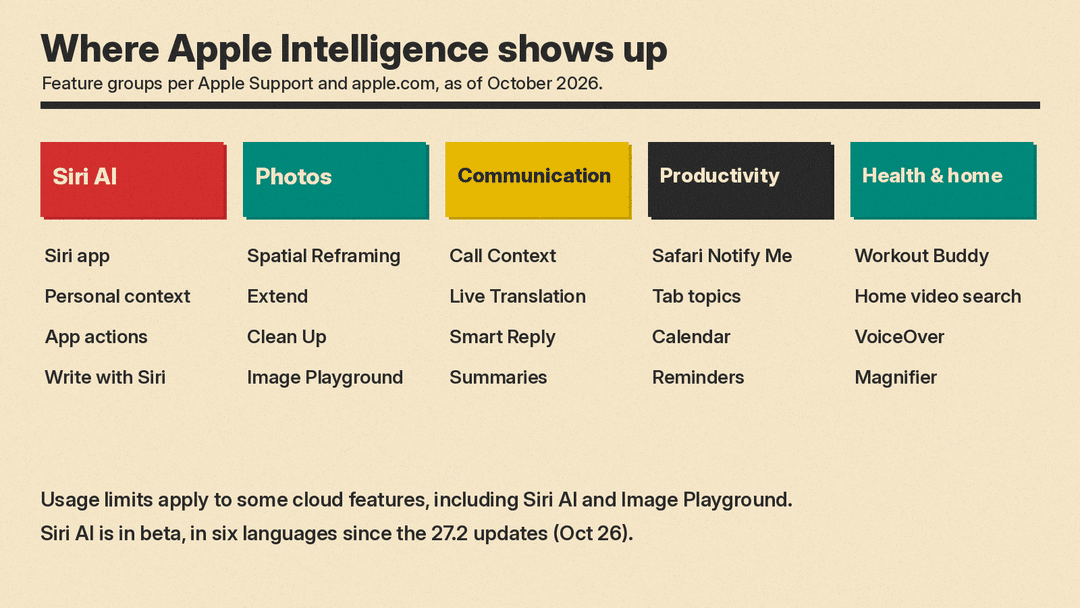
- Personal context. It can find things across Messages, Mail, Calendar, Notes, Reminders and more. Apple's examples include finding a photo from years ago or an email buried in your inbox.
- Onscreen awareness. Ask about, and act on, what is on your screen.
- App actions. Send messages, create events and get other things done across apps.
- The Siri app. A dedicated app keeps your conversation history, synced with iCloud, so you can start on iPhone and continue on Mac, iPad, Apple Watch or Apple Vision Pro. You can pin conversations or start new ones.
- Write with Siri. Describe what you need and Siri can draft from scratch, edit what you wrote or give feedback, virtually anywhere you type.
- Expressive voices. Customize pace and expressiveness (English only, per the setup page). This one needs a device with Apple's AFM Core Advanced on-device model, which Apple lists as iPhone Air, iPhone 17 Pro models and later, iPhone Duo, iPads with M4 or later and at least 12GB of unified memory, Macs with M3 or later and at least 12GB of unified memory, and Apple Vision Pro (M5).
How to turn it on. Apple's steps: after you update, go to Settings, tap Siri, then tap Try Siri AI (Beta). If Siri is off, tap Turn On Siri first. Then follow the prompts to pick a voice, complete voice enrollment and review your privacy settings. Siri AI then begins to download on its own. Apple says that during times of high demand you might be added to a waitlist first, and wait times can vary.
Where it is not available. Apple says Siri AI is not available for iOS, iPadOS or watchOS in the EU. EU users can use it on macOS 27 Golden Gate and visionOS 27 if their Apple Account region is in the EU and their device and Siri language are set to the same supported language. It does not currently work if your Apple Account region is mainland China.
If you want more detail on how Siri AI's memory and app exclusions work, see our iOS 27.2 Siri AI explainer.
To see how Siri AI compares with other phone assistants, read our Siri vs Gemini vs ChatGPT Voice guide.
Visual Intelligence: ask about what you see
Visual Intelligence lets you search, ask questions and take action on what is in front of you or on your screen. On iPhone you can use Siri mode in the Camera app. On iPhone and iPad you can use the screenshot gesture, and on iPad you can tap an item or circle it with Apple Pencil. On Mac you use a keyboard shortcut or a screenshot. On Apple Vision Pro you look at something and ask Siri.
Apple's examples of smart actions include splitting a bill with friends when the check arrives, getting nutrition information on a dish in front of you, and importing a card into Apple Wallet.
Writing help
There are two layers here.
- Write with Siri (part of Siri AI) drafts, edits and reviews text almost anywhere you type. In Messages and Mail, Apple says it can match your writing style, punctuation and tone.
- Writing Tools remain available for people who do not have Siri AI writing support.
Other writing features Apple lists:
- Automatic proofreading checks grammar and spelling as you type, on iPhone, iPad and Mac.
- Personalized Smart Reply in Messages (English only) and in Mail.
- Suggestions in Mail (English only), which offer quick actions from the context of a conversation, such as adding a calendar event.
- Customized writing prompts in the Journal app.
Photos and images
Apple's photo and image features include:
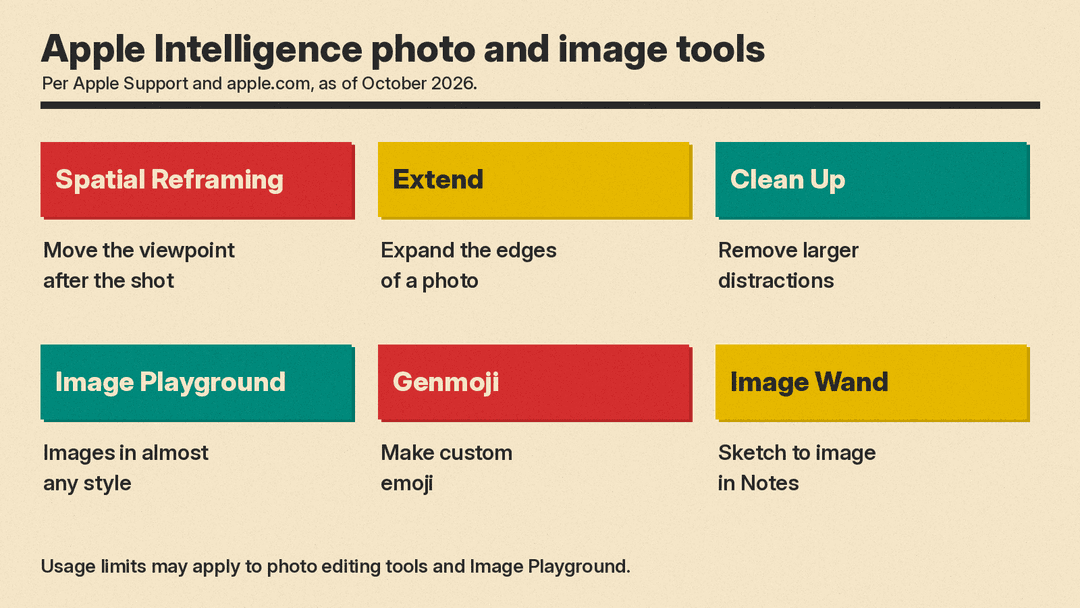
- Spatial Reframing. Move the viewpoint, adjust the angle or zoom in after a photo is taken, "as if you were repositioning the camera," in Apple's words.
- Extend. Expand the edges of a shot.
- Improved Clean Up. Remove larger distracting objects than before.
- Image Playground. Create and modify images in almost any style, now including photorealistic, from a description or with touch.
- Genmoji. Make custom emoji. You can also create a background in Messages.
- Image Wand. Turn rough sketches into images in Notes.
- Natural language search in Photos and memory movies in Photos.
Apple notes that the photo editing tools and Image Playground are subject to usage limits.
Calls, messages and translation
- Call Context surfaces relevant information from your apps while you call a business. Apple's example is a confirmation code from Mail when you call an airline.
- Live Translation translates texts in Messages, shows translated captions in FaceTime, and gives spoken translations in Phone calls and in conversations through AirPods. AirPods support covers AirPods 4 with Active Noise Cancellation and later, AirPods Pro 2 and later, and AirPods Max 2 with the latest firmware.
- Summaries for notifications, Mail and Messages, plus voicemail summaries and Notes transcription summaries in a set of supported languages.
- Priority messages in Mail, poll suggestions in Messages, the Reduce Interruptions Focus, and intelligent breakthrough and silencing in Focus.
Safari, Shortcuts and everyday tasks
- Safari can group tabs by topic. Notify Me watches a page for changes, such as a price change or a restock, and alerts you. You can also describe an extension that changes how a site looks or automates common actions.
- Shortcuts can be created by describing what you want in plain words. Apple's support page lists this for iPhone, iPad and Mac with the 27.0 releases, with usage limits, but its product page still lists it under "Coming in a future software update." You can also use Apple Intelligence models in Shortcuts.
- Calendar and Reminders accept plain-language descriptions. Apple's example is changing a lunch meeting to a coffee chat and letting Calendar adjust the details. Reminders can also auto-categorize items.
- Finder suggests file and folder names.
- Wallet offers enhanced order tracking in English (US and UK).
- ChatGPT extension is available where the ChatGPT app and service are available.
Health, home and accessibility
- Workout Buddy works on iPhone and Apple Watch. Apple says the enhanced version gives deeper insights and more data-rich motivation, works without the iPhone nearby (with a Wi-Fi or cellular connection) and now supports Spanish as well as English. It needs Bluetooth headphones. Apple's separate redesigned Health app is a different feature, still in the iOS 27.3 beta; see our report on the Health app returning in the iOS 27.3 beta.
- Home app features combine related activity notifications and can describe and search HomeKit Secure Video footage. These need a compatible home hub, and video search needs an eligible iCloud+ plan.
- Accessibility features include richer scene descriptions in VoiceOver and Magnifier, cleaned-up text and summaries in Accessibility Reader, and Voice Control commands that accept more flexible names.
Limits to know about
Apple's support page says features that rely on server-side models have daily usage limits, including Siri AI, the photo editing tools, Image Playground and AFM 3 Cloud models in Shortcuts. Limits "may vary by feature, request complexity, system demand, system policies, and other factors." Apple also says "expanded access to such features will be available for a fee in the future." The page does not give a price or a date.
Region rules matter too. Apple says the next generation of Apple Intelligence features across apps is available to EU users on supported devices, even though Siri AI on iPhone, iPad and Apple Watch is not. In mainland China, Apple Intelligence does not currently work on devices bought there, or on devices bought elsewhere when both your location and Apple Account region are in mainland China. Apple began testing Apple Intelligence in China on November 4, with Alibaba's Qwen in some features.
What about privacy?
Apple says Apple Intelligence uses on-device processing where it can, and a system called Private Cloud Compute for larger server-based models. On its product page, Apple states that with Private Cloud Compute your data is never stored and is used only for your requests. Siri AI syncs conversation history across devices through iCloud, and the setup flow asks you to review privacy settings before you start.
Where to start
If you have a supported device and it is updated, try these three first:
- Turn on Siri AI in Settings, then Siri, and follow the prompts.
- Open a photo in Photos and try Clean Up or Spatial Reframing.
- Take a screenshot of something you want to know more about and ask Siri about it.
Then check the rest of the list above against what you do every day.
If you use Keynote, Pages, Numbers or Logic Pro, Apple has also announced a separate beta AI assistant for those apps, covered in our Apple Creator Studio AI assistant post.
