
Siri AI on iPhone has a daily cap starting with iOS 27.3. Apple published a support document on November 16 that sets daily usage limits on Siri AI and several other Apple Intelligence features that run on Apple's server models. Basic Siri requests keep working after you hit the cap. Advanced requests pause until the next day, unless you pay for an eligible iCloud+ storage plan, which now doubles as an AI usage upgrade.
iOS 27.3 is in beta now. MacRumors expects the public release in December. Here is what changes, what counts toward the limit, and what each iCloud+ tier gets you.
What Apple is limiting
Apple says the 2027 software releases make Siri AI and Apple Intelligence free on supported devices. Features that rely on "powerful server models" get daily limits starting with the 27.3 releases. Apple's support page lists these categories, and says the list is not complete:
- Siri AI, for the more complex requests
- Images: Clean Up, Extend and Spatial Reframing in Photos, plus Image Playground
- Workflows and automation: the AFM Cloud and Cloud Pro models in Shortcuts
- Third-party apps that use Apple Foundation Models in Private Cloud Compute
Apple says limits "may vary by feature category, request complexity, system demand, system policies, and other factors." It does not publish the size of the standard limit. MacRumors reports that each of the four categories has its own limit, and that Apple will probably adjust them during the beta.
Basic vs advanced Siri requests
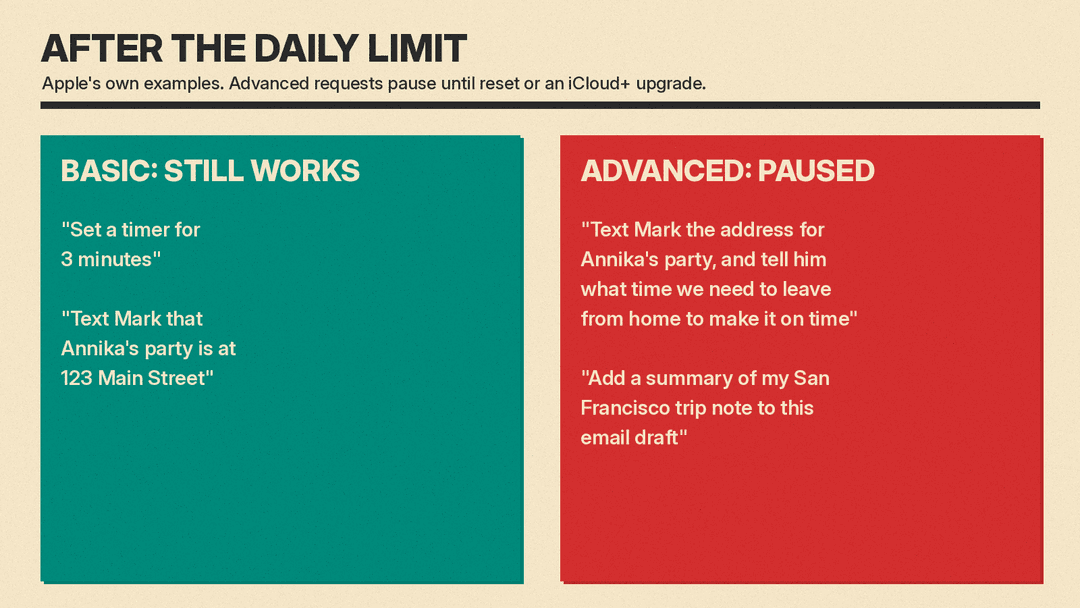
This is the part most iPhone owners will notice. Apple says that when you reach the Siri AI limit you get a notification, and you can still make "everyday" requests. Its examples are "Set a timer for 3 minutes" and "Text Mark that Annika's party is at 123 Main Street."
Advanced requests are paused. Apple gives two examples:
- "Text Mark the address for Annika's party, and tell him what time we need to leave from home to make it on time."
- "Add a summary of my San Francisco trip note to this email draft."
The difference is that the advanced requests pull information from one place and use it somewhere else, or chain several steps together.
Apple has not published a full rule for which requests count. 9to5Mac reports a list that leaker pdfu posted on X and says Siri AI uses to sort requests. Apple has not confirmed it, so treat it as unofficial. According to that list, a request counts as advanced if it:
- uses information from one app, the screen or a message in a different app, or needs the result of one step in another step or app
- packs two or more separate asks into one sentence, even in the same app
- asks about or summarizes a photo, camera view or attachment (editing, searching and albums are fine)
- deletes, archives, moves, marks or changes a whole set of emails, notes, reminders, messages, photos, files, contacts or events at once
- sets up an action or notification on a time or trigger, other than alarms, timers, reminders and calendar events, notifies someone when a person arrives or leaves, or builds or edits a Shortcut or automation
- is deep research or a multi-step task done for you
- asks Siri to write new content such as a story, plan, recipe, image, or a message from a topic rather than your own words, or to rewrite text in a tone other than friendly, professional or concise
9to5Mac also cites an X user on the beta who hit the limit. He first reported that complex questions still worked, then said they stopped shortly after, while basic requests kept working.
How iCloud+ raises the limit
Starting with iOS 27.3, Apple's existing iCloud+ storage plans include more AI usage, with no price change according to MacRumors. The 50GB plan does not raise the limit. Higher plans do:
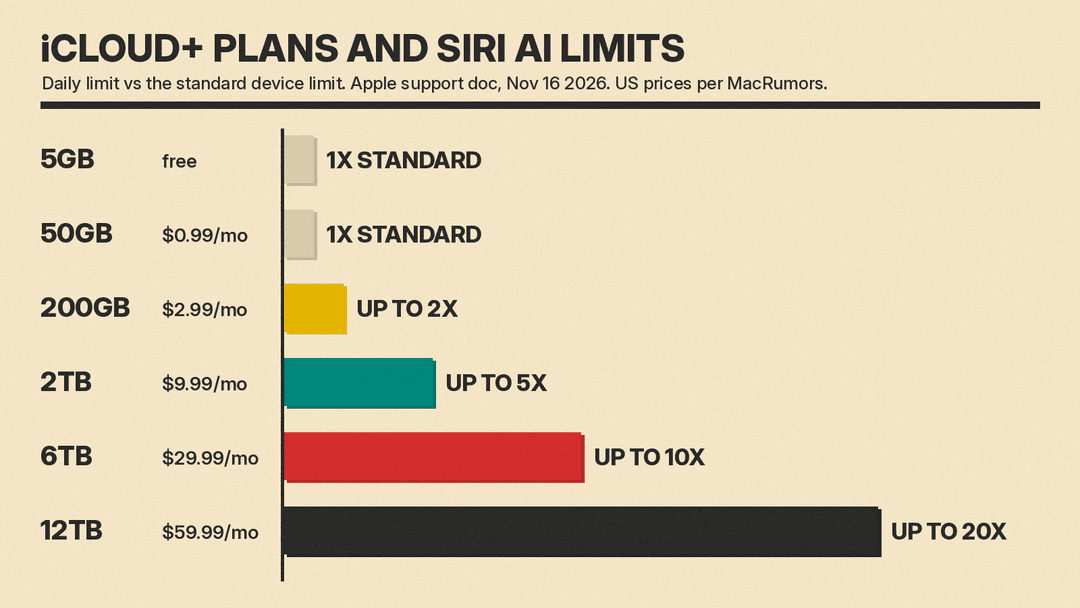
- Free (5GB) and 50GB ($0.99 a month): standard device limit
- 200GB ($2.99 a month): up to 2x the standard limit
- 2TB ($9.99 a month): up to 5x
- 6TB ($29.99 a month): up to 10x
- 12TB ($59.99 a month): up to 20x
Prices are U.S. prices as listed by MacRumors on November 17, 2026. The multipliers come from Apple's support page.
Two details matter here. First, the free limit is per device. Your iPhone, iPad and Mac each have their own. Second, the paid boost is a shared pool. Apple says that after a device uses up its own daily limit, it draws on an increased limit "shared by all devices signed in to your Apple Account and across any Family members sharing your plan, on a first-come, first-served basis." So a family on one 2TB plan shares one larger pool, not 5x each.
MacRumors reports Apple does not plan to sell more usage beyond the 12TB plan for now.
Shortcuts and Home get their own rules
The Cloud Pro model in the Shortcuts app's Use Model action becomes an iCloud+ feature. Apple's table shows no Cloud Pro access on the free or 50GB tiers, standard access on 200GB, and up to 5x, 10x and 20x on the larger plans. 9to5Mac calls it one of two new perks for subscribers.
Some Apple Intelligence features in the Home app, such as video summaries, are capped by camera count: up to 1 camera on the 2TB plan, 2 on 6TB and 5 on 12TB.
When the limit resets
All categories reset daily at the same time, and unused usage does not roll over. Apple says the reset happens around midnight in your current time zone, with three exceptions:
- When traveling abroad, it resets around midnight in the central time zone of your Apple Account's country or region.
- On a shared Family plan, it follows the time zone of the person who bought the plan.
- If you are not signed in to an Apple Account, it resets about 24 hours after you started using that feature category.
Not available everywhere
Apple says increased access to Apple Intelligence features through iCloud+ is not available in China, Brazil, the EU, the UK or South Korea. Increased Siri AI access through iCloud+ is not available in Brazil, the EU, the UK or South Korea. The standard free limits still apply where the features themselves are offered.
Why it matters
Apple is following the pattern of ChatGPT, Gemini and Claude: a free tier with a cap, and more for people who pay. The difference is that Apple did not create a new AI subscription. It folded AI usage into a storage plan that many iPhone owners already pay for. That fits what Samsung said about Galaxy AI: core features free, extras possibly paid.
For most people, the practical advice is simple. If you mostly set timers, send short texts and ask quick questions, those everyday requests keep working even after the limit, according to Apple. If you lean on Siri AI for multi-step tasks, photo edits like Clean Up, or writing help, watch for Apple's warning in iOS 27.3 and check which iCloud+ plan you already have before buying anything. Apple says the standard limit and plan features may change over time, so the numbers above are as of November 2026.
For background on what Siri AI can do, see our guides to Siri AI in iOS 27.2 and Siri AI opening to every app.
Sources
- Apple Support: Learn about iCloud+ with Apple Intelligence and Siri AI
- 9to5Mac: iOS 27.3 adds Siri AI usage limits, here's what counts toward your limit
- 9to5Mac: iOS 27.3 will give iCloud+ subscribers two new perks
- MacRumors: iOS 27.3 Beta Adds Daily Siri AI Limits and iCloud+ Upgrades
- MacRumors: iPhone Users Who Pay for iCloud Storage Receive New Perk on iOS 27.3
