
Google's Gemini app can now do errands, not just answer questions, and it no longer costs anything to try. On November 17, Google announced that Tasks in Gemini is rolling out free of charge in the US, Japan, Korea, Canada, Australia and India, running on its new Gemini 4 Hydrogen model. Google says that covers "hundreds of millions of people."
Tasks is the feature Google first called Spark. According to The Verge, Spark launched in May for Google AI Pro and Ultra subscribers only. Now it sits inside the regular Gemini app as a switch: Chat for questions, Task for jobs you want handed off. Here is what it does, who can use it, and what to check before you let it spend money or make calls for you.
What Gemini Tasks does
In Chat mode, Gemini talks. In Task mode, it works through a job step by step, using your connected apps, websites, and what it knows about you through Personal Intelligence. Google's help page lists examples like cleaning up your inbox by summarizing or archiving newsletters, watching for flight and hotel price drops within your budget, and pulling together research into downloadable files such as PDFs, documents, spreadsheets and slides.
In Google's announcement, Josh Woodward, the vice president in charge of the Gemini app, describes his own uses:
- Booking a car service. He asked Gemini to call the two nearest dealerships about an early Friday appointment. Gemini called both at once, waited on hold, booked a slot and added it to his Google Calendar. Google says Gemini tells the business right away that it is an AI, and businesses can opt out.
- Finding a high bill's cause. After a surprise $389 electric bill, he let Gemini sign in to his utility portal through Google Password Manager and read past statements in his email. It pointed to a heat pump running during peak pricing.
- Shopping. Gemini compared USB-C chargers, asked follow-up questions about wattage and color, found a discount code that saved $10, and checked out with Google Pay.
- Family logistics. He forwarded school emails to gemini@google.com, and Gemini put the dates on his calendar and flagged a clash with basketball practice.
These are Google's own examples from its own executive, not independent tests. Google also says Gemini now connects with more than 60 popular apps, including Instacart.
Who can use it for free
Google's help page sets out the rules. To assign tasks you must:
- Be 18 or older.
- Sign in with a personal Google Account. Work and school accounts are not supported for now.
- Have Gemini History turned on.
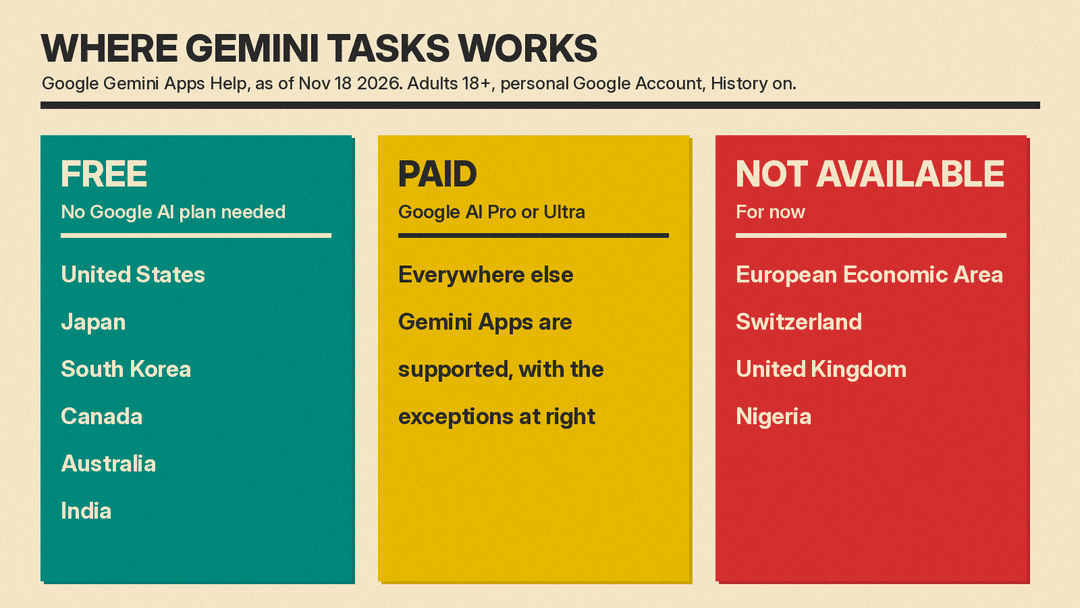
Tasks is free, with no Google AI subscription, in Australia, Canada, India, Japan, South Korea and the US. Everywhere else Gemini is offered, it needs a Google AI Pro or Ultra plan, except in the European Economic Area, Switzerland, the United Kingdom and Nigeria, where it is not available at all. It works in the Gemini mobile app, the Gemini app on Mac, and the web app at gemini.google.com.
Free does not mean unlimited. Google's limits page says Gemini usage limits are based on compute: how complex your request is, which model and features you use, and how long the conversation runs. Your allowance refreshes every 5 hours until you hit a weekly limit, and Google says limits can change. A long task that browses many sites will use more than a quick question.
US-only extras
Some of the most useful parts start in the US only. The Verge lists them: Gemini can call businesses to compare prices and check stock, buy things with Google Pay, sign in to accounts that support Google Password Manager, and take tasks by email or text.
There are fine-print limits. Google says calling through Gemini is not available in Indiana, Louisiana, Minnesota, Montana and Nebraska. Texting Gemini needs a US phone number with an eligible mobile carrier.
How to start a task
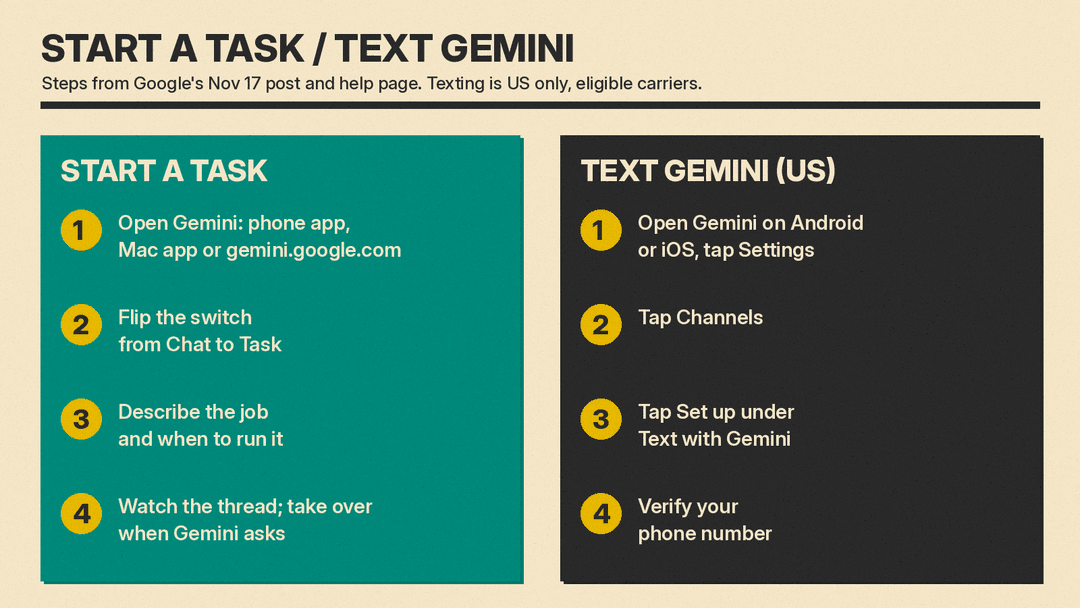
- Open the Gemini app on your phone or Mac, or go to gemini.google.com.
- Flip the switch on the home screen from Chat to Task. On mobile it sits above the text box; 9to5Google notes it sits below the box on the web.
- Describe the job and, if you want, when it should run. Google suggests typing "set up," "get started," or "interview me" for a guided first task.
- Watch the task thread. You can add instructions while Gemini works, and it will ask you to take over when it needs you, for example to sign in to a site.
To text Gemini in the US, open the app, tap Settings, tap Channels, tap Set up under Text with Gemini, and verify your phone number. To email a task, forward the message to gemini@google.com.
Safety and money controls
Google says each task runs in a hardware-isolated virtual machine dedicated to your account and never shared with other users. It also scans search results and web pages for prompt-injection attacks and uses Google Safe Browsing to limit which links Gemini can open.
On spending, Google says Gemini is designed to ask for your confirmation or pre-approval before clicking "Buy," and you can set a hard spending cap upfront. For routine actions you trust, such as adding an item to a grocery cart, you can choose "Always allow." Purchases use the Agent Payments Protocol (AP2) with Mastercard and Visa, with American Express "coming soon," and receipts and tracking go to Google Wallet, which Google says is expanding to iOS.
Google's own help page adds advice worth following:
- Do not type passwords, payment details or other sensitive information into the task thread. Take over the browser and enter them on the website instead.
- Avoid scheduling tasks you consider sensitive. If a schedule runs while you are offline, you may not be able to stop an unintended action.
- When Gemini uses its cloud browser, it saves browser data such as sign-in cookies for later. You can delete it under Settings, then Browser, then "Delete remote browser data."
- To switch the feature off on the web, go to Settings, then Task settings, and turn off task mode.
Google also admits Tasks makes mistakes. Its announcement says some websites are not built for AI assistants yet, so Gemini may get most of the way through and then hand the screen back to you for the final click.
Why it matters
Agents that act for you have mostly been sold as paid extras. Making Tasks free in six large markets puts one in front of ordinary Gemini users, many of whom already keep their email, calendar, passwords and cards with Google. That is Google's pitch: Woodward writes that because this data "already lives at Google," you "don't have to send it elsewhere." It also means a free assistant can now place calls and spend money for you, so the confirmation settings matter more than they used to.
Gemini Tasks joins a crowded field. The Verge points to OpenAI's Dots and Meta's Muse as similar agents. If you use Gemini on CarPlay, our guide to Gemini on Apple CarPlay covers the in-car side, and our Meta Muse on Apple Watch and Wear OS guide covers Meta's rival.
A good first test is something reversible: a price watch, an inbox cleanup, or a research file. Leave purchase confirmation on until you have seen how Gemini handles your requests.
Sources
- Google: Put Gemini to work for you (Nov 17, 2026)
- Gemini Apps Help: Manage your tasks and workflows in Gemini Apps
- Gemini Apps Help: Gemini Apps limits and feature availability
- The Verge: Google's Spark AI agent becomes Tasks, and now it's free
- 9to5Google: You can now assign Gemini tasks for free in six countries
- TechCrunch: Google expands access to Gemini Tasks
