
OPPO's new flagship phones, the Find X10 and Find X10 Pro Max, launched globally on October 21, 2026, and OPPO says they go on sale worldwide beginning in late October. OPPO's launch release leads with the cameras. This explainer is about the AI in ColorOS 17, the software the phones ship with, and in particular a feature called Agent Mode that OPPO built with the AI agent company Manus.
This explainer covers what Agent Mode does, what stays on the phone and what does not, the other AI features in ColorOS 17, and the fine print that decides whether you get any of it in your country.
What OPPO launched
The Find X10 series is two phones. According to OPPO's launch release:
- Find X10 has a 6.59-inch display, a 3nm MediaTek Dimensity 9600M chip and a Dual 200MP camera system.
- Find X10 Pro Max has a 6.78-inch display, a 2nm MediaTek Dimensity 9600 Pro chip and a Triple 200MP camera system, with 200MP on all three rear cameras.
- Both run ColorOS 17, support 80W wired and 50W wireless charging, and carry IP66, IP68 and IP69 water and dust ratings.
Battery size depends on where you buy. OPPO's Find X10 AI features page lists 8,000mAh typical for non-European versions and 7,150mAh typical for European versions. The launch release gives no price. It points to OPPO's website and social channels for pre-order and launch promotion details.
Agent Mode: the headline AI feature
OPPO's assistant is called AI Mind Pilot. In ColorOS 17 it has two modes.
- Ask Mode answers text and voice questions. OPPO lists Gemini, Perplexity and GPT as the models it can use, and says it can compare answers across those assistants.
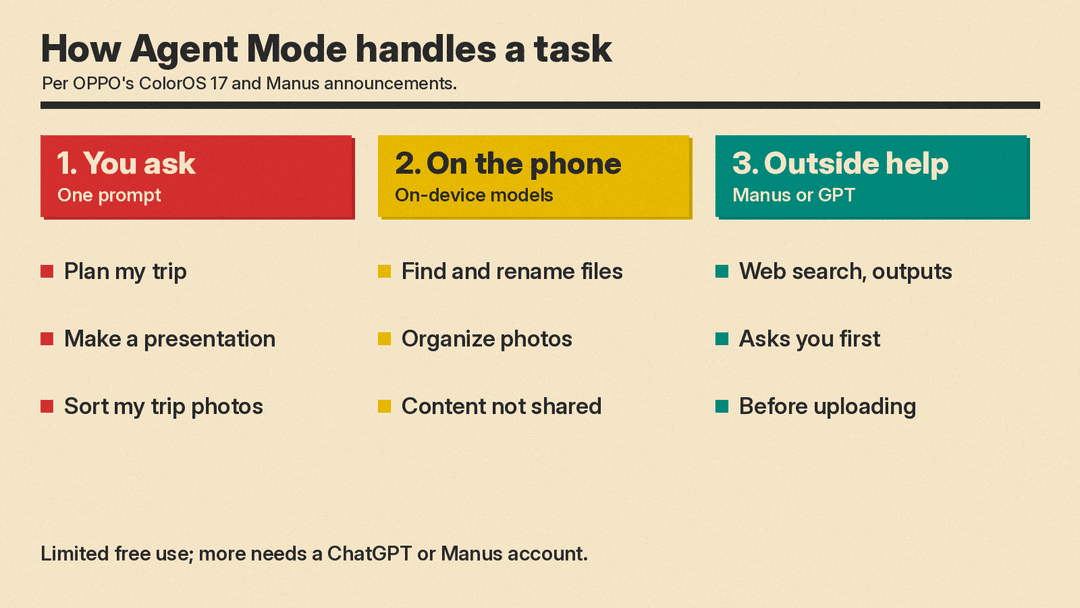
- Agent Mode takes an instruction, plans multi-step work and produces a finished item. OPPO lists GPT and Manus as the models behind it.
OPPO announced the Manus partnership on October 13. The idea is that you describe the end result you want, and the phone breaks it into steps, finds the information it needs, picks the tools and hands you the output.
OPPO's own examples:
- Trip planning. Ask it to organize your travel plans and it finds flight tickets, hotel bookings, restaurant reservations and attraction tickets scattered across apps on the phone, combines them with information from the web, and builds a day-by-day itinerary.
- Files. It can find scattered files, rename them based on their content and date, and use what is inside them to make new things such as an itinerary or a webpage, according to OPPO's ColorOS 17 announcement.
- Photos. It can find photos from a specific trip, sort them into albums, and turn a chosen photo into a vlog cover.
- Documents. OPPO says one prompt can bring together existing files and online information to create a presentation, proposal or portfolio. Its AI features page adds reports and resumes to the list of outputs.
Tasks can keep running in the background. OPPO says Fluid Cloud, its status display, shows how a task is going while you do something else.
"Smartphones are central to people's daily lives and support many of the tasks they handle every day, making them a natural platform for personal AI agents," Manus co-founder and chief product officer Tao Zhang said in the partnership announcement.
What stays on your phone
This matters for any AI agent that can read your photos and files. OPPO's answer has two parts.
First, local tasks stay local. OPPO says ColorOS 17 uses on-device models to understand and organize information, and for local jobs such as finding, organizing or renaming files and photos, "the original content remains on the device and is not shared with Manus."
Second, anything that needs outside processing asks first. OPPO says AI Mind Pilot "will ask for the user's explicit confirmation before relevant content is uploaded or shared." So a trip plan that pulls in web results is a different case from renaming your downloads folder: the first may send some of your content to an outside service, and you should see a prompt before it does.
For cloud AI work in general, OPPO says its Private Computing Cloud uses end-to-end encryption and processes data in a secure environment designed to block access by third parties, including OPPO. ColorOS 17 also adds a Transparency Report that lists which AI services were used, when they were accessed and what operations they performed. You can view it on the phone and export it. On iPhone, Apple added a different control in iOS 27.2, an Excluded Apps setting that controls which apps Siri, Search and suggestions can access; our iOS 27.2 Siri AI explainer covers it.
These are OPPO's descriptions of its own system. No independent review of the privacy setup has been published in the sources cited here.
Is Agent Mode free?
Partly. OPPO's fine print says AI Mind Pilot includes "limited free usage," and that further use "is subject to the relevant ChatGPT or Manus account and in-app conditions." OPPO does not say in these pages how large the free allowance is or what a paid plan costs. Expect to need an account with ChatGPT or Manus if you use Agent Mode heavily.
The other AI features in ColorOS 17
Agent Mode is not the only AI feature. Here is the rest, in plain terms, based on OPPO's ColorOS 17 announcement and its AI features page.
- AI Photo Agent. A photo editing assistant. You can describe the edit you want in plain language, let it suggest changes based on the scene and subject, or use Style Match: give it a reference image and it copies that photo's color, tone and mood onto yours. It needs a network connection and has limited free use.
- AI Call Guard. On-device AI that watches calls in real time for fraud risks such as synthetic voices and AI face swaps, and warns you if it spots something.
- AI Mind Space. A personal hub where you save documents and video links. AI organizes them into searchable "memories" and groups related items into collections, which it can turn into trip plans with maps.
- AI Mind Suggest. Cards that surface information when it is useful, such as a morning brief (OPPO says it appears from 4:00am to 10:00am), flight updates and music suggestions when headphones connect.
- OSee. Point the camera at something and it connects you to a tool: identifying plants and animals, checking dish or ingredient information, scanning documents to PDF, translating menus or reading QR codes.
- AI Live Interpreter. Live translation through earbuds across 31 listed languages, dialects and accents. It needs OPPO Enco X4 or later earbuds.
There is also a camera note worth knowing. OPPO says its new LUMO True Image Engine reduces "excessive sharpening, noise reduction and AI-generated detail" to keep photos closer to the real scene.
The fine print: where these features work
This is where buyers need to pay attention. OPPO's AI features page says many features are not available everywhere. What it says:
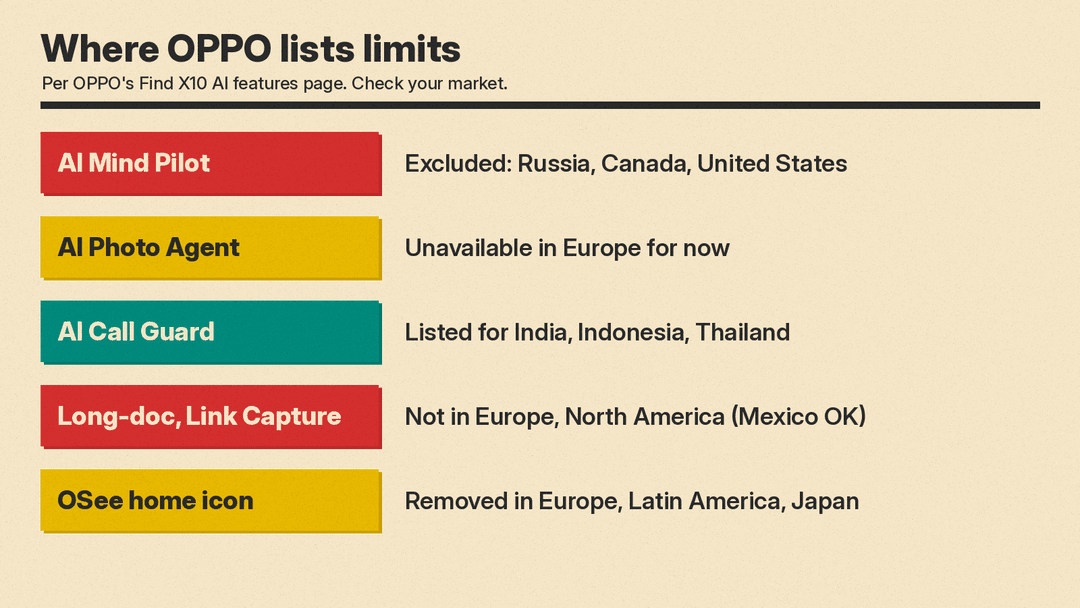
- AI Mind Pilot, including Agent Mode, lists Russia, Canada and the United States as excluded regions. OPPO adds that this list "does not establish local availability" elsewhere, so check your own market.
- AI Photo Agent is "currently unavailable in Europe," and OPPO says launch timing there is still being evaluated. Overseas voice input for it is not supported.
- AI Call Guard is listed for India, Indonesia and Thailand. Face-swap detection works only in supported one-to-one video calls, not group calls, and synthetic voice detection checks incoming call audio only. OPPO says results "are risk references and do not constitute a security commitment or guarantee."
- AI Mind Space features Long-doc Capture and Link Capture are listed as unavailable in Europe and North America, with Mexico supported.
- AI Mind Suggest is limited to specified markets and carrier builds.
- OSee works across regions, but its home-screen app icon is removed in Europe, Latin America and Japan. Other entry points, such as Camera, then More, then Scan, remain.
OPPO also notes that some AI features "may not be included in the software version at launch" and will arrive later by over-the-air update in some countries, and that an account login may be needed for certain features.
Why it matters
OPPO pitches Agent Mode as a move "beyond simple question-and-answer interactions": an assistant that finishes jobs using what is already on the phone, such as your bookings, files and photos. OPPO says the feature combines Manus' agent skills with ColorOS 17's system-level integration, which is how it can reach across apps in the trip-planning example.
Two things will decide whether it is useful. The first is reliability: a multi-step agent that gets one booking wrong can produce a confident but wrong itinerary, and OPPO's own fine print says "AI-generated results may be inaccurate or incomplete." Check what it makes before you rely on it. The second is access. For readers in the US and Canada, the main AI feature is listed as excluded, and several other features are limited to a short list of countries. In Europe, the Photo Agent is not available yet.
If you are thinking about buying a Find X10, OPPO's page advises you to check each AI feature on the local product page or on the device in your market before you count it as a reason to buy. If you mainly want a voice assistant, our Siri vs Gemini vs ChatGPT Voice comparison covers three assistants and the phones they support.
