
Microsoft has put two AI agents for sales and customer service teams into public preview, along with a set of ready-made CRM skills for its Copilot apps. The pieces were rolled out from October 8 and gathered into one Partner Center announcement on October 23, 2026. For a small sales or support team, the short version is this: Copilot can now read and update your Dynamics 365 records from inside Teams, Outlook and Cowork, and one agent can do first-pass prospecting on its own.
Here is what each piece does, who can use it, and what to check before you turn it on.
The Sales Development Agent
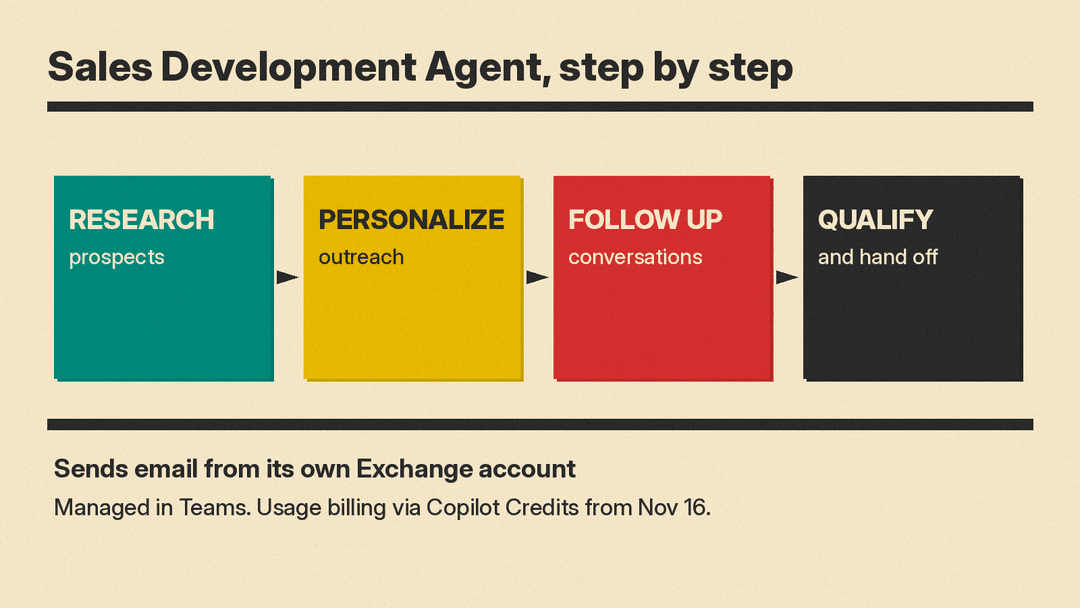
The Sales Development Agent is the part that works on its own: the Partner Center post says it can "autonomously research prospects, personalize outreach, follow up, and qualify leads." According to Microsoft's message center notice (MC1492151, published October 8), it "helps sellers build and qualify pipeline by researching prospects, personalizing outreach, managing follow-up conversations, and advancing qualified opportunities before handing them to a seller."
Three details matter for anyone thinking about using it:
- It sends email as itself. The notice says the agent "sends email from its own Exchange account." Prospects get mail from the agent's own mailbox. Other vendors sell outreach agents too; for a voice-based example, see our explainer on monday.com Harmony, whose AI agents call sales leads.
- It is managed in Teams and can connect to "customer-authorized CRM platforms," so it is not limited to Dynamics 365 data.
- Billing changes on November 16. From that date it moves to usage-based billing through Copilot Credits. Until November 16, organizations also need Frontier enablement (Microsoft's early access program) to use it.
The Service Agent
The Service Agent brings Dynamics 365 Customer Service data into Microsoft 365 Copilot. Microsoft's Dynamics 365 blog lists what it can do in preview:
- Summarize customer cases, including context from earlier interactions and related knowledge.
- Answer "what needs attention now" questions based on customer signals and service data.
- Pull answers from Dataverse and SharePoint knowledge.
- Update service records, add case notes and start workflows such as creating a child case, without leaving Copilot.
- Keep shared memory and chat history as a rep moves between Teams, Outlook and Dynamics 365 Customer Service.
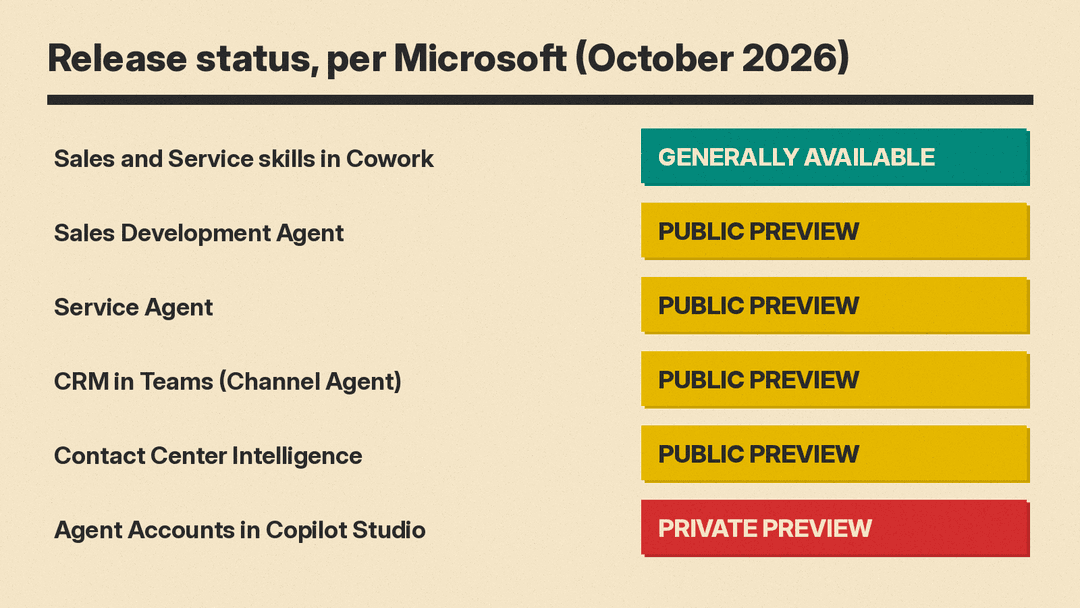
The Partner Center announcement lists the Service Agent in public preview from October 8, 2026. Microsoft's Dynamics 365 blog first announced its public preview on March 31, 2026.
Thirty sales and service skills for Copilot
The part that is generally available, not a preview, is the set of Dynamics 365 skills. MC1492151 describes "thirty sales and service skills" that package Dynamics 365 business knowledge into reusable building blocks. Their status depends on where you use them:
- Cowork: generally available.
- Code: Frontier program.
- Autopilot: listed as private preview in the October 8 notice and as public preview in the October 23 Partner Center announcement.
For Cowork, Microsoft's Dynamics 365 Sales skills documentation says the Dynamics 365 Sales plugin "is installed by default in Copilot Cowork and available to all users who have access to Cowork." Admins control who gets Cowork. Sellers can use the skills to check opportunity and pipeline context, spot risks, prioritize leads and get suggested next steps without pulling data from several systems by hand.
CRM inside Teams channels
A fourth piece, Dynamics 365 CRM in the flow of Teams, entered public preview on October 8. It works through the Teams Channel Agent and puts customer updates and supported actions into a channel conversation, so a team can work an account or a case together. MC1492151 says it needs licenses for Microsoft 365 Copilot, Dynamics 365 Customer Service and Microsoft Teams, and an admin has to turn on the Channel Agent.
Contact centers and agent accounts
Two related items round out the announcement. Microsoft Contact Center Intelligence, in public preview from October 21, adds Microsoft AI and agents to existing contact centers "without rip-and-replace," per the Partner Center post. Microsoft's blog names a Customer Assist Agent and a Quality Assurance Agent among its parts. Agent Accounts in Copilot Studio, for building agents that run recurring business processes with permissions, triggers and process memory, entered private preview on October 15.
Why it matters
For sales and support teams on Microsoft 365, the change is that Copilot can take actions on Dynamics 365 customer data, not only answer questions about it. Google is building similar coworker agents for Workspace, covered in our Gemini Agent for Work explainer, and our comparison of Microsoft 365 Copilot and Gemini in Google Workspace covers prices and features if you are choosing between the two suites.
The Sales Development Agent is the one to approach carefully. An agent that writes to prospects from its own mailbox speaks for your company, and Microsoft asks admins to review its deployment guidance before activation. Before you enable it:
- Check licenses first. CRM in Teams needs Copilot, Customer Service and Teams licenses, and the Sales Development Agent needs Frontier enablement until November 16.
- Plan for Copilot Credits. After November 16 the Sales Development Agent bills by usage, so set a budget or limit before a pilot runs at scale.
- Decide how the agent identifies itself. Since it mails from its own Exchange account, agree on the mailbox name, signature and handoff wording.
- Start in Cowork. The skills are the only generally available piece, and they are on by default for Cowork users, which makes them the lowest-risk place to try this.
Sources
- Microsoft Partner Center: October 2026 announcements, "New AI capabilities across business apps"
- MC1492151: New Dynamics 365 Sales and Customer Service experiences across Teams, Copilot, and Outlook (Message Center archive)
- Microsoft Dynamics 365 blog: Service Agent for Microsoft 365 Copilot
- Microsoft Learn: Use Dynamics 365 Sales skills in Microsoft 365 Copilot Cowork
- Microsoft Dynamics 365 blog: Introducing Microsoft Contact Center Intelligence
