
Microsoft says the Browser Automation tool in Foundry Agent Service is now generally available. In a Nov 18 Microsoft Foundry blog post titled "Browser Automation Tool in Microsoft Foundry : Ignite'26 Announcements", the company says the tool, "powered by Azure Playwright Workspaces", gives Foundry agents "secure, scalable browsers with isolated sessions." The same post adds several features in preview: a bring-your-own browser proxy, CAPTCHA handling through Web Bot Auth, secret management, and profile reuse, which the post marks "preview, coming soon."
The Foundry documentation says to use it "typically when the application you need has no API or connector, or when its API doesn't cover your task." If you are new to the idea, our explainer on what a browser agent is covers the basics.
What the tool does
According to the Foundry documentation, the Browser Automation tool "lets Microsoft Foundry agents navigate websites, read information, and interact with web applications through a managed remote browser." The docs say you don't need a local browser or Playwright runtime.
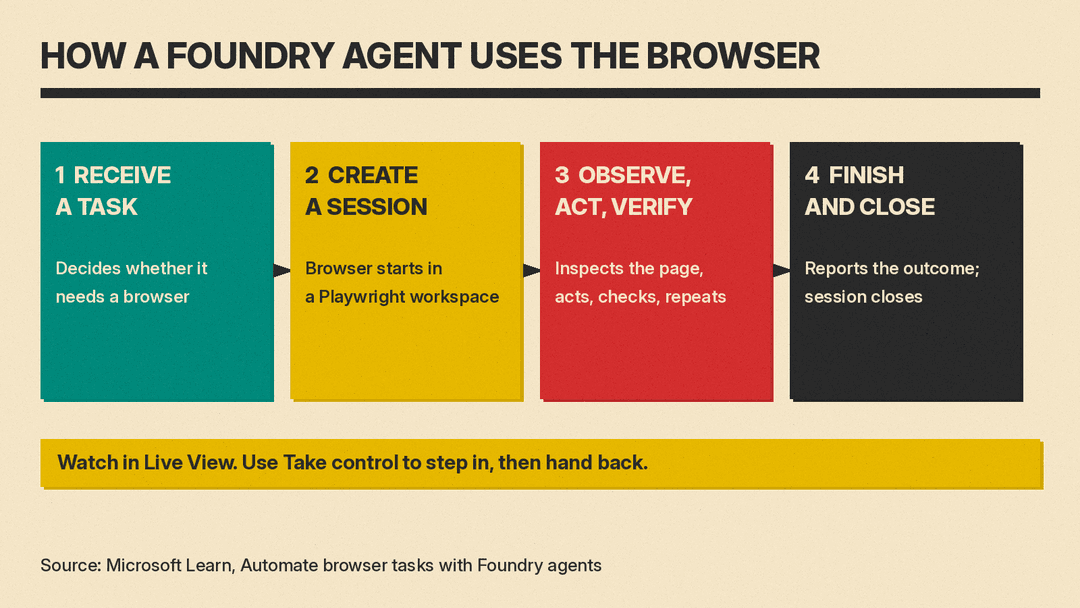
The docs describe four steps:
- Receive a task. The agent decides whether it needs a browser.
- Create a session. The tool starts a browser in the connected Playwright workspace.
- Observe, act, and verify. The agent inspects the page, acts, checks the result and repeats.
- Finish and close. The agent reports the outcome and the session closes.
The blog post demo shows an agent asked to "Process 15 invoices, validate them against the rules, flag anomalies in Excel, and enter the validated invoices into the expense portal."
What is GA and what is preview
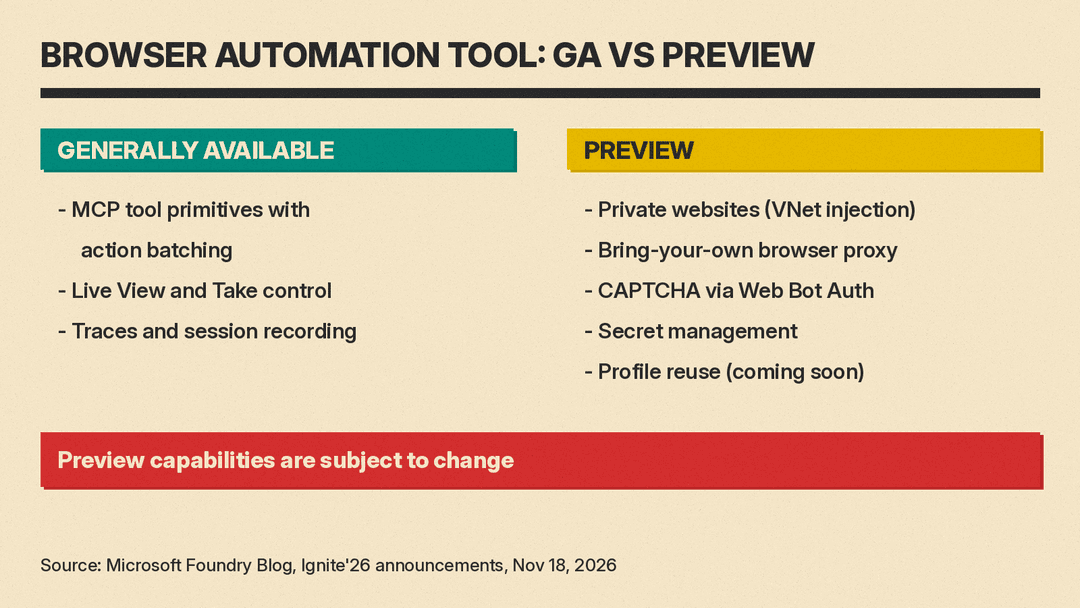
The blog post lists these capabilities as generally available:
- Expanded MCP tool primitives with action batching
- Live View and Take control, for sign-ins and steering the agent
- Traces and session recording
It lists these as preview:
- Private websites with VNet injection
- Bring-your-own browser proxy
- CAPTCHA management through Web Bot Auth
- Secret management
- Profile reuse ("preview, coming soon")
The post says "Preview capabilities are subject to change."
Batching steps into one script
The tool exposes its browser actions as Model Context Protocol (MCP) tools, such as opening pages, clicking, typing and taking screenshots. For longer sequences, the blog post says agents can use a run-code tool that "runs one Playwright script for the whole sequence instead of a long chain of snapshot, click and type calls."
Microsoft recommends batched scripts for repetitive flows and step-by-step tools for unfamiliar pages. Because scripts can run any code, the post says the run-code tools "stay opt-in and should be enabled only for reviewed scenarios."
The same browser tools are offered through the Playwright Workspaces remote MCP server. That page says an inactive session "is cleaned up after 15 minutes," and a closed or expired session can't be reopened.
People in the loop, and a record of what happened
Live View shows the agent's browser in real time. With Take control, a person can step in, for example to complete a sign-in, then hand control back. Session recording is opt-in, and the blog post says recordings are stored in your own storage account.
Sign-ins, secrets and CAPTCHAs
For secret management (preview), the blog post says the secret "is read on the server side, inside the Playwright Workspaces remote MCP server, so neither your application code nor the model ever receives the value," and each secret can be bound to a domain allowlist.
The Foundry documentation, as read on Nov 18, is narrower for one agent type. It says that when Azure Key Vault credentials are given to a prompt agent, "the model currently has access to the secret value," while coded or hosted agents can keep the secret hidden from the model. The same page still lists browser profiles and browser proxies under "Not supported scenarios," so check the docs for each feature before you plan around it.
On CAPTCHAs, the blog post says: "Our focus is secure, responsible, enterprise-grade automation, not getting around a website's security controls." Web Bot Auth, based on an IETF draft, lets agents cryptographically sign their HTTP requests. Customers can register themselves, or fill out a form to express interest in Microsoft platform registration through selected bot management providers such as Akamai, Cloudflare and F5. The docs add: "Stealth browsers aren't supported."
Other browser agents we covered take different routes: Browser Use 1.0 is an open source library, and Google Antigravity drives a browser built into its app.
Pricing
The Foundry docs tell builders to review "Playwright Workspaces pricing." The Azure App Testing pricing page lists, under Playwright Workspaces, a free "30 Day free trial (First 100 test minutes)" and per-minute prices for cloud browsers hosted on Linux and on Windows. The page says test minutes are billed "by the second" and its prices "are estimates only." Azure's public Retail Prices API lists these pay-as-you-go consumption rates for the East US region:
- Playwright Linux Test Minutes: $0.01 per minute
- Playwright Windows Test Minutes: $0.02 per minute
The pricing page has no separate line for the Browser Automation tool.
How to start
The blog post says to create a Playwright Workspace, connect the Browser Automation tool to a toolbox in Microsoft Foundry, and add the toolbox to your agent. Its resources include a Forgebook notebook that drafts a sample invoice form and researches public sites. The docs note: "Browser automation tool carries security risks."
Sources
- Microsoft Foundry Blog: Browser Automation Tool in Microsoft Foundry : Ignite'26 Announcements
- Microsoft Learn: Automate browser tasks with Foundry agents
- Microsoft Learn: Automate browsers with the Playwright Workspaces remote MCP server
- Azure App Testing pricing
- Azure Retail Prices API, Azure App Testing, East US
- Forgebook: Browser Automation: Invoice Drafts and Web Research
