
Granola, the AI notepad known for writing up meeting notes, now types for you too. On October 29, 2026, the company posted on X: "Granola now does voice typing. Unlimited words, for free." The feature, called Voice Typing, lets you hold a key on a Mac, talk, and get cleaned-up text pasted into whatever app you are using.
That puts Granola on the same ground as dedicated dictation apps. TechCrunch framed it as a move against Wispr, which makes a dictation tool and launched its own meeting notetaker months ago. TechCrunch puts Granola's valuation at $1.5 billion and Wispr's at $2 billion.
What it does
According to Granola's Voice Typing help page, the feature is in beta in the Mac desktop app and is included free in every Granola plan. Windows and mobile versions are listed as coming soon, and the company's account replied on X that "Windows and iOS" are on the way.
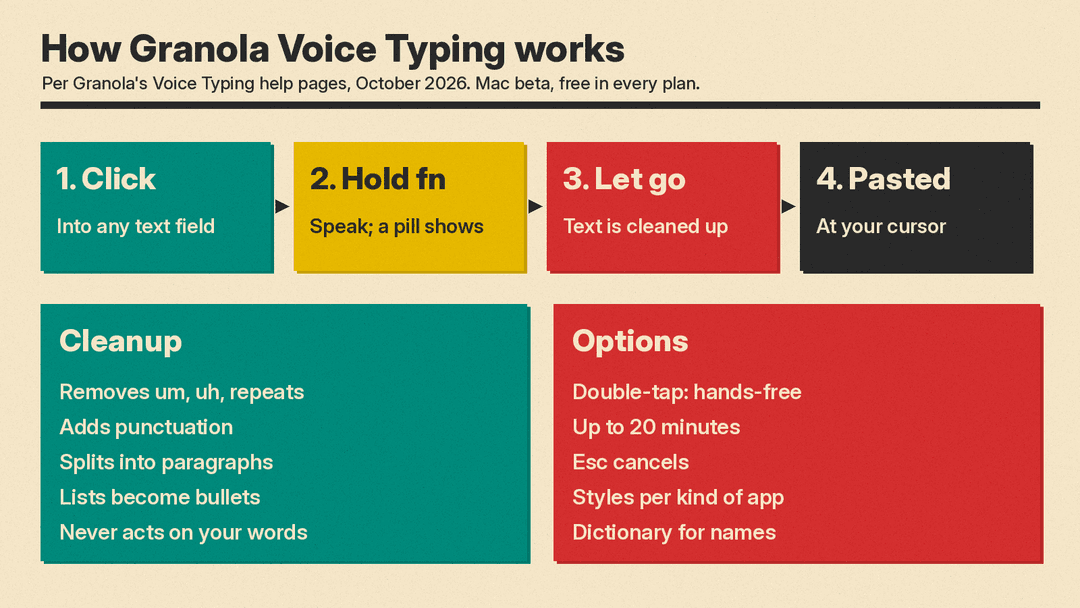
Using it takes three steps:
- Click into a text field in any app.
- Press and hold the shortcut, which is the fn (globe) key by default, and speak. A small pill with a waveform sits at the bottom of the screen while Granola listens.
- Let go. Granola finishes the text and pastes it at your cursor.
For longer passages you can double-tap the shortcut for hands-free mode, which runs until you press it again. One dictation can last up to 20 minutes, after which Granola stops and pastes what it has. Esc cancels, and nothing is pasted.
Granola stresses that this is not a raw transcript. Its docs say it removes filler words like "um" and accidental repeats, adds punctuation, splits thoughts into paragraphs, and turns spoken lists into bullets or numbers while keeping your wording. It also never acts on what you say: if you dictate "Write a reply to Sam about the launch" into ChatGPT, that sentence is what gets pasted. Voice Typing is separate from Granola's meeting transcription and does not start or add to a meeting note. To turn recordings or audio files into text instead, see our comparison of AI transcription tools.
Styles that match the app
With a setting called screen context turned on, Granola reads text from the app you are dictating into so it can spell names right and format to fit. The help page on names and terms says email gets a separate greeting and sign-off, chat apps like Slack stay short, code editors keep exact technical terms, and one-line fields such as a subject line get no line breaks or final period.
You can also pick a dictation style for four kinds of apps: email, work messages, personal messages (Messages, WhatsApp, Telegram, Signal, Discord), and everything else, including ChatGPT and Claude. The choices are Formal, Casual and Excited. Personal messages get Very casual (all lowercase, no periods) in place of Excited. Each starts on Automatic. Granola says styles only change capitalization, punctuation and spacing, never your words.
Other settings worth knowing:
- Dictionary. Add names and terms, each up to 50 characters and six words, so Granola recognizes them.
- Learn from your corrections. If you fix a misspelled name right after dictating, Granola can add it to your dictionary. You can turn this off.
- Language. Pick your languages or use Auto-detect if you switch between them. Granola keeps each part in the language you spoke and does not translate.
- Mute audio while dictating is on by default, so music or videos are not picked up.
What it sends, and what it keeps
Dictation needs an internet connection and macOS Accessibility and microphone permissions, per Granola's troubleshooting page. The app must also stay open; quitting Granola stops dictation.
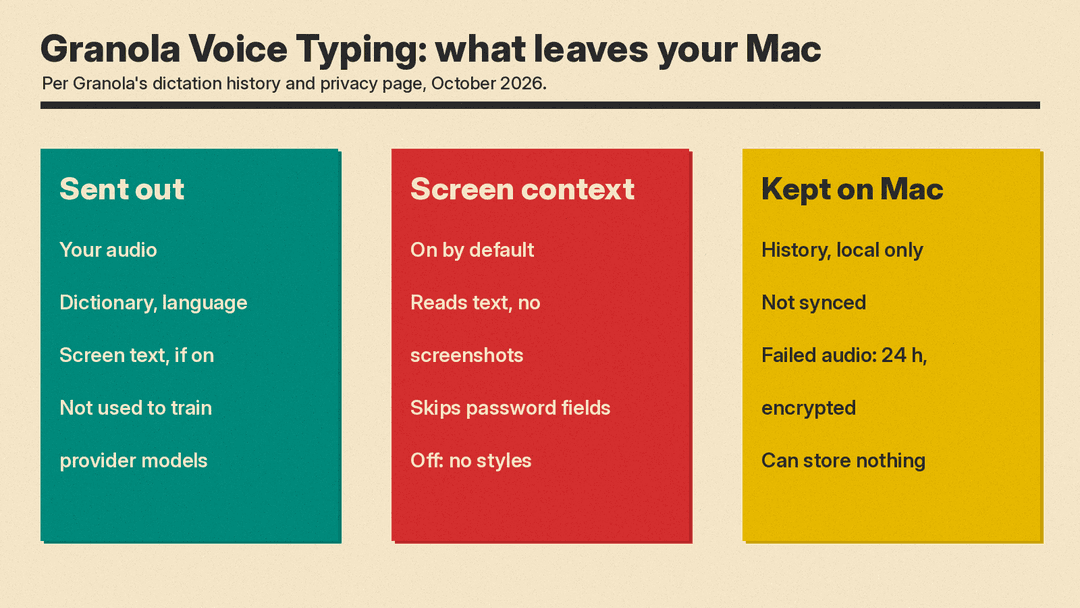
Granola's history and privacy page spells out the data flow. It listens only from when you press the shortcut until you finish or cancel. To turn speech into text it sends your audio, your dictionary and chosen language, and, with screen context on, limited text from the current app to its transcription and AI providers. Granola says those providers do not use dictations to train their models. With Learn from your corrections on, Granola also sends a word you fix, and the text around it, to check whether it is a name or term worth learning.
Screen context can include the app name, window title, website address, the text around your cursor, any selected text, and visible nearby text such as the email you are replying to. Granola says it reads this through macOS Accessibility, takes no screenshots, skips password fields, and does not save that text in your history. Screen context is on by default. Turning it off keeps dictation working but also turns off styles and app-specific formatting.
History stays on your Mac only and is not synced to your account. By default Granola keeps history until you delete it and keeps audio only from failed dictations, encrypted, for 24 hours so you can retry. You can switch to deleting everything after 24 hours, or to storing nothing locally, which means failed dictations cannot be retried.
Why it matters
Voice typing is getting crowded. TechCrunch says apps in consumer voice AI "seem to be converging": Fireflies, Speechify and Monologue now combine meeting notes and dictation, and Raycast added dictation to its new iPhone keyboard the same day. Granola's pitch is price: unlimited words, free on every plan. Of the 39 replies to the launch post that we read on October 29, at least five talk about dropping a paid tool or saving money (three name Wispr Flow), and three ask for an iOS or mobile version. The catch for now is reach: it is a Mac-only beta.
If you try it, the main setting to decide on is screen context. It helps with name spelling and app-specific formatting, but it also means text from the app you are in, such as the email thread on screen, goes to Granola's providers with each dictation.
Sources
- Granola on X: Voice Typing announcement
- TechCrunch: Granola crunches up a dictation feature to compete with Wispr
- Granola Docs: Voice Typing
- Granola Docs: Help voice typing spell names and terms
- Granola Docs: Dictation styles
- Granola Docs: Dictation history and privacy
- Granola Docs: Troubleshooting dictation
- Granola on X: Windows and iOS coming soon
