
Anthropic's docs ask for clear, direct instructions, the context Claude cannot see, and a way for Claude to check its work. This guide turns that advice into 30 copy-paste prompts for everyday coding: setup, reading code, debugging, changes, tests, review, SQL, regex, docs and long runs.
Templates that read a repo, edit files or run commands need Claude Code; the rest also work in the Claude app or the API. Fill in the [brackets], paste your code inside the tags, and read the answer before you use it. As of October 2026.
We ran five of the templates on a small local model, Gemma 3 1B, to see how the structure holds up. That was a small test, not a test of Claude. The results are in the section "What a small test showed", near the end. A companion guide, Claude prompts for writing, uses the same method for drafts in your own voice.
The four rules behind every template
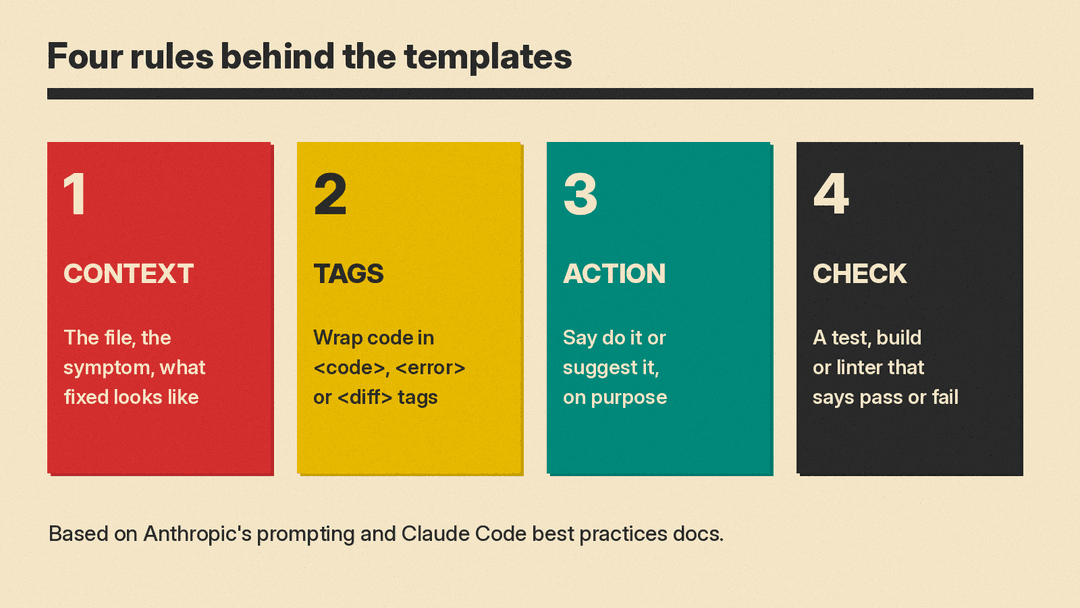
Anthropic's prompting best practices page and the Claude Code best practices page repeat a few ideas. The templates below are built on them.
- Give the context Claude cannot see. Anthropic suggests you think of Claude as "a brilliant but new employee who lacks context on your norms and workflows." For code, that means the file, the symptom, and what "fixed" looks like. The Claude Code page gives this example of a better prompt: "users report login fails after the session times out. look at token refresh in src/auth/, write a failing test that reproduces it, then fix it".
- Separate code from instructions. The prompting page says XML tags help Claude parse prompts that mix instructions, context, examples and inputs. That is why the templates wrap code in tags such as
<code>,<error>and<diff>. For long inputs, the page says to put the data at the top and the question at the end. - Say "do it" or "suggest it" on purpose. Per the prompting page, if you ask Claude to "suggest some changes", it will sometimes only suggest, even when you wanted edits. Ask for the action you want.
- Give Claude a check to run. The Claude Code page says that if Claude has nothing to run that tells it whether the work is done, "looks done" is all it has to go on. A test, a build, a linter or a script that comes back pass or fail lets Claude close the loop itself. It also says to ask for evidence: the command Claude ran and its output.
One more point from the Claude Code page: phrases like "think step by step" or "be thorough" are ordinary prompt text, not keywords. The main control for how hard Claude thinks is the effort level (/effort in Claude Code). Use ultrathink in a single prompt when only that turn needs deeper reasoning.
Set up the project (templates 1 to 4)
1. Start a short CLAUDE.md. Claude Code loads CLAUDE.md into every session. Anthropic says to keep it to what Claude cannot work out from the code, and notes that the memory guide recommends staying under 200 lines. /init generates a starting version from your codebase, and from there the work is mostly removing lines.
Read this repo and write a CLAUDE.md. Include only what you cannot learn from the code itself:
- the exact install, test, typecheck and lint commands, and how to run one test file
- places where the code is misleading (old patterns new code must not copy)
- team decisions that are not in the repo: [list them]
Keep it under 60 lines. Do not describe the file layout.
2. Let Claude interview you before a feature. This is close to the example on the Claude Code page.
I want to add [feature] to [project] but have not thought it through yet. Interview me with short multiple-choice questions until you could write the spec. Then write it to SPEC.md. Do not write any code yet.3. Set a role in the system prompt (API). The prompting page says even one role sentence makes a difference.
You are a senior [language] developer working on [type of app]. Our stack is [stack]. We support [versions]. Prefer the standard library over new dependencies. When you are unsure about our code, read the file before you answer.4. Plan first, no edits. Adapted from the do_not_act_before_instructions example on the prompting page.
<task>[describe the change]</task>
Do not change any files yet. Read the code you need, then give me a numbered plan: the files you will touch, what changes in each, and the risks. Wait for my OK before you edit.
Understand code (templates 5 to 7)
5. Explain a file.
<code>
[paste file]
</code>
Explain what this file does for a developer who is new to the project. Start with a 3-sentence summary. Then list each function with one line on what it does and what calls it, if you can tell. Flag anything that looks surprising.
6. Trace one request through the code. In Claude Code you can name files with @ so their contents go into the message.
Trace what happens when [a user submits the signup form] from the first handler to the database write. Name each file and function in order. Read the files before you answer. Do not guess about code you have not opened.The last two lines come from Anthropic's investigate_before_answering example, which tells Claude never to speculate about code it has not opened.
7. Ask an onboarding question.
I am new to this codebase. Where is [authentication / billing / the job queue] handled, and what are the 3 files I should read first? Quote the line in each file that made you pick it.Debug (templates 8 to 11)
8. Find a bug from a symptom. We tested this one (see below).
<code>
[paste the function]
</code>
<symptom>
[input] returns [actual]. I expected [expected].
</symptom>
Find the cause of this bug. First quote the exact line that causes it. Then explain why in two sentences. Then give the smallest fix. Do not change anything else in the code.
9. Read a stack trace. The Claude Code page shows you can pipe output in, for example cat error.log | claude -p "what's going on here".
<error>
[paste the full stack trace]
</error>
<code>
[paste the file named at the top of the trace]
</code>
What is the most likely cause? Give your top 2 guesses, the evidence for each in the trace, and one command or log line I can add to tell them apart.
10. Reproduce first, then fix. Modeled on the login example in the Claude Code docs.
Users report [symptom]. Look at [folder or file]. Write a failing test that reproduces it, run it to show it fails, then fix the code and run the test again. Show me the test output from both runs.11. Chase a flaky test. The Claude Code page names a flaky test as a time to raise effort with /effort high or /effort xhigh.
The test [test name] passes most runs and fails some. Read the test and the code it covers. List what could make it nondeterministic (time, order, shared state, network, randomness). For each, say how to confirm it. Do not change the test until we know the cause.Write and change code (templates 12 to 16)
12. Build a feature that follows an existing pattern. Adapted from the "calendar widget" example on the Claude Code page.
Follow the pattern in [existing file] and build [new feature]. It should [behavior]. No new libraries. Run [test command] when you are done and show me the output.13. Ask for the fuller version. The Claude Code page says Claude tends to read a request conservatively, and that "be ambitious" still helps when you want more.
Build [the settings page] from [the mockup]. Be ambitious: empty and error states, [the save flow], keyboard navigation, not just the layout.14. Keep a change small. Anthropic says some Claude models (it names Opus 4.5 and 4.6) can overengineer, and gives a longer prompt to stop it. This is a short version.
Make only the change I ask for: [change]. Do not refactor nearby code, add features, add comments or docstrings to code you did not change, or add error handling for cases that cannot happen. If you think something else needs work, list it at the end instead of doing it.15. Refactor without changing behavior.
<code>
[paste code]
</code>
Refactor this for readability: [goal, for example split the long function, clearer names]. The behavior must not change. Keep the public function names and signatures. Before you start, tell me which tests cover this code, and run them before and after.
16. Speed up slow code.
<code>
[paste code]
</code>
This runs in [time] on [input size]. I need it under [target]. Explain where the time goes, then change the code to fix the biggest cause first. Keep the output identical. Show a quick benchmark before and after.
Tests (templates 17 to 19)
17. Write tests for existing code. We tested this one.
<code>
[paste function]
</code>
Write [pytest / Jest / Go] tests for this function. Cover the normal case and at least four edge cases ([list them]). Write tests for the behavior a user would expect. If the current code fails a test, keep the test and tell me which tests will fail and why. Do not change the function.
18. Tests before code. For tasks that span several context windows, the prompting page says to have Claude write tests before it starts work and track them in a structured format, such as tests.json.
Before you write any code for [feature], write the tests that define "done" and save their names and status in tests.json. Then implement until they pass. Do not remove or edit a test to make it pass. If you think a test is wrong, tell me.19. No hard-coding to pass tests. Shortened from Anthropic's prompt on this problem. The page says Claude can sometimes focus too heavily on making tests pass at the expense of more general solutions.
Write a general solution that works for all valid inputs, not just the test cases. Do not hard-code values or special-case test inputs. Tests are there to check correctness, not to define the solution. If a test looks wrong, tell me instead of working around it.Review (templates 20 to 22)
20. Review a diff for real problems. The Claude Code page says not to drop "skip style" from a review prompt, because "A reviewer that's asked to find problems will always find something." We tested this one.
You are reviewing code you did not write.
<diff>
[paste diff]
</diff>
Report only problems that affect correctness or security. Skip style. For each problem: quote the line, say what can go wrong in one sentence, and suggest a fix. If you find nothing, say so.
21. Security pass.
<diff>
[paste diff]
</diff>
Check this change only for security issues: injection (SQL, shell, HTML), missing auth checks, secrets in code or logs, unsafe file paths, and unvalidated input from users or external APIs. Quote each risky line and rate it high, medium or low. Do not report style.
22. Review against the spec. Close to the example on the Claude Code page. The Claude Code page says a fresh subagent never saw your conversation, so it is not swayed by the reasoning that produced the code.
Use a subagent to review the [feature] diff against SPEC.md. Check every requirement is implemented and the listed edge cases have tests. Report gaps that affect correctness and skip style.SQL, regex and the command line (templates 23 to 26)
23. Write a SQL query from a schema. We tested this one.
<schema>
[paste table definitions]
</schema>
Write a [PostgreSQL / MySQL / SQLite] query that returns [result]. Explain each clause in one line. Tell me any assumption you made about the data.
24. Plan a database migration. The Claude Code page names a schema change, "where Claude has to find every reader of the old shape", as a case for higher effort.
I need to change [table.column] from [old] to [new]. Find every place in the code that reads or writes it. Then write the migration in [tool], a rollback, and a list of the code changes, in the order to deploy them so nothing breaks mid-deploy. Do not run the migration.25. Write a regex with test cases. We tested this one.
Write a regular expression for [language/engine] that matches: [describe, with 2 examples], and nothing else on the line.
Then give 3 strings it should match and 3 it should not, and explain each part of the pattern in one line.
26. Explain or build a shell command.
Explain this command part by part, and tell me what it changes on disk before I run it:
<command>[paste]</command>
Docs and commits (templates 27 and 28)
27. Write docs a newcomer can use.
<code>
[paste module]
</code>
Write a README section for this module: what it is for, a 5-line usage example, the config options with defaults, and one common mistake. Use only facts from the code. If something is unclear, list it as a question at the end.
28. Commit message and PR description.
Read the staged diff. Write a commit message: a summary line under 72 characters, a blank line, then 2 to 4 lines on why the change was made. Then write a PR description with: what changed, how I tested it, and anything a reviewer should look at closely.Long runs and safety (templates 29 and 30)
29. Confirm before risky actions. Adapted from Anthropic's prompt on reversibility. The prompting page says that without guidance, Claude Opus 4.6 might take actions that are hard to reverse, such as deleting files or force-pushing.
Edit files and run tests freely. Ask me before anything hard to undo or visible to others: deleting files or branches, dropping tables, git push --force, git reset --hard, pushing code, commenting on PRs, or changing shared infrastructure. Do not bypass safety checks such as --no-verify.A prompt is not a guarantee. The Claude Code page is clear that rules that can never be broken belong in a hook, a deny rule or a managed setting, which Claude Code applies every time, not in a prompt or CLAUDE.md.
30. Unattended batch job with a stop condition. Based on the claude -p loop on the Claude Code page, which also uses --max-turns as a cap.
claude -p "Migrate [file] to [new API] and commit. Reply OK or FAIL." --allowedTools "Read,Edit,Bash(git add *),Bash(git commit *)" --permission-mode dontAsk --max-turns 20Anthropic suggests trying a loop like this on three files first, then fixing the prompt before you run the rest.
What a small test showed
We ran templates 8, 17, 20, 23 and 25 on Gemma 3 1B, a 1-billion-parameter open model, served locally on October 27, 2026, with temperature 0. This was a small test of how readable the answers are when a prompt asks for a fixed structure. It says nothing about how Claude would do. We then checked each answer by hand or by running it.
- Debug (8). The code skipped the first number in a list (
range(1, len(nums))), soaverage([2, 4, 6])returned about 3.33 instead of 4. The model quoted thereturnline instead, and its "fix" was the same line unchanged. Because the prompt asked it to quote one line first, the wrong answer was easy to spot. - Tests (17). The model wrote 17 test functions. Some names repeated, so pytest collected 15. When we ran them, 5 failed. The model had said the code passes all its tests. The prompt asked it to name the tests that would fail; it did not.
- Review (20). The sample built a SQL query by adding a user value to a string. The model did not flag it, and reported a non-issue about
res.jsoninstead. - SQL (23). The query joined, filtered to 2025, grouped and sorted correctly. We asked for revenue in dollars, and it summed cents without dividing. It did list its assumptions, as asked.
- Regex (25). The pattern
^\d{5}(?:-\d{4})?$was right when we checked it with Python'sremodule. But one of its three "should match" strings,12345-6789-0000, does not match its own pattern.
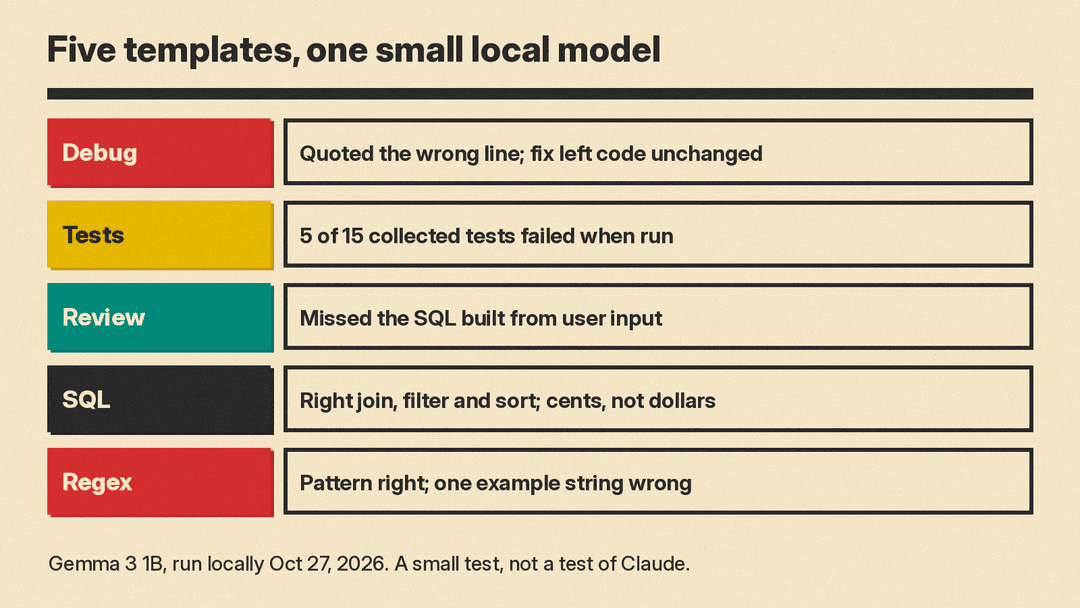
The point is not that a 1B model is weak at code. It is that the structured prompts made each mistake visible in seconds: a quoted line, a test file we could run, a pattern we could check. That matches the advice on the Claude Code page to ask for evidence and to give the model a check it can run. With Claude, run the tests and read the output too.
Quick tips for using these templates
- Paste real code, not a description of it. In Claude Code, use
@path/to/file. - Put long inputs first and your question last, as the prompting page suggests.
- One task per session. The Claude Code page suggests
/clearbetween unrelated tasks, and after two failed corrections,/clearand a better prompt instead of a third correction. - Tell Claude what to do, not only what not to do. The prompting page gives this as a formatting tip.
- On Claude Opus 5, Anthropic says to remove verification instructions carried over from prompts tuned for older models, because that model verifies its own work well and those lines can cause over-verification. Keep the checks you run yourself.
For a full build loop rather than single prompts, see our guide to vibe coding with Claude. For safety with coding agents, see how to keep AI agents safe from prompt injection.
