
Vibe coding is conversational, AI-assisted coding where you describe what you want in plain language, accept most of what the model writes, and steer by outcomes rather than by hand-editing every line. Andrej Karpathy coined the phrase in a February 2, 2025 post on X: you "fully give in to the vibes," talk to the model, paste errors back in, and treat throwaway projects as fair game for that style of work. This guide turns that loose habit into a repeatable Claude workflow, using Anthropic's own prompting docs, Claude Projects, Artifacts, and Claude Code as of October 2026.
The prompts in this post are templates. We did not run them against a Claude model for this article, so treat every block as a starting point. Fill in the brackets, read the output, and follow up.
Product details below are as of October 2026. Check claude.ai, Anthropic's prompting docs, and Claude Code docs for changes.
If you are new to prompting in general, see our beginner's guide to writing better AI prompts. For building a site with AI prompts rather than a coding agent, see prompts to build a website with AI.
What vibe coding is (and is not)
Karpathy's post describes a style, not a product. You describe UI tweaks in words ("decrease the padding on the sidebar by half"), accept every diff without reading it, paste error messages back with no comment, and sometimes ask for random changes until a bug goes away. He called it "not too bad for throwaway weekend projects."
That is different from:
- Asking Claude for a one-shot script you then own and review line by line
- Using autocomplete inside an IDE without handing over multi-file edits
- Shipping vibe-coded changes to production without tests, review, or a human who can explain the design
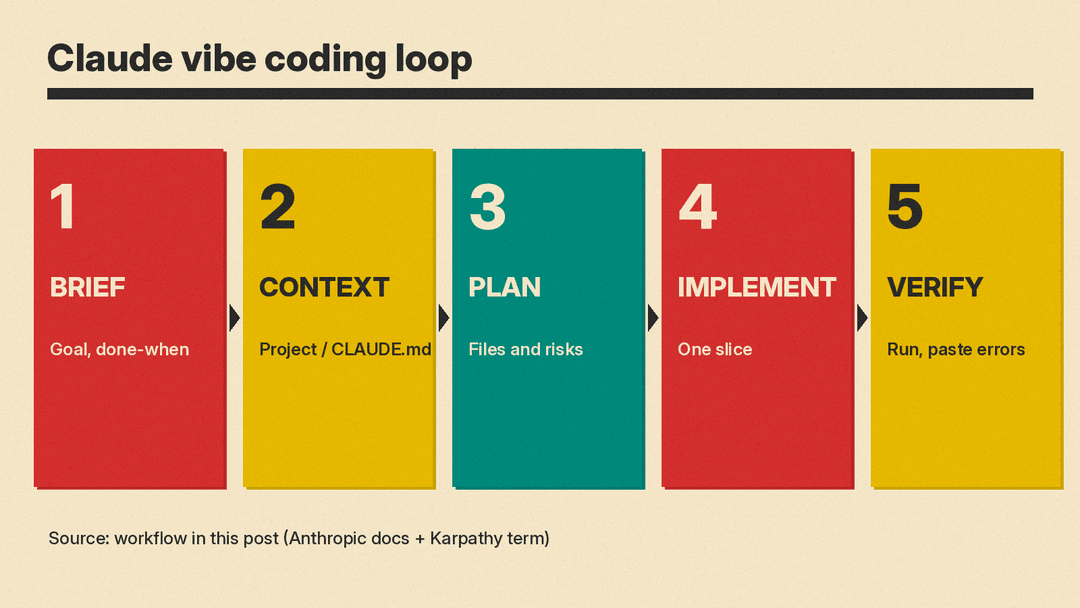
For this guide, vibe coding with Claude means: you keep a short written brief, you give Claude durable project context, you work in small loops (plan, implement, run, paste errors, verify), and you still decide when to stop and read the code yourself.
Which Claude surface to use
Pick one primary surface so context does not scatter.
- Claude on the web or desktop (chat). Good for planning, reviewing pasted snippets, and small Artifacts (a single-page UI, a doc, a diagram). Weak for a multi-file repo unless you paste files yourself.
- Projects. Anthropic's projects help article describes self-contained workspaces with their own chat history and a knowledge base of uploaded files, plus per-project instructions. Free accounts can create up to five projects. Paid plans can scale project knowledge with RAG when content approaches context limits. Use a Project when the same brief, stack, and style rules should follow every chat.
- Artifacts. Per Anthropic's artifacts help article, an artifact is self-contained work you would put in front of someone: a design, deck, doc, dashboard, or small interactive tool. It opens beside the chat. Ask for one when you want a runnable preview or a shareable page, not only prose. Artifacts need Cloud code execution and file creation enabled under Settings > Capabilities (or Organization settings for Team and Enterprise).
- Claude Code. Anthropic's Claude Code overview describes an agentic coding tool that reads a codebase, edits files, runs commands, and works in the terminal, IDE extensions, a desktop app, and the browser. It can use a project
CLAUDE.md(orAGENTS.mdin place of one) for durable instructions. Use Claude Code when the work lives in a real git repo and you want the model to open files rather than guess from pasted snippets.
Anthropic prompting rules that matter for coding
Anthropic's prompting reference (the page that covers system prompts, XML tags, and related techniques for current Claude models) repeats a few rules that map cleanly onto vibe coding.
Put the role in the system prompt (API) or in project instructions (chat / Claude Code). Anthropic's examples set something like "You are a helpful coding assistant specializing in Python" in the system field. In Claude chat Projects, that belongs in project instructions. In Claude Code, put durable role and stack rules in CLAUDE.md. Do not bury the role only in a long user message if you can put it in the durable slot.
Use XML tags to separate instructions, context, examples, and inputs. Anthropic recommends wrapping distinct parts of a complex prompt in consistent tags such as <instructions>, <context>, <example>, and <input>. That reduces the chance Claude mixes your stack constraints with your pasted error log.
Be clear and direct; explain why a constraint exists. Vague asks ("make it better") underperform. Specific asks with a reason ("Your response will be read aloud by a text-to-speech engine, so never use ellipses") help Claude generalize. For coding, say which files it may touch, which commands to run, and why you care (latency, security, style consistency).
Put long material above the question. For large documents or code dumps (Anthropic cites 20k+ tokens), place the long content near the top and put the query last. Anthropic reports that queries at the end can improve response quality in tests on complex multidocument inputs.
Prefer "do this" over "do not do that" when steering format. Tell Claude the positive shape of the answer. When you need action in a tool-using surface, use verbs that implement ("Change this function...") rather than soft suggestions ("Can you suggest some changes..."), which Anthropic notes can produce advice instead of edits.
Ask Claude to investigate before it claims. Anthropic's agentic-coding guidance includes an <investigate_before_answering> pattern: do not speculate about files you have not opened. That is the opposite of pure vibe coding, and it is the main guardrail this workflow adds back in.
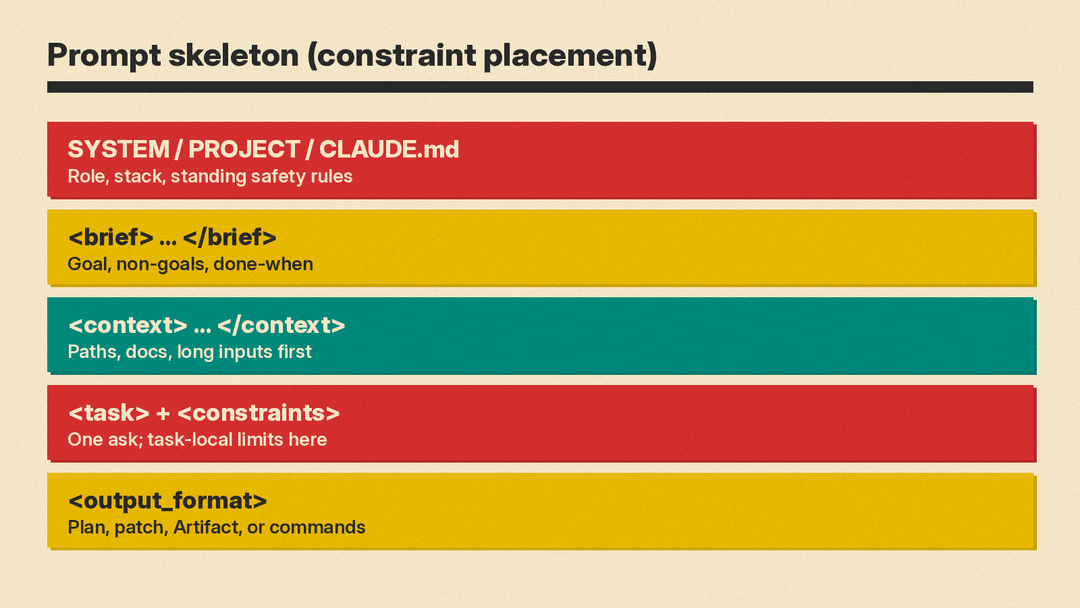
Constraint placement note: put standing rules (stack, style, safety) in the system / project / CLAUDE.md slot. Put task-specific constraints next to the task in the user message, inside XML tags. Do not hide a one-off constraint only in a system prompt where it will apply to every later turn by accident.
Step-by-step workflow
Step 1. Write a one-page brief (human, before Claude)
Before you open Claude, write five lines you can reuse:
- Goal in one sentence
- Non-goals (what you will not build this session)
- Stack and versions you already use
- Definition of done (commands that must pass, or a screenshot of the UI)
- Files Claude may create or edit
Paste that brief into the Project knowledge base, or into CLAUDE.md / the first user message.
<brief>
Goal: [one sentence]
Non-goals: [bullets]
Stack: [language, framework, package manager, test runner]
Done when: [exact command or UI check]
Allowed paths: [dirs Claude may touch]
Out of bounds: [dirs or services Claude must not change]
</brief>
Step 2. Load durable context
In a Project: upload README, schema notes, and a short style guide; set project instructions to your role and stack rules.
In Claude Code: add a project-root CLAUDE.md. Anthropic's memory docs say to keep it concrete ("Use 2-space indentation", "Run npm test before committing") and under about 200 lines per file when you can. Run /init if you want Claude to draft a starting file from the repo, then edit it. Prefer facts Claude would otherwise re-ask every session.
# Project rules for Claude

## Stack
- Language: [e.g. TypeScript 5.x]
- Framework: [e.g. Next.js App Router]
- Package manager: [e.g. pnpm]
- Tests: [e.g. vitest]; command: `[exact command]`

## Conventions
- [rule 1]
- [rule 2]

## Do by default
- Read relevant files before editing.
- Prefer small diffs over new abstractions.
- After edits, run `[test or lint command]` and report the exit code.

## Ask before
- Deleting files, force-pushing, changing CI, or touching production config.
Step 3. Plan in chat before writing files
Ask for a plan with file list and risks. Do not ask for full code yet.
<instructions>
Read the brief and the files I named. Propose a plan only. Do not edit files yet.
</instructions>

<brief>
[paste brief]
</brief>

<context>
Relevant paths: [list]
Known constraints: [list]
</context>

<output_format>
Return:
1. Approach in under 10 lines
2. Ordered file list (create vs edit)
3. Commands you will run to verify
4. Risks or unknowns (questions for me)
</output_format>
Approve or cut the plan. Explicitly reject over-scoping ("no new helper libraries", "no drive-by refactors").
Step 4. Implement one slice
Give Claude one slice of the plan. On Claude Code, use an action verb. On chat, ask for a complete Artifact or a single file you can paste.
<instructions>
Implement only step [N] from the approved plan. Stay inside <allowed_paths>. After edits, run `[verify command]` and paste the full terminal output.
</instructions>

<allowed_paths>
[paths]
</allowed_paths>

<plan_step>
[exact step text]
</plan_step>

<constraints>
- Do not refactor unrelated code.
- Do not add dependencies unless I approve the package name first.
- If a file is missing context, open it before guessing.
</constraints>
Step 5. Verify, then paste failures back
Run the agreed command yourself if Claude cannot. When something fails, paste the full error with almost no commentary (that part matches Karpathy's habit), but keep the brief and allowed paths in the message so Claude does not "fix" the bug by deleting tests.
<error>
[full stderr / stack trace / failing test output]
</error>

<instructions>
Diagnose from the error and the current code. Propose the smallest fix. Do not remove or weaken tests to make them pass. After the fix, re-run `[verify command]`.
</instructions>
Step 6. Close the loop
When the slice passes, ask for a short summary of what changed and what remains. Commit yourself, or ask Claude Code to draft a commit message you still review.
Summarize what changed (files and behavior), what was verified, and the next unfinished plan step. Do not start the next step until I say so.Repeat steps 3 to 6 for each slice. Start a fresh chat or Claude Code session when the thread is long and confused; re-attach the brief and point at progress notes or git history rather than relying on a bloated transcript.
Reusable prompt skeleton
Use this shape for almost any coding turn. Put the role in project instructions or CLAUDE.md. Put the rest in the user message.
<role>
[Only if you cannot set a system / project / CLAUDE.md role]
You are a careful coding assistant for [stack]. Prefer small, reviewable diffs.
</role>

<brief>
[goal, non-goals, done-when]
</brief>

<context>
[paths, pasted snippets, or "open these files first: ..."]
</context>

<task>
[one concrete ask]
</task>

<constraints>
[positive rules and hard limits]
</constraints>

<output_format>
[plan only | patch | full file | Artifact | commands to run]
</output_format>
Copy-paste prompts for common moments
Bootstrap a greenfield toy app
<brief>
Goal: a local [app type] I can run with `[start command]`.
Non-goals: auth, payments, deploy.
Stack: [stack].
Done when: `[start command]` serves a page that [acceptance check].
</brief>

<task>
Scaffold the minimum file tree, list exact commands to install and run, then implement the first screen only.
</task>

<constraints>
- One package manager: [pnpm|npm|bun].
- No UI component library unless I approve the name.
- Include a README with run steps.
</constraints>
Explain a file before changing it
Open [path]. Summarize what it does, its public API, and the three riskiest call sites if we change [behavior]. Quote short passages. Do not edit yet.UI tweak in plain language (classic vibe-coding turn)
In the running UI / in [path], [change], because [reason]. Touch only layout or style files needed for that change. Show the diff summary before applying if you are in Claude Code.Turn a vague idea into a checklist
I want [idea]. Ask me up to seven clarifying questions. Then produce a checklist of implementation slices I can approve one at a time. No code yet.Review a Claude-written diff like a human reviewer
Review the current uncommitted changes as a senior reviewer. List:
1. Correctness bugs
2. Security or data-handling issues
3. Missing tests
4. Unnecessary scope
Do not fix yet. Wait for my go-ahead on each item.
Common mistakes
- No brief. Vibe coding without a written done-when check produces endless polish loops.
- Role only in the first user message. Later turns forget it. Put standing rules in project instructions or
CLAUDE.md. - Constraints stuffed in the wrong place. One-off task limits belong next to the task in XML tags. Standing safety rules belong in the durable system/project slot (see Anthropic's system-prompt and XML guidance linked in Sources).
- Accepting every diff unread. Fine for a disposable demo. Not fine for anything that handles secrets, money, or other people's data.
- Deleting tests to "fix" failures. Anthropic's own agentic guidance warns against optimizing for green tests instead of a general solution. Paste the failure; keep the tests.
- Asking for suggestions when you wanted edits. On tool-using Claude Code, say "change" or "implement," not "can you suggest."
- Dumping the whole repo into one chat message when Claude Code can open files. Prefer paths plus investigate-first instructions.
- Pasting secrets into chat or Project knowledge. Use env vars and local files outside shared Project uploads.
What this workflow is good for
Good fit: prototypes, internal tools, homework-sized apps, UI experiments, refactors you can verify with tests, and learning a new stack with Claude Code reading the repo.
Poor fit: unfamiliar production incidents with unclear blast radius, crypto or auth changes you cannot review, and any change your org's policy forbids sending to a third-party model.
Sources
- Andrej Karpathy on X, February 2, 2025 - original "vibe coding" post
- Thread Reader App mirror of the Karpathy post
- MIT Technology Review: What is vibe coding, exactly?
- Anthropic: Prompt engineering overview
- Anthropic: Prompting best practices (system prompts, XML tags, coding agents)
- Claude Code overview
- Claude Code: How Claude remembers your project (CLAUDE.md)
- Anthropic Help: What are projects?
- Anthropic Help: What are artifacts and how do I use them?
- claude.ai
