
Anthropic's official Claude Code plugin marketplace now lists an Xcode plugin with "Apple Inc." as its author. The entry was added by pull request 6338 in the anthropics/claude-plugins-official repository, which GitHub shows as merged on November 6, 2026 at 00:55 UTC (November 5, 4:55 PM PT).
The plugin's marketplace entry describes it in one sentence: "Work with Xcode projects from Claude Code: build, run, and test schemes, render SwiftUI previews, drive simulators and devices, read build logs and diagnostics, and search Apple developer documentation."
What the entry says
The entry is 15 lines of JSON. It sets the name xcode, the display name "Xcode", the author name "Apple Inc.", the category "development" and a homepage link to Apple's Xcode page.
Pull request 6338 says it "Carries the change from #6259, by its original author, onto a branch inside this repository so its checks can run." The earlier pull request 6259, opened on September 18, says it "Adds Apple xcode plugin to the official marketplace" and that the plugin "exposes Xcode capabilities via MCP to enable native development for Apple platforms." It also says claude plugin validate . passes and that the plugin was tested with a local marketplace.
A write-up from CellCog says Apple has published no announcement about the plugin.
The plugin comes from your installed Xcode
Most marketplace entries point at a folder or a repository. This one does not. Its source is a command, xcrun agent plugin path --plugin-format claude, in link mode.
Anthropic's marketplace reference explains what that means. A command source is a "Directory printed by a command Claude Code runs on the user's machine," and it requires Claude Code v2.1.229 or later. The docs give the use case as "an IDE that renders its plugin for the toolchain the user has selected." Claude Code runs the command when you install or update the plugin, and again once per session, "so users get the tool's changed output without reinstalling."
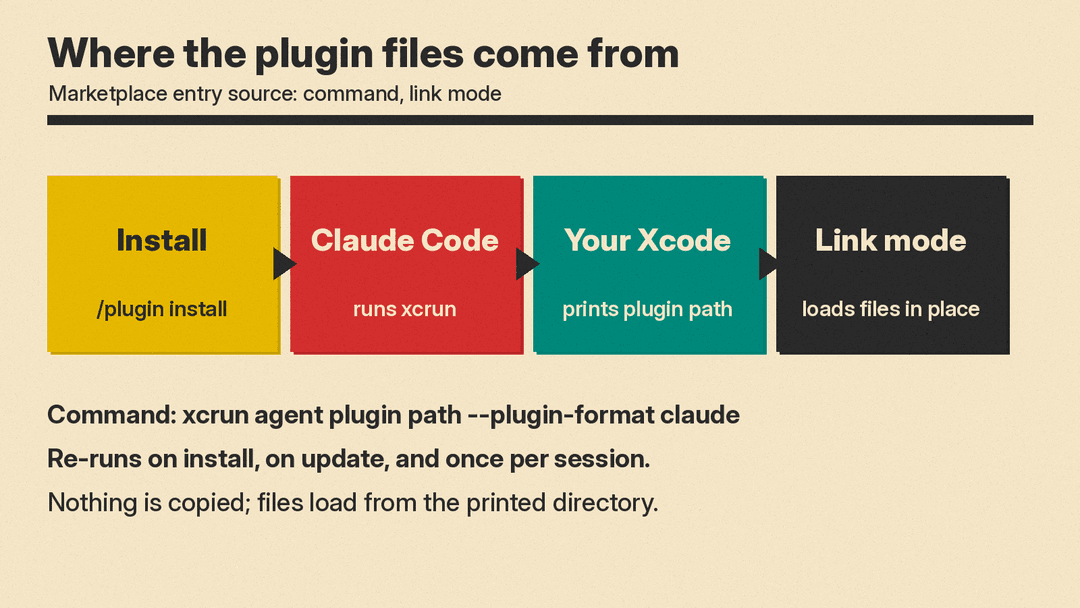
In link mode, the same page says, Claude Code "fills the plugin's cache entry with a link to each top-level entry of the printed directory and loads the files in place. Nothing is copied." The printed directory must stay in place for as long as the plugin is installed.
So the plugin files come from the copy of Xcode on your Mac, not from Anthropic's repository. The entry only works on a Mac where xcrun knows the agent plugin path command. Apple's public page on external agents, which we read, does not name an Xcode version for that command.
Anthropic's docs add two points. Claude Code "shows users the whole string for review before it runs" a command source. And administrators can turn command sources off with the disableCommandPluginSources setting.
How it relates to Apple's existing MCP setup
Apple already documents a way to connect outside agents to Xcode. Its page Giving external agents access to Xcode says you can let agents that you launch outside of Xcode "modify your Xcode project and perform actions, such as building your app," through the Model Context Protocol (MCP) server that Xcode provides.
That page lists three steps:
- In Xcode, choose Xcode > Settings > Intelligence, and under Model Context Protocol set "Allow External Agents to Use Xcode Tools" to Always or "While Xcode is Open".
- Configure the agent to use the server with
xcrun mcpbridge. For Claude Code, Apple givesclaude mcp add --transport stdio xcode -- xcrun mcpbridge. For Codex, it givescodex mcp add xcode -- xcrun mcpbridge. - Open your project in Xcode before you prompt the agent.
Apple's page also says "Xcode alerts you when the external agent connects to Xcode and when it's active," and suggests adding hints about Xcode and your project to files such as AGENTS.md or CLAUDE.md. We explained those instruction files in What Is AGENTS.md?.
The pull request text says the plugin exposes Xcode capabilities through MCP. Apple's page does not mention the plugin, so it does not say whether the Intelligence setting and an open project are still needed with it.
How to install it
Claude Code adds the official marketplace, claude-plugins-official, the first time you start an interactive terminal session, according to Anthropic's marketplaces page. Anthropic's plugin install guide uses the form /plugin install <name>@claude-plugins-official, so the Xcode plugin installs with:
/plugin install xcode@claude-plugins-official
In a session, the guide says, this "doesn't install right away: it opens the /plugin panel on that plugin's details so you can review it and choose a scope first."
Who publishes what in the official marketplace
The official marketplace holds "Plugins Anthropic maintains, plus plugins from partners and other authors," according to Anthropic's marketplaces page. Anthropic's plugin security page adds that a marketplace's name "tells you who publishes the catalog, not what each plugin in it does," and advises you to review a plugin before you install it. The same page says a plugin can carry content that runs code on your machine with your user privileges.
GitHub said on November 4 that Copilot is in public preview in Xcode's coding assistant. For background on how these tools differ, see our explainer What Is a Coding Agent?.
Sources
- anthropics/claude-plugins-official pull request 6338: Add Xcode plugin (xcode)
- anthropics/claude-plugins-official pull request 6259
- claude-plugins-official marketplace.json
- Claude Code docs: Marketplace reference
- Claude Code docs: Anthropic's marketplaces
- Claude Code docs: Install plugins
- Claude Code docs: Plugin security and trust
- Apple Developer: Giving external agents access to Xcode
- CellCog: Apple's Xcode Plugin for Claude Code
