
Cursor, Claude Code and Codex now do much the same job. Each one reads your repository, plans a change, edits files across the codebase, runs commands and tests, and opens a pull request. The differences that matter are where each tool lives, which models it can use, and how you pay for it. This guide compares the three as of October 2026, using each vendor's own pricing and documentation pages.
Short version: pick Cursor if you want an editor with a wide choice of models, Claude Code if you work in the terminal and want Anthropic's models with deep automation hooks, and Codex if you already pay for ChatGPT and want cloud tasks and GitHub review in the same plan.
What each tool is
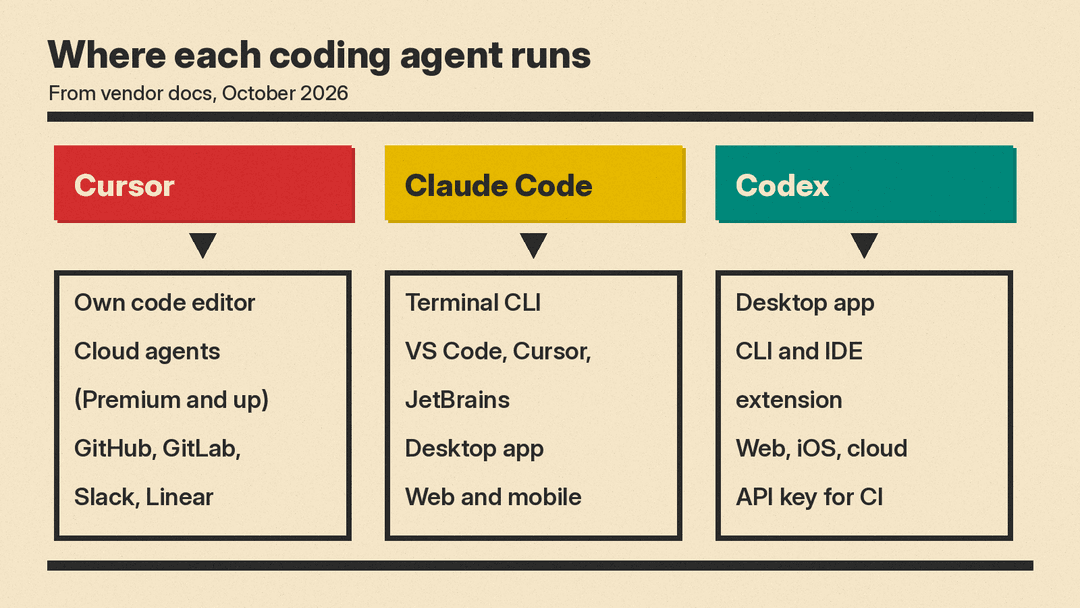
Cursor is a code editor built around an agent. Its documentation describes it as "a coding agent for building ambitious software" and lists Plan Mode, code review, and connections to GitHub, GitLab, Azure DevOps, Bitbucket, JetBrains, Slack and Linear. Plugins, skills, MCP servers and rules are managed from one place. Paid plans add cloud agents that run without your laptop open.
Claude Code is Anthropic's agentic coding tool. According to Anthropic's overview, it runs in the terminal, as a VS Code extension (which also installs in Cursor), as a JetBrains plugin, in a desktop app, and on the web at claude.ai/code. Every surface uses the same engine, so one project's CLAUDE.md file, settings and MCP servers work everywhere.
Codex is OpenAI's coding agent, sold inside ChatGPT plans. OpenAI's Codex pricing page lists a desktop app, a CLI, an IDE extension, a web version, iOS, and cloud tasks. Codex also runs with a plain API key for automation in CI, without the cloud features.
Price: what you pay as of October 2026
All prices below are US list prices per month from the vendors' pages on October 19, 2026, before tax.
Cursor (pricing):
- Free: $0, with limited agent and chat requests.
- Plus: $8. Grok models only.
- Premium: $30. Adds cloud agents and automations, code hosting through Origin, AI code reviews through Bugbot, and third-party models.
- Super: $100, with 15 times the usage of Plus and priority model access at peak times.
- Ultra: $200, with 50 times the usage of Plus.
- Teams: from $30 per user.
One detail changes the math. Cursor's paid tiers include a usage pool for Grok models, but third-party models (Claude, GPT, Gemini and others) are billed separately at API list price. If you want to run Claude Opus inside Cursor every day, budget for API charges on top of the subscription. The usage pool refreshes weekly and is shared across Cursor and Grok, and the plans are now sold through X Subscription Corp alongside X and Grok features.
Claude Code (pricing):
- Free: no Claude Code.
- Pro: $20 billed monthly, or $17 a month on an annual plan ($200 up front). Includes Claude Code.
- Max: from $100, with a choice of 5 times or 20 times Pro usage, plus priority access and monthly API credits.
- Team and Enterprise: Claude Code included. Enterprise is $20 per seat per month plus usage at API rates.
Claude Code draws from the same usage pool as Claude chat. Anthropic says limits reset on a rolling five-hour window, with weekly limits on paid plans. When you hit a limit you can wait, upgrade, or turn on usage credits at API rates.
Codex (pricing):
- Free: $0, and Go: $8. Both get GPT-6 Luna at standard speed in the desktop app, "subject to rollout."
- Plus: $20. Codex on web, CLI, IDE extension and iOS, cloud code review, the Slack integration, and GPT-6.1 Sol plus GPT-6 Luna.
- Pro: $100, $200 or $500. OpenAI says Pro plans currently have no five-hour limit, and the $500 tier adds Ultrafast mode.
- Business: $25 per user per month billed monthly.
- API key: pay per token at API rates, with no cloud features.
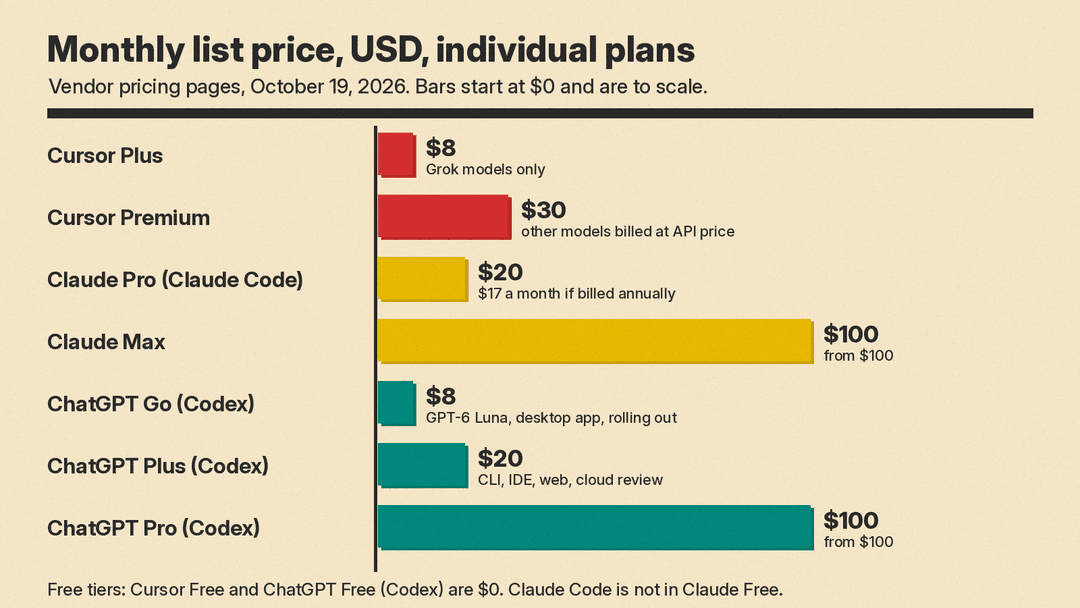
What the price comparison means. Codex is the only one of the three with a free tier that includes an agent model, though only in the desktop app and still rolling out. At $20, Claude Pro and ChatGPT Plus are the like-for-like entry plans. Cursor Premium costs $30 but does not include an allowance for Claude or GPT models, so it is cheapest for people who are happy with the Grok models in its usage pool.
Usage limits
None of the three publishes a fixed message count, and all three say usage depends on model, context size and task.
- Codex gives the most concrete guide. For Plus and standard Business seats, OpenAI estimates 15 to 160 local messages per five hours on GPT-6.1 Sol, 5 to 45 on GPT-6 Astra, and 350 to 3,000 on GPT-6 Luna. Cloud tasks may use more. Weekly limits may also apply.
- Claude Code shares one pool with chat. Pro gives "at least 5x more usage per 5-hour session than Free," and Max gives 5 times or 20 times Pro.
- Cursor states usage as multiples of Plus: Premium is 4 times, Super 15 times, Ultra 50 times. Third-party model use is pay as you go.
If you hit limits often, the cheapest path differs. In Claude Code and Codex you can add credits or switch to an API key. In Cursor you can buy top-offs or wait for the weekly refresh.
Models
This is the clearest split.
- Cursor is multi-model. Its docs list models from Anthropic (Opus 5.5, Sonnet 5.5, Haiku 5.5, Fable 5.1), OpenAI (the GPT-5.6 family), Google (Gemini 3.1 Pro, Gemini 4 Argon and Flash models), Moonshot, Meta and Z.ai, plus Cursor's own Composer 2.5 and Grok 4.7, which Cursor says it trained jointly with SpaceXAI.
- Claude Code uses Anthropic's models. Anthropic's docs say the terminal CLI, VS Code and JetBrains versions also support third-party providers.
- Codex uses OpenAI's models. With ChatGPT sign-in that is GPT-6.1 Sol, GPT-6 Sol, GPT-6 Luna and GPT-6 Astra, depending on plan. With an API key, it follows the models your key can reach. OpenAI retired GPT-5.5 from Codex for ChatGPT sign-in on October 14, 2026.
If you want to switch between labs on the same task, Cursor is the only one of the three that does it natively. If you have settled on one lab's models, that lab's own tool bundles them into a subscription instead of charging API rates.
Features side by side
All three support the basics: multi-file edits, running commands, git operations, MCP servers, project instruction files, and some form of parallel or background agents. The differences are in the extras.
Instructions and customization. Claude Code reads CLAUDE.md and will read an existing AGENTS.md. It adds skills, hooks that run shell commands before or after actions, and auto memory. Codex uses AGENTS.md, skills, plugins, subagents and custom agents. Cursor uses rules, skills, plugins and MCPs, and Teams plans add a team marketplace for internal rules, skills and plugins.
Automation. Claude Code has the deepest scripting story: claude -p pipes into shell scripts, GitHub Actions and GitLab CI run it in pipelines, and Routines run scheduled or event-triggered jobs in Anthropic's cloud. Codex offers codex exec, an SDK, scheduled tasks, and access tokens for trusted automation on Business and Enterprise. Cursor offers cloud agents and automations from the Premium tier up. OpenAI also offers the Codex harness as a hosted service through its Agents API.
Code review. All three now review pull requests. Cursor does it through Bugbot on Premium and above. Anthropic's Code Review is generally available on Team and Enterprise plans, and /code-review runs a lighter version locally. Codex reviews pull requests on GitHub when you tag @codex, and runs /review locally.
Team chat and trackers. Claude Code takes bug reports from Slack through @Claude mentions. Codex has Slack and Linear cloud integrations and takes GitHub issue and PR delegation through @codex. Cursor connects to Slack and Linear as well.
Browser and computer control. Claude Code can debug live web apps through Chrome. Codex lists Computer Use, browser control and built-in browser previews, with some of these limited to specific regions.
Which one should you pick?
- You want an editor and model choice. Pick Cursor. Start on Premium if you want cloud agents and Bugbot, and expect API charges if you use Claude or GPT models heavily.
- You live in the terminal or want heavy automation. Pick Claude Code. Pro at $20 is enough to learn it. Our Claude vibe coding workflow has prompts to start with. Daily heavy use usually means Max.
- You already pay for ChatGPT. Try Codex first, since it is already in your plan. Plus covers the CLI, IDE extension and cloud review.
- You want to spend nothing. Codex Free and Cursor Free both let you try an agent. Claude Code needs a paid plan.
- Your team runs CI with API keys. Claude Code and Codex both run headless with API billing. Codex with an API key drops cloud features such as GitHub review and Slack.
You can also combine them. Anthropic ships the Claude Code extension for Cursor, so you can run Claude Code inside the Cursor editor and keep Cursor's own agent for other models.
Why it matters
These tools started in different places: Cursor as an editor, Claude Code as a terminal tool, and Codex as a CLI and cloud agent. Now each one covers most surfaces, and each has added code review, background agents and scheduled jobs. The real choice has moved to pricing structure and model access. Cursor bundles its own models and charges API rates for everyone else's. Anthropic and OpenAI bundle their own models into a chat subscription. Check which models you actually use before you compare sticker prices.
Prices and limits change often. Recheck the vendor pages before you buy.
